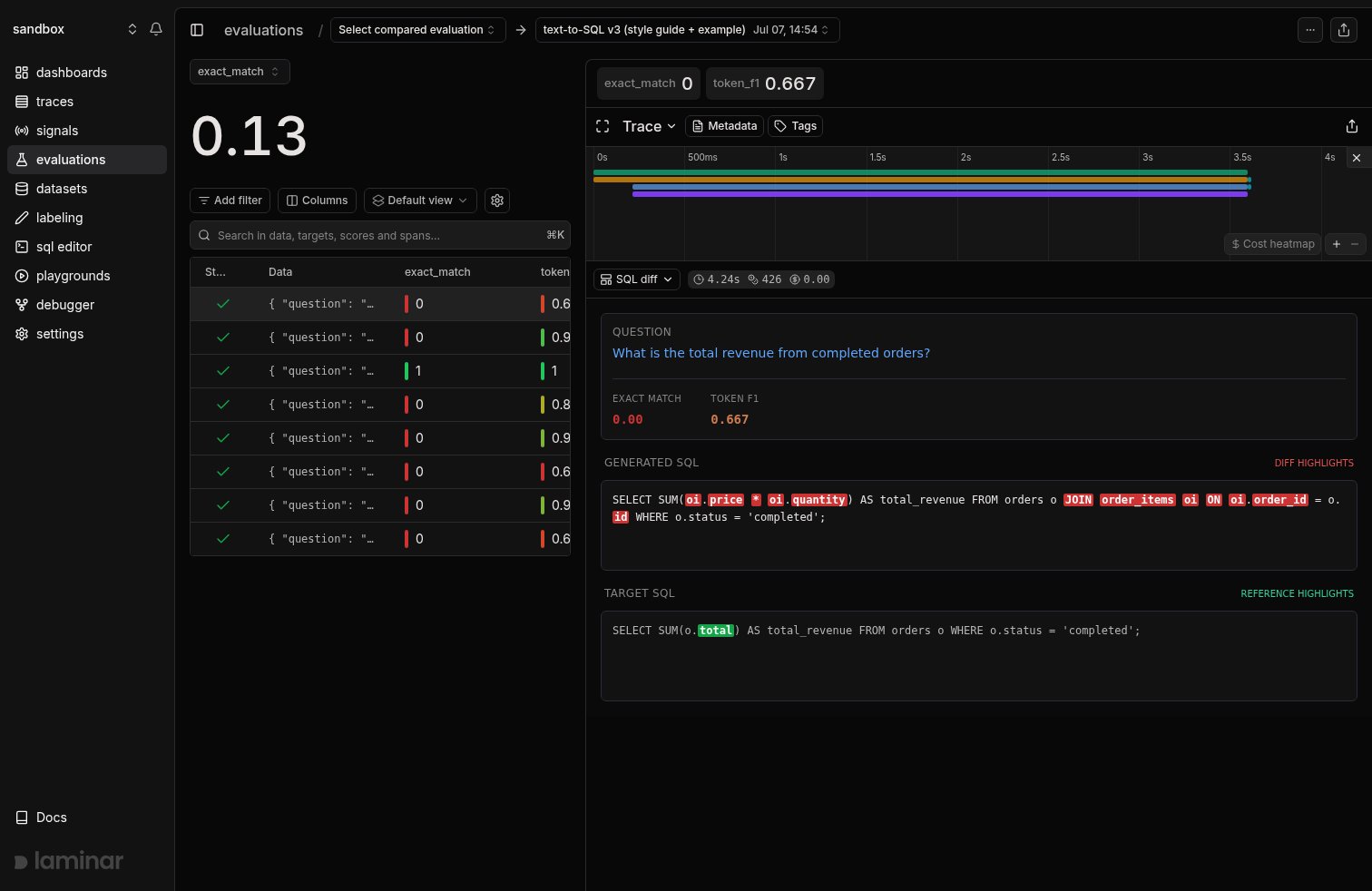
 The view sticks as you click through datapoints, so reviewing a whole run takes seconds per row instead of expanding spans on every trace.
## What an eval trace gives you
Every datapoint becomes one trace with a predictable structure:
* An `EVALUATION` root span.
* An `EXECUTOR` span: its `input` is the datapoint's `data`, its `output` is whatever your executor returned.
* Any auto-instrumented LLM or tool spans nested under the executor.
* One `EVALUATOR` span per scoring function: its `input` is `[output, target]`, its `output` is the score.
So the three things you need to judge a row (input, output, target) are always in the same two span types. A template that reads them works on every datapoint of every run of that eval.
## Create a template from an eval trace
1. Open any datapoint of the run: its trace shows in the right-hand panel.
2. Click the view dropdown in the trace pane (where **Transcript** and **Tree** live) and pick **+ New template**.
The view sticks as you click through datapoints, so reviewing a whole run takes seconds per row instead of expanding spans on every trace.
## What an eval trace gives you
Every datapoint becomes one trace with a predictable structure:
* An `EVALUATION` root span.
* An `EXECUTOR` span: its `input` is the datapoint's `data`, its `output` is whatever your executor returned.
* Any auto-instrumented LLM or tool spans nested under the executor.
* One `EVALUATOR` span per scoring function: its `input` is `[output, target]`, its `output` is the score.
So the three things you need to judge a row (input, output, target) are always in the same two span types. A template that reads them works on every datapoint of every run of that eval.
## Create a template from an eval trace
1. Open any datapoint of the run: its trace shows in the right-hand panel.
2. Click the view dropdown in the trace pane (where **Transcript** and **Tree** live) and pick **+ New template**.
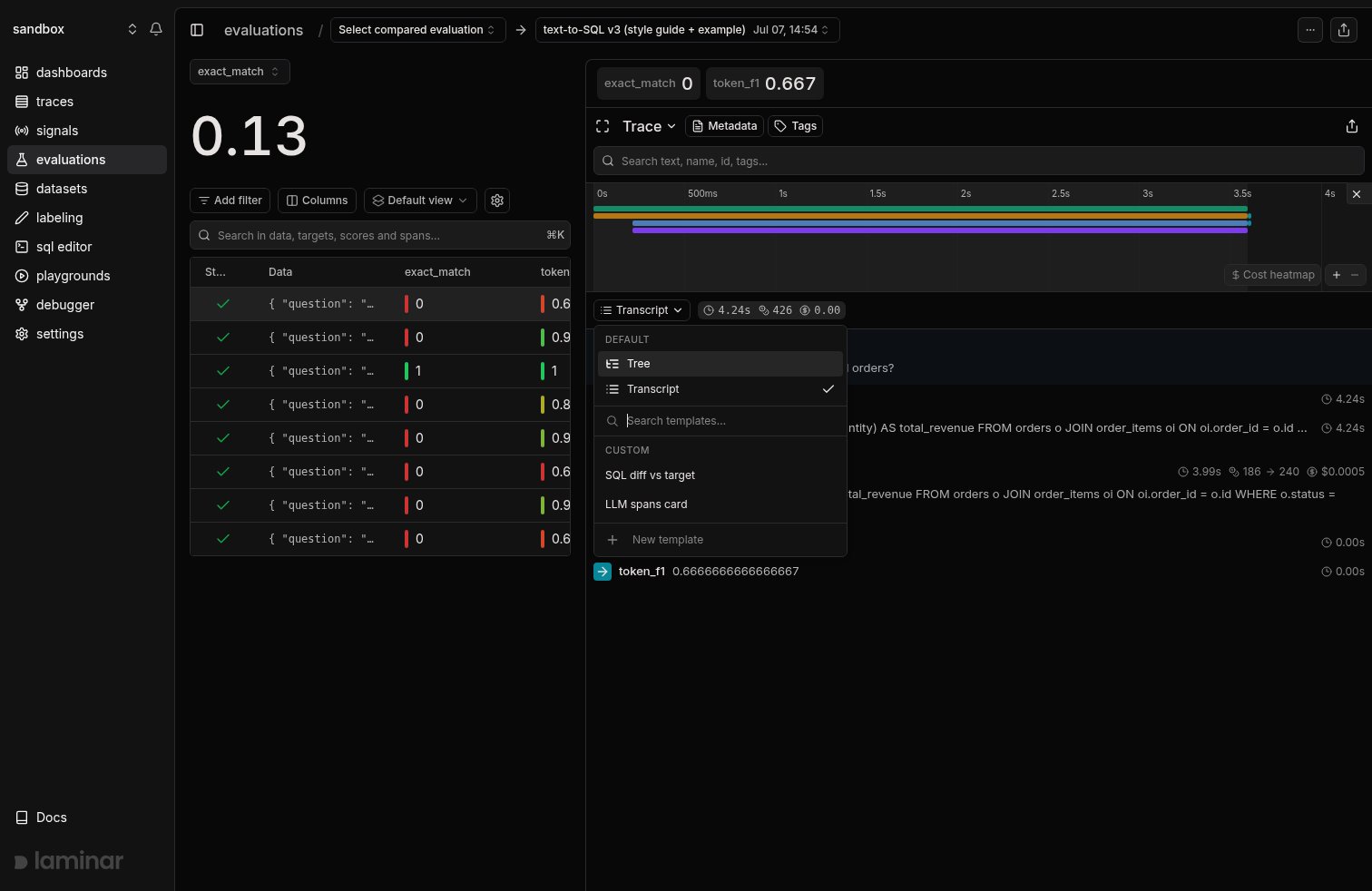 3. Name the template and describe what you want to see, like "show the question, both scores, and a word diff between the model's SQL and the target".
4. Click **Generate**. Laminar reads an outline of the eval trace and writes both the span filter and the JSX: for a template like this it filters to `span_type IN ('EXECUTOR', 'EVALUATOR')`, pulls the real spans, and renders the preview against them. If the view isn't right, describe the change and click **Request changes**.
5. Click **Save**.
3. Name the template and describe what you want to see, like "show the question, both scores, and a word diff between the model's SQL and the target".
4. Click **Generate**. Laminar reads an outline of the eval trace and writes both the span filter and the JSX: for a template like this it filters to `span_type IN ('EXECUTOR', 'EVALUATOR')`, pulls the real spans, and renders the preview against them. If the view isn't right, describe the change and click **Request changes**.
5. Click **Save**.
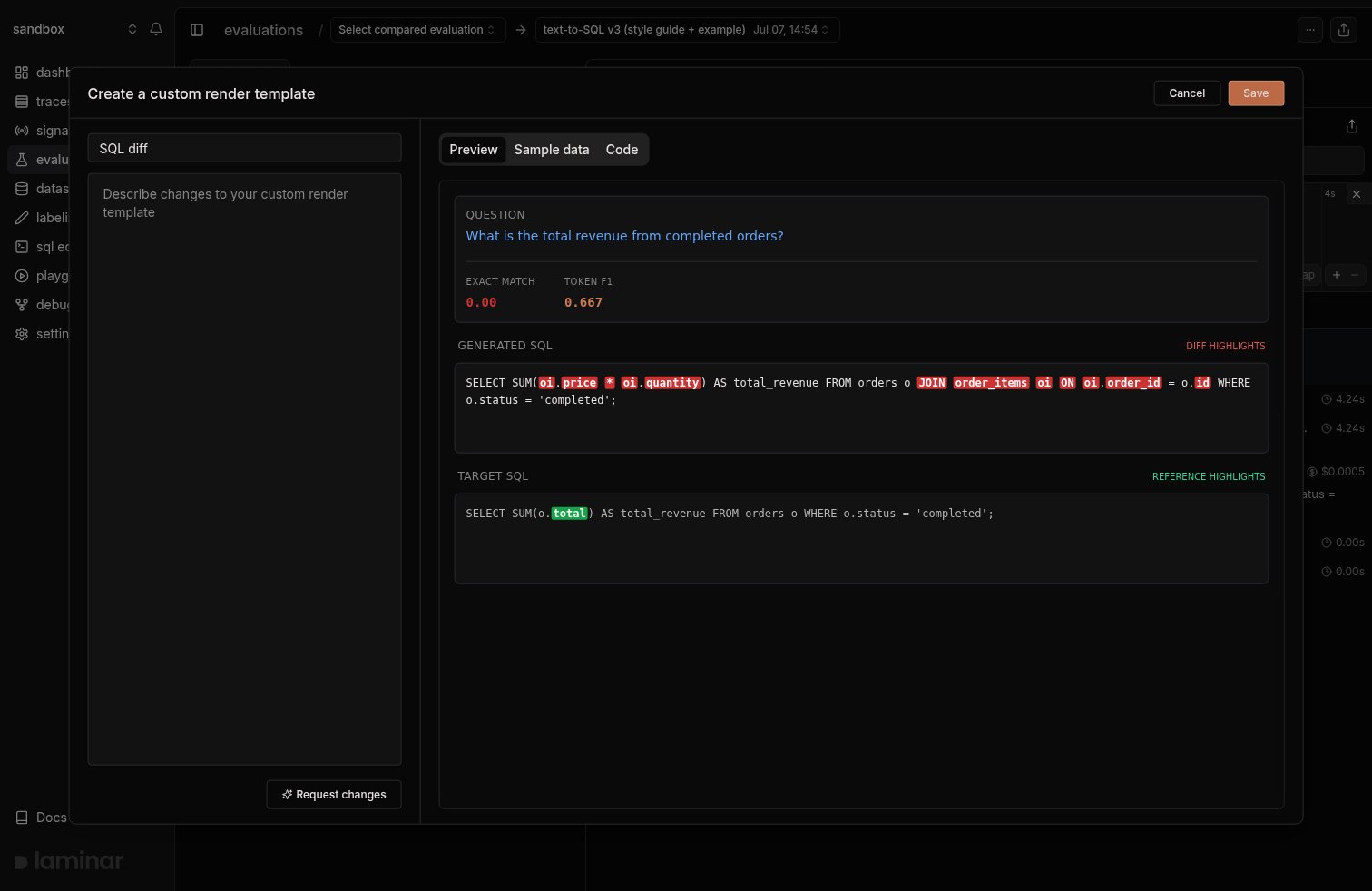 To tweak things by hand, the **Code** tab holds the JSX and the **Sample data** tab holds the span filter; **Test** reruns the filter against this trace and reloads the preview data.
Once created, the template appears in the view dropdown under **Custom** for every trace in the project.
## Example: diff the output against the target
The screenshot at the top comes from a text-to-SQL eval: the executor generates SQL from an analytics question, and `exact_match` / `token_f1` evaluators score it against a target query. `token_f1` tells you *how far* the output is from the target, but not *where* it differs. The template below shows exactly where: it pulls the question from the executor's input, the generated SQL from its output, and the target from the evaluator's input, then renders a word-level diff.
```jsx theme={null}
function({ data }) {
const spans = data?.spans ?? [];
const executor = spans.find((s) => s.spanType === "EXECUTOR");
const evaluators = spans.filter((s) => s.spanType === "EVALUATOR");
const question = executor?.input?.question ?? "";
const output = typeof executor?.output === "string" ? executor.output : "";
const evalWithTarget = evaluators.find((s) => Array.isArray(s.input) && s.input.length > 1);
const target = evalWithTarget ? String(evalWithTarget.input[1] ?? "") : "";
const tokenize = (sql) => sql.split(/(\s+)/).filter((t) => t.length > 0);
// Word-level LCS diff between output and target
const diff = (a, b) => {
const n = a.length, m = b.length;
const dp = Array.from({ length: n + 1 }, () => new Array(m + 1).fill(0));
for (let i = n - 1; i >= 0; i--) {
for (let j = m - 1; j >= 0; j--) {
dp[i][j] = a[i].trim().toLowerCase() === b[j].trim().toLowerCase()
? dp[i + 1][j + 1] + 1
: Math.max(dp[i + 1][j], dp[i][j + 1]);
}
}
const left = [], right = [];
let i = 0, j = 0;
while (i < n && j < m) {
if (a[i].trim().toLowerCase() === b[j].trim().toLowerCase()) {
left.push({ t: a[i], k: "same" });
right.push({ t: b[j], k: "same" });
i++; j++;
} else if (dp[i + 1][j] >= dp[i][j + 1]) {
left.push({ t: a[i], k: "del" });
i++;
} else {
right.push({ t: b[j], k: "add" });
j++;
}
}
while (i < n) { left.push({ t: a[i], k: "del" }); i++; }
while (j < m) { right.push({ t: b[j], k: "add" }); j++; }
return { left, right };
};
const { left, right } = diff(tokenize(output), tokenize(target));
const Chunk = ({ part }) => {
if (part.k === "same") return {part.t};
if (part.k === "del")
return {part.t};
return {part.t};
};
return (
To tweak things by hand, the **Code** tab holds the JSX and the **Sample data** tab holds the span filter; **Test** reruns the filter against this trace and reloads the preview data.
Once created, the template appears in the view dropdown under **Custom** for every trace in the project.
## Example: diff the output against the target
The screenshot at the top comes from a text-to-SQL eval: the executor generates SQL from an analytics question, and `exact_match` / `token_f1` evaluators score it against a target query. `token_f1` tells you *how far* the output is from the target, but not *where* it differs. The template below shows exactly where: it pulls the question from the executor's input, the generated SQL from its output, and the target from the evaluator's input, then renders a word-level diff.
```jsx theme={null}
function({ data }) {
const spans = data?.spans ?? [];
const executor = spans.find((s) => s.spanType === "EXECUTOR");
const evaluators = spans.filter((s) => s.spanType === "EVALUATOR");
const question = executor?.input?.question ?? "";
const output = typeof executor?.output === "string" ? executor.output : "";
const evalWithTarget = evaluators.find((s) => Array.isArray(s.input) && s.input.length > 1);
const target = evalWithTarget ? String(evalWithTarget.input[1] ?? "") : "";
const tokenize = (sql) => sql.split(/(\s+)/).filter((t) => t.length > 0);
// Word-level LCS diff between output and target
const diff = (a, b) => {
const n = a.length, m = b.length;
const dp = Array.from({ length: n + 1 }, () => new Array(m + 1).fill(0));
for (let i = n - 1; i >= 0; i--) {
for (let j = m - 1; j >= 0; j--) {
dp[i][j] = a[i].trim().toLowerCase() === b[j].trim().toLowerCase()
? dp[i + 1][j + 1] + 1
: Math.max(dp[i + 1][j], dp[i][j + 1]);
}
}
const left = [], right = [];
let i = 0, j = 0;
while (i < n && j < m) {
if (a[i].trim().toLowerCase() === b[j].trim().toLowerCase()) {
left.push({ t: a[i], k: "same" });
right.push({ t: b[j], k: "same" });
i++; j++;
} else if (dp[i + 1][j] >= dp[i][j + 1]) {
left.push({ t: a[i], k: "del" });
i++;
} else {
right.push({ t: b[j], k: "add" });
j++;
}
}
while (i < n) { left.push({ t: a[i], k: "del" }); i++; }
while (j < m) { right.push({ t: b[j], k: "add" }); j++; }
return { left, right };
};
const { left, right } = diff(tokenize(output), tokenize(target));
const Chunk = ({ part }) => {
if (part.k === "same") return {part.t};
if (part.k === "del")
return {part.t};
return {part.t};
};
return (
{left.map((part, idx) =>
{right.map((part, idx) =>