> ## Documentation Index
> Fetch the complete documentation index at: https://laminar.sh/docs/llms.txt
> Use this file to discover all available pages before exploring further.
# Manual evaluation API
`evaluate()` is the right entry point for 95% of cases. For the other 5% (wiring evaluations into an existing pipeline, streaming datapoints from a long-running job, scoring production traffic after the fact) use the lower-level `LaminarClient.evals` API.
## When to use this
Reach for the manual API when you need to:
* Create an evaluation now and append datapoints to it over hours or days, as work completes.
* Register a datapoint in the UI *before* the executor runs, so a row is visible while the run is still in progress.
* Run the executor in one process and write scores from another (for example, an async judge that posts results back later).
* Score production traces without re-running the call: save the executor output and scores against a new datapoint.
If none of those apply, use [`evaluate()`](/evaluations/quickstart).
## The three-phase pattern
The manual API is designed around three distinct moments in an evaluation's lifecycle. Call them in order:
1. **Create the evaluation** with `create_evaluation` / `create`. Returns an `eval_id`. Do this once per run.
2. **Pre-register each datapoint** with `create_datapoint`. Returns a `datapoint_id`. A row appears in the UI immediately, even though the executor hasn't run yet.
3. **Update the datapoint** with `update_datapoint`: link it to a trace, then (once the executor and evaluators finish) write the executor output and scores.
Pre-registering is the pattern that matters. It's how a long-running evaluation stays observable while it runs, and how a separate scoring process can write results back to rows created by the executor.
## Setup
```typescript TypeScript theme={null}
import { Laminar, LaminarClient, observe } from '@lmnr-ai/lmnr';
import { OpenAI } from 'openai';
Laminar.initialize({
projectApiKey: process.env.LMNR_PROJECT_API_KEY,
instrumentModules: { OpenAI },
});
const client = new LaminarClient({
projectApiKey: process.env.LMNR_PROJECT_API_KEY,
});
const openai = new OpenAI();
```
```python Python theme={null}
import os
from lmnr import Laminar, LaminarClient, observe
from openai import AsyncOpenAI
Laminar.initialize(project_api_key=os.environ["LMNR_PROJECT_API_KEY"])
client = LaminarClient(project_api_key=os.environ["LMNR_PROJECT_API_KEY"])
openai_client = AsyncOpenAI()
```
## Build executor and evaluator spans
Wrap the executor and each evaluator in `observe()` with the matching `spanType`. The evaluation UI uses `EXECUTOR` and `EVALUATOR` to know which spans hold the input, output, and score for each row.
```typescript TypeScript theme={null}
const runExecutor = async (testCase: { data: { country: string }; target: string }) =>
observe(
{ name: 'executor', spanType: 'EXECUTOR', input: testCase.data },
async () => {
const response = await openai.chat.completions.create({
model: 'gpt-5-mini',
messages: [
{
role: 'user',
content:
`What is the capital of ${testCase.data.country}? ` +
'Answer only with the capital, no other text.',
},
],
});
return response.choices[0].message.content ?? '';
},
);
const accuracy = async (output: string, target: string) =>
observe(
{ name: 'accuracy', spanType: 'EVALUATOR', input: { output, target } },
async () => (output.toLowerCase().includes(target.toLowerCase()) ? 1 : 0),
);
const lengthOk = async (output: string) =>
observe(
{ name: 'length_ok', spanType: 'EVALUATOR', input: { output } },
async () => (output.length > 0 && output.length < 50 ? 1 : 0),
);
```
```python Python theme={null}
@observe(name="executor", span_type="EXECUTOR")
async def run_executor(test_case):
response = await openai_client.chat.completions.create(
model="gpt-5-mini",
messages=[
{
"role": "user",
"content": (
f"What is the capital of {test_case['data']['country']}? "
"Answer only with the capital, no other text."
),
}
],
)
return response.choices[0].message.content or ""
@observe(name="accuracy", span_type="EVALUATOR")
async def accuracy(output, target):
return 1 if target.lower() in output.lower() else 0
@observe(name="length_ok", span_type="EVALUATOR")
async def length_ok(output, target=None):
return 1 if 0 < len(output) < 50 else 0
```
## Create the evaluation and datapoints
Open the evaluation up front, then loop over the test data. For each row, pre-register the datapoint, run the executor inside an `EVALUATION` span, and write scores back once the evaluators finish.
```typescript TypeScript theme={null}
const testData = [
{ data: { country: 'France' }, target: 'Paris' },
{ data: { country: 'Germany' }, target: 'Berlin' },
{ data: { country: 'Japan' }, target: 'Tokyo' },
];
const evalId = await client.evals.createEvaluation(
'Manual capitals eval',
'capitals-manual',
{ model: 'gpt-5-mini', run_by: 'manual-api-demo' },
);
for (let i = 0; i < testData.length; i++) {
const testCase = testData[i];
await observe(
{ name: 'evaluation', spanType: 'EVALUATION', input: { testCase } },
async () => {
// Pre-register the datapoint with the current trace ID.
// The row shows up in the UI now, before the executor runs.
const datapointId = await client.evals.createDatapoint({
evalId,
data: testCase.data,
target: testCase.target,
index: i,
traceId: Laminar.getTraceId(),
});
const output = await runExecutor(testCase);
const accuracyScore = await accuracy(output, testCase.target);
const lengthOkScore = await lengthOk(output);
await client.evals.updateDatapoint({
evalId,
datapointId,
scores: { accuracy: accuracyScore, length_ok: lengthOkScore },
executorOutput: { response: output, model: 'gpt-5-mini' },
});
},
);
}
await Laminar.flush();
```
```python Python theme={null}
test_data = [
{"data": {"country": "France"}, "target": "Paris"},
{"data": {"country": "Germany"}, "target": "Berlin"},
{"data": {"country": "Japan"}, "target": "Tokyo"},
]
async def run_one(eval_id, index, test_case):
# Phase 2: pre-register the datapoint. A row appears in the UI now.
datapoint_id = client.evals.create_datapoint(
eval_id=eval_id,
data=test_case["data"],
target=test_case["target"],
index=index,
)
@observe(name="evaluation", span_type="EVALUATION")
async def run_inside_span():
# Link the datapoint to the evaluation trace that is now active.
trace_id = Laminar.get_trace_id()
client.evals.update_datapoint(
eval_id=eval_id,
datapoint_id=datapoint_id,
scores={},
trace_id=trace_id,
)
output = await run_executor(test_case)
accuracy_score = await accuracy(output, test_case["target"])
length_ok_score = await length_ok(output, test_case["target"])
return output, {"accuracy": accuracy_score, "length_ok": length_ok_score}
output, scores = await run_inside_span()
# Phase 3: write the final executor output and scores.
client.evals.update_datapoint(
eval_id=eval_id,
datapoint_id=datapoint_id,
executor_output={"response": output, "model": "gpt-5-mini"},
scores=scores,
)
async def main():
eval_id = client.evals.create_evaluation(
name="Manual capitals eval",
group_name="capitals-manual",
metadata={"model": "gpt-5-mini", "run_by": "manual-api-demo"},
)
for index, test_case in enumerate(test_data):
await run_one(eval_id, index, test_case)
Laminar.flush()
```
The two SDKs link traces to datapoints in slightly different places. TypeScript accepts `traceId` on `createDatapoint` only, so call it from inside the `EVALUATION` span and pass `Laminar.getTraceId()` there. Python's `update_datapoint` accepts `trace_id`, so you can register the datapoint *before* the span opens and link the trace once it's running. The Python pattern is what you want when the row needs to be visible before you know which trace will own it.
## Decoupling the executor from the scorer
Because `update_datapoint` can be called any time after `create_datapoint`, executor and scorer can live in different processes. A common shape:
1. A worker runs the agent, produces a trace, and calls `update_datapoint` with `executor_output` and an empty `scores={}` dict.
2. A judge process reads `executor_output` from the dataset or from the agent's output store, scores it, and calls `update_datapoint` again with the filled-in `scores`.
Both writes target the same `datapoint_id`. The UI updates in place each time.
## Backfilling without running the executor
For pure backfills (rows you already have outputs and scores for, no live executor), loop `create_datapoint` + `update_datapoint` over the pre-scored rows:
```python theme={null}
eval_id = client.evals.create_evaluation(
name="Backfilled capitals",
group_name="capitals",
)
for i, row in enumerate(rows):
datapoint_id = client.evals.create_datapoint(
eval_id=eval_id,
data=row["data"],
target=row["target"],
index=i,
)
client.evals.update_datapoint(
eval_id=eval_id,
datapoint_id=datapoint_id,
executor_output=row["output"],
scores=row["scores"],
)
```
No `EVALUATION` span is opened, so no trace is attached. The row shows `data`, `target`, `executor_output`, and `scores`, which is enough for the list view, progression chart, and side-by-side comparison. Use this when you want the numbers in Laminar but don't need per-row transcript drill-down.
## Result
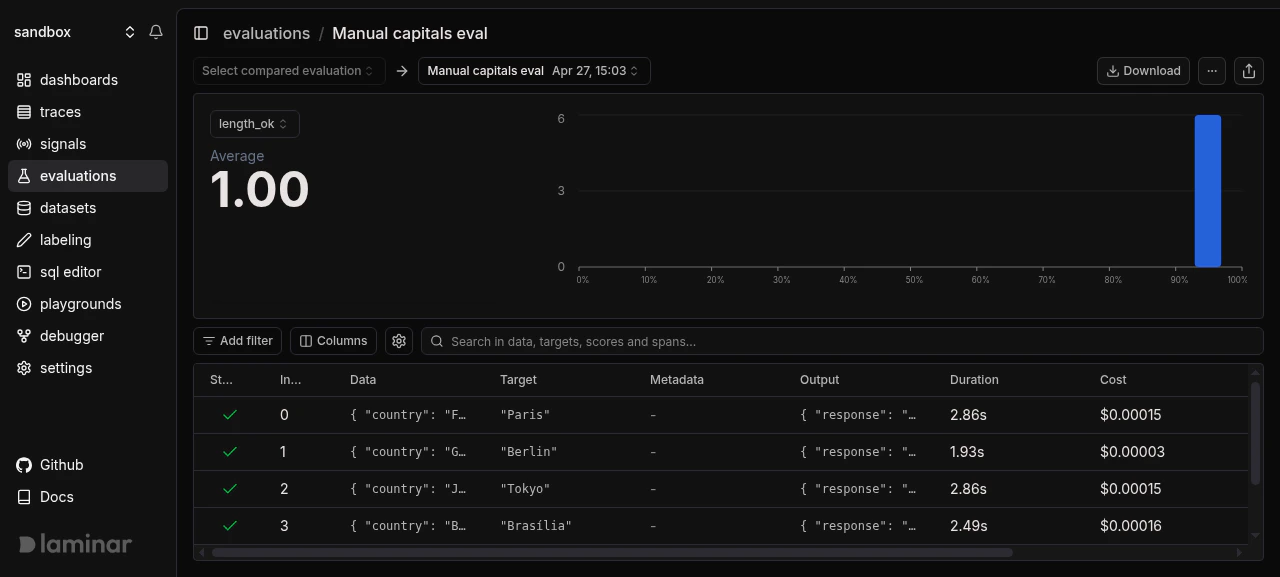
Manual evaluations show up in the same evaluations list, progression chart, and comparison UI as `evaluate()` runs. Groups, per-datapoint deltas, and CSV export all work the same way.
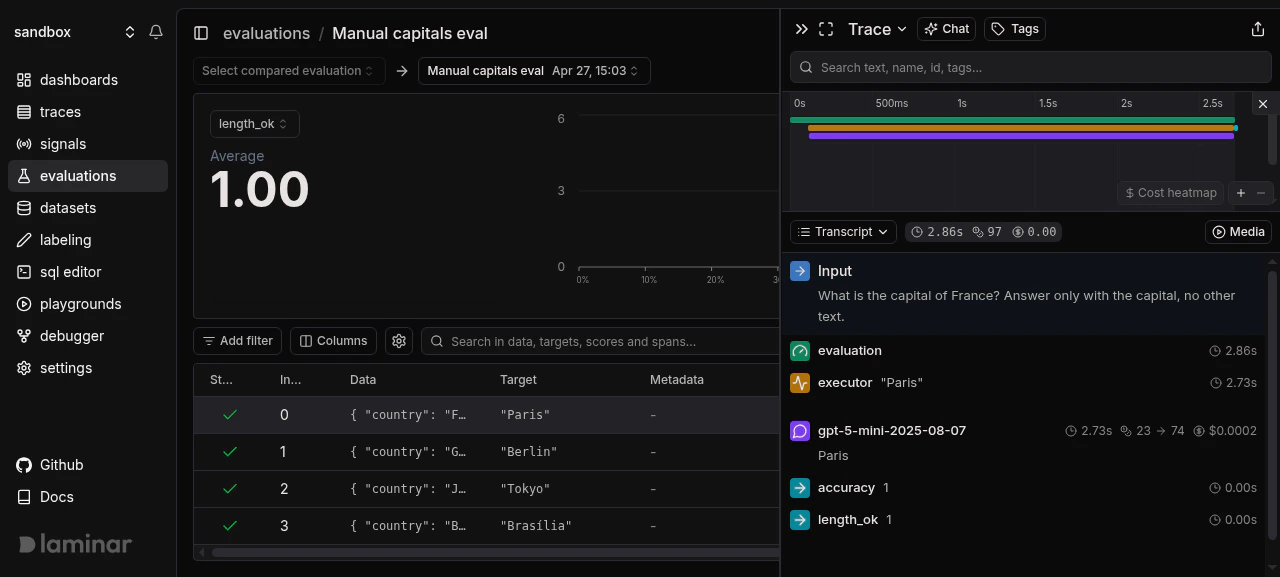 Clicking a row opens the transcript for that datapoint's trace, with the full `EVALUATION` root, `EXECUTOR`, and `EVALUATOR` nesting you'd expect from `evaluate()`.
 ## Next steps
The high-level `evaluate()` API, which is the right starting point for most cases.
Group manual runs so you can compare them like any other evaluation.
The datapoint / executor / evaluator / group model the manual API maps onto.
Full parameters for `LaminarClient.evals` methods.
## Next steps
The high-level `evaluate()` API, which is the right starting point for most cases.
Group manual runs so you can compare them like any other evaluation.
The datapoint / executor / evaluator / group model the manual API maps onto.
Full parameters for `LaminarClient.evals` methods.