> ## Documentation Index
> Fetch the complete documentation index at: https://laminar.sh/docs/llms.txt
> Use this file to discover all available pages before exploring further.
# Evaluations quickstart
In this quickstart you'll write a tiny evaluation, run it, and read the results in Laminar. The example asks an LLM for the capital of a country and scores each answer on correctness and brevity.
## Prerequisites
To get the project API key, go to the Laminar dashboard, click the project settings,
and generate a project API key. This is available both in the cloud and in the self-hosted version of Laminar.
Specify the key at `Laminar` initialization. If not specified,
Laminar will look for the key in the `LMNR_PROJECT_API_KEY` environment variable.
Install the SDK and set your API key:
```bash theme={null}
npm install @lmnr-ai/lmnr openai
export LMNR_PROJECT_API_KEY=
```
```bash theme={null}
pip install lmnr openai
export LMNR_PROJECT_API_KEY=
```
## Write the evaluation
The file below has all four parts of an evaluation: a list of datapoints, an executor that calls the LLM, two evaluators (one for correctness, one for output length), and a name so you can find it later.
```typescript capitals-eval.ts theme={null}
import { evaluate } from '@lmnr-ai/lmnr';
import { OpenAI } from 'openai';
const openai = new OpenAI();
const capitalOfCountry = async (data: { country: string }) => {
const response = await openai.chat.completions.create({
model: 'gpt-5-mini',
messages: [
{
role: 'user',
content:
`What is the capital of ${data.country}? ` +
'Answer only with the capital, no other text.',
},
],
});
return response.choices[0].message.content ?? '';
};
const accuracy = (output: string, target: string) =>
output.toLowerCase().includes(target.toLowerCase()) ? 1 : 0;
const lengthOk = (output: string) =>
output.length > 0 && output.length < 50 ? 1 : 0;
evaluate({
data: [
{ data: { country: 'France' }, target: 'Paris' },
{ data: { country: 'Germany' }, target: 'Berlin' },
{ data: { country: 'Japan' }, target: 'Tokyo' },
{ data: { country: 'Brazil' }, target: 'Brasília' },
{ data: { country: 'Australia' }, target: 'Canberra' },
{ data: { country: 'Canada' }, target: 'Ottawa' },
],
executor: capitalOfCountry,
evaluators: { accuracy, lengthOk },
name: 'Capitals v1 (gpt-5-mini)',
groupName: 'capitals',
config: {
instrumentModules: { OpenAI },
},
});
```
Pass `instrumentModules` so Laminar instruments the OpenAI client. Without it, LLM calls still run but they won't appear as spans on the executor trace.
```python capitals_eval.py theme={null}
from lmnr import evaluate
from openai import OpenAI
client = OpenAI()
def capital_of_country(data: dict) -> str:
response = client.chat.completions.create(
model="gpt-5-mini",
messages=[
{
"role": "user",
"content": (
f"What is the capital of {data['country']}? "
"Answer only with the capital, no other text."
),
}
],
)
return response.choices[0].message.content or ""
def accuracy(output: str, target: str) -> int:
return 1 if target.lower() in output.lower() else 0
def length_ok(output: str, *_args, **_kwargs) -> int:
return 1 if 0 < len(output) < 50 else 0
evaluate(
data=[
{"data": {"country": "France"}, "target": "Paris"},
{"data": {"country": "Germany"}, "target": "Berlin"},
{"data": {"country": "Japan"}, "target": "Tokyo"},
{"data": {"country": "Brazil"}, "target": "Brasília"},
{"data": {"country": "Australia"}, "target": "Canberra"},
{"data": {"country": "Canada"}, "target": "Ottawa"},
],
executor=capital_of_country,
evaluators={
"accuracy": accuracy,
"length_ok": length_ok,
},
name="Capitals v1 (gpt-5-mini)",
group_name="capitals",
)
```
A few things worth pointing out:
* The executor's type on `data` matches the shape of each datapoint's `data` field. Evaluators take the executor's return as their first argument and `target` as their second.
* Evaluators return a number. You can also return a dict if one evaluator produces multiple score dimensions (for example `{ "precision": 0.9, "recall": 0.8 }`).
* `groupName` / `group_name` ties related runs together. Keep it stable across prompt and model changes so Laminar can [compare runs](/evaluations/comparing-runs) and draw a progression chart.
* No `Laminar.initialize()` needed. `evaluate()` initializes Laminar on first call.
## Run it
You have two options. Pick whichever fits your workflow.
### As a script
```bash theme={null}
npx tsx capitals-eval.ts
```
```bash theme={null}
python capitals_eval.py
```
### Via the CLI
The CLI discovers evaluation files in an `evals/` directory and runs them all in one pass. Use this in CI or when you want to run a suite.
Files named `*.eval.ts` or `*.eval.js` under `evals/` are picked up automatically:
```
project/
├─ src/
└─ evals/
├─ capitals.eval.ts
└─ tone.eval.ts
```
```bash theme={null}
npx lmnr eval # runs every *.eval.{ts,js} under evals/
npx lmnr eval capitals-eval.ts # runs a single file
```
Files named `eval_*.py` or `*_eval.py` under `evals/` are picked up automatically:
```
project/
├─ src/
└─ evals/
├─ capitals_eval.py
└─ tone_eval.py
```
```bash theme={null}
lmnr eval # runs every eval_*.py or *_eval.py under evals/
lmnr eval capitals_eval.py # runs a single file
```
When the run finishes, the SDK prints a link to the evaluation page in Laminar.
## Read the results
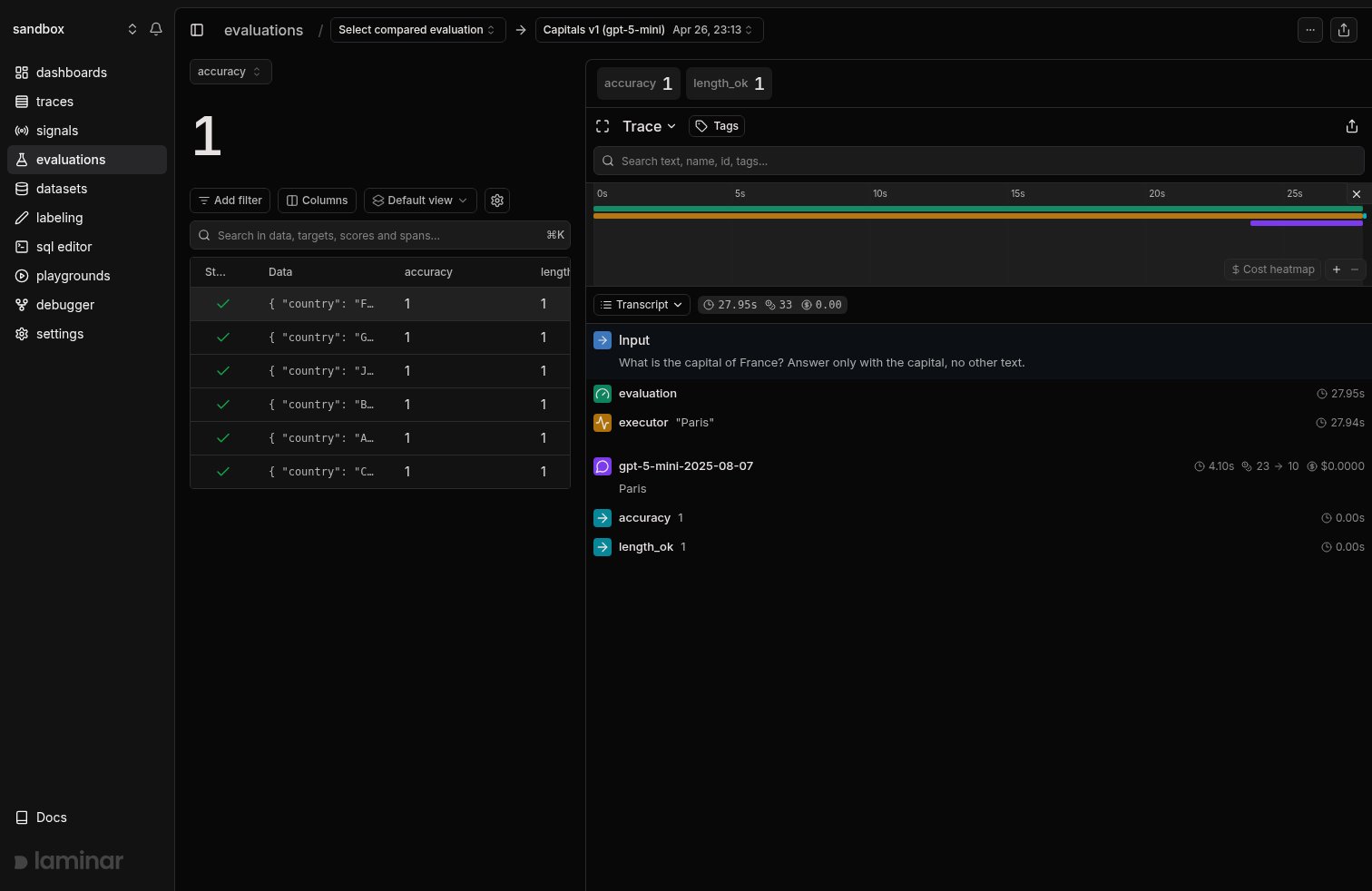
Every datapoint becomes one trace. Every trace gets one score per evaluator.
The evaluation page is a split view: the datapoint table on the left, the trace for the selected row on the right. Pick a score dimension in the top-left dropdown to see its aggregate for the run; for non-binary scores an aggregation picker appears next to it (Average by default; Sum, Min, Max, Median, and percentiles). Score chips above the trace show every score for the selected datapoint.
 ## Change something and run it again
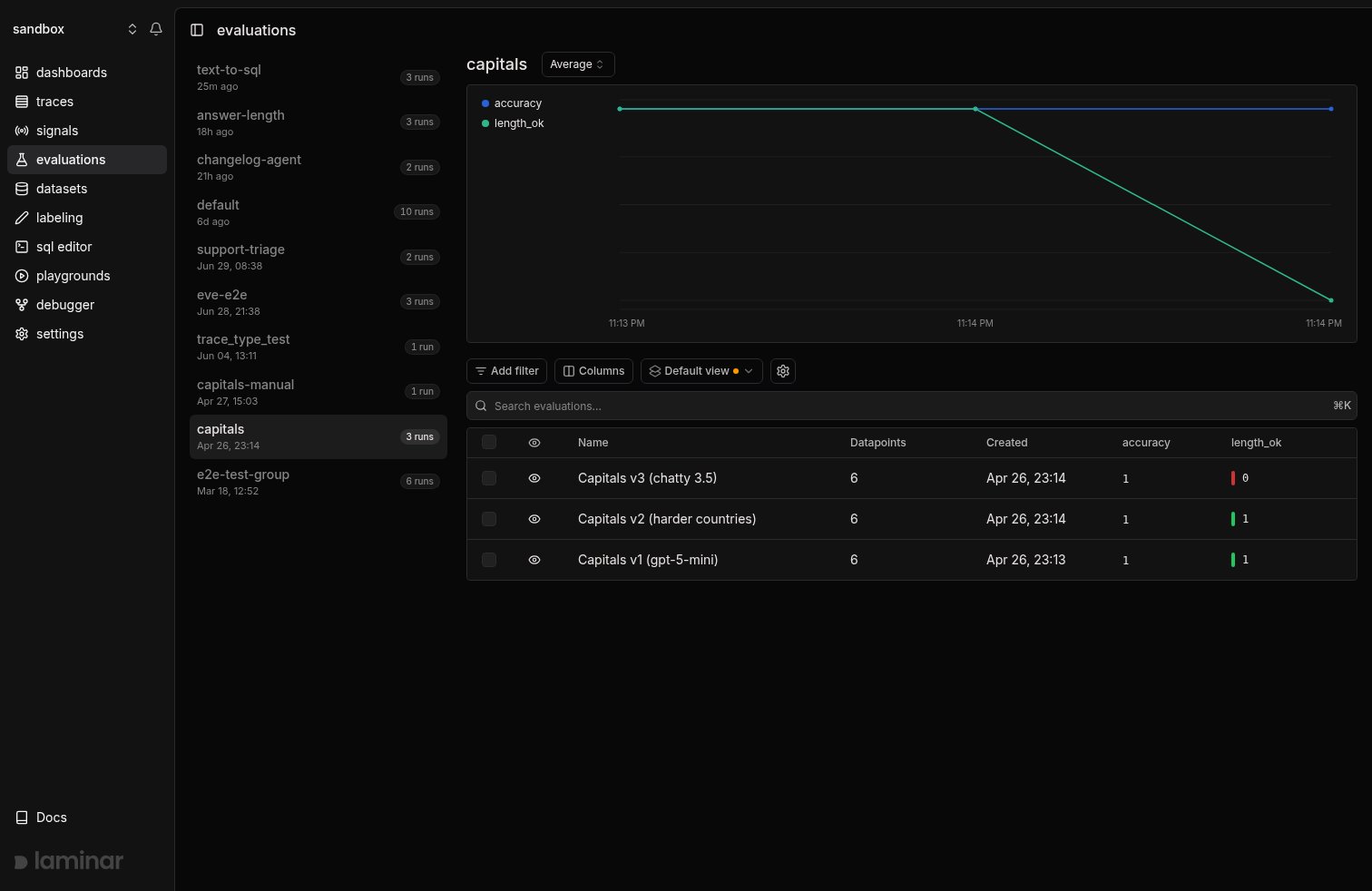
Keep `groupName` the same and change the thing you want to test. The second run lands in the same group, and Laminar charts the average of every score dimension over time.
For example, change the prompt so the model returns a full explanatory sentence:
```python theme={null}
"content": (
f"What is the capital of {data['country']}? "
"Answer in ONE sentence explaining a fun fact."
),
```
Rerun. Because the output is now longer than 50 characters, `length_ok` drops from 1.0 to 0.0 for every datapoint while `accuracy` stays at 1.0. That's a regression you caught before production.
## Change something and run it again
Keep `groupName` the same and change the thing you want to test. The second run lands in the same group, and Laminar charts the average of every score dimension over time.
For example, change the prompt so the model returns a full explanatory sentence:
```python theme={null}
"content": (
f"What is the capital of {data['country']}? "
"Answer in ONE sentence explaining a fun fact."
),
```
Rerun. Because the output is now longer than 50 characters, `length_ok` drops from 1.0 to 0.0 for every datapoint while `accuracy` stays at 1.0. That's a regression you caught before production.
 See [Compare runs](/evaluations/comparing-runs) for side-by-side diffs and per-datapoint deltas.
## Add custom columns
In the evaluation results table, click **Columns → Add column** to create a computed column from SQL. This is useful for pulling fields out of `metadata`, `data`, `target`, or `scores` without changing your evaluation code.
Example: extract a model name from JSON metadata:
```sql theme={null}
simpleJSONExtractString(simpleJSONExtractRaw(metadata, 'llm'), 'model')
```
Pick a data type (usually `String` or `Float64`) and save. The expression runs per row on `evaluation_datapoints`. For more JSON parsing functions, see the [SQL editor](/platform/sql-editor).
## Next steps
The executor, evaluator, datapoint, and group model in detail.
Group runs, read the progression chart, diff side-by-side.
Point `evaluate()` at a Laminar dataset instead of a hardcoded list.
Lower-level control for pipelines where `evaluate()` is too opinionated.
See [Compare runs](/evaluations/comparing-runs) for side-by-side diffs and per-datapoint deltas.
## Add custom columns
In the evaluation results table, click **Columns → Add column** to create a computed column from SQL. This is useful for pulling fields out of `metadata`, `data`, `target`, or `scores` without changing your evaluation code.
Example: extract a model name from JSON metadata:
```sql theme={null}
simpleJSONExtractString(simpleJSONExtractRaw(metadata, 'llm'), 'model')
```
Pick a data type (usually `String` or `Float64`) and save. The expression runs per row on `evaluation_datapoints`. For more JSON parsing functions, see the [SQL editor](/platform/sql-editor).
## Next steps
The executor, evaluator, datapoint, and group model in detail.
Group runs, read the progression chart, diff side-by-side.
Point `evaluate()` at a Laminar dataset instead of a hardcoded list.
Lower-level control for pipelines where `evaluate()` is too opinionated.