> ## Documentation Index
> Fetch the complete documentation index at: https://laminar.sh/docs/llms.txt
> Use this file to discover all available pages before exploring further.
# Debug an AI Agent End to End: Record, Replay, Evaluate
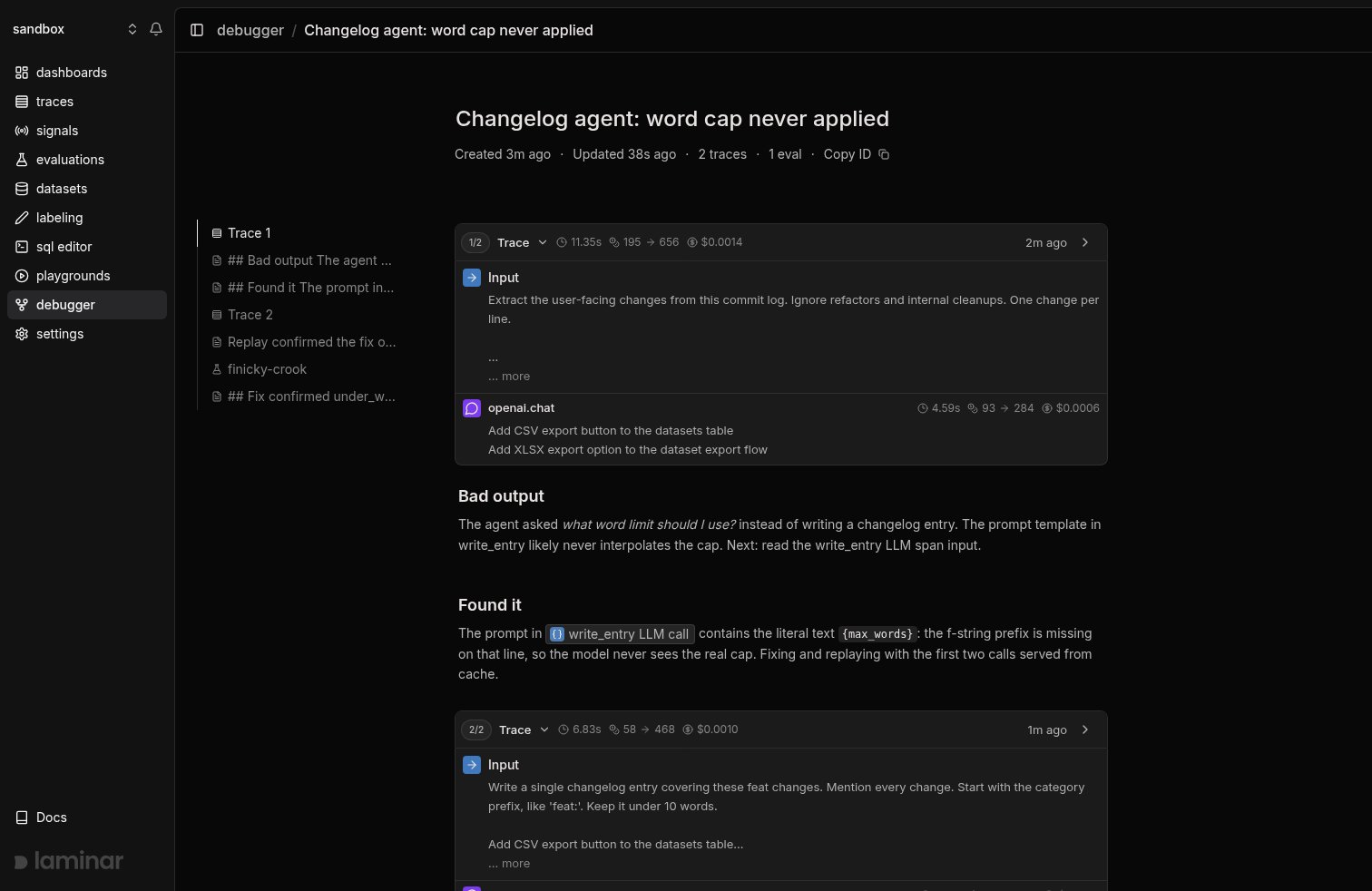
This guide runs one complete investigation with the [Laminar debugger](/debugger/introduction), from a bad output to a proven fix. You will record a buggy run, find the broken LLM call with SQL, leave notes as you go, replay from a checkpoint with earlier calls served from cache, and close with an evaluation that shows the fix holds. Every command and every output below comes from a real run, and the whole loop is exactly what a coding agent with the [Laminar skill](https://github.com/lmnr-ai/lmnr-skills) executes on your behalf.
 ## The example agent
The agent is a three-step changelog writer: extract user-facing changes from a commit log, classify them, and write a one-line entry under a word cap. It has a planted bug: the prompt in `write_entry` is missing its f-string prefix, so the model receives the literal text `{max_words}` instead of the number.
```python agent.py {3,7,13,31,48,69} theme={null}
from dotenv import load_dotenv
from openai import OpenAI
from lmnr import Laminar, observe
load_dotenv()
Laminar.initialize()
client = OpenAI()
MODEL = "gpt-5-mini"
@observe()
def extract_changes(raw_log: str) -> str:
response = client.chat.completions.create(
model=MODEL,
messages=[
{
"role": "user",
"content": (
"Extract the user-facing changes from this commit log. "
"Ignore refactors and internal cleanups. "
f"One change per line.\n\n{raw_log}"
),
}
],
)
return response.choices[0].message.content
@observe()
def classify_change(changes: str) -> str:
response = client.chat.completions.create(
model=MODEL,
messages=[
{
"role": "user",
"content": (
"Classify the overall change as exactly one word: "
f"feat, fix, or chore.\n\n{changes}"
),
}
],
)
return response.choices[0].message.content.strip().lower()
@observe()
def write_entry(changes: str, category: str, max_words: int) -> str:
response = client.chat.completions.create(
model=MODEL,
messages=[
{
"role": "user",
"content": (
f"Write a single changelog entry covering these {category} "
"changes. Mention every change. Start with the category "
"prefix, like 'feat:'. "
# BUG: missing f prefix, {max_words} is sent literally
"Keep it under {max_words} words."
f"\n\n{changes}"
),
}
],
)
return response.choices[0].message.content.strip()
@observe(name="changelog_agent")
def run_agent(raw_log: str, max_words: int = 10) -> str:
changes = extract_changes(raw_log)
category = classify_change(changes)
return write_entry(changes, category, max_words)
if __name__ == "__main__":
raw_log = """
a41f9c2 add CSV export button to the datasets table
7d02b1e fix flaky retry logic in export worker
3c9d044 refactor: extract export serializer
91b2a77 add XLSX support to the same export flow
"""
entry = run_agent(raw_log)
print(f"\nENTRY ({len(entry.split())} words): {entry}")
```
The instrumentation is the highlighted lines: `Laminar.initialize()` once, `@observe()` on each step. Nothing here is debugger-specific; this is normal [tracing](/tracing/introduction).
## 1. Set up the CLI
```bash theme={null}
npx lmnr-cli@latest setup
```
`setup` logs you in, links the directory to a project via `.lmnr/project.json`, and writes `LMNR_PROJECT_API_KEY` to your env file. See [debugger setup](/debugger/setup) for the details. Everything below assumes you run commands from this directory: the debug session commands and the SDK both resolve the session and project from the `.lmnr` files here.
## 2. Record the buggy run
Run the agent with debug mode on:
```bash theme={null}
LMNR_DEBUG=true python agent.py 2>&1 | tee run.log
```
The output makes the bug obvious. Instead of a changelog entry, the model asks a question:
```text theme={null}
ENTRY (23 words): You didn't specify a value for {max_words}. What word
limit should I use? (Or should I proceed with a default, e.g., 20 words?)
LMNR_DEBUG_RUN {"session_id":"e8fb0cf5-620a-479c-b90a-1606ef33b8fc","trace_id":"a4fe1192-3b40-cdce-d8dc-f08a80a7b74a","replay_trace_id":null,"cache_until":null,...}
```
The first `LMNR_DEBUG=true` run registers a session, opens it in your browser, and writes `.lmnr/debug-session.json`. The `LMNR_DEBUG_RUN` line at the end carries the run's ids; the same payload is saved to the file, so you never copy ids around. Every later run in this directory rejoins the session automatically.
## 3. Name the session and note what you see
Name the investigation and record the observation before touching anything. The CLI targets the session from `.lmnr/debug-session.json`, so no session id is passed:
```bash theme={null}
npx lmnr-cli debug session set-name "Changelog agent: word cap never applied"
npx lmnr-cli debug session add-note "## Bad output
The agent asked *what word limit should I use?* instead of writing a
changelog entry. The prompt template in write_entry likely never
interpolates the cap. Next: read the write_entry LLM span input."
```
Notes are markdown blocks in the session timeline, slotted between the runs they comment on. Anyone watching the session view sees them land live.
## 4. Find the broken call with SQL
List the spans of the recorded trace, using the `trace_id` from the `LMNR_DEBUG_RUN` line:
```bash theme={null}
npx lmnr-cli sql query "
SELECT span_id, name, span_type, start_time
FROM spans
WHERE trace_id = 'a4fe1192-3b40-cdce-d8dc-f08a80a7b74a'
ORDER BY start_time"
```
```text theme={null}
span_id name span_t… start_time
00000000-0000-0000-9399-9b9c… changelog_a… DEFAULT 2026-07-06 17:44:48.08…
00000000-0000-0000-89d4-3d02… extract_cha… DEFAULT 2026-07-06 17:44:48.08…
00000000-0000-0000-c8ca-b979… openai.chat LLM 2026-07-06 17:44:48.08…
00000000-0000-0000-c465-aac5… classify_ch… DEFAULT 2026-07-06 17:44:53.24…
00000000-0000-0000-94b5-a446… openai.chat LLM 2026-07-06 17:44:53.24…
00000000-0000-0000-50a8-2a28… write_entry DEFAULT 2026-07-06 17:44:55.05…
00000000-0000-0000-6c26-52f1… openai.chat LLM 2026-07-06 17:44:55.05…
```
Three LLM calls, one per step. The suspect is the last one, under `write_entry`. Read its input:
```bash theme={null}
npx lmnr-cli sql query "
SELECT input FROM spans
WHERE trace_id = 'a4fe1192-3b40-cdce-d8dc-f08a80a7b74a'
AND span_id = '00000000-0000-0000-6c26-52f1410ab527'" --json
```
```json theme={null}
[{"input": "[{\"role\":\"user\",\"content\":\"Write a single changelog entry covering these feat changes. Mention every change. Start with the category prefix, like 'feat:'. Keep it under {max_words} words.\\n\\n...\"}]"}]
```
There it is: the model received the literal string `{max_words}`. Note the finding, referencing the span with an XML tag that the session view renders as a clickable chip:
```bash theme={null}
npx lmnr-cli debug session add-note "## Found it
The prompt in contains the literal text \`{max_words}\`: the
f-string prefix is missing on that line, so the model never sees the real
cap. Fixing and replaying with the first two calls served from cache."
```
## 5. Fix the code and replay
Fix the bug by adding the missing `f` prefix:
```python agent.py theme={null}
f"Keep it under {max_words} words."
```
Now rerun without paying for the two calls that already worked. `LMNR_DEBUG_REPLAY_TRACE_ID` is the trace you recorded; `LMNR_DEBUG_CACHE_UNTIL` is the span id of the last LLM call to serve from cache, which is the `classify_change` call, the one right before the buggy call. The last two UUID groups are enough:
```bash theme={null}
LMNR_DEBUG=true \
LMNR_DEBUG_REPLAY_TRACE_ID=a4fe1192-3b40-cdce-d8dc-f08a80a7b74a \
LMNR_DEBUG_CACHE_UNTIL=94b5-a4460083b7d7 \
python agent.py 2>&1 | tee run.log
```
```text theme={null}
ENTRY (9 words): feat: add CSV table button and XLSX export option
```
Nine words, under the cap. The run rejoined the session automatically, so only the two replay variables were set. Query the new trace and the replayed calls show up as `CACHED` spans:
```text theme={null}
name span_type
changelog_agent DEFAULT
extract_changes DEFAULT
openai.chat CACHED
classify_change DEFAULT
openai.chat CACHED
write_entry DEFAULT
openai.chat LLM
```
Only the fixed call ran live. On a real agent, where the prefix is minutes of tool calls and LLM turns, this is the difference between iterating in seconds and iterating in coffee breaks. See [how caching works](/debugger/caching) for the mechanism.
## 6. Prove it with an eval
A replay shows the fix works on one input. To show it holds in general, run an [evaluation](/evaluations/introduction) under the same session. The eval imports the same agent and scores the output on two axes:
```python changelog_eval.py {2,46-51} theme={null}
from dotenv import load_dotenv
from lmnr import evaluate
load_dotenv()
from agent import run_agent # noqa: E402
data = [
{
"data": {
"raw_log": (
"a41f9c2 add CSV export button to the datasets table\n"
"7d02b1e fix flaky retry logic in export worker\n"
"3c9d044 refactor: extract export serializer\n"
"91b2a77 add XLSX support to the same export flow"
),
"max_words": 10,
},
"target": {"category": "feat", "max_words": 10},
},
{
"data": {
"raw_log": (
"0f31aa9 fix off-by-one in pagination cursor\n"
"c77d2b1 fix crash when dataset name contains a slash"
),
"max_words": 10,
},
"target": {"category": "fix", "max_words": 10},
},
]
def executor(data: dict) -> str:
return run_agent(data["raw_log"], data["max_words"])
def under_word_cap(output: str, target: dict) -> int:
return 1 if len(output.split()) <= target["max_words"] else 0
def correct_category(output: str, target: dict) -> int:
return 1 if output.lower().startswith(target["category"]) else 0
evaluate(
data=data,
executor=executor,
evaluators={"under_word_cap": under_word_cap, "correct_category": correct_category},
group_name="changelog-agent",
)
```
Note what you are about to verify, run it, and close the investigation:
```bash theme={null}
npx lmnr-cli debug session add-note "Replay confirmed the fix on one input:
9 words, under the cap of 10. Running the eval to check it holds on more inputs."
LMNR_DEBUG=true python changelog_eval.py
```
```text theme={null}
Average scores:
under_word_cap: 1.0
correct_category: 1.0
```
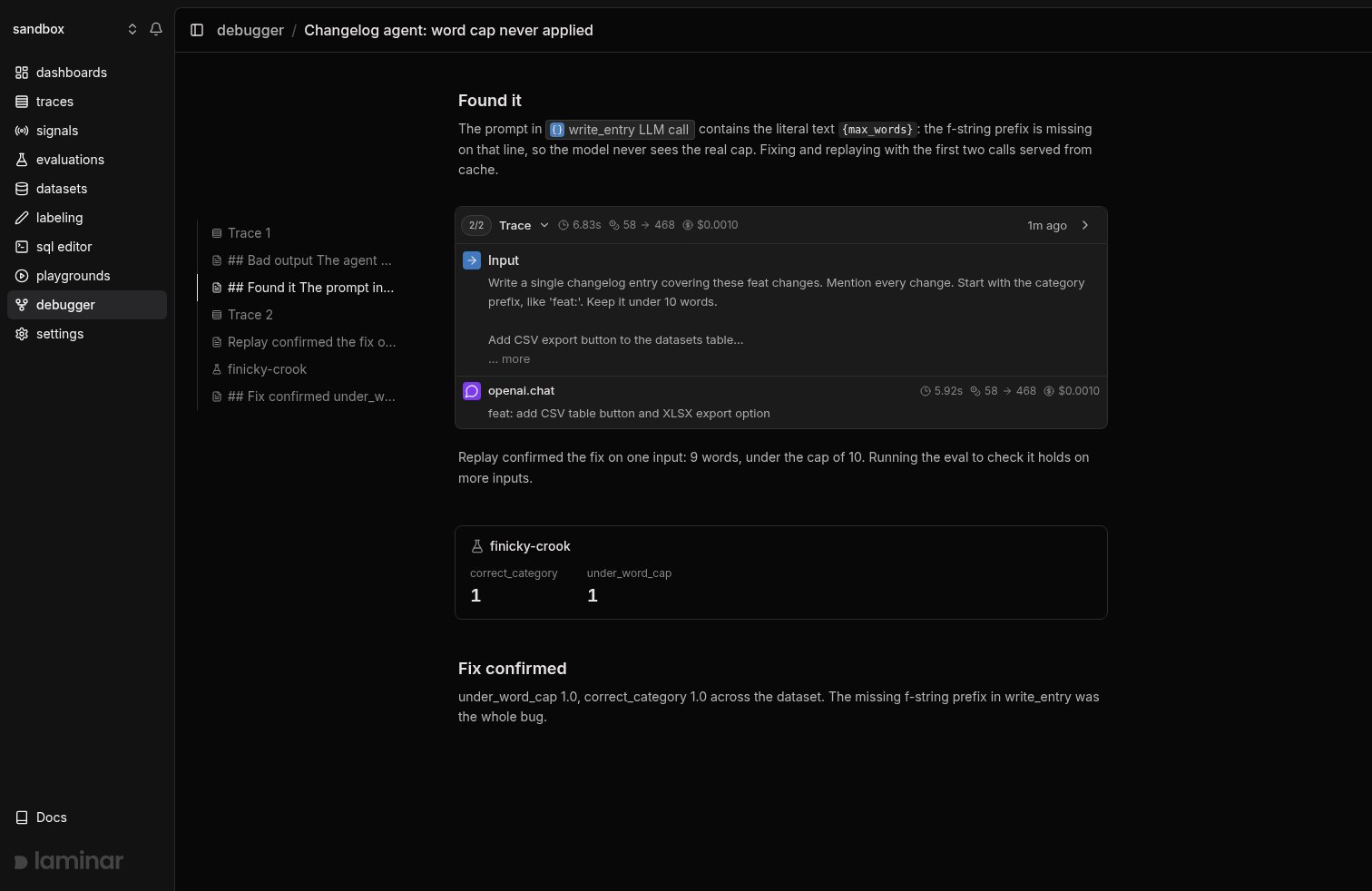
There is no eval-specific setup: any evaluation run with `LMNR_DEBUG=true` resolves the session from `.lmnr/debug-session.json` exactly like agent runs do, and appears in the timeline as a card with per-score averages.
```bash theme={null}
npx lmnr-cli debug session add-note "## Fix confirmed
under_word_cap 1.0, correct_category 1.0 across the dataset. The missing
f-string prefix in write_entry was the whole bug."
```
## The example agent
The agent is a three-step changelog writer: extract user-facing changes from a commit log, classify them, and write a one-line entry under a word cap. It has a planted bug: the prompt in `write_entry` is missing its f-string prefix, so the model receives the literal text `{max_words}` instead of the number.
```python agent.py {3,7,13,31,48,69} theme={null}
from dotenv import load_dotenv
from openai import OpenAI
from lmnr import Laminar, observe
load_dotenv()
Laminar.initialize()
client = OpenAI()
MODEL = "gpt-5-mini"
@observe()
def extract_changes(raw_log: str) -> str:
response = client.chat.completions.create(
model=MODEL,
messages=[
{
"role": "user",
"content": (
"Extract the user-facing changes from this commit log. "
"Ignore refactors and internal cleanups. "
f"One change per line.\n\n{raw_log}"
),
}
],
)
return response.choices[0].message.content
@observe()
def classify_change(changes: str) -> str:
response = client.chat.completions.create(
model=MODEL,
messages=[
{
"role": "user",
"content": (
"Classify the overall change as exactly one word: "
f"feat, fix, or chore.\n\n{changes}"
),
}
],
)
return response.choices[0].message.content.strip().lower()
@observe()
def write_entry(changes: str, category: str, max_words: int) -> str:
response = client.chat.completions.create(
model=MODEL,
messages=[
{
"role": "user",
"content": (
f"Write a single changelog entry covering these {category} "
"changes. Mention every change. Start with the category "
"prefix, like 'feat:'. "
# BUG: missing f prefix, {max_words} is sent literally
"Keep it under {max_words} words."
f"\n\n{changes}"
),
}
],
)
return response.choices[0].message.content.strip()
@observe(name="changelog_agent")
def run_agent(raw_log: str, max_words: int = 10) -> str:
changes = extract_changes(raw_log)
category = classify_change(changes)
return write_entry(changes, category, max_words)
if __name__ == "__main__":
raw_log = """
a41f9c2 add CSV export button to the datasets table
7d02b1e fix flaky retry logic in export worker
3c9d044 refactor: extract export serializer
91b2a77 add XLSX support to the same export flow
"""
entry = run_agent(raw_log)
print(f"\nENTRY ({len(entry.split())} words): {entry}")
```
The instrumentation is the highlighted lines: `Laminar.initialize()` once, `@observe()` on each step. Nothing here is debugger-specific; this is normal [tracing](/tracing/introduction).
## 1. Set up the CLI
```bash theme={null}
npx lmnr-cli@latest setup
```
`setup` logs you in, links the directory to a project via `.lmnr/project.json`, and writes `LMNR_PROJECT_API_KEY` to your env file. See [debugger setup](/debugger/setup) for the details. Everything below assumes you run commands from this directory: the debug session commands and the SDK both resolve the session and project from the `.lmnr` files here.
## 2. Record the buggy run
Run the agent with debug mode on:
```bash theme={null}
LMNR_DEBUG=true python agent.py 2>&1 | tee run.log
```
The output makes the bug obvious. Instead of a changelog entry, the model asks a question:
```text theme={null}
ENTRY (23 words): You didn't specify a value for {max_words}. What word
limit should I use? (Or should I proceed with a default, e.g., 20 words?)
LMNR_DEBUG_RUN {"session_id":"e8fb0cf5-620a-479c-b90a-1606ef33b8fc","trace_id":"a4fe1192-3b40-cdce-d8dc-f08a80a7b74a","replay_trace_id":null,"cache_until":null,...}
```
The first `LMNR_DEBUG=true` run registers a session, opens it in your browser, and writes `.lmnr/debug-session.json`. The `LMNR_DEBUG_RUN` line at the end carries the run's ids; the same payload is saved to the file, so you never copy ids around. Every later run in this directory rejoins the session automatically.
## 3. Name the session and note what you see
Name the investigation and record the observation before touching anything. The CLI targets the session from `.lmnr/debug-session.json`, so no session id is passed:
```bash theme={null}
npx lmnr-cli debug session set-name "Changelog agent: word cap never applied"
npx lmnr-cli debug session add-note "## Bad output
The agent asked *what word limit should I use?* instead of writing a
changelog entry. The prompt template in write_entry likely never
interpolates the cap. Next: read the write_entry LLM span input."
```
Notes are markdown blocks in the session timeline, slotted between the runs they comment on. Anyone watching the session view sees them land live.
## 4. Find the broken call with SQL
List the spans of the recorded trace, using the `trace_id` from the `LMNR_DEBUG_RUN` line:
```bash theme={null}
npx lmnr-cli sql query "
SELECT span_id, name, span_type, start_time
FROM spans
WHERE trace_id = 'a4fe1192-3b40-cdce-d8dc-f08a80a7b74a'
ORDER BY start_time"
```
```text theme={null}
span_id name span_t… start_time
00000000-0000-0000-9399-9b9c… changelog_a… DEFAULT 2026-07-06 17:44:48.08…
00000000-0000-0000-89d4-3d02… extract_cha… DEFAULT 2026-07-06 17:44:48.08…
00000000-0000-0000-c8ca-b979… openai.chat LLM 2026-07-06 17:44:48.08…
00000000-0000-0000-c465-aac5… classify_ch… DEFAULT 2026-07-06 17:44:53.24…
00000000-0000-0000-94b5-a446… openai.chat LLM 2026-07-06 17:44:53.24…
00000000-0000-0000-50a8-2a28… write_entry DEFAULT 2026-07-06 17:44:55.05…
00000000-0000-0000-6c26-52f1… openai.chat LLM 2026-07-06 17:44:55.05…
```
Three LLM calls, one per step. The suspect is the last one, under `write_entry`. Read its input:
```bash theme={null}
npx lmnr-cli sql query "
SELECT input FROM spans
WHERE trace_id = 'a4fe1192-3b40-cdce-d8dc-f08a80a7b74a'
AND span_id = '00000000-0000-0000-6c26-52f1410ab527'" --json
```
```json theme={null}
[{"input": "[{\"role\":\"user\",\"content\":\"Write a single changelog entry covering these feat changes. Mention every change. Start with the category prefix, like 'feat:'. Keep it under {max_words} words.\\n\\n...\"}]"}]
```
There it is: the model received the literal string `{max_words}`. Note the finding, referencing the span with an XML tag that the session view renders as a clickable chip:
```bash theme={null}
npx lmnr-cli debug session add-note "## Found it
The prompt in contains the literal text \`{max_words}\`: the
f-string prefix is missing on that line, so the model never sees the real
cap. Fixing and replaying with the first two calls served from cache."
```
## 5. Fix the code and replay
Fix the bug by adding the missing `f` prefix:
```python agent.py theme={null}
f"Keep it under {max_words} words."
```
Now rerun without paying for the two calls that already worked. `LMNR_DEBUG_REPLAY_TRACE_ID` is the trace you recorded; `LMNR_DEBUG_CACHE_UNTIL` is the span id of the last LLM call to serve from cache, which is the `classify_change` call, the one right before the buggy call. The last two UUID groups are enough:
```bash theme={null}
LMNR_DEBUG=true \
LMNR_DEBUG_REPLAY_TRACE_ID=a4fe1192-3b40-cdce-d8dc-f08a80a7b74a \
LMNR_DEBUG_CACHE_UNTIL=94b5-a4460083b7d7 \
python agent.py 2>&1 | tee run.log
```
```text theme={null}
ENTRY (9 words): feat: add CSV table button and XLSX export option
```
Nine words, under the cap. The run rejoined the session automatically, so only the two replay variables were set. Query the new trace and the replayed calls show up as `CACHED` spans:
```text theme={null}
name span_type
changelog_agent DEFAULT
extract_changes DEFAULT
openai.chat CACHED
classify_change DEFAULT
openai.chat CACHED
write_entry DEFAULT
openai.chat LLM
```
Only the fixed call ran live. On a real agent, where the prefix is minutes of tool calls and LLM turns, this is the difference between iterating in seconds and iterating in coffee breaks. See [how caching works](/debugger/caching) for the mechanism.
## 6. Prove it with an eval
A replay shows the fix works on one input. To show it holds in general, run an [evaluation](/evaluations/introduction) under the same session. The eval imports the same agent and scores the output on two axes:
```python changelog_eval.py {2,46-51} theme={null}
from dotenv import load_dotenv
from lmnr import evaluate
load_dotenv()
from agent import run_agent # noqa: E402
data = [
{
"data": {
"raw_log": (
"a41f9c2 add CSV export button to the datasets table\n"
"7d02b1e fix flaky retry logic in export worker\n"
"3c9d044 refactor: extract export serializer\n"
"91b2a77 add XLSX support to the same export flow"
),
"max_words": 10,
},
"target": {"category": "feat", "max_words": 10},
},
{
"data": {
"raw_log": (
"0f31aa9 fix off-by-one in pagination cursor\n"
"c77d2b1 fix crash when dataset name contains a slash"
),
"max_words": 10,
},
"target": {"category": "fix", "max_words": 10},
},
]
def executor(data: dict) -> str:
return run_agent(data["raw_log"], data["max_words"])
def under_word_cap(output: str, target: dict) -> int:
return 1 if len(output.split()) <= target["max_words"] else 0
def correct_category(output: str, target: dict) -> int:
return 1 if output.lower().startswith(target["category"]) else 0
evaluate(
data=data,
executor=executor,
evaluators={"under_word_cap": under_word_cap, "correct_category": correct_category},
group_name="changelog-agent",
)
```
Note what you are about to verify, run it, and close the investigation:
```bash theme={null}
npx lmnr-cli debug session add-note "Replay confirmed the fix on one input:
9 words, under the cap of 10. Running the eval to check it holds on more inputs."
LMNR_DEBUG=true python changelog_eval.py
```
```text theme={null}
Average scores:
under_word_cap: 1.0
correct_category: 1.0
```
There is no eval-specific setup: any evaluation run with `LMNR_DEBUG=true` resolves the session from `.lmnr/debug-session.json` exactly like agent runs do, and appears in the timeline as a card with per-score averages.
```bash theme={null}
npx lmnr-cli debug session add-note "## Fix confirmed
under_word_cap 1.0, correct_category 1.0 across the dataset. The missing
f-string prefix in write_entry was the whole bug."
```
 ## 7. Read the whole story back
`debug session summary` prints the session's full timeline, oldest first: traces and evals as self-closing tags, notes as raw markdown. This is how a coding agent re-orients after a context reset, and it reads as the complete story of the investigation:
```bash theme={null}
npx lmnr-cli debug session summary
```
```text theme={null}
## Bad output
The agent asked *what word limit should I use?* instead of writing a
changelog entry. The prompt template in write_entry likely never
interpolates the cap. Next: read the write_entry LLM span input.
## Found it
The prompt in contains the literal text `{max_words}`: the
f-string prefix is missing on that line, so the model never sees the real
cap. Fixing and replaying with the first two calls served from cache.
Replay confirmed the fix on one input: 9 words, under the cap of 10.
Running the eval to check it holds on more inputs.
## Fix confirmed
under_word_cap 1.0, correct_category 1.0 across the dataset. The missing
f-string prefix in write_entry was the whole bug.
```
The session view in the browser renders this same timeline, so a human watching the UI and a coding agent reading the summary see the same story.
## Hand the loop to a coding agent
Everything in this guide is a CLI command or an environment variable, which is the point: a coding agent can drive all of it. With the [Laminar skill](https://github.com/lmnr-ai/lmnr-skills) installed by `lmnr-cli setup`, ask Claude Code, Cursor, or Codex to *"debug why the changelog agent ignores the word cap"* and it runs this exact sequence, record, inspect, fix, replay, evaluate, while you watch the session view fill in.
## What's next
The reference for every step in this loop, including all environment variables.
What gets cached, the input hash, and which integrations support replay.
Datasets, executors, evaluators, and comparing runs over time.
The same loop applied to a slow browser agent, where replay saves the most time.
## 7. Read the whole story back
`debug session summary` prints the session's full timeline, oldest first: traces and evals as self-closing tags, notes as raw markdown. This is how a coding agent re-orients after a context reset, and it reads as the complete story of the investigation:
```bash theme={null}
npx lmnr-cli debug session summary
```
```text theme={null}
## Bad output
The agent asked *what word limit should I use?* instead of writing a
changelog entry. The prompt template in write_entry likely never
interpolates the cap. Next: read the write_entry LLM span input.
## Found it
The prompt in contains the literal text `{max_words}`: the
f-string prefix is missing on that line, so the model never sees the real
cap. Fixing and replaying with the first two calls served from cache.
Replay confirmed the fix on one input: 9 words, under the cap of 10.
Running the eval to check it holds on more inputs.
## Fix confirmed
under_word_cap 1.0, correct_category 1.0 across the dataset. The missing
f-string prefix in write_entry was the whole bug.
```
The session view in the browser renders this same timeline, so a human watching the UI and a coding agent reading the summary see the same story.
## Hand the loop to a coding agent
Everything in this guide is a CLI command or an environment variable, which is the point: a coding agent can drive all of it. With the [Laminar skill](https://github.com/lmnr-ai/lmnr-skills) installed by `lmnr-cli setup`, ask Claude Code, Cursor, or Codex to *"debug why the changelog agent ignores the word cap"* and it runs this exact sequence, record, inspect, fix, replay, evaluate, while you watch the session view fill in.
## What's next
The reference for every step in this loop, including all environment variables.
What gets cached, the input hash, and which integrations support replay.
Datasets, executors, evaluators, and comparing runs over time.
The same loop applied to a slow browser agent, where replay saves the most time.