> ## Documentation Index
> Fetch the complete documentation index at: https://laminar.sh/docs/llms.txt
> Use this file to discover all available pages before exploring further.
# Google ADK observability
> Trace Google Agent Development Kit (ADK) runs in Python: agent invocations, Gemini calls, and tool executions, readable as a conversation in Laminar.
## Overview
Laminar is an open-source, OpenTelemetry-native observability platform for AI agents built with [Google ADK](https://google.github.io/adk-docs/) (Agent Development Kit). Trace, debug, and monitor every agent invocation, model call, and tool execution with a single `Laminar.initialize()` call. Self-host via Helm or use managed cloud.
ADK is Google's Python framework for building agents: you define an `Agent` with a model, an instruction, and tools, then drive it with a `Runner`. ADK emits its own OpenTelemetry spans for agent invocations, LLM calls, and tool calls. Laminar routes those spans into your project and enriches them so they read as a conversation.
What Laminar captures:
* An `invocation` span for each `runner.run_async()` call.
* An agent span named after the agent (for example `travel_assistant`), with the ADK session ID and user ID attached as Laminar's [session](/docs/tracing/structure/sessions) and [user ID](/docs/tracing/structure/user-id).
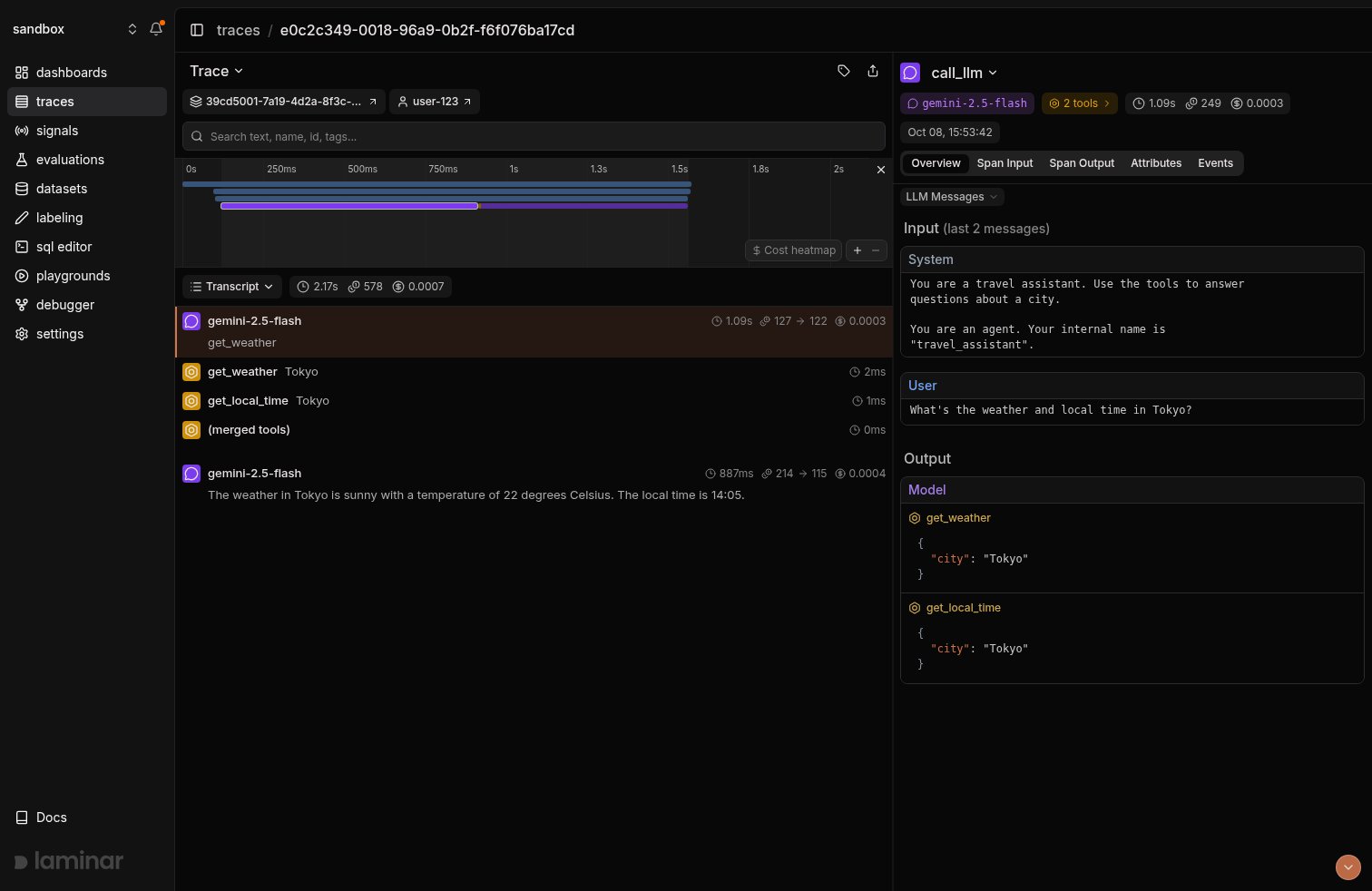
* A `call_llm` span for every model turn, with the model, token counts, latency, and cost.
* A tool span named after the tool (for example `get_weather`) with the tool's arguments and return value.
## Getting started
Ensure you have `lmnr` version `0.7.67` or higher and `google-adk` version `2.0.0` or higher:
```bash theme={null}
pip install -U lmnr google-adk
```
```bash theme={null}
export LMNR_PROJECT_API_KEY=your-laminar-project-api-key
export GOOGLE_API_KEY=your-gemini-api-key
```
`Laminar.initialize()` auto-instruments ADK when `google-adk` is installed. No ADK telemetry configuration or OTLP exporter setup is needed.
```python {6,8} theme={null}
import asyncio
from google.adk.agents import Agent
from google.adk.runners import InMemoryRunner
from google.genai import types
from lmnr import Laminar, observe
Laminar.initialize()
def get_weather(city: str) -> dict:
"""Returns the current weather for a city."""
return {"city": city, "forecast": "sunny", "temperature_c": 22}
def get_local_time(city: str) -> dict:
"""Returns the current local time for a city."""
return {"city": city, "time": "14:05"}
agent = Agent(
name="travel_assistant",
model="gemini-2.5-flash",
instruction="You are a travel assistant. Use the tools to answer questions about a city.",
tools=[get_weather, get_local_time],
)
@observe(name="travel-question")
async def main():
runner = InMemoryRunner(agent=agent, app_name="travel_app")
session = await runner.session_service.create_session(
app_name="travel_app", user_id="user-123"
)
message = types.Content(
role="user",
parts=[types.Part(text="What's the weather and local time in Tokyo?")],
)
async for event in runner.run_async(
user_id="user-123", session_id=session.id, new_message=message
):
if event.is_final_response() and event.content and event.content.parts:
print(event.content.parts[0].text)
if __name__ == "__main__":
asyncio.run(main())
```
Wrapping your entry point in `@observe()` is optional but recommended: it creates a root span that captures inputs and outputs and makes the trace easy to find in the UI.
When `google-adk` is installed, Laminar leaves the [Google Gen AI SDK](/docs/integrations/gemini) instrumentation out of the default set. ADK's `call_llm` span already records the full request and response, so tracing the underlying `generate_content` call as well would produce two LLM spans for every model turn. If you also call `google-genai` directly outside ADK in the same process and want those calls traced, pass both instruments explicitly:
```python theme={null}
from lmnr import Laminar, Instruments
Laminar.initialize(instruments={Instruments.GOOGLE_ADK, Instruments.GOOGLE_GENAI})
```
## See what happened in a trace
Open the trace in Laminar. The transcript view extracts the user message, each model turn, and every tool call with its arguments and result, so you read the conversation instead of a span tree. Switch to tree view to see how ADK nests `call_llm` and tool spans under the agent span for each `invocation`.
 More on the trace UX: [Viewing traces](/docs/platform/viewing-traces).
## Sessions and users
ADK sessions map to Laminar sessions automatically. The `session_id` and `user_id` you pass to `runner.run_async()` are attached to each agent span, so every turn of one ADK conversation is grouped under the same [session](/docs/tracing/structure/sessions) and filterable by [user ID](/docs/tracing/structure/user-id).
## Message content and privacy
Laminar reads model and tool content from the attributes ADK itself records, so ADK's content toggle applies to Laminar too. Set `ADK_CAPTURE_MESSAGE_CONTENT_IN_SPANS=false` to keep prompts, responses, and tool payloads out of the trace while still recording span timing, model names, and token counts.
## Track outcomes with Signals
Traces answer *what happened on this run*. **[Signals](/docs/signals/introduction) answer the cross-trace question**: *how often does the agent call the wrong tool, when does it answer without calling a tool at all, how many runs end without a final response*. A Signal pairs a plain-language prompt with a JSON output schema. Laminar runs it live on new traces (Triggers) or backfills it across history (Jobs) and records a structured event every time it matches. From there you [query](/docs/platform/sql-editor), [cluster](/docs/signals/clusters), and [alert](/docs/signals/alerts) on events across every trace.
Every new project ships with a **Failure Detector** Signal that categorizes issues on any trace over 1000 tokens. Open it from the Signals sidebar to see events as soon as your ADK traces arrive.
## Query across traces
* **[SQL editor](/docs/platform/sql-editor)** for ad-hoc queries across traces, spans, signals, and evals.
* **SQL API** for programmatic access from scripts and pipelines.
* **[CLI](/docs/platform/cli)** (`lmnr-cli sql query`) for terminal-driven queries and piping JSON into shell tools or coding agents.
* **[MCP server](/docs/platform/mcp)** to query Laminar directly from Claude Code, Cursor, or Codex.
## Troubleshooting
* Confirm `LMNR_PROJECT_API_KEY` is set in the same process that runs the agent.
* `google-adk` must be installed when `Laminar.initialize()` runs.
* The integration requires `lmnr >= 0.7.62` and `google-adk >= 2.0.0, < 3.0.0`. `google-adk` 2.10 and later need `lmnr >= 0.7.67` for full prompt and response capture.
Check your versions with `pip show lmnr google-adk`. With `google-adk` 2.10 or later, `lmnr` before 0.7.67 doesn't attach the prompt and response to `call_llm` spans: upgrade with `pip install -U lmnr`. If your versions are fine, check `ADK_CAPTURE_MESSAGE_CONTENT_IN_SPANS` (see below).
Check whether `ADK_CAPTURE_MESSAGE_CONTENT_IN_SPANS` is set to `false`. With content capture off, ADK records tool and model payloads as empty, and Laminar keeps them empty.
Pass `disabled_instruments={Instruments.GOOGLE_ADK}` to `Laminar.initialize()`. The Google Gen AI SDK instrumentation is then enabled again, so Gemini calls are still traced as plain LLM spans.
```python theme={null}
from lmnr import Laminar, Instruments
Laminar.initialize(disabled_instruments={Instruments.GOOGLE_ADK})
```
Set `base_url` and the ports of your instance when initializing. For a local OSS deployment:
```python theme={null}
Laminar.initialize(
base_url="http://localhost",
http_port=8000,
grpc_port=8001,
)
```
## What's next
Read the transcript view, filter, and search across traces.
Detect behaviors and failures across every run, then query, cluster, and alert on them.
Query traces programmatically from the UI, API, or your IDE.
Sessions, metadata, and tags for deeper control.
## Related integrations
Calling the Google Gen AI SDK directly without ADK? Trace it here.
Trace Pydantic AI agents and typed tool calls.
Trace agent runs, handoffs, and tool calls.
Trace LangChain chains and LangGraph graphs.
Running ADK agents on non-Gemini models through `LiteLlm`? See how LiteLLM calls are traced.
Browse every provider, framework, coding agent, and browser integration Laminar supports.
This documentation is built and hosted on [Mintlify](https://mintlify.com), a developer documentation platform.
More on the trace UX: [Viewing traces](/docs/platform/viewing-traces).
## Sessions and users
ADK sessions map to Laminar sessions automatically. The `session_id` and `user_id` you pass to `runner.run_async()` are attached to each agent span, so every turn of one ADK conversation is grouped under the same [session](/docs/tracing/structure/sessions) and filterable by [user ID](/docs/tracing/structure/user-id).
## Message content and privacy
Laminar reads model and tool content from the attributes ADK itself records, so ADK's content toggle applies to Laminar too. Set `ADK_CAPTURE_MESSAGE_CONTENT_IN_SPANS=false` to keep prompts, responses, and tool payloads out of the trace while still recording span timing, model names, and token counts.
## Track outcomes with Signals
Traces answer *what happened on this run*. **[Signals](/docs/signals/introduction) answer the cross-trace question**: *how often does the agent call the wrong tool, when does it answer without calling a tool at all, how many runs end without a final response*. A Signal pairs a plain-language prompt with a JSON output schema. Laminar runs it live on new traces (Triggers) or backfills it across history (Jobs) and records a structured event every time it matches. From there you [query](/docs/platform/sql-editor), [cluster](/docs/signals/clusters), and [alert](/docs/signals/alerts) on events across every trace.
Every new project ships with a **Failure Detector** Signal that categorizes issues on any trace over 1000 tokens. Open it from the Signals sidebar to see events as soon as your ADK traces arrive.
## Query across traces
* **[SQL editor](/docs/platform/sql-editor)** for ad-hoc queries across traces, spans, signals, and evals.
* **SQL API** for programmatic access from scripts and pipelines.
* **[CLI](/docs/platform/cli)** (`lmnr-cli sql query`) for terminal-driven queries and piping JSON into shell tools or coding agents.
* **[MCP server](/docs/platform/mcp)** to query Laminar directly from Claude Code, Cursor, or Codex.
## Troubleshooting
* Confirm `LMNR_PROJECT_API_KEY` is set in the same process that runs the agent.
* `google-adk` must be installed when `Laminar.initialize()` runs.
* The integration requires `lmnr >= 0.7.62` and `google-adk >= 2.0.0, < 3.0.0`. `google-adk` 2.10 and later need `lmnr >= 0.7.67` for full prompt and response capture.
Check your versions with `pip show lmnr google-adk`. With `google-adk` 2.10 or later, `lmnr` before 0.7.67 doesn't attach the prompt and response to `call_llm` spans: upgrade with `pip install -U lmnr`. If your versions are fine, check `ADK_CAPTURE_MESSAGE_CONTENT_IN_SPANS` (see below).
Check whether `ADK_CAPTURE_MESSAGE_CONTENT_IN_SPANS` is set to `false`. With content capture off, ADK records tool and model payloads as empty, and Laminar keeps them empty.
Pass `disabled_instruments={Instruments.GOOGLE_ADK}` to `Laminar.initialize()`. The Google Gen AI SDK instrumentation is then enabled again, so Gemini calls are still traced as plain LLM spans.
```python theme={null}
from lmnr import Laminar, Instruments
Laminar.initialize(disabled_instruments={Instruments.GOOGLE_ADK})
```
Set `base_url` and the ports of your instance when initializing. For a local OSS deployment:
```python theme={null}
Laminar.initialize(
base_url="http://localhost",
http_port=8000,
grpc_port=8001,
)
```
## What's next
Read the transcript view, filter, and search across traces.
Detect behaviors and failures across every run, then query, cluster, and alert on them.
Query traces programmatically from the UI, API, or your IDE.
Sessions, metadata, and tags for deeper control.
## Related integrations
Calling the Google Gen AI SDK directly without ADK? Trace it here.
Trace Pydantic AI agents and typed tool calls.
Trace agent runs, handoffs, and tool calls.
Trace LangChain chains and LangGraph graphs.
Running ADK agents on non-Gemini models through `LiteLlm`? See how LiteLLM calls are traced.
Browse every provider, framework, coding agent, and browser integration Laminar supports.
This documentation is built and hosted on [Mintlify](https://mintlify.com), a developer documentation platform.