> ## Documentation Index
> Fetch the complete documentation index at: https://laminar.sh/docs/llms.txt
> Use this file to discover all available pages before exploring further.
# TypeSafe AI Jev observability
> Trace every TypeSafe AI Jev call with its state, questions, typed answers, and token usage, all readable in Laminar's transcript view.
## Overview
Laminar is an open-source, OpenTelemetry-native observability platform for AI agents. Trace, debug, and monitor every TypeSafe AI Jev call your agent makes, with the state, the questions you asked, the typed answers, and token usage on each span, in both TypeScript and Python.
[Jev](https://typesafe.ai) is TypeSafe AI's System One model. Instead of generating text, it reads your application state and answers typed questions: a yes/no probability (`Noul`), a selected option (`Choice`), or a rubric score (`Score`). Agents use it for routing, guardrails, and scoring, so these are exactly the decisions you want visible in a trace. Laminar auto-instruments the TypeSafe SDK: initialize Laminar once and every System One call is traced.
## Getting Started
Jev is in early access: create your key in the [TypeSafe console](https://console.typesafe.ai). No account yet? Use an [OpenRouter](/docs/integrations/openrouter) API key with `TYPESAFE_BASE_URL=https://openrouter.ai/api` instead.
### 1. Install Laminar and the TypeSafe SDK
```bash theme={null}
npm install @lmnr-ai/lmnr@latest @typesafe-ai/sdk
```
### 2. Set up your environment variables
Store your API keys in a `.env` file:
```bash theme={null}
# .env file
LMNR_PROJECT_API_KEY=your-laminar-project-api-key
TYPESAFE_API_KEY=your-typesafe-api-key
```
Then load them in your application using a package like [dotenv](https://www.npmjs.com/package/dotenv).
### 3. Initialize Laminar
`@typesafe-ai/sdk` is loaded as an ES module in most projects, so pass the client class to `instrumentModules` for Laminar to patch it:
```typescript {5-7} theme={null}
import { Laminar } from '@lmnr-ai/lmnr';
import { TypeSafeClient } from '@typesafe-ai/sdk';
import 'dotenv/config';
Laminar.initialize({
instrumentModules: { typesafe: TypeSafeClient },
});
const client = new TypeSafeClient({ defaultModel: 'jev-1.13.0' });
```
### 4. Use the TypeSafe SDK as usual
```typescript theme={null}
import { choice, noul } from '@typesafe-ai/sdk';
const result = await client.systemOne({
state:
'I was charged twice for my annual plan. Please refund one of the charges.',
questions: {
wants_refund: noul('Does the customer ask for money back?'),
queue: choice('Which team should handle this?', {
billing: 'Charges, invoices, refunds',
technical: 'Bugs and integration problems',
other: null,
}),
},
});
console.log(result.answers.wants_refund.noul);
console.log(result.answers.queue.choice);
```
All `systemOne` calls are now traced in Laminar.
### 1. Install Laminar and the TypeSafe SDK
```bash theme={null}
pip install -U lmnr typesafe-sdk python-dotenv
```
### 2. Set up your environment variables
Store your API keys in a `.env` file:
```bash theme={null}
# .env file
LMNR_PROJECT_API_KEY=your-laminar-project-api-key
TYPESAFE_API_KEY=your-typesafe-api-key
```
### 3. Initialize Laminar
Laminar instruments the TypeSafe SDK automatically when the `typesafe-sdk` package is installed:
```python {8} theme={null}
import os
from dotenv import load_dotenv
from lmnr import Laminar
from typesafe_sdk import TypeSafeClient
load_dotenv()
Laminar.initialize()
client = TypeSafeClient(model="jev-1.13.0")
```
### 4. Use the TypeSafe SDK as usual
```python theme={null}
from typesafe_sdk import Choice, Noul
response = client.system_one(
state="I was charged twice for my annual plan. Please refund one of the charges.",
questions={
"wants_refund": Noul(instructions="Does the customer ask for money back?"),
"queue": Choice(
instructions="Which team should handle this?",
criteria={
"billing": "Charges, invoices, refunds",
"technical": "Bugs and integration problems",
"other": None,
},
),
},
)
print(response.answers["wants_refund"].noul)
print(response.answers["queue"].choice)
```
All `system_one` calls are now traced in Laminar, including calls made with `AsyncTypeSafeClient`.
## What Laminar captures
Each call becomes an LLM span named `typesafe.system_one`. Every span carries:
* The model that answered (`jev-1.13.0`, or the resolved default when you rely on `jev-latest`).
* The state you sent, shown as the span input.
* The full question set: instructions and criteria for every `Noul`, `Choice`, and `Score`.
* The typed answers, shown as the span output, with probabilities and confidence intact.
* Input and output token counts.
Failed calls (an unknown model name, an authentication error) are marked as errors on the span with the exception recorded, so a misconfigured guardrail shows up in the trace instead of disappearing into a retry loop.
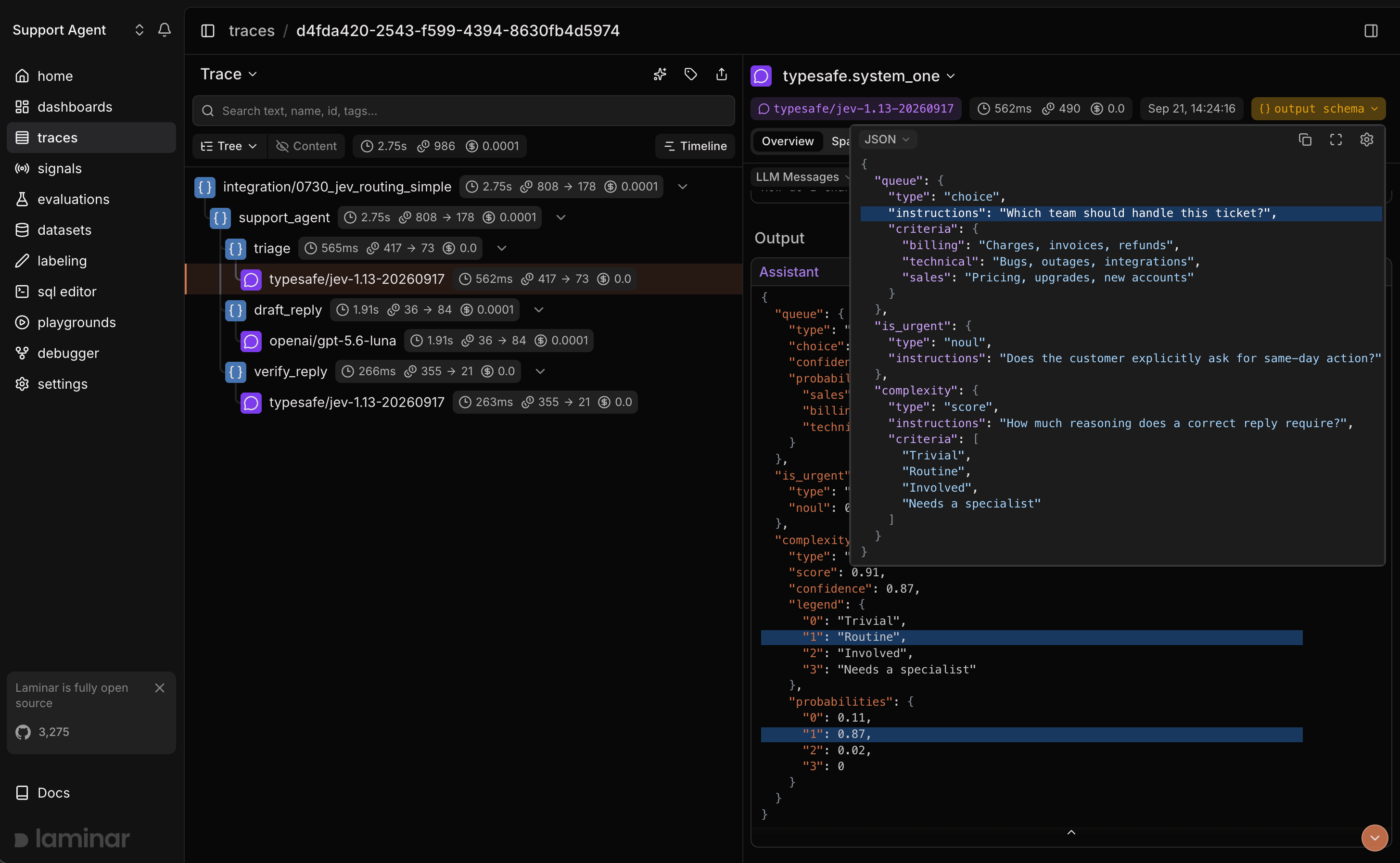 ## See what happened in a trace
Open a trace in Laminar and you land on the transcript view: Laminar extracts the agent input, the model's turns, and any tool calls into a conversation, so you read what happened instead of clicking through a tree of span names. A Jev call sits inline with the LLM calls it routes or guards, so you can see the classification next to the action it triggered.
More on the trace UX: [Viewing traces](/docs/platform/viewing-traces).
## Track outcomes with Signals
Traces answer *what happened on this run*. **[Signals](/docs/signals/introduction) answer the cross-trace question**: *how often does the guardrail fire, which queue gets the most tickets, when does confidence drop below the threshold you tuned for*. A Signal pairs a plain-language prompt with a JSON output schema. Laminar runs it live on new traces (Triggers) or backfills it across history (Jobs) and records a structured event every time it matches. From there you [query](/docs/platform/sql-editor), [cluster](/docs/signals/clusters), and [alert](/docs/signals/alerts) on events across every trace.
## Query across traces
* **[SQL editor](/docs/platform/sql-editor)** for ad-hoc queries across traces, spans, signals, and evals.
* **SQL API** for programmatic access from scripts and pipelines.
* **[CLI](/docs/platform/cli)** (`lmnr-cli sql query`) for terminal-driven queries and piping JSON into shell tools or coding agents.
* **[MCP server](/docs/platform/mcp)** to query Laminar directly from Claude Code, Cursor, Codex, or any MCP-aware client.
## Enrich your TypeSafe traces
* Attach sessions, user IDs, metadata, and tags to TypeSafe spans via the [SDK reference](/docs/sdk/reference).
* Wrap the functions around your Jev calls with `observe` and mark them as [TOOL spans](/docs/tracing/structure/span-types) so they show up in the transcript.
* Set `LMNR_TRACE_CONTENT=false` to keep the model and token counts while omitting state, questions, and answers from spans.
## What's next
Read the transcript view, filter, and search across traces.
Detect behaviors and failures across every run, then query, cluster, and alert on them.
Query traces programmatically from the UI, API, or your IDE.
Add sessions, metadata, and tags, and group calls under your own spans.
## Related integrations
Trace the OpenAI SDK directly in TypeScript and Python.
Trace the Anthropic SDK directly in TypeScript and Python.
One integration for every model LiteLLM routes to.
Trace any model called through OpenRouter, Jev included.
Trace Gemini calls made with the Google Gen AI SDK.
Browse every provider, framework, coding agent, and browser integration Laminar supports.
## See what happened in a trace
Open a trace in Laminar and you land on the transcript view: Laminar extracts the agent input, the model's turns, and any tool calls into a conversation, so you read what happened instead of clicking through a tree of span names. A Jev call sits inline with the LLM calls it routes or guards, so you can see the classification next to the action it triggered.
More on the trace UX: [Viewing traces](/docs/platform/viewing-traces).
## Track outcomes with Signals
Traces answer *what happened on this run*. **[Signals](/docs/signals/introduction) answer the cross-trace question**: *how often does the guardrail fire, which queue gets the most tickets, when does confidence drop below the threshold you tuned for*. A Signal pairs a plain-language prompt with a JSON output schema. Laminar runs it live on new traces (Triggers) or backfills it across history (Jobs) and records a structured event every time it matches. From there you [query](/docs/platform/sql-editor), [cluster](/docs/signals/clusters), and [alert](/docs/signals/alerts) on events across every trace.
## Query across traces
* **[SQL editor](/docs/platform/sql-editor)** for ad-hoc queries across traces, spans, signals, and evals.
* **SQL API** for programmatic access from scripts and pipelines.
* **[CLI](/docs/platform/cli)** (`lmnr-cli sql query`) for terminal-driven queries and piping JSON into shell tools or coding agents.
* **[MCP server](/docs/platform/mcp)** to query Laminar directly from Claude Code, Cursor, Codex, or any MCP-aware client.
## Enrich your TypeSafe traces
* Attach sessions, user IDs, metadata, and tags to TypeSafe spans via the [SDK reference](/docs/sdk/reference).
* Wrap the functions around your Jev calls with `observe` and mark them as [TOOL spans](/docs/tracing/structure/span-types) so they show up in the transcript.
* Set `LMNR_TRACE_CONTENT=false` to keep the model and token counts while omitting state, questions, and answers from spans.
## What's next
Read the transcript view, filter, and search across traces.
Detect behaviors and failures across every run, then query, cluster, and alert on them.
Query traces programmatically from the UI, API, or your IDE.
Add sessions, metadata, and tags, and group calls under your own spans.
## Related integrations
Trace the OpenAI SDK directly in TypeScript and Python.
Trace the Anthropic SDK directly in TypeScript and Python.
One integration for every model LiteLLM routes to.
Trace any model called through OpenRouter, Jev included.
Trace Gemini calls made with the Google Gen AI SDK.
Browse every provider, framework, coding agent, and browser integration Laminar supports.