> ## Documentation Index
> Fetch the complete documentation index at: https://laminar.sh/docs/llms.txt
> Use this file to discover all available pages before exploring further.
# Try Laminar Alongside Langfuse with the Python SDK
## Overview
If you already instrument your agent with Langfuse and want to try Laminar, you can, without rewriting or migrating anything. Add one line and the same spans flow to both platforms at once, so you can evaluate Laminar on your own real traces:
* **No code changes.** Your `@observe` functions, `langfuse.openai` calls, and `langfuse.langchain` runs stay exactly as they are.
* **Side by side.** Langfuse keeps receiving everything it does today; Laminar receives a copy in parallel.
* **Reversible.** It is one specifier you can remove whenever you want, so there is no commitment to evaluate.
Laminar is an open-source, OpenTelemetry-native observability platform for AI agents. [Langfuse](https://langfuse.com) is an LLM observability platform whose Python SDK (v3 and up) is also built on OpenTelemetry. Because both speak OpenTelemetry, Laminar attaches its own span processor to Langfuse's tracer provider: every span Langfuse emits is dual-exported to Laminar and translated into Laminar's conventions.
What the bridge captures:
* Every Langfuse observation: `@observe` functions, `langfuse.openai` LLM calls, and `langfuse.langchain` runs.
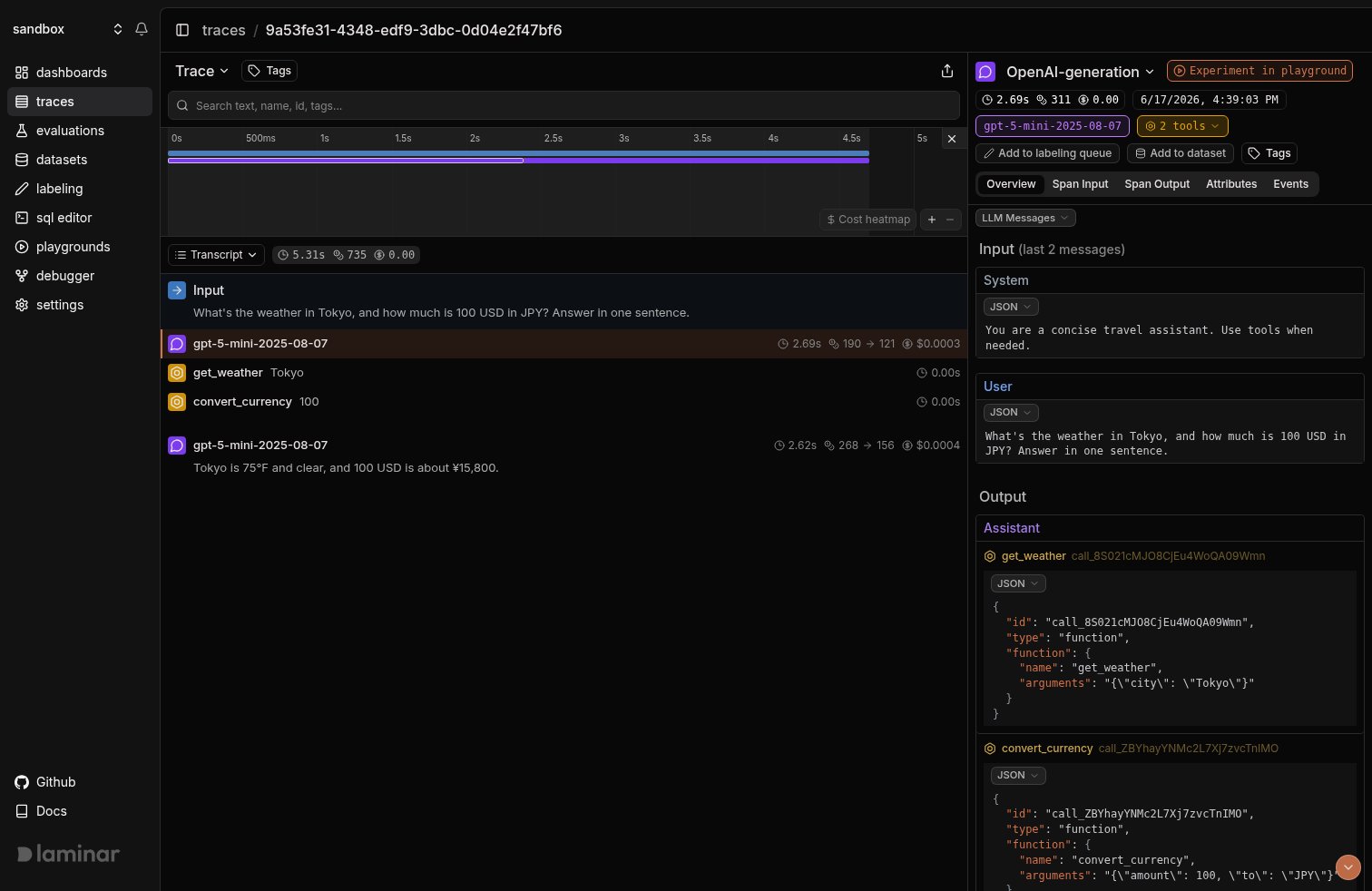
* LLM turns with prompts, responses, tool-call arguments, token counts, latency, and cost, rewritten into Laminar's GenAI message format so they render in the transcript view.
* Tool observations (`@observe(as_type="tool")`) as TOOL spans, so they show up as tool rows instead of opaque function spans.
* Trace-level metadata (session id, user id, tags) mapped onto the Laminar trace.
The bridge is Python-only and requires `langfuse` version `3.0.0` or higher (the OpenTelemetry-native major version). There is no TypeScript equivalent today.
## Getting started
You already have `langfuse` in your project. Add `lmnr` alongside it:
```bash theme={null}
pip install -U lmnr "langfuse>=3.0.0"
```
Keep your Langfuse keys exactly as they are. Add your Laminar project API key:
```bash theme={null}
export LMNR_PROJECT_API_KEY=your-laminar-project-api-key
# Your existing Langfuse credentials stay untouched.
export LANGFUSE_PUBLIC_KEY=pk-lf-...
export LANGFUSE_SECRET_KEY=sk-lf-...
```
Call `Laminar.initialize()` with `instruments={Instruments.LANGFUSE}`. That single argument attaches Laminar to Langfuse's tracer provider, whether the Langfuse client is built before or after this call. Everything else in your code stays the same.
```python {1,4} theme={null}
from lmnr import Laminar, Instruments
Laminar.initialize(instruments={Instruments.LANGFUSE})
from langfuse import observe
from langfuse.openai import OpenAI
client = OpenAI()
```
Passing an explicit `instruments` set is honored verbatim: only the instruments you list are enabled. If your app also makes raw OpenAI or Anthropic calls outside Langfuse and you want those traced too, add them to the set, for example `instruments={Instruments.LANGFUSE, Instruments.OPENAI}`.
No other change. Your Langfuse-instrumented agent keeps reporting to Langfuse, and the same spans now also land in Laminar.
```python theme={null}
import json
TOOLS = [
{
"type": "function",
"function": {
"name": "get_weather",
"description": "Get the current weather for a city.",
"parameters": {
"type": "object",
"properties": {"city": {"type": "string"}},
"required": ["city"],
},
},
},
{
"type": "function",
"function": {
"name": "convert_currency",
"description": "Convert an amount of USD to another currency.",
"parameters": {
"type": "object",
"properties": {
"amount": {"type": "number"},
"to": {"type": "string"},
},
"required": ["amount", "to"],
},
},
},
]
@observe(as_type="tool")
def get_weather(city: str) -> str:
return {"Tokyo": "75F, clear", "Paris": "59F, rain"}.get(city, "unknown")
@observe(as_type="tool")
def convert_currency(amount: float, to: str) -> str:
rates = {"EUR": 0.92, "JPY": 158.0, "GBP": 0.79}
return f"{amount * rates.get(to, 1.0):.2f} {to}"
DISPATCH = {"get_weather": get_weather, "convert_currency": convert_currency}
@observe()
def agent(question: str) -> str:
messages = [
{"role": "system", "content": "You are a concise travel assistant. Use tools when needed."},
{"role": "user", "content": question},
]
for _ in range(4):
response = client.chat.completions.create(
model="gpt-5-mini",
messages=messages,
tools=TOOLS,
)
msg = response.choices[0].message
messages.append(msg)
if not msg.tool_calls:
return msg.content
for call in msg.tool_calls:
args = json.loads(call.function.arguments)
result = DISPATCH[call.function.name](**args)
messages.append(
{"role": "tool", "tool_call_id": call.id, "content": str(result)}
)
return "stopped"
print(agent("What's the weather in Tokyo, and how much is 100 USD in JPY?"))
```
## See what happened in a trace
Open a bridged run in Laminar and you land on the transcript view: the user prompt at the top, each model turn as a conversation line, and every tool call inline with its arguments and result. The bridge rewrites Langfuse's observations into Laminar's message format, so an LLM turn with tool calls reads as a conversation rather than a raw attribute blob. The span tree tells you the shape of the run; the transcript tells you what actually happened.
 More on the trace UX: [Viewing traces](/docs/platform/viewing-traces).
## When you're ready to use Laminar only
The point of the bridge is that you don't have to commit up front. Once you decide Laminar is what you want, remove the Langfuse-specific code at your own pace:
1. Drop the `Instruments.LANGFUSE` specifier and enable Laminar's native instrumentors instead. For the example above, that is `Laminar.initialize()` with the default instruments, which auto-instruments the OpenAI SDK.
2. Replace `from langfuse.openai import OpenAI` with `from openai import OpenAI`, and swap `@observe` from `langfuse` for [Laminar's own `observe`](/docs/tracing/structure/observe-decorator).
3. Remove the Langfuse client and credentials.
Until then, running both costs you nothing: the bridge only adds Laminar export, so your Langfuse setup keeps working unchanged.
## Track outcomes with Signals
Traces answer *what happened on this run*. **[Signals](/docs/signals/introduction) answer the cross-trace question**: *how often does the agent skip a tool it should have called, when does it loop, which runs end without answering the user*. A Signal pairs a plain-language prompt with a JSON output schema. Laminar runs it live on new traces (Triggers) or backfills it across history (Jobs) and records a structured event every time it matches. From there you [query](/docs/platform/sql-editor), [cluster](/docs/signals/clusters), and [alert](/docs/signals/alerts) on events across every trace. This is a layer Langfuse doesn't have, and it's a good reason to keep the bridged traces flowing while you evaluate.
Every new project ships with a **Failure Detector** Signal that categorizes issues on any trace over 1000 tokens. Open it from the Signals sidebar to see events as soon as your bridged traces arrive.
## Query across traces
* **[SQL editor](/docs/platform/sql-editor)** for ad-hoc queries across traces, spans, signals, and evals.
* **SQL API** for programmatic access from scripts and pipelines.
* **[CLI](/docs/platform/cli)** (`lmnr-cli sql query`) for terminal-driven queries and piping JSON into shell tools or coding agents.
* **[MCP server](/docs/platform/mcp)** to query Laminar directly from Claude Code, Cursor, or Codex.
## Troubleshooting
* Confirm `LMNR_PROJECT_API_KEY` is set in the same process that runs the agent.
* The bridge is opt-in. It is NOT enabled merely because `langfuse` is installed. You must pass `instruments={Instruments.LANGFUSE}` to `Laminar.initialize()`.
* The bridge requires `langfuse >= 3.0.0`. On `langfuse` 2.x there's nothing OpenTelemetry-native to attach to.
Opting into the bridge does not turn off Laminar's other instrumentors. If you enable `Instruments.LANGFUSE` while the default instruments are still active, a `langfuse.openai` call can be traced once by the bridge and once by Laminar's native OpenAI instrumentor. Pass an explicit `instruments` set listing only what you want, for example `instruments={Instruments.LANGFUSE}`, so the bridge is the single source.
The bridge translates `langfuse.openai` and `langfuse.langchain` observations into Laminar's GenAI message format. If a span still shows a raw blob, it's likely a non-LLM observation, which falls back to the raw input/output. Make sure LLM calls go through `langfuse.openai` (or `langfuse.langchain`) so the observation is typed as a generation.
Set `base_url` and the ports of your instance when initializing. For a local OSS deployment:
```python theme={null}
Laminar.initialize(
base_url="http://localhost",
http_port=8000,
grpc_port=8001,
instruments={Instruments.LANGFUSE},
)
```
## What's next
Read the transcript view, filter, and search across traces.
Detect behaviors and failures across every run, then query, cluster, and alert on them.
Drop Langfuse and trace the OpenAI SDK with Laminar's native instrumentor.
Use Laminar's own `observe`, sessions, metadata, and tags once you migrate off Langfuse.
More on the trace UX: [Viewing traces](/docs/platform/viewing-traces).
## When you're ready to use Laminar only
The point of the bridge is that you don't have to commit up front. Once you decide Laminar is what you want, remove the Langfuse-specific code at your own pace:
1. Drop the `Instruments.LANGFUSE` specifier and enable Laminar's native instrumentors instead. For the example above, that is `Laminar.initialize()` with the default instruments, which auto-instruments the OpenAI SDK.
2. Replace `from langfuse.openai import OpenAI` with `from openai import OpenAI`, and swap `@observe` from `langfuse` for [Laminar's own `observe`](/docs/tracing/structure/observe-decorator).
3. Remove the Langfuse client and credentials.
Until then, running both costs you nothing: the bridge only adds Laminar export, so your Langfuse setup keeps working unchanged.
## Track outcomes with Signals
Traces answer *what happened on this run*. **[Signals](/docs/signals/introduction) answer the cross-trace question**: *how often does the agent skip a tool it should have called, when does it loop, which runs end without answering the user*. A Signal pairs a plain-language prompt with a JSON output schema. Laminar runs it live on new traces (Triggers) or backfills it across history (Jobs) and records a structured event every time it matches. From there you [query](/docs/platform/sql-editor), [cluster](/docs/signals/clusters), and [alert](/docs/signals/alerts) on events across every trace. This is a layer Langfuse doesn't have, and it's a good reason to keep the bridged traces flowing while you evaluate.
Every new project ships with a **Failure Detector** Signal that categorizes issues on any trace over 1000 tokens. Open it from the Signals sidebar to see events as soon as your bridged traces arrive.
## Query across traces
* **[SQL editor](/docs/platform/sql-editor)** for ad-hoc queries across traces, spans, signals, and evals.
* **SQL API** for programmatic access from scripts and pipelines.
* **[CLI](/docs/platform/cli)** (`lmnr-cli sql query`) for terminal-driven queries and piping JSON into shell tools or coding agents.
* **[MCP server](/docs/platform/mcp)** to query Laminar directly from Claude Code, Cursor, or Codex.
## Troubleshooting
* Confirm `LMNR_PROJECT_API_KEY` is set in the same process that runs the agent.
* The bridge is opt-in. It is NOT enabled merely because `langfuse` is installed. You must pass `instruments={Instruments.LANGFUSE}` to `Laminar.initialize()`.
* The bridge requires `langfuse >= 3.0.0`. On `langfuse` 2.x there's nothing OpenTelemetry-native to attach to.
Opting into the bridge does not turn off Laminar's other instrumentors. If you enable `Instruments.LANGFUSE` while the default instruments are still active, a `langfuse.openai` call can be traced once by the bridge and once by Laminar's native OpenAI instrumentor. Pass an explicit `instruments` set listing only what you want, for example `instruments={Instruments.LANGFUSE}`, so the bridge is the single source.
The bridge translates `langfuse.openai` and `langfuse.langchain` observations into Laminar's GenAI message format. If a span still shows a raw blob, it's likely a non-LLM observation, which falls back to the raw input/output. Make sure LLM calls go through `langfuse.openai` (or `langfuse.langchain`) so the observation is typed as a generation.
Set `base_url` and the ports of your instance when initializing. For a local OSS deployment:
```python theme={null}
Laminar.initialize(
base_url="http://localhost",
http_port=8000,
grpc_port=8001,
instruments={Instruments.LANGFUSE},
)
```
## What's next
Read the transcript view, filter, and search across traces.
Detect behaviors and failures across every run, then query, cluster, and alert on them.
Drop Langfuse and trace the OpenAI SDK with Laminar's native instrumentor.
Use Laminar's own `observe`, sessions, metadata, and tags once you migrate off Langfuse.