> ## Documentation Index
> Fetch the complete documentation index at: https://laminar.sh/docs/llms.txt
> Use this file to discover all available pages before exploring further.
# Observability for OpenAI Agents SDK
## Overview
Laminar is an open-source, OpenTelemetry-native observability platform for the OpenAI Agents SDK ([Python](https://openai.github.io/openai-agents-python/), [TypeScript](https://openai.github.io/openai-agents-js/)). Trace, debug, and monitor every agent turn, tool call, handoff, and sub-agent with a single `Laminar.initialize()` call. Self-host via Helm or use managed cloud.
The OpenAI Agents SDK lets you build agent workflows with `Agent`, `Runner.run` / `run`, function tools, and handoffs between specialists. Laminar hooks into the SDK's built-in trace processor to mirror every agent span into Laminar, plus adds the system instructions so the full prompt is visible in the trace.
What Laminar captures:
* The root agent workflow, each `agents.task`, and every `agents.turn` with the model, prompt, response, token counts, latency, and cost.
* Every `function_tool` invocation, with arguments and return value.
* Handoffs between agents, with the destination agent's turns nested under the handoff span.
* Agents invoked as tools (`Agent.as_tool` / `Agent.asTool`), with the sub-agent's full run nested under the tool call.
* Sandbox sessions (Python only) started via `SandboxRunConfig`, including manifest materialization and shell/file tool calls.
* Agent instructions prepended to the input messages on every LLM span.
## Getting started
Ensure you have `lmnr` version `0.7.49` or higher:
```bash theme={null}
pip install -U lmnr openai-agents
```
```bash theme={null}
export LMNR_PROJECT_API_KEY=your-laminar-project-api-key
export OPENAI_API_KEY=your-openai-api-key
```
`Laminar.initialize()` auto-instruments the OpenAI Agents SDK when `openai-agents` is importable. No wrapping call is needed.
```python {4-6} theme={null}
import asyncio
from agents import Agent, Runner
from lmnr import Laminar, observe
Laminar.initialize()
@observe(name="math-homework")
async def main():
agent = Agent(
name="MathHelper",
instructions="You are a patient math tutor. Explain each step clearly.",
model="gpt-5-mini",
)
result = await Runner.run(agent, "A train leaves Boston at 9am at 60 mph...")
print(result.final_output)
if __name__ == "__main__":
asyncio.run(main())
```
Wrapping your entry point in `@observe()` is optional but recommended: it creates a root span that captures inputs and outputs and makes the trace easy to find in the UI.
Ensure you are using `@lmnr-ai/lmnr` version `0.8.21` or higher:
```bash theme={null}
npm install @lmnr-ai/lmnr@latest @openai/agents@latest
# or
pnpm add @lmnr-ai/lmnr@latest @openai/agents@latest
```
```bash theme={null}
export LMNR_PROJECT_API_KEY=your-laminar-project-api-key
export OPENAI_API_KEY=your-openai-api-key
```
`Laminar.initialize()` auto-instruments `@openai/agents` when it is installed. No wrapping call is needed.
```typescript {2,4} theme={null}
import { Agent, run } from '@openai/agents';
import { Laminar, observe } from '@lmnr-ai/lmnr';
Laminar.initialize();
await observe({ name: 'math-homework' }, async () => {
const agent = new Agent({
name: 'MathHelper',
instructions: 'You are a patient math tutor. Explain each step clearly.',
model: 'gpt-5-mini',
});
const result = await run(agent, 'A train leaves Boston at 9am at 60 mph...');
console.log(result.finalOutput);
});
```
If `@openai/agents` is imported before `Laminar.initialize()` in ESM (or if you set `"type": "module"` in `package.json`), pass the module explicitly so the models get patched:
```typescript theme={null}
import * as agents from '@openai/agents';
import { Laminar } from '@lmnr-ai/lmnr';
Laminar.initialize({ instrumentModules: { openAIAgents: agents } });
```
## See what happened in a trace
Open the trace in Laminar and you land on the transcript view: each turn reads as a conversation, with the prompt, the model's response, and any tool calls inline with their inputs and outputs. A tree of span names tells you the shape of the run; the transcript tells you what actually happened.
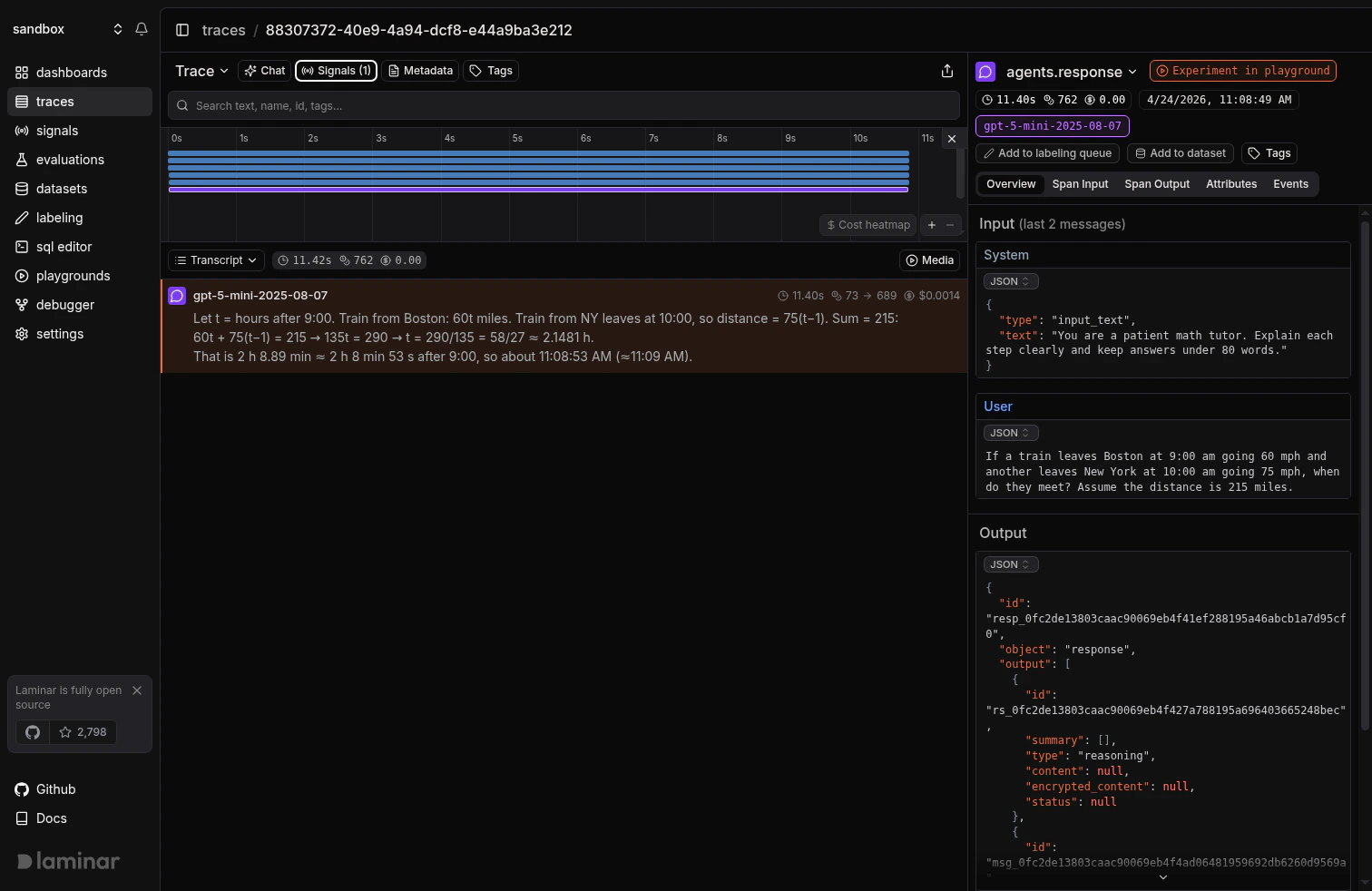 More on the trace UX: [Viewing traces](/docs/platform/viewing-traces).
## Multi-agent runs with handoffs
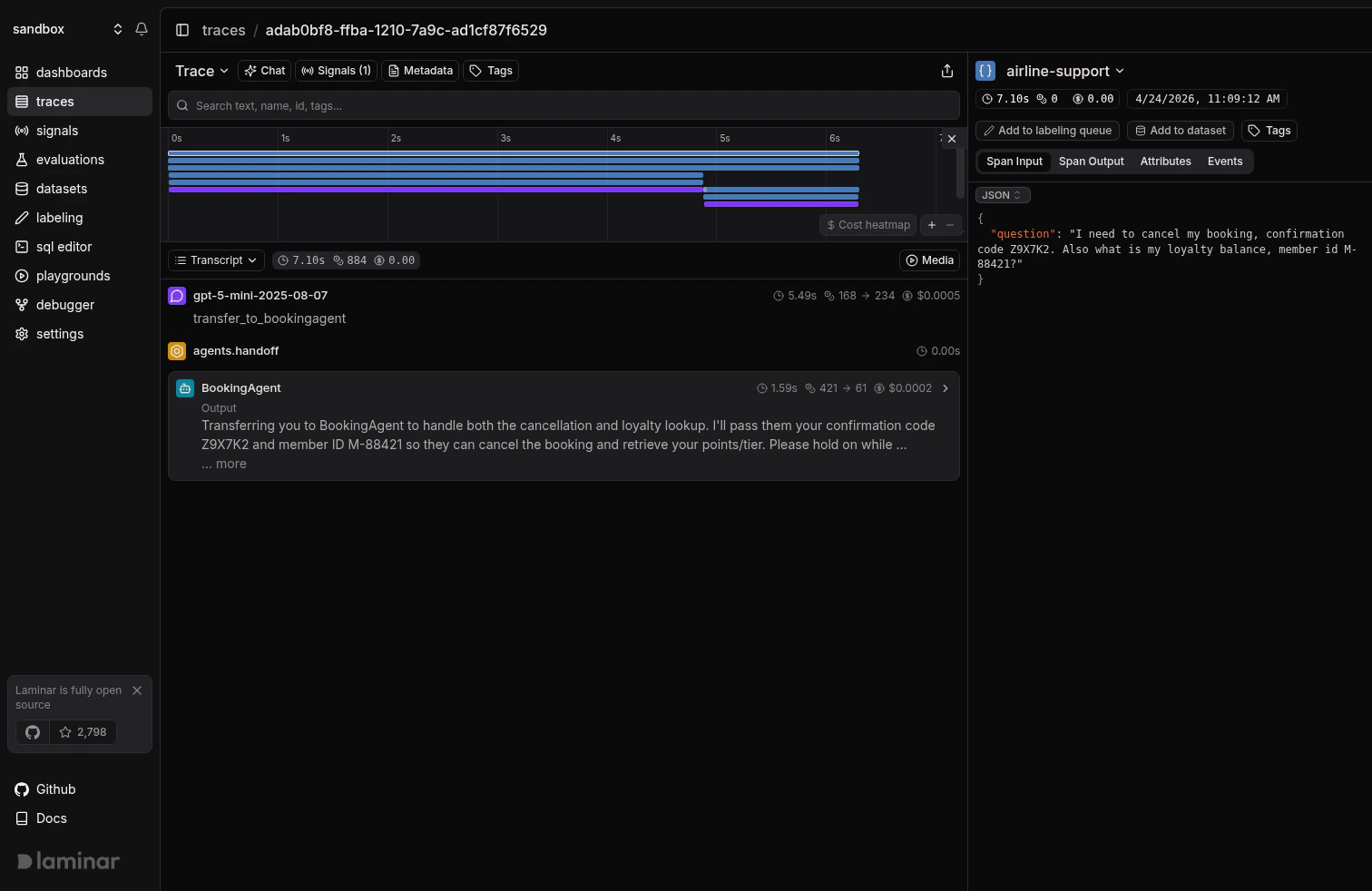
The OpenAI Agents SDK models specialization through handoffs: a triage agent routes the user to a specialist via `handoff(other_agent)` / `handoff(otherAgent)`, and the SDK exposes each handoff as a `transfer_to_` tool call. In Laminar, the destination agent's turns and tool calls nest under the handoff span, so you can follow the full multi-agent conversation in one trace.
```python theme={null}
import asyncio
from agents import Agent, Runner, function_tool, handoff
from lmnr import Laminar, observe
Laminar.initialize()
@function_tool
def cancel_booking(confirmation_code: str) -> str:
return f"Booking {confirmation_code} cancelled. Refund in 5-7 business days."
@function_tool
def lookup_loyalty_balance(member_id: str) -> str:
return f"Member {member_id}: 48,200 points, Gold tier."
booking_agent = Agent(
name="BookingAgent",
handoff_description="Handles cancellations and loyalty balance lookups.",
instructions=(
"You handle cancellations and loyalty questions. Use cancel_booking for "
"cancellations and lookup_loyalty_balance for points and tier."
),
tools=[cancel_booking, lookup_loyalty_balance],
model="gpt-5-mini",
)
triage_agent = Agent(
name="TriageAgent",
instructions=(
"Route the user to the correct specialist. For cancellations or loyalty, "
"hand off to BookingAgent. Do not answer specialist topics yourself."
),
handoffs=[handoff(booking_agent)],
model="gpt-5-mini",
)
@observe(name="airline-support")
async def main():
result = await Runner.run(
triage_agent,
"Cancel my booking Z9X7K2 and look up loyalty for member M-88421.",
)
print(result.final_output)
if __name__ == "__main__":
asyncio.run(main())
```
```typescript theme={null}
import { Agent, handoff, run, tool } from '@openai/agents';
import { Laminar, observe } from '@lmnr-ai/lmnr';
import { z } from 'zod';
Laminar.initialize();
const cancelBooking = tool({
name: 'cancel_booking',
description: 'Cancel a booking by confirmation code.',
parameters: z.object({ confirmation_code: z.string() }),
execute: async ({ confirmation_code }) =>
`Booking ${confirmation_code} cancelled. Refund in 5-7 business days.`,
});
const lookupLoyaltyBalance = tool({
name: 'lookup_loyalty_balance',
description: 'Look up a loyalty member balance and tier.',
parameters: z.object({ member_id: z.string() }),
execute: async ({ member_id }) => `Member ${member_id}: 48,200 points, Gold tier.`,
});
const bookingAgent = new Agent({
name: 'BookingAgent',
handoffDescription: 'Handles cancellations and loyalty balance lookups.',
instructions:
'You handle cancellations and loyalty questions. Use cancel_booking for ' +
'cancellations and lookup_loyalty_balance for points and tier.',
tools: [cancelBooking, lookupLoyaltyBalance],
model: 'gpt-5-mini',
});
const triageAgent = new Agent({
name: 'TriageAgent',
instructions:
'Route the user to the correct specialist. For cancellations or loyalty, ' +
'hand off to BookingAgent. Do not answer specialist topics yourself.',
handoffs: [handoff(bookingAgent)],
model: 'gpt-5-mini',
});
await observe({ name: 'airline-support' }, async () => {
const result = await run(
triageAgent,
'Cancel my booking Z9X7K2 and look up loyalty for member M-88421.',
);
console.log(result.finalOutput);
});
```
The resulting trace shows the triage turn, the handoff, and the booking agent's tool calls in a single conversation:
More on the trace UX: [Viewing traces](/docs/platform/viewing-traces).
## Multi-agent runs with handoffs
The OpenAI Agents SDK models specialization through handoffs: a triage agent routes the user to a specialist via `handoff(other_agent)` / `handoff(otherAgent)`, and the SDK exposes each handoff as a `transfer_to_` tool call. In Laminar, the destination agent's turns and tool calls nest under the handoff span, so you can follow the full multi-agent conversation in one trace.
```python theme={null}
import asyncio
from agents import Agent, Runner, function_tool, handoff
from lmnr import Laminar, observe
Laminar.initialize()
@function_tool
def cancel_booking(confirmation_code: str) -> str:
return f"Booking {confirmation_code} cancelled. Refund in 5-7 business days."
@function_tool
def lookup_loyalty_balance(member_id: str) -> str:
return f"Member {member_id}: 48,200 points, Gold tier."
booking_agent = Agent(
name="BookingAgent",
handoff_description="Handles cancellations and loyalty balance lookups.",
instructions=(
"You handle cancellations and loyalty questions. Use cancel_booking for "
"cancellations and lookup_loyalty_balance for points and tier."
),
tools=[cancel_booking, lookup_loyalty_balance],
model="gpt-5-mini",
)
triage_agent = Agent(
name="TriageAgent",
instructions=(
"Route the user to the correct specialist. For cancellations or loyalty, "
"hand off to BookingAgent. Do not answer specialist topics yourself."
),
handoffs=[handoff(booking_agent)],
model="gpt-5-mini",
)
@observe(name="airline-support")
async def main():
result = await Runner.run(
triage_agent,
"Cancel my booking Z9X7K2 and look up loyalty for member M-88421.",
)
print(result.final_output)
if __name__ == "__main__":
asyncio.run(main())
```
```typescript theme={null}
import { Agent, handoff, run, tool } from '@openai/agents';
import { Laminar, observe } from '@lmnr-ai/lmnr';
import { z } from 'zod';
Laminar.initialize();
const cancelBooking = tool({
name: 'cancel_booking',
description: 'Cancel a booking by confirmation code.',
parameters: z.object({ confirmation_code: z.string() }),
execute: async ({ confirmation_code }) =>
`Booking ${confirmation_code} cancelled. Refund in 5-7 business days.`,
});
const lookupLoyaltyBalance = tool({
name: 'lookup_loyalty_balance',
description: 'Look up a loyalty member balance and tier.',
parameters: z.object({ member_id: z.string() }),
execute: async ({ member_id }) => `Member ${member_id}: 48,200 points, Gold tier.`,
});
const bookingAgent = new Agent({
name: 'BookingAgent',
handoffDescription: 'Handles cancellations and loyalty balance lookups.',
instructions:
'You handle cancellations and loyalty questions. Use cancel_booking for ' +
'cancellations and lookup_loyalty_balance for points and tier.',
tools: [cancelBooking, lookupLoyaltyBalance],
model: 'gpt-5-mini',
});
const triageAgent = new Agent({
name: 'TriageAgent',
instructions:
'Route the user to the correct specialist. For cancellations or loyalty, ' +
'hand off to BookingAgent. Do not answer specialist topics yourself.',
handoffs: [handoff(bookingAgent)],
model: 'gpt-5-mini',
});
await observe({ name: 'airline-support' }, async () => {
const result = await run(
triageAgent,
'Cancel my booking Z9X7K2 and look up loyalty for member M-88421.',
);
console.log(result.finalOutput);
});
```
The resulting trace shows the triage turn, the handoff, and the booking agent's tool calls in a single conversation:
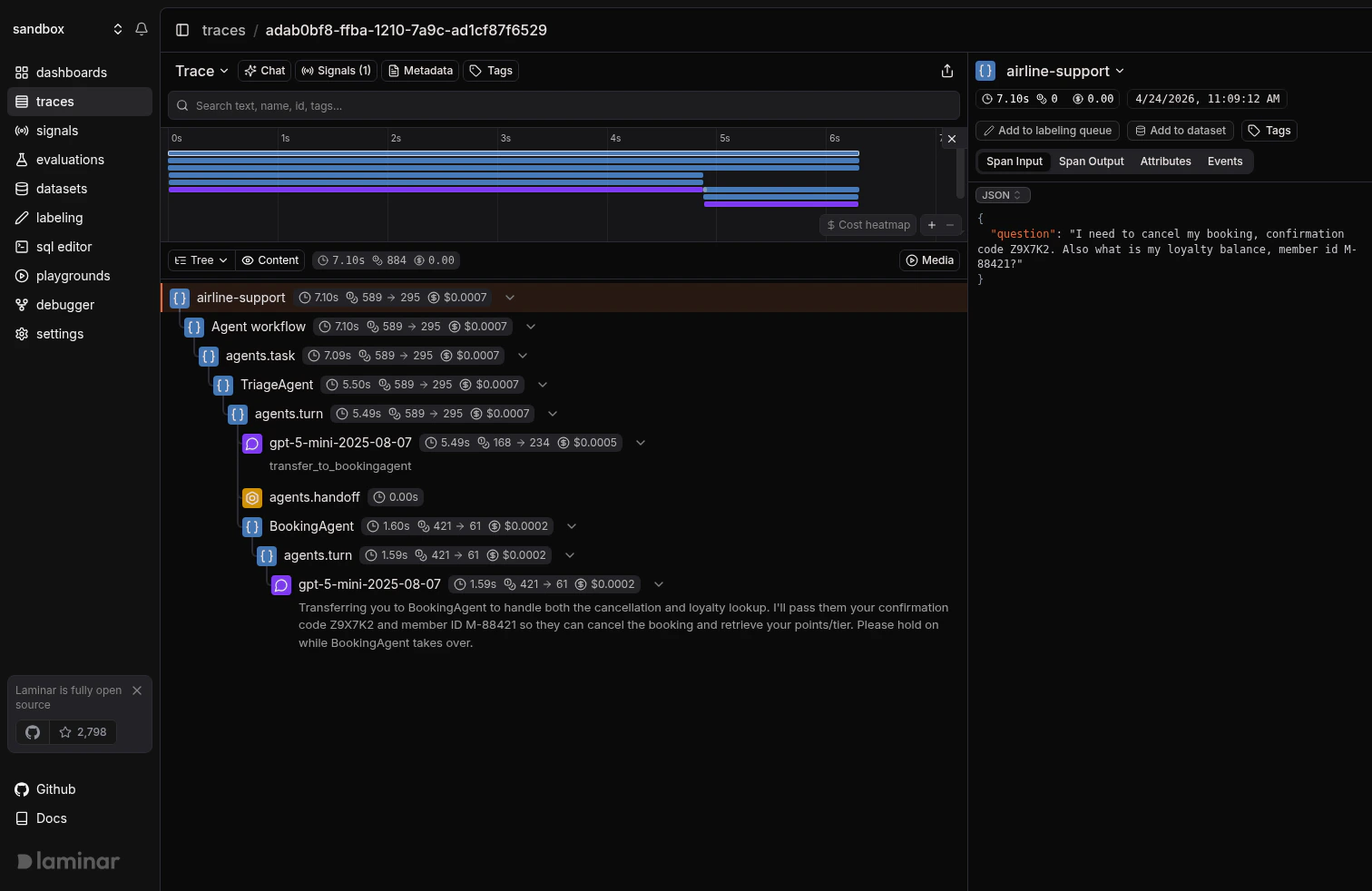
 Switch to tree view when you want the full hierarchy at a glance:
 ## Sub-agents as tools
Handoffs transfer the conversation to another agent. **Sub-agents as tools** keep the orchestrator in control: `Agent.as_tool` (Python) and `Agent.asTool` (TypeScript) wrap a specialist as a `FunctionTool` that the parent agent can call like any other tool, then synthesize the sub-agent's output back into the parent's turn. Laminar nests the sub-agent's full run (its own turns and tool calls) directly under the parent's tool-call span, so you can read the orchestrator-plus-specialist flow in a single trace.
```python theme={null}
import asyncio
from agents import Agent, Runner, function_tool
from lmnr import Laminar, observe
Laminar.initialize()
@function_tool
def search_flights(origin: str, destination: str) -> str:
return f"Flights from {origin} to {destination}: UA123 08:00, DL456 14:30."
flight_agent = Agent(
name="FlightAgent",
instructions="Find flights matching the user's origin and destination.",
tools=[search_flights],
model="gpt-5-mini",
)
summary_agent = Agent(
name="SummaryAgent",
instructions="Summarize the user's itinerary in a single short paragraph.",
model="gpt-5-mini",
)
concierge = Agent(
name="Concierge",
instructions=(
"You are a travel concierge. Call book_flight to look up flights, "
"then call write_summary to draft a one-paragraph itinerary."
),
tools=[
flight_agent.as_tool(
tool_name="book_flight",
tool_description="Search for flights between two cities.",
),
summary_agent.as_tool(
tool_name="write_summary",
tool_description="Write a one-paragraph summary of an itinerary.",
),
],
model="gpt-5-mini",
)
@observe(name="travel-concierge")
async def main():
result = await Runner.run(
concierge,
"I'm flying SFO to JFK next Tuesday. Book something in the morning and summarize it.",
)
print(result.final_output)
if __name__ == "__main__":
asyncio.run(main())
```
```typescript theme={null}
import { Agent, run, tool } from '@openai/agents';
import { Laminar, observe } from '@lmnr-ai/lmnr';
import { z } from 'zod';
Laminar.initialize();
const searchFlights = tool({
name: 'search_flights',
description: 'Search for flights between two cities.',
parameters: z.object({ origin: z.string(), destination: z.string() }),
execute: async ({ origin, destination }) =>
`Flights from ${origin} to ${destination}: UA123 08:00, DL456 14:30.`,
});
const flightAgent = new Agent({
name: 'FlightAgent',
instructions: "Find flights matching the user's origin and destination.",
tools: [searchFlights],
model: 'gpt-5-mini',
});
const summaryAgent = new Agent({
name: 'SummaryAgent',
instructions: "Summarize the user's itinerary in a single short paragraph.",
model: 'gpt-5-mini',
});
const concierge = new Agent({
name: 'Concierge',
instructions:
'You are a travel concierge. Call book_flight to look up flights, ' +
'then call write_summary to draft a one-paragraph itinerary.',
tools: [
flightAgent.asTool({
toolName: 'book_flight',
toolDescription: 'Search for flights between two cities.',
}),
summaryAgent.asTool({
toolName: 'write_summary',
toolDescription: 'Write a one-paragraph summary of an itinerary.',
}),
],
model: 'gpt-5-mini',
});
await observe({ name: 'travel-concierge' }, async () => {
const result = await run(
concierge,
"I'm flying SFO to JFK next Tuesday. Book something in the morning and summarize it.",
);
console.log(result.finalOutput);
});
```
In tree view, the Concierge turn calls `book_flight` and `write_summary`; each call expands into the sub-agent's own turns, tool calls, and LLM spans, rather than being flattened to a single tool-return value.
Choose between handoffs and sub-agents-as-tools based on who owns the reply: handoffs hand the conversation to the specialist and its answer is returned to the user; sub-agents-as-tools return a structured result back to the orchestrator, which then keeps writing the user-facing response.
## Running agents in sandboxes (Python)
The Python SDK can execute an agent against a sandboxed workspace (locally on your machine or on a remote provider like E2B, Modal, Daytona, Runloop, Cloudflare, Vercel, or Blaxel) via `SandboxAgent` and `SandboxRunConfig`. Laminar instruments sandbox sessions and surfaces each manifest materialization step, shell exec, and file read as a span, so you can see exactly what the agent did inside the sandbox alongside the LLM turns that drove it.
Sandboxes are Python-only. The TypeScript SDK does not expose `SandboxAgent` / `SandboxRunConfig` at the time of writing.
### Local sandbox (UnixLocal)
`UnixLocalSandboxClient` runs the agent against your host filesystem with no extra infrastructure: a good starting point for development and tests.
```python theme={null}
import asyncio
from agents import Runner
from agents.run_config import RunConfig
from agents.sandbox import Manifest, SandboxAgent, SandboxRunConfig
from agents.sandbox.entries import GitRepo
from agents.sandbox.sandboxes import UnixLocalSandboxClient
from lmnr import Laminar, observe
Laminar.initialize()
@observe(name="sandbox-repo-summary")
async def main():
agent = SandboxAgent(
name="WorkspaceAssistant",
instructions="Inspect the sandbox workspace before answering.",
default_manifest=Manifest(
entries={
"repo": GitRepo(repo="openai/openai-agents-python", ref="main"),
}
),
model="gpt-5-mini",
)
result = await Runner.run(
agent,
"Inspect the repo README and summarize what this project does.",
run_config=RunConfig(
sandbox=SandboxRunConfig(client=UnixLocalSandboxClient()),
),
)
print(result.final_output)
if __name__ == "__main__":
asyncio.run(main())
```
### Remote sandbox (E2B)
Swap the client for any remote provider to run the same agent on managed infrastructure. The example below uses [E2B](https://e2b.dev); the pattern is identical for `ModalSandboxClient`, `DaytonaSandboxClient`, `RunloopSandboxClient`, `CloudflareSandboxClient`, `VercelSandboxClient`, and `BlaxelSandboxClient` under `agents.extensions.sandbox.`.
```bash theme={null}
pip install -U 'openai-agents[e2b]'
export E2B_API_KEY=your-e2b-api-key
```
```python theme={null}
import asyncio
from agents import Runner
from agents.extensions.sandbox.e2b import E2BSandboxClient
from agents.run_config import RunConfig
from agents.sandbox import Manifest, SandboxAgent, SandboxRunConfig
from agents.sandbox.entries import GitRepo
from lmnr import Laminar, observe
Laminar.initialize()
@observe(name="sandbox-repo-summary-e2b")
async def main():
agent = SandboxAgent(
name="WorkspaceAssistant",
instructions="Inspect the sandbox workspace before answering.",
default_manifest=Manifest(
entries={
"repo": GitRepo(repo="openai/openai-agents-python", ref="main"),
}
),
model="gpt-5-mini",
)
result = await Runner.run(
agent,
"Inspect the repo README and summarize what this project does.",
run_config=RunConfig(
sandbox=SandboxRunConfig(client=E2BSandboxClient()),
),
)
print(result.final_output)
if __name__ == "__main__":
asyncio.run(main())
```
In either case the trace includes a `sandbox.start` / `sandbox.cleanup` span pair around the agent's work, the manifest materialization spans that pulled `repo` into the workspace, and every shell or file operation the agent ran via its sandbox tools.
## Track outcomes with Signals
Traces answer *what happened on this run*. **[Signals](/docs/signals/introduction) answer the cross-trace question**: *how often does the triage agent answer a cancellation itself instead of handing off, when do tool calls return errors, how many runs exceed three turns without a final answer*. A Signal pairs a plain-language prompt with a JSON output schema. Laminar runs it live on new traces (Triggers) or backfills it across history (Jobs) and records a structured event every time it matches. From there you [query](/docs/platform/sql-editor), [cluster](/docs/signals/clusters), and [alert](/docs/signals/alerts) on events across every trace.
Every new project ships with a **Failure Detector** Signal that categorizes issues on any trace over 1000 tokens. Open it from the Signals sidebar to see events as soon as your agent traces arrive.
## Query across traces
* **[SQL editor](/docs/platform/sql-editor)** for ad-hoc queries across traces, spans, signals, and evals.
* **SQL API** for programmatic access from scripts and pipelines.
* **[CLI](/docs/platform/cli)** (`lmnr-cli sql query`) for terminal-driven queries and piping JSON into shell tools or coding agents.
* **[MCP server](/docs/platform/mcp)** to query Laminar directly from Claude Code, Cursor, Codex, or any MCP-aware client.
## Troubleshooting
* Confirm `LMNR_PROJECT_API_KEY` is set in the same process that runs the SDK.
* Python: `openai-agents` must be importable when `Laminar.initialize()` runs. Install with `pip install openai-agents`. The integration requires `openai-agents >= 0.7.0` and `lmnr >= 0.7.49`.
* TypeScript: `@openai/agents` must be installed in the same workspace. The integration requires `@lmnr-ai/lmnr >= 0.8.21`. If you import `@openai/agents` before `Laminar.initialize()` in ESM, pass the module via `instrumentModules: { openAIAgents: agents }`.
The SDK emits a `transfer_to_` tool call followed by an `agents.handoff` span, and the destination agent's work lands as a sibling under the same parent task. Open the trace in tree view to see the full structure.
Make sure the sub-agent is registered in the orchestrator's `tools` array via `.as_tool(...)` / `.asTool(...)`, not re-exported as a plain function. Each `as_tool` call produces a `FunctionTool` whose `execute` spins up a nested `Runner` run; Laminar nests the inner run under the parent tool-call span only when the wrapper is the one invoked.
Set `base_url` and the ports of your instance when initializing. For a local OSS deployment:
```python theme={null}
Laminar.initialize(
base_url="http://localhost",
http_port=8000,
grpc_port=8001,
)
```
```typescript theme={null}
Laminar.initialize({
baseUrl: 'http://localhost',
httpPort: 8000,
port: 8001,
});
```
## What's next
Read the transcript view, filter, and search across traces.
Detect behaviors and failures across every run, then query, cluster, and alert on them.
Query traces programmatically from the UI, API, or your IDE.
Sessions, metadata, and tags for deeper control.
## Sub-agents as tools
Handoffs transfer the conversation to another agent. **Sub-agents as tools** keep the orchestrator in control: `Agent.as_tool` (Python) and `Agent.asTool` (TypeScript) wrap a specialist as a `FunctionTool` that the parent agent can call like any other tool, then synthesize the sub-agent's output back into the parent's turn. Laminar nests the sub-agent's full run (its own turns and tool calls) directly under the parent's tool-call span, so you can read the orchestrator-plus-specialist flow in a single trace.
```python theme={null}
import asyncio
from agents import Agent, Runner, function_tool
from lmnr import Laminar, observe
Laminar.initialize()
@function_tool
def search_flights(origin: str, destination: str) -> str:
return f"Flights from {origin} to {destination}: UA123 08:00, DL456 14:30."
flight_agent = Agent(
name="FlightAgent",
instructions="Find flights matching the user's origin and destination.",
tools=[search_flights],
model="gpt-5-mini",
)
summary_agent = Agent(
name="SummaryAgent",
instructions="Summarize the user's itinerary in a single short paragraph.",
model="gpt-5-mini",
)
concierge = Agent(
name="Concierge",
instructions=(
"You are a travel concierge. Call book_flight to look up flights, "
"then call write_summary to draft a one-paragraph itinerary."
),
tools=[
flight_agent.as_tool(
tool_name="book_flight",
tool_description="Search for flights between two cities.",
),
summary_agent.as_tool(
tool_name="write_summary",
tool_description="Write a one-paragraph summary of an itinerary.",
),
],
model="gpt-5-mini",
)
@observe(name="travel-concierge")
async def main():
result = await Runner.run(
concierge,
"I'm flying SFO to JFK next Tuesday. Book something in the morning and summarize it.",
)
print(result.final_output)
if __name__ == "__main__":
asyncio.run(main())
```
```typescript theme={null}
import { Agent, run, tool } from '@openai/agents';
import { Laminar, observe } from '@lmnr-ai/lmnr';
import { z } from 'zod';
Laminar.initialize();
const searchFlights = tool({
name: 'search_flights',
description: 'Search for flights between two cities.',
parameters: z.object({ origin: z.string(), destination: z.string() }),
execute: async ({ origin, destination }) =>
`Flights from ${origin} to ${destination}: UA123 08:00, DL456 14:30.`,
});
const flightAgent = new Agent({
name: 'FlightAgent',
instructions: "Find flights matching the user's origin and destination.",
tools: [searchFlights],
model: 'gpt-5-mini',
});
const summaryAgent = new Agent({
name: 'SummaryAgent',
instructions: "Summarize the user's itinerary in a single short paragraph.",
model: 'gpt-5-mini',
});
const concierge = new Agent({
name: 'Concierge',
instructions:
'You are a travel concierge. Call book_flight to look up flights, ' +
'then call write_summary to draft a one-paragraph itinerary.',
tools: [
flightAgent.asTool({
toolName: 'book_flight',
toolDescription: 'Search for flights between two cities.',
}),
summaryAgent.asTool({
toolName: 'write_summary',
toolDescription: 'Write a one-paragraph summary of an itinerary.',
}),
],
model: 'gpt-5-mini',
});
await observe({ name: 'travel-concierge' }, async () => {
const result = await run(
concierge,
"I'm flying SFO to JFK next Tuesday. Book something in the morning and summarize it.",
);
console.log(result.finalOutput);
});
```
In tree view, the Concierge turn calls `book_flight` and `write_summary`; each call expands into the sub-agent's own turns, tool calls, and LLM spans, rather than being flattened to a single tool-return value.
Choose between handoffs and sub-agents-as-tools based on who owns the reply: handoffs hand the conversation to the specialist and its answer is returned to the user; sub-agents-as-tools return a structured result back to the orchestrator, which then keeps writing the user-facing response.
## Running agents in sandboxes (Python)
The Python SDK can execute an agent against a sandboxed workspace (locally on your machine or on a remote provider like E2B, Modal, Daytona, Runloop, Cloudflare, Vercel, or Blaxel) via `SandboxAgent` and `SandboxRunConfig`. Laminar instruments sandbox sessions and surfaces each manifest materialization step, shell exec, and file read as a span, so you can see exactly what the agent did inside the sandbox alongside the LLM turns that drove it.
Sandboxes are Python-only. The TypeScript SDK does not expose `SandboxAgent` / `SandboxRunConfig` at the time of writing.
### Local sandbox (UnixLocal)
`UnixLocalSandboxClient` runs the agent against your host filesystem with no extra infrastructure: a good starting point for development and tests.
```python theme={null}
import asyncio
from agents import Runner
from agents.run_config import RunConfig
from agents.sandbox import Manifest, SandboxAgent, SandboxRunConfig
from agents.sandbox.entries import GitRepo
from agents.sandbox.sandboxes import UnixLocalSandboxClient
from lmnr import Laminar, observe
Laminar.initialize()
@observe(name="sandbox-repo-summary")
async def main():
agent = SandboxAgent(
name="WorkspaceAssistant",
instructions="Inspect the sandbox workspace before answering.",
default_manifest=Manifest(
entries={
"repo": GitRepo(repo="openai/openai-agents-python", ref="main"),
}
),
model="gpt-5-mini",
)
result = await Runner.run(
agent,
"Inspect the repo README and summarize what this project does.",
run_config=RunConfig(
sandbox=SandboxRunConfig(client=UnixLocalSandboxClient()),
),
)
print(result.final_output)
if __name__ == "__main__":
asyncio.run(main())
```
### Remote sandbox (E2B)
Swap the client for any remote provider to run the same agent on managed infrastructure. The example below uses [E2B](https://e2b.dev); the pattern is identical for `ModalSandboxClient`, `DaytonaSandboxClient`, `RunloopSandboxClient`, `CloudflareSandboxClient`, `VercelSandboxClient`, and `BlaxelSandboxClient` under `agents.extensions.sandbox.`.
```bash theme={null}
pip install -U 'openai-agents[e2b]'
export E2B_API_KEY=your-e2b-api-key
```
```python theme={null}
import asyncio
from agents import Runner
from agents.extensions.sandbox.e2b import E2BSandboxClient
from agents.run_config import RunConfig
from agents.sandbox import Manifest, SandboxAgent, SandboxRunConfig
from agents.sandbox.entries import GitRepo
from lmnr import Laminar, observe
Laminar.initialize()
@observe(name="sandbox-repo-summary-e2b")
async def main():
agent = SandboxAgent(
name="WorkspaceAssistant",
instructions="Inspect the sandbox workspace before answering.",
default_manifest=Manifest(
entries={
"repo": GitRepo(repo="openai/openai-agents-python", ref="main"),
}
),
model="gpt-5-mini",
)
result = await Runner.run(
agent,
"Inspect the repo README and summarize what this project does.",
run_config=RunConfig(
sandbox=SandboxRunConfig(client=E2BSandboxClient()),
),
)
print(result.final_output)
if __name__ == "__main__":
asyncio.run(main())
```
In either case the trace includes a `sandbox.start` / `sandbox.cleanup` span pair around the agent's work, the manifest materialization spans that pulled `repo` into the workspace, and every shell or file operation the agent ran via its sandbox tools.
## Track outcomes with Signals
Traces answer *what happened on this run*. **[Signals](/docs/signals/introduction) answer the cross-trace question**: *how often does the triage agent answer a cancellation itself instead of handing off, when do tool calls return errors, how many runs exceed three turns without a final answer*. A Signal pairs a plain-language prompt with a JSON output schema. Laminar runs it live on new traces (Triggers) or backfills it across history (Jobs) and records a structured event every time it matches. From there you [query](/docs/platform/sql-editor), [cluster](/docs/signals/clusters), and [alert](/docs/signals/alerts) on events across every trace.
Every new project ships with a **Failure Detector** Signal that categorizes issues on any trace over 1000 tokens. Open it from the Signals sidebar to see events as soon as your agent traces arrive.
## Query across traces
* **[SQL editor](/docs/platform/sql-editor)** for ad-hoc queries across traces, spans, signals, and evals.
* **SQL API** for programmatic access from scripts and pipelines.
* **[CLI](/docs/platform/cli)** (`lmnr-cli sql query`) for terminal-driven queries and piping JSON into shell tools or coding agents.
* **[MCP server](/docs/platform/mcp)** to query Laminar directly from Claude Code, Cursor, Codex, or any MCP-aware client.
## Troubleshooting
* Confirm `LMNR_PROJECT_API_KEY` is set in the same process that runs the SDK.
* Python: `openai-agents` must be importable when `Laminar.initialize()` runs. Install with `pip install openai-agents`. The integration requires `openai-agents >= 0.7.0` and `lmnr >= 0.7.49`.
* TypeScript: `@openai/agents` must be installed in the same workspace. The integration requires `@lmnr-ai/lmnr >= 0.8.21`. If you import `@openai/agents` before `Laminar.initialize()` in ESM, pass the module via `instrumentModules: { openAIAgents: agents }`.
The SDK emits a `transfer_to_` tool call followed by an `agents.handoff` span, and the destination agent's work lands as a sibling under the same parent task. Open the trace in tree view to see the full structure.
Make sure the sub-agent is registered in the orchestrator's `tools` array via `.as_tool(...)` / `.asTool(...)`, not re-exported as a plain function. Each `as_tool` call produces a `FunctionTool` whose `execute` spins up a nested `Runner` run; Laminar nests the inner run under the parent tool-call span only when the wrapper is the one invoked.
Set `base_url` and the ports of your instance when initializing. For a local OSS deployment:
```python theme={null}
Laminar.initialize(
base_url="http://localhost",
http_port=8000,
grpc_port=8001,
)
```
```typescript theme={null}
Laminar.initialize({
baseUrl: 'http://localhost',
httpPort: 8000,
port: 8001,
});
```
## What's next
Read the transcript view, filter, and search across traces.
Detect behaviors and failures across every run, then query, cluster, and alert on them.
Query traces programmatically from the UI, API, or your IDE.
Sessions, metadata, and tags for deeper control.