> ## Documentation Index
> Fetch the complete documentation index at: https://laminar.sh/docs/llms.txt
> Use this file to discover all available pages before exploring further.
# Observability for Stagehand
## Overview
[Stagehand](https://github.com/browserbase/stagehand) is an AI Browser Automation Framework developed by [Browserbase](https://browserbase.com/).
Laminar provides native integration with Stagehand, allowing you to trace your Stagehand code with just a few lines of code.
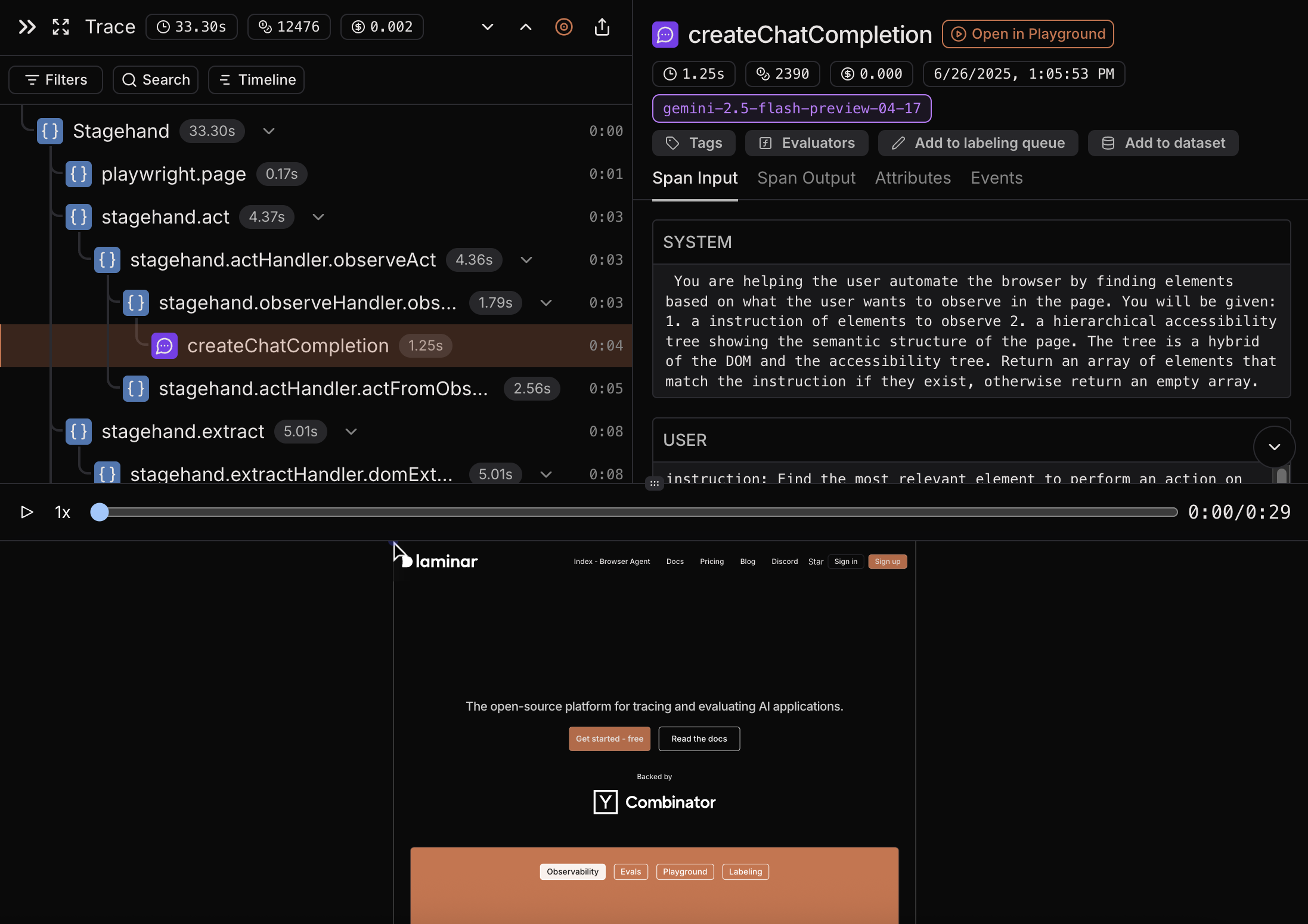
Laminar observability captures:
* Full recording of a browser window while the code is running.
* Execution steps, such as, `act`, `extract`, `observe` and `agent` calls.
* Full LLM calls, including the prompts and responses.
* LLM cost of the execution steps.
* Latency of the execution steps and LLM calls.
## Quickstart
Below is an example of a simple Stagehand script. Highlighted lines are the ones that are required to trace Stagehand with Laminar.
```javascript {2, 4-10, 32} theme={null}
import { Stagehand } from '@browserbase/stagehand';
import { Laminar } from '@lmnr-ai/lmnr';
import { z } from 'zod';
Laminar.initialize({
projectApiKey: process.env.LMNR_PROJECT_API_KEY,
instrumentModules: {
stagehand: Stagehand,
},
});
const main = async () => {
const stagehand = new Stagehand();
await stagehand.init({
model: {
modelName: 'openai/gpt-4.1-mini',
apiKey: process.env.OPENAI_API_KEY,
},
});
const page = stagehand.context.pages()[0];
await page.goto('https://www.lmnr.ai');
await stagehand.act('go to Laminar pricing page');
const pricing = await stagehand.extract(
"get the hobby tier pricing",
z.object({
pricing: z.object({
price: z.string(),
features: z.array(z.string()),
}),
}),
);
await stagehand.close();
await Laminar.flush();
return pricing;
};
main().then(console.log).catch(console.error);
```
```javascript {2, 4-10, 32} theme={null}
import { Stagehand } from '@browserbase/stagehand';
import { Laminar } from '@lmnr-ai/lmnr';
import { z } from 'zod';
Laminar.initialize({
projectApiKey: process.env.LMNR_PROJECT_API_KEY,
instrumentModules: {
stagehand: Stagehand,
},
});
const main = async () => {
const stagehand = new Stagehand();
await stagehand.init({
modelName: 'gpt-4.1-mini',
modelClientOptions: {
apiKey: process.env.OPENAI_API_KEY,
},
});
const page = stagehand.page;
await page.goto('https://www.lmnr.ai');
await page.act('go to Laminar pricing page');
const pricing = await page.extract({
instruction: "get the hobby tier pricing",
schema: z.object({
pricing: z.object({
price: z.string(),
features: z.array(z.string()),
}),
}),
});
await stagehand.close();
await Laminar.flush();
return pricing;
};
main().then(console.log).catch(console.error);
```
### Step-by-step guide
```sh theme={null}
npx create-browser-app@latest
```
Choose "Yes" when prompted to start with a quickstart app and follow other instructions.
Finally go to the newly created directory and install dependencies.
```sh theme={null}
cd YOUR_APP_NAME
npm install && npm update
```
```sh theme={null}
npm install @lmnr-ai/lmnr@latest
```
First, we need to initialize Laminar at the start of your application and pass the Stagehand module to `instrumentModules`.
```javascript theme={null}
import { Stagehand } from '@browserbase/stagehand';
import { Laminar } from '@lmnr-ai/lmnr';
Laminar.initialize({
projectApiKey: process.env.LMNR_PROJECT_API_KEY,
instrumentModules: {
stagehand: Stagehand,
},
});
```
If you run Stagehand in a standalone script, in order to flush queued Stagehand traces, make sure to call `stagehand.close()` and `Laminar.flush()`.
```javascript theme={null}
await stagehand.close(); // closes the browser and the parent span
await Laminar.flush(); // sends any remaining spans to Laminar
```
## Example of a Stagehand trace
You can see entire session recording of a browser window while the code was running, along with execution steps, such as `act` and `extract`. You can also see LLM cost of the entire execution and of each execution step. For LLM spans you can see the prompt, the response and the model name.