> ## Documentation Index
> Fetch the complete documentation index at: https://laminar.sh/docs/llms.txt
> Use this file to discover all available pages before exploring further.
# Observability and Tracing for Vercel AI SDK in Next.js and Node.js
## Overview
Laminar is OpenTelemetry-native, so it captures full traces of every [Vercel AI SDK](https://ai-sdk.dev/) call: `generateText`, `streamText`, `embed`, tool calls, and provider-level request and response payloads.
What Laminar captures:
* Prompts, messages, and system instructions sent to the model.
* Model output, reasoning, and structured object results.
* Tool calls, arguments, and tool results.
* Token counts, latency, and cost per call.
* Provider identity (OpenAI, Anthropic, Google, Mistral, and others) and model name.
The AI SDK changed its telemetry API in v7. The setup below shows both styles. On AI SDK v7 you register Laminar once and every call is traced. On v5 and v6 you initialize Laminar and pass its tracer per call. Pick the tab that matches your `ai` version.
## Getting Started
```bash theme={null}
npm install @lmnr-ai/lmnr@latest ai@latest @ai-sdk/openai@latest
```
Swap `@ai-sdk/openai` for any provider adapter you use ([full list](https://ai-sdk.dev/providers/ai-sdk-providers)).
```bash theme={null}
# .env
LMNR_PROJECT_API_KEY=your-laminar-project-api-key
OPENAI_API_KEY=your-openai-api-key
```
To get the project API key, go to the Laminar dashboard, click the project settings,
and generate a project API key. This is available both in the cloud and in the self-hosted version of Laminar.
Specify the key at `Laminar` initialization. If not specified,
Laminar will look for the key in the `LMNR_PROJECT_API_KEY` environment variable.
Register Laminar once at the entry point of your application, before the first AI SDK call. This one line initializes all of Laminar's tracing and wires it into the AI SDK.
```typescript theme={null}
import { registerTelemetry } from 'ai';
import { LaminarAiSdkTelemetry } from '@lmnr-ai/lmnr';
import 'dotenv/config';
registerTelemetry(new LaminarAiSdkTelemetry());
```
`new LaminarAiSdkTelemetry()` initializes Laminar for you (it calls `Laminar.initialize()` internally if Laminar isn't already initialized), so you don't need a separate `Laminar.initialize()` call. Pass options to the constructor to configure it: see [Configure the integration](#configure-the-integration).
`@lmnr-ai/lmnr` also exports `registerAiSdkTelemetry()`, a one-line equivalent that registers the same integration without importing `registerTelemetry` from `ai`:
```typescript theme={null}
import { registerAiSdkTelemetry } from '@lmnr-ai/lmnr';
registerAiSdkTelemetry(); // same as registerTelemetry(new LaminarAiSdkTelemetry())
```
It takes the same options object as `LaminarAiSdkTelemetry` (including `laminarOptions`). Reach for it when you want to register telemetry before the AI SDK is loaded, or to keep the import surface to a single package.
No per-call configuration. Every `generate*` and `stream*` call is traced automatically.
```typescript theme={null}
import { openai } from '@ai-sdk/openai';
import { generateText } from 'ai';
const { text } = await generateText({
model: openai('gpt-5-mini'),
prompt: 'What is laminar flow?',
});
```
The same applies to `streamText` and `embed`.
```bash theme={null}
npm install @lmnr-ai/lmnr@latest ai@latest @ai-sdk/openai@latest
```
Swap `@ai-sdk/openai` for any provider adapter you use ([full list](https://ai-sdk.dev/providers/ai-sdk-providers)).
```bash theme={null}
# .env
LMNR_PROJECT_API_KEY=your-laminar-project-api-key
OPENAI_API_KEY=your-openai-api-key
```
To get the project API key, go to the Laminar dashboard, click the project settings,
and generate a project API key. This is available both in the cloud and in the self-hosted version of Laminar.
Specify the key at `Laminar` initialization. If not specified,
Laminar will look for the key in the `LMNR_PROJECT_API_KEY` environment variable.
Call `Laminar.initialize()` once at the entry point of your application, before any AI SDK call runs.
```typescript theme={null}
import { Laminar } from '@lmnr-ai/lmnr';
import 'dotenv/config';
Laminar.initialize();
```
Enable `experimental_telemetry` and hand it Laminar's tracer. Do this on every `generate*` and `stream*` call you want traced.
```typescript theme={null}
import { openai } from '@ai-sdk/openai';
import { generateText } from 'ai';
import { getTracer } from '@lmnr-ai/lmnr';
const { text } = await generateText({
model: openai('gpt-5-mini'),
prompt: 'What is laminar flow?',
experimental_telemetry: {
isEnabled: true,
tracer: getTracer(),
},
});
```
The same pattern works for `streamText`, `generateObject`, `streamObject`, and `embed`.
## Turn telemetry off for one call
With `registerTelemetry`, tracing is on for every call by default. To disable it for a single call site, pass a `telemetry` block with `isEnabled: false`. This overrides the global registration for that call only.
```typescript theme={null}
import { openai } from '@ai-sdk/openai';
import { generateText } from 'ai';
const { text } = await generateText({
model: openai('gpt-5-mini'),
prompt: 'Summarize this internal document.',
// not traced, even though Laminar is registered globally
telemetry: { isEnabled: false },
});
```
The same `telemetry` block also carries `functionId` and `metadata` if you want to name a span or attach metadata to one call:
```typescript theme={null}
const { text } = await generateText({
model: openai('gpt-5-mini'),
prompt: 'Draft a release note.',
telemetry: {
functionId: 'release-notes',
metadata: { env: 'production' },
},
});
```
On AI SDK v5 and v6, the equivalent control is the `experimental_telemetry` block: omit it (or set `isEnabled: false`) to skip tracing for a call, and pass `functionId` / `metadata` there.
## Configure the integration
`LaminarAiSdkTelemetry` takes an options object. All options are optional.
`laminarOptions` accepts exactly what you would pass to `Laminar.initialize()`. Use it to set the project API key, base URL, or any other init option in one place, so you don't need a separate `Laminar.initialize()` call.
```typescript theme={null}
import { registerTelemetry } from 'ai';
import { LaminarAiSdkTelemetry } from '@lmnr-ai/lmnr';
registerTelemetry(
new LaminarAiSdkTelemetry({
laminarOptions: {
projectApiKey: process.env.LMNR_PROJECT_API_KEY,
},
}),
);
```
If Laminar is already initialized when the integration is constructed, `laminarOptions` is ignored.
Both default to `true`. Set either to `false` to keep prompt or response content off your spans (for sensitive data or to reduce payload size). Token counts, finish reasons, latency, and cost are always recorded, regardless of these flags.
```typescript theme={null}
registerTelemetry(
new LaminarAiSdkTelemetry({
recordInputs: false,
recordOutputs: false,
}),
);
```
Defaults to `false`. Set it to `true` to emit an extra span for each step of a multi-step generation, so the trace shows the step boundaries explicitly in addition to the LLM and tool spans.
```typescript theme={null}
registerTelemetry(
new LaminarAiSdkTelemetry({
createStepSpan: true,
}),
);
```
## Flush spans before exit
In short-lived scripts and serverless runtimes, the process can exit before Laminar finishes sending its last batch of spans. Call `Laminar.shutdown()` at the end of a script, or `Laminar.flush()` at a checkpoint you want to force out, to make sure the final spans land.
```typescript theme={null}
import { Laminar } from '@lmnr-ai/lmnr';
// ... your AI SDK calls ...
await Laminar.shutdown();
```
This applies to both integration styles. Long-running servers don't need it: the batch processor flushes on its own schedule.
## Next.js setup
In Next.js, Laminar lives in `instrumentation.ts`, which Next.js auto-loads before any route or server component runs.
```bash theme={null}
npm install @lmnr-ai/lmnr@latest ai@latest @ai-sdk/openai@latest
```
```bash theme={null}
# .env.local
LMNR_PROJECT_API_KEY=your-laminar-project-api-key
OPENAI_API_KEY=your-openai-api-key
```
Tell Next.js to treat Laminar as an external server package. Laminar depends on OpenTelemetry, which uses Node-specific APIs Next.js cannot bundle.
```typescript next.config.ts theme={null}
const nextConfig = {
serverExternalPackages: ['@lmnr-ai/lmnr'],
};
export default nextConfig;
```
More on this option in the [Next.js docs](https://nextjs.org/docs/app/api-reference/config/next-config-js/serverExternalPackages).
Create `instrumentation.ts` at the project root.
```typescript instrumentation.ts theme={null}
export async function register() {
if (process.env.NEXT_RUNTIME === 'nodejs') {
const { registerTelemetry } = await import('ai');
const { LaminarAiSdkTelemetry } = await import('@lmnr-ai/lmnr');
registerTelemetry(
new LaminarAiSdkTelemetry({
laminarOptions: { projectApiKey: process.env.LMNR_PROJECT_API_KEY },
}),
);
}
}
```
```typescript instrumentation.ts theme={null}
export async function register() {
if (process.env.NEXT_RUNTIME === 'nodejs') {
const { Laminar } = await import('@lmnr-ai/lmnr');
Laminar.initialize({
projectApiKey: process.env.LMNR_PROJECT_API_KEY,
});
}
}
```
Laminar only runs in the `nodejs` runtime. The guard skips Edge runtime routes automatically.
If you already use `@vercel/otel` or `@sentry/nextjs`, initialize them first, then Laminar. See [Coexisting with @vercel/otel](#coexisting-with-vercelotel) below.
```typescript app/api/chat/route.ts theme={null}
import { openai } from '@ai-sdk/openai';
import { streamText } from 'ai';
export async function POST(req: Request) {
const { messages } = await req.json();
const result = streamText({
model: openai('gpt-5-mini'),
system: 'You are a helpful assistant.',
messages,
});
return result.toTextStreamResponse();
}
```
```typescript app/api/chat/route.ts theme={null}
import { openai } from '@ai-sdk/openai';
import { streamText } from 'ai';
import { getTracer } from '@lmnr-ai/lmnr';
export async function POST(req: Request) {
const { messages } = await req.json();
const result = streamText({
model: openai('gpt-5-mini'),
system: 'You are a helpful assistant.',
messages,
experimental_telemetry: {
isEnabled: true,
tracer: getTracer(),
},
});
return result.toTextStreamResponse();
}
```
## Tracing a multi-step agent
The AI SDK runs the tool-calling loop for you: the model calls a tool, the SDK runs the tool's `execute`, feeds the result back, and repeats until the model stops calling tools or a stop condition trips. Laminar records every step as a span under one trace, so the transcript shows each tool call and its result in order.
Two shapes are common. `generateText` with `tools` and `stopWhen` is the workhorse. `ToolLoopAgent` is a thin wrapper if you want to reuse the same tools and instructions across many calls.
### generateText with tools
```typescript theme={null}
import { openai } from '@ai-sdk/openai';
import { generateText, stepCountIs, tool } from 'ai';
import { z } from 'zod';
const result = await generateText({
model: openai('gpt-5-mini'),
system:
'You are a concise travel assistant. Call tools to look up weather and local time before answering.',
prompt:
'I have meetings in Paris and Tokyo tomorrow. What is the weather and local time in each city right now?',
tools: {
weather: tool({
description: 'Get the current weather for a city.',
inputSchema: z.object({ city: z.string() }),
execute: async ({ city }) => {
const res = await fetch(`https://wttr.in/${encodeURIComponent(city)}?format=j1`);
const data = await res.json();
const c = data.current_condition[0];
return { tempC: Number(c.temp_C), condition: c.weatherDesc[0].value };
},
}),
timezone: tool({
description: 'Get the current local time for a city.',
inputSchema: z.object({ city: z.string() }),
execute: async ({ city }) => {
const res = await fetch(
`https://timeapi.io/api/time/current/zone?timeZone=${encodeURIComponent(
`Europe/${city}`,
)}`,
);
return res.ok ? await res.json() : { error: 'unknown city' };
},
}),
},
stopWhen: stepCountIs(5),
telemetry: {
functionId: 'travel-assistant',
metadata: { env: 'production' },
},
});
console.log(result.text);
console.log(`Completed in ${result.steps.length} steps`);
```
`stopWhen: stepCountIs(5)` caps the loop at five model-and-tool rounds. You can combine conditions (`stopWhen: [stepCountIs(20), hasToolCall('finalize')]`) or pass a custom predicate.
On AI SDK v5 and v6, replace the `telemetry` block with `experimental_telemetry: { isEnabled: true, tracer: getTracer(), functionId: 'travel-assistant', metadata: { env: 'production' } }`.
### ToolLoopAgent
Reuse the same configuration across calls by constructing a `ToolLoopAgent` once:
```typescript theme={null}
import { openai } from '@ai-sdk/openai';
import { ToolLoopAgent, stepCountIs } from 'ai';
import { weather, timezone } from './tools';
const travelAgent = new ToolLoopAgent({
model: openai('gpt-5-mini'),
instructions:
'You are a concise travel assistant. Call tools to look up weather and local time before answering.',
tools: { weather, timezone },
stopWhen: stepCountIs(5),
});
const result = await travelAgent.generate({
prompt: 'Weather and local time in Paris and Tokyo?',
});
```
Both shapes produce the same trace structure in Laminar: one parent span per call, nested tool-call spans, and the final model output in the transcript.
## Debugging with the replay debugger
The [Laminar debugger](/debugger/introduction) records a run, lets you edit your code, and replays from a cached checkpoint so unchanged LLM calls are served from cache. For the AI SDK, caching needs one extra step: wrap each model with `wrapLanguageModel`, which hashes the call's input and asks the Laminar backend for a cached response. The telemetry wiring above is unchanged.
```typescript theme={null}
import { openai } from '@ai-sdk/openai';
import { generateText } from 'ai';
import { wrapLanguageModel } from '@lmnr-ai/lmnr';
const { text } = await generateText({
// wrapLanguageModel is what enables debugger caching
model: wrapLanguageModel(openai('gpt-5-mini')),
prompt: 'What is laminar flow?',
});
```
See [AI SDK caching](/debugger/setup#ai-sdk-caching) for the full debugger setup, including the v5 and v6 telemetry variant.
## See what happened in a trace
Open the trace in Laminar and you get the transcript view: system prompt, user messages, model output, tool calls, and tool results laid out as a conversation. Sub-agents collapse to their input and final output so you read what mattered, not a tree of span names.
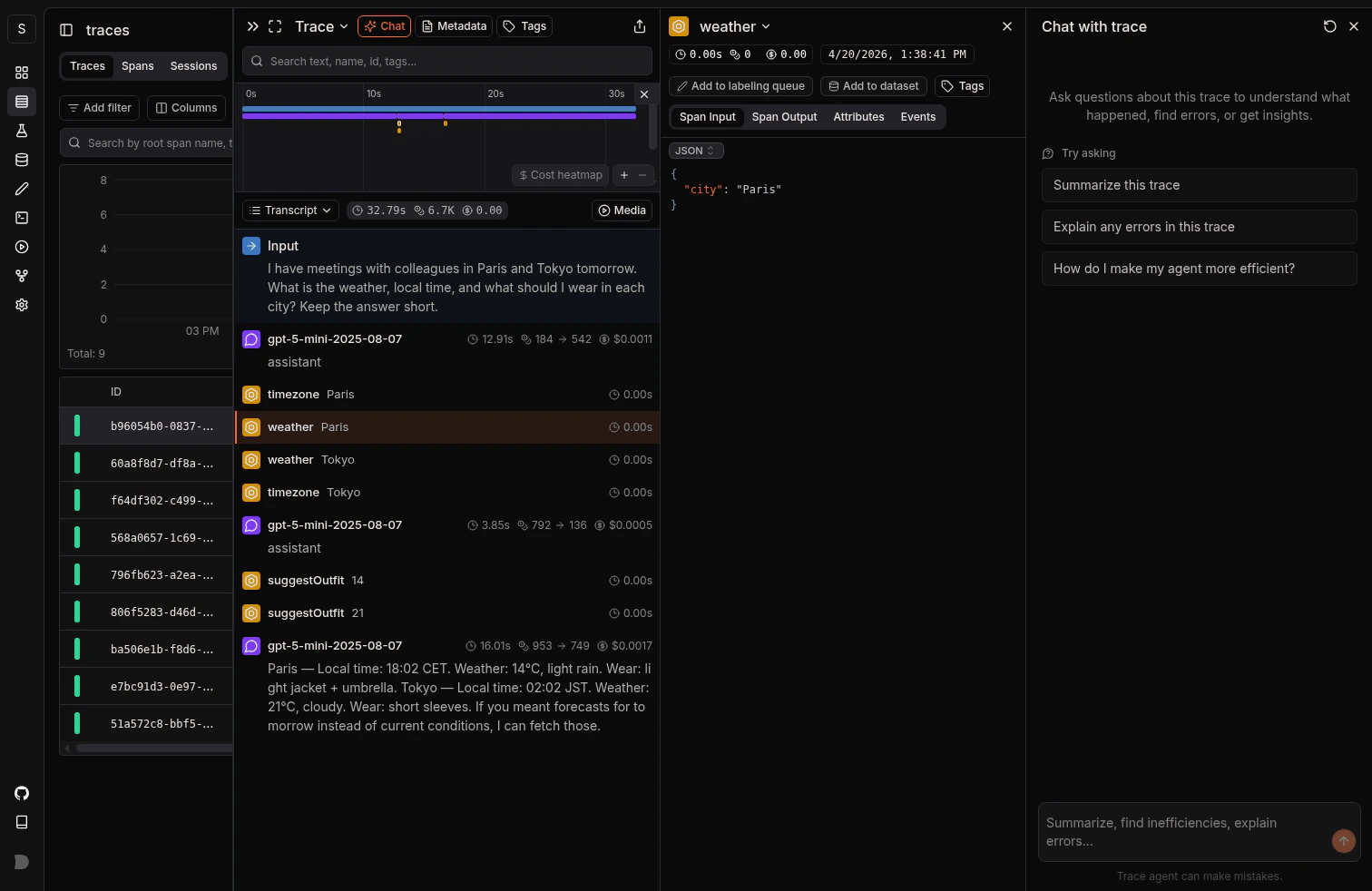 Tool calls appear as nested spans with their arguments and return values captured. More on the trace UX: [Viewing traces](/platform/viewing-traces).
## Track outcomes with Signals
Traces answer *what happened on this run*. **[Signals](/signals/introduction) answer the cross-trace question**: *how often does the agent recommend a product that wasn't in stock, when does a tool call return an empty result, which generateText calls fan out into more steps than expected*. A Signal pairs a plain-language prompt with a JSON output schema. Laminar runs it live on new traces (Triggers) or backfills it across history (Jobs) and records a structured event every time it matches. From there you [query](/platform/sql-editor), [cluster](/signals/clusters), and [alert](/signals/alerts) on events across every trace.
Every new project ships with a **Failure Detector** Signal that categorizes issues on any trace over 1000 tokens. Open it from the Signals sidebar to see events as soon as your AI SDK traces arrive.
## Query across traces
* **[SQL editor](/platform/sql-editor)** for ad-hoc queries across traces, spans, signals, and evals.
* **SQL API** for programmatic access from scripts and pipelines.
* **[CLI](/platform/cli)** (`lmnr-cli sql query`) for terminal-driven queries and piping JSON into shell tools or coding agents.
* **[MCP server](/platform/mcp)** to query Laminar from Claude Code, Cursor, or Codex.
## Grouping calls inside one route
If a single route makes multiple LLM calls, wrap them in `observe` to group them under one parent span.
```typescript app/api/chat/route.ts theme={null}
import { openai } from '@ai-sdk/openai';
import { generateText } from 'ai';
import { observe } from '@lmnr-ai/lmnr';
import { NextResponse } from 'next/server';
export const POST = async (req: Request) => {
const { topic } = await req.json();
const result = await observe(
{ name: 'POST /api/chat' },
async () => {
const { text: outline } = await generateText({
model: openai('gpt-5-mini'),
prompt: `Outline an article about ${topic}.`,
});
const { text: draft } = await generateText({
model: openai('gpt-5-mini'),
prompt: `Write a draft based on: ${outline}`,
});
return { outline, draft };
},
);
return NextResponse.json(result);
};
```
You also get grouping for free if another tracing library (for example `@vercel/otel` or `@sentry/nextjs`) is already wrapping your handler.
See the full [observe reference](/tracing/structure/observe-decorator) for session IDs, user IDs, metadata, and tags.
## Coexisting with @vercel/otel
If you already register a tracer provider with `@vercel/otel`, do not call `Laminar.initialize()` (that would register a second provider). Plug Laminar's span processor into the existing one instead:
```typescript instrumentation.ts theme={null}
import { registerOTel } from '@vercel/otel';
export async function register() {
if (process.env.NEXT_RUNTIME === "nodejs") {
const { registerTelemetry } = await import("ai");
const { initializeLaminarInstrumentations, LaminarAiSdkTelemetry } =
await import('@lmnr-ai/lmnr');
// Next.js telemetry
registerOTel({
serviceName: 'my-service',
instrumentations: initializeLaminarInstrumentations(),
});
// Laminar AI SDK telemetry. Or `Laminar.initialize()`
// for AI SDK before v7.
registerTelemetry(new LaminarAiSdkTelemetry());
}
}
```
On AI SDK v7, register Laminar telemetry after this so calls are traced without a per-call tracer. On v5 and v6, keep passing `getTracer()` per call.
## Migrating from v5 or v6 to v7
If you already trace the AI SDK with the `experimental_telemetry` + `getTracer()` pattern, here is how to move to the v7 style. The trace shapes are nearly identical, so your existing traces, Signals, and dashboards keep working.
Update `ai`, `@lmnr-ai/lmnr`, and every `@ai-sdk/*` provider package you use to the latest version.
```bash theme={null}
npm install ai@latest @lmnr-ai/lmnr@latest @ai-sdk/openai@latest
```
Replace the `Laminar.initialize()` call at your entry point with a single `registerTelemetry` call. The integration initializes Laminar for you, so move any `Laminar.initialize()` options into `laminarOptions`.
```typescript theme={null}
// Before (v5 / v6)
import { Laminar } from '@lmnr-ai/lmnr';
Laminar.initialize({ projectApiKey: process.env.LMNR_PROJECT_API_KEY });
// After (v7)
import { registerTelemetry } from 'ai';
import { LaminarAiSdkTelemetry } from '@lmnr-ai/lmnr';
registerTelemetry(
new LaminarAiSdkTelemetry({
laminarOptions: { projectApiKey: process.env.LMNR_PROJECT_API_KEY },
}),
);
```
Once Laminar is registered, every call is traced. Remove the per-call `experimental_telemetry` block.
```typescript theme={null}
// Before (v5 / v6)
const { text } = await generateText({
model: openai('gpt-5-mini'),
prompt: 'What is laminar flow?',
experimental_telemetry: { isEnabled: true, tracer: getTracer() },
});
// After (v7)
const { text } = await generateText({
model: openai('gpt-5-mini'),
prompt: 'What is laminar flow?',
});
```
If a call passed `functionId` or `metadata` through `experimental_telemetry`, or you want to turn tracing off for it, use the `telemetry` block instead.
```typescript theme={null}
const { text } = await generateText({
model: openai('gpt-5-mini'),
prompt: 'Draft a release note.',
telemetry: { functionId: 'release-notes', metadata: { env: 'production' } },
// or: telemetry: { isEnabled: false } to skip this call
});
```
The [debugger](/debugger/setup#ai-sdk-caching) still needs `wrapLanguageModel` around each model for caching. That step is unchanged across versions.
`await Laminar.shutdown()` (or `Laminar.flush()`) is still required at the end of short-lived scripts and serverless runtimes so the last spans are sent.
## Troubleshooting
* Confirm `LMNR_PROJECT_API_KEY` is set in the runtime environment, not just your shell.
* Laminar must be registered (v7: `registerTelemetry(new LaminarAiSdkTelemetry())`) or initialized (v5/v6: `Laminar.initialize()`) before the first AI SDK call. In Next.js, that means it lives in `instrumentation.ts`.
* On v5 and v6, `experimental_telemetry` is opt-in per call. If you forget to pass `{ isEnabled: true, tracer: getTracer() }`, the call is not traced. On v7, check you didn't pass `telemetry: { isEnabled: false }`.
* Short-lived scripts can exit before spans flush. Call `await Laminar.shutdown()` at the end.
* Edge runtime is not supported. Make sure your route runs in `nodejs`.
Add `@lmnr-ai/lmnr` to `serverExternalPackages` in `next.config.ts`. OpenTelemetry uses Node-specific APIs that Next.js cannot bundle.
`instrumentation.ts` is experimental before Next.js 15. Enable it in `next.config.js`:
```javascript next.config.js theme={null}
module.exports = {
experimental: { instrumentationHook: true },
};
```
Direct SDK calls are auto-instrumented by `Laminar.initialize()` in Node.js. In Next.js, imports inside `instrumentation.ts` are not visible to the rest of the app, so auto-instrumentation may miss them. Call `Laminar.patch({ OpenAI, anthropic })` where you construct the client:
```typescript lib/llm-clients.ts theme={null}
import { OpenAI } from 'openai';
import * as anthropic from '@anthropic-ai/sdk';
import { Laminar } from '@lmnr-ai/lmnr';
Laminar.patch({ OpenAI, anthropic });
export const openai = new OpenAI();
export const claude = new anthropic.Anthropic();
```
## What's next
Read the transcript view, filter, and search across traces.
Detect behaviors and failures across every run, then query, cluster, and alert on them.
Query traces programmatically from the UI, API, or your IDE.
Sessions, user IDs, metadata, and tags.
Mixing AI SDK with the OpenAI SDK directly? Trace it here.
Mixing AI SDK with the Anthropic SDK directly? Trace it here.
Tool calls appear as nested spans with their arguments and return values captured. More on the trace UX: [Viewing traces](/platform/viewing-traces).
## Track outcomes with Signals
Traces answer *what happened on this run*. **[Signals](/signals/introduction) answer the cross-trace question**: *how often does the agent recommend a product that wasn't in stock, when does a tool call return an empty result, which generateText calls fan out into more steps than expected*. A Signal pairs a plain-language prompt with a JSON output schema. Laminar runs it live on new traces (Triggers) or backfills it across history (Jobs) and records a structured event every time it matches. From there you [query](/platform/sql-editor), [cluster](/signals/clusters), and [alert](/signals/alerts) on events across every trace.
Every new project ships with a **Failure Detector** Signal that categorizes issues on any trace over 1000 tokens. Open it from the Signals sidebar to see events as soon as your AI SDK traces arrive.
## Query across traces
* **[SQL editor](/platform/sql-editor)** for ad-hoc queries across traces, spans, signals, and evals.
* **SQL API** for programmatic access from scripts and pipelines.
* **[CLI](/platform/cli)** (`lmnr-cli sql query`) for terminal-driven queries and piping JSON into shell tools or coding agents.
* **[MCP server](/platform/mcp)** to query Laminar from Claude Code, Cursor, or Codex.
## Grouping calls inside one route
If a single route makes multiple LLM calls, wrap them in `observe` to group them under one parent span.
```typescript app/api/chat/route.ts theme={null}
import { openai } from '@ai-sdk/openai';
import { generateText } from 'ai';
import { observe } from '@lmnr-ai/lmnr';
import { NextResponse } from 'next/server';
export const POST = async (req: Request) => {
const { topic } = await req.json();
const result = await observe(
{ name: 'POST /api/chat' },
async () => {
const { text: outline } = await generateText({
model: openai('gpt-5-mini'),
prompt: `Outline an article about ${topic}.`,
});
const { text: draft } = await generateText({
model: openai('gpt-5-mini'),
prompt: `Write a draft based on: ${outline}`,
});
return { outline, draft };
},
);
return NextResponse.json(result);
};
```
You also get grouping for free if another tracing library (for example `@vercel/otel` or `@sentry/nextjs`) is already wrapping your handler.
See the full [observe reference](/tracing/structure/observe-decorator) for session IDs, user IDs, metadata, and tags.
## Coexisting with @vercel/otel
If you already register a tracer provider with `@vercel/otel`, do not call `Laminar.initialize()` (that would register a second provider). Plug Laminar's span processor into the existing one instead:
```typescript instrumentation.ts theme={null}
import { registerOTel } from '@vercel/otel';
export async function register() {
if (process.env.NEXT_RUNTIME === "nodejs") {
const { registerTelemetry } = await import("ai");
const { initializeLaminarInstrumentations, LaminarAiSdkTelemetry } =
await import('@lmnr-ai/lmnr');
// Next.js telemetry
registerOTel({
serviceName: 'my-service',
instrumentations: initializeLaminarInstrumentations(),
});
// Laminar AI SDK telemetry. Or `Laminar.initialize()`
// for AI SDK before v7.
registerTelemetry(new LaminarAiSdkTelemetry());
}
}
```
On AI SDK v7, register Laminar telemetry after this so calls are traced without a per-call tracer. On v5 and v6, keep passing `getTracer()` per call.
## Migrating from v5 or v6 to v7
If you already trace the AI SDK with the `experimental_telemetry` + `getTracer()` pattern, here is how to move to the v7 style. The trace shapes are nearly identical, so your existing traces, Signals, and dashboards keep working.
Update `ai`, `@lmnr-ai/lmnr`, and every `@ai-sdk/*` provider package you use to the latest version.
```bash theme={null}
npm install ai@latest @lmnr-ai/lmnr@latest @ai-sdk/openai@latest
```
Replace the `Laminar.initialize()` call at your entry point with a single `registerTelemetry` call. The integration initializes Laminar for you, so move any `Laminar.initialize()` options into `laminarOptions`.
```typescript theme={null}
// Before (v5 / v6)
import { Laminar } from '@lmnr-ai/lmnr';
Laminar.initialize({ projectApiKey: process.env.LMNR_PROJECT_API_KEY });
// After (v7)
import { registerTelemetry } from 'ai';
import { LaminarAiSdkTelemetry } from '@lmnr-ai/lmnr';
registerTelemetry(
new LaminarAiSdkTelemetry({
laminarOptions: { projectApiKey: process.env.LMNR_PROJECT_API_KEY },
}),
);
```
Once Laminar is registered, every call is traced. Remove the per-call `experimental_telemetry` block.
```typescript theme={null}
// Before (v5 / v6)
const { text } = await generateText({
model: openai('gpt-5-mini'),
prompt: 'What is laminar flow?',
experimental_telemetry: { isEnabled: true, tracer: getTracer() },
});
// After (v7)
const { text } = await generateText({
model: openai('gpt-5-mini'),
prompt: 'What is laminar flow?',
});
```
If a call passed `functionId` or `metadata` through `experimental_telemetry`, or you want to turn tracing off for it, use the `telemetry` block instead.
```typescript theme={null}
const { text } = await generateText({
model: openai('gpt-5-mini'),
prompt: 'Draft a release note.',
telemetry: { functionId: 'release-notes', metadata: { env: 'production' } },
// or: telemetry: { isEnabled: false } to skip this call
});
```
The [debugger](/debugger/setup#ai-sdk-caching) still needs `wrapLanguageModel` around each model for caching. That step is unchanged across versions.
`await Laminar.shutdown()` (or `Laminar.flush()`) is still required at the end of short-lived scripts and serverless runtimes so the last spans are sent.
## Troubleshooting
* Confirm `LMNR_PROJECT_API_KEY` is set in the runtime environment, not just your shell.
* Laminar must be registered (v7: `registerTelemetry(new LaminarAiSdkTelemetry())`) or initialized (v5/v6: `Laminar.initialize()`) before the first AI SDK call. In Next.js, that means it lives in `instrumentation.ts`.
* On v5 and v6, `experimental_telemetry` is opt-in per call. If you forget to pass `{ isEnabled: true, tracer: getTracer() }`, the call is not traced. On v7, check you didn't pass `telemetry: { isEnabled: false }`.
* Short-lived scripts can exit before spans flush. Call `await Laminar.shutdown()` at the end.
* Edge runtime is not supported. Make sure your route runs in `nodejs`.
Add `@lmnr-ai/lmnr` to `serverExternalPackages` in `next.config.ts`. OpenTelemetry uses Node-specific APIs that Next.js cannot bundle.
`instrumentation.ts` is experimental before Next.js 15. Enable it in `next.config.js`:
```javascript next.config.js theme={null}
module.exports = {
experimental: { instrumentationHook: true },
};
```
Direct SDK calls are auto-instrumented by `Laminar.initialize()` in Node.js. In Next.js, imports inside `instrumentation.ts` are not visible to the rest of the app, so auto-instrumentation may miss them. Call `Laminar.patch({ OpenAI, anthropic })` where you construct the client:
```typescript lib/llm-clients.ts theme={null}
import { OpenAI } from 'openai';
import * as anthropic from '@anthropic-ai/sdk';
import { Laminar } from '@lmnr-ai/lmnr';
Laminar.patch({ OpenAI, anthropic });
export const openai = new OpenAI();
export const claude = new anthropic.Anthropic();
```
## What's next
Read the transcript view, filter, and search across traces.
Detect behaviors and failures across every run, then query, cluster, and alert on them.
Query traces programmatically from the UI, API, or your IDE.
Sessions, user IDs, metadata, and tags.
Mixing AI SDK with the OpenAI SDK directly? Trace it here.
Mixing AI SDK with the Anthropic SDK directly? Trace it here.