> ## Documentation Index
> Fetch the complete documentation index at: https://laminar.sh/docs/llms.txt
> Use this file to discover all available pages before exploring further.
# LangGraph Visualization
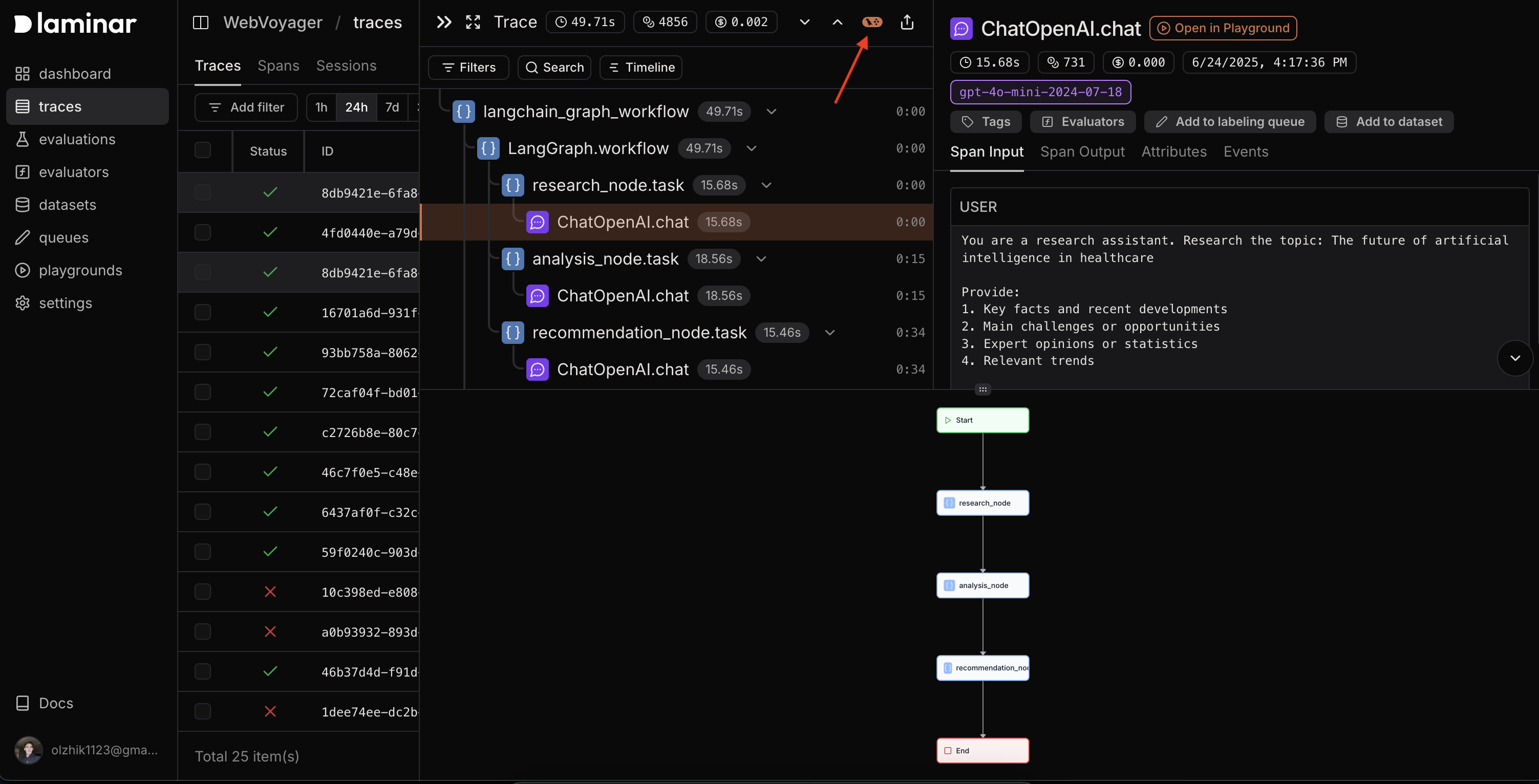
When you trace a LangGraph graph execution, Laminar automatically captures the graph structure and workflow, allowing you to visualize the entire graph flow directly in the trace view.
## Prerequisites
You'll need to install LangChain to work with LangGraph:
```bash theme={null}
pip install -U langchain langchain-openai langgraph
```
## Overview
LangGraph creates complex, stateful, multi-actor applications with Large Language Models.
When these graphs are traced with Laminar, you can see complete graph structure and node relationships.
## Example: Multi-Step Research Workflow
Here's how to set up a LangGraph workflow with Laminar tracing:
### 1. Initialize Laminar
```python theme={null}
from lmnr import observe, Laminar
Laminar.initialize(project_api_key="your-project-api-key")
```
### 2. Define Your Graph State
```python theme={null}
from typing import TypedDict, List
from langchain_core.messages import BaseMessage, HumanMessage
from langchain_openai import ChatOpenAI
class AgentState(TypedDict):
messages: List[BaseMessage]
research_results: str
analysis: str
final_recommendation: str
llm = ChatOpenAI(
model="gpt-4o-mini",
temperature=0.7,
openai_api_key=OPENAI_API_KEY
)
```
### 3. Create Traced Graph Nodes
```python theme={null}
@observe(name="research_step")
async def research_step(state: AgentState) -> AgentState:
result = await llm.ainvoke([HumanMessage(content=research_prompt)])
state["research_results"] = result.content
return state
@observe(name="analysis_step")
async def analysis_step(state: AgentState) -> AgentState:
result = await llm.ainvoke([HumanMessage(content=analysis_prompt)])
state["analysis"] = result.content
return state
@observe(name="recommendation_step")
async def recommendation_step(state: AgentState) -> AgentState:
result = await llm.ainvoke([HumanMessage(content=recommendation_prompt)])
state["final_recommendation"] = result.content
return state
```
### 4. Build the Graph Workflow
```python theme={null}
from langgraph.graph import StateGraph, END, START
from langgraph.checkpoint.memory import MemorySaver
@observe(name="langchain_graph_workflow")
async def create_and_run_graph():
workflow = StateGraph(AgentState)
workflow.add_node("research_node", research_step)
workflow.add_node("analysis_node", analysis_step)
workflow.add_node("recommendation_node", recommendation_step)
workflow.add_edge(START, "research_node")
workflow.add_edge("research_node", "analysis_node")
workflow.add_edge("analysis_node", "recommendation_node")
workflow.add_edge("recommendation_node", END)
memory = MemorySaver()
app = workflow.compile(checkpointer=memory)
config = {"configurable": {"thread_id": "demo-thread"}}
final_state = await app.aget_state(config)
return final_state
```