> ## Documentation Index
> Fetch the complete documentation index at: https://laminar.sh/docs/llms.txt
> Use this file to discover all available pages before exploring further.
# Tracing Images
Laminar automatically detects and stores image data sent to vision-capable models across supported integrations.
* Captures both **Base64 data URLs** and **image URLs**
* Works transparently in the background (no tracing-specific code required)
* Renders images inline in the trace view so you can debug multimodal runs
## OpenAI Example (Base64 Image)
```typescript theme={null}
import OpenAI from 'openai';
import fs from 'node:fs';
import { Laminar, observe } from '@lmnr-ai/lmnr';
Laminar.initialize({
projectApiKey: process.env.LMNR_PROJECT_API_KEY,
instrumentModules: { OpenAI },
});
const openai = new OpenAI.OpenAI({ apiKey: process.env.OPENAI_API_KEY });
const analyzeImage = (imagePath: string, userQuestion: string) =>
observe({ name: 'analyzeImage' }, async () => {
const base64 = fs.readFileSync(imagePath).toString('base64');
const response = await openai.chat.completions.create({
model: 'gpt-4o',
messages: [
{
role: 'user',
content: [
{ type: 'text', text: userQuestion },
{
type: 'image_url',
image_url: { url: `data:image/jpeg;base64,${base64}` },
},
],
},
],
max_tokens: 500,
});
return response.choices[0].message.content;
});
```
```python theme={null}
import base64
from openai import OpenAI
from lmnr import Laminar, observe
Laminar.initialize()
client = OpenAI()
@observe()
def analyze_image(image_path: str, user_question: str) -> str:
with open(image_path, "rb") as f:
base64_image = base64.b64encode(f.read()).decode("utf-8")
response = client.chat.completions.create(
model="gpt-4o",
messages=[
{
"role": "user",
"content": [
{"type": "text", "text": user_question},
{
"type": "image_url",
"image_url": {
"url": f"data:image/jpeg;base64,{base64_image}"
},
},
],
}
],
max_tokens=500,
)
return response.choices[0].message.content
```
## Image URLs
If you reference an image by URL instead of uploading it, Laminar traces the URL and associates it with the LLM call (no extra tracing code needed).
### OpenAI Example (Image URL)
```typescript theme={null}
import OpenAI from 'openai';
import { observe } from '@lmnr-ai/lmnr';
const openai = new OpenAI.OpenAI({ apiKey: process.env.OPENAI_API_KEY });
const analyzeWebImage = (imageUrl: string, analysisPrompt: string) =>
observe({ name: 'analyzeWebImage' }, async () => {
const response = await openai.chat.completions.create({
model: 'gpt-4o',
messages: [
{
role: 'user',
content: [
{ type: 'text', text: analysisPrompt },
{ type: 'image_url', image_url: { url: imageUrl, detail: 'high' } },
],
},
],
});
return response.choices[0].message.content;
});
```
```python theme={null}
from openai import OpenAI
from lmnr import observe
client = OpenAI()
@observe()
def analyze_web_image(image_url: str, analysis_prompt: str) -> str:
response = client.chat.completions.create(
model="gpt-4o",
messages=[
{
"role": "user",
"content": [
{"type": "text", "text": analysis_prompt},
{
"type": "image_url",
"image_url": {"url": image_url, "detail": "high"},
},
],
}
],
)
return response.choices[0].message.content
```
## Viewing Images in Laminar Platform
When you send images to LLM models, Laminar renders them in the trace view:
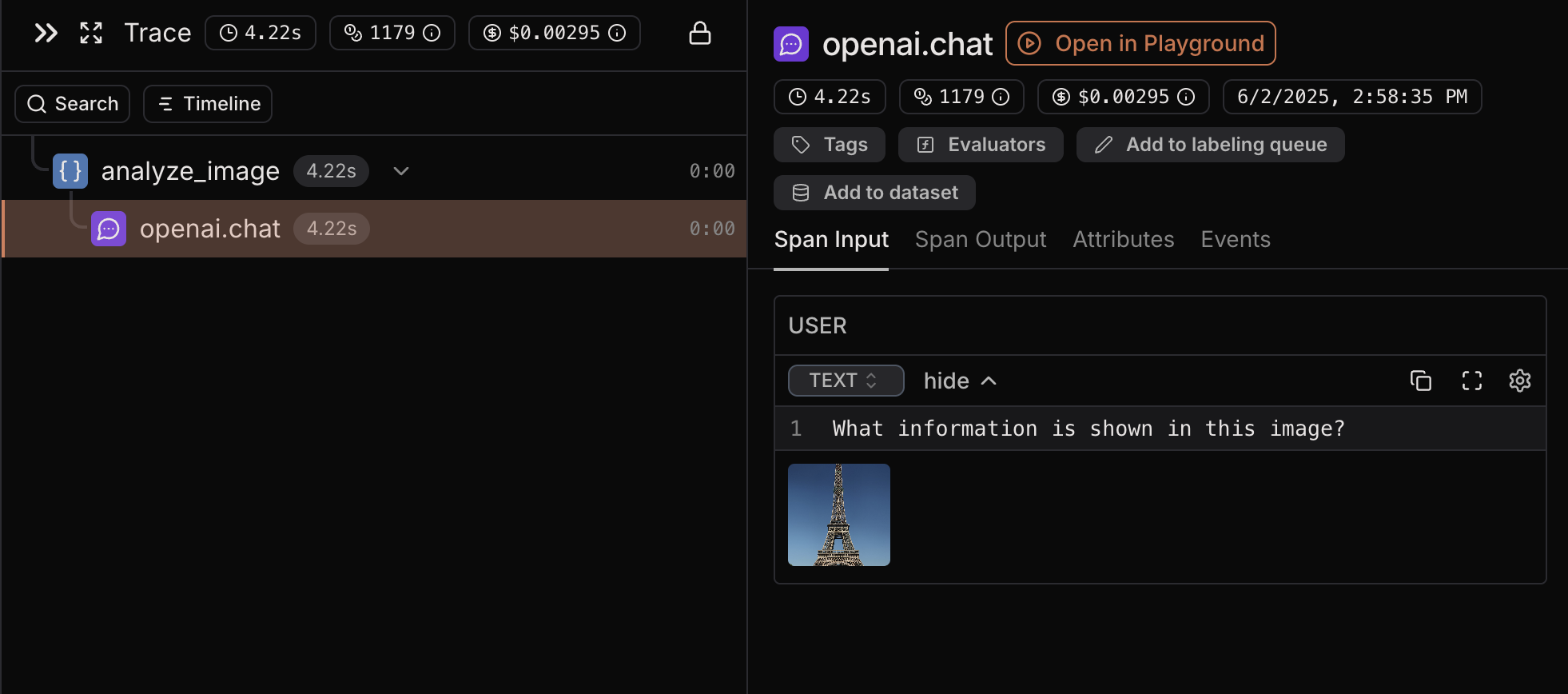 In the Laminar platform, you can:
* View the actual images that were sent to the model
* Click on the image to view it in a larger view
* Correlate images with model responses for debugging
* Track image usage across different traces and sessions
## Supported Integrations
Start here:
* [OpenAI](/tracing/integrations/openai)
* [Anthropic](/tracing/integrations/anthropic)
* [Gemini](/tracing/integrations/gemini)
* [LangChain](/tracing/integrations/langchain)
* [Vercel AI SDK](/tracing/integrations/vercel-ai-sdk)
* [LiteLLM](/tracing/integrations/litellm)
* [Browser Use](/tracing/integrations/browser-use)
* [Stagehand](/tracing/integrations/stagehand)
In the Laminar platform, you can:
* View the actual images that were sent to the model
* Click on the image to view it in a larger view
* Correlate images with model responses for debugging
* Track image usage across different traces and sessions
## Supported Integrations
Start here:
* [OpenAI](/tracing/integrations/openai)
* [Anthropic](/tracing/integrations/anthropic)
* [Gemini](/tracing/integrations/gemini)
* [LangChain](/tracing/integrations/langchain)
* [Vercel AI SDK](/tracing/integrations/vercel-ai-sdk)
* [LiteLLM](/tracing/integrations/litellm)
* [Browser Use](/tracing/integrations/browser-use)
* [Stagehand](/tracing/integrations/stagehand)