> ## Documentation Index
> Fetch the complete documentation index at: https://laminar.sh/docs/llms.txt
> Use this file to discover all available pages before exploring further.
# Sessions
Sessions group related traces (multiple requests / turns) under a shared identifier, useful for conversational AI and multi-step workflows.
* Set a session ID at the trace level so all spans in a trace share it.
* Use the Sessions view in the Laminar UI to review all traces in the same session.
Set the session ID early in your request/handler entry point so downstream spans inherit it.
You must set the session ID inside a span context so it can attach to the current trace (for example, inside an @observed function / observe() call, or by passing sessionId / session\_id via observe options).
## What is a Session?
A **trace** usually represents one request / one conversational turn. A **session** groups multiple traces that belong to the same higher-level flow (for example, an entire chat conversation or checkout process).
## Example
```typescript theme={null}
import { observe } from '@lmnr-ai/lmnr';
// One trace per turn/request; reuse the same sessionId across turns
export async function handleTurn(conversationId: string, userMessage: string) {
return observe({ name: 'handleTurn', sessionId: conversationId }, async () => {
// ... LLM calls / tools ...
});
}
```
See also: [`observe(..., { sessionId })`](/sdk/observe#ts-observe) and [`Laminar.setTraceSessionId`](/sdk/trace-methods#ts-laminar-set-trace-session-id)
```python theme={null}
from lmnr import Laminar, observe
# One trace per turn/request; reuse the same session_id across turns.
# Note: set_trace_session_id must be called inside a span context (e.g., an @observe'd function).
@observe()
def handle_turn(conversation_id: str, user_message: str):
Laminar.set_trace_session_id(conversation_id)
# ... LLM calls / tools ...
```
See also: [`@observe()`](/sdk/observe#py-observe) and [`Laminar.set_trace_session_id`](/sdk/trace-methods#py-laminar-set-trace-session-id)
## Viewing Sessions in Laminar
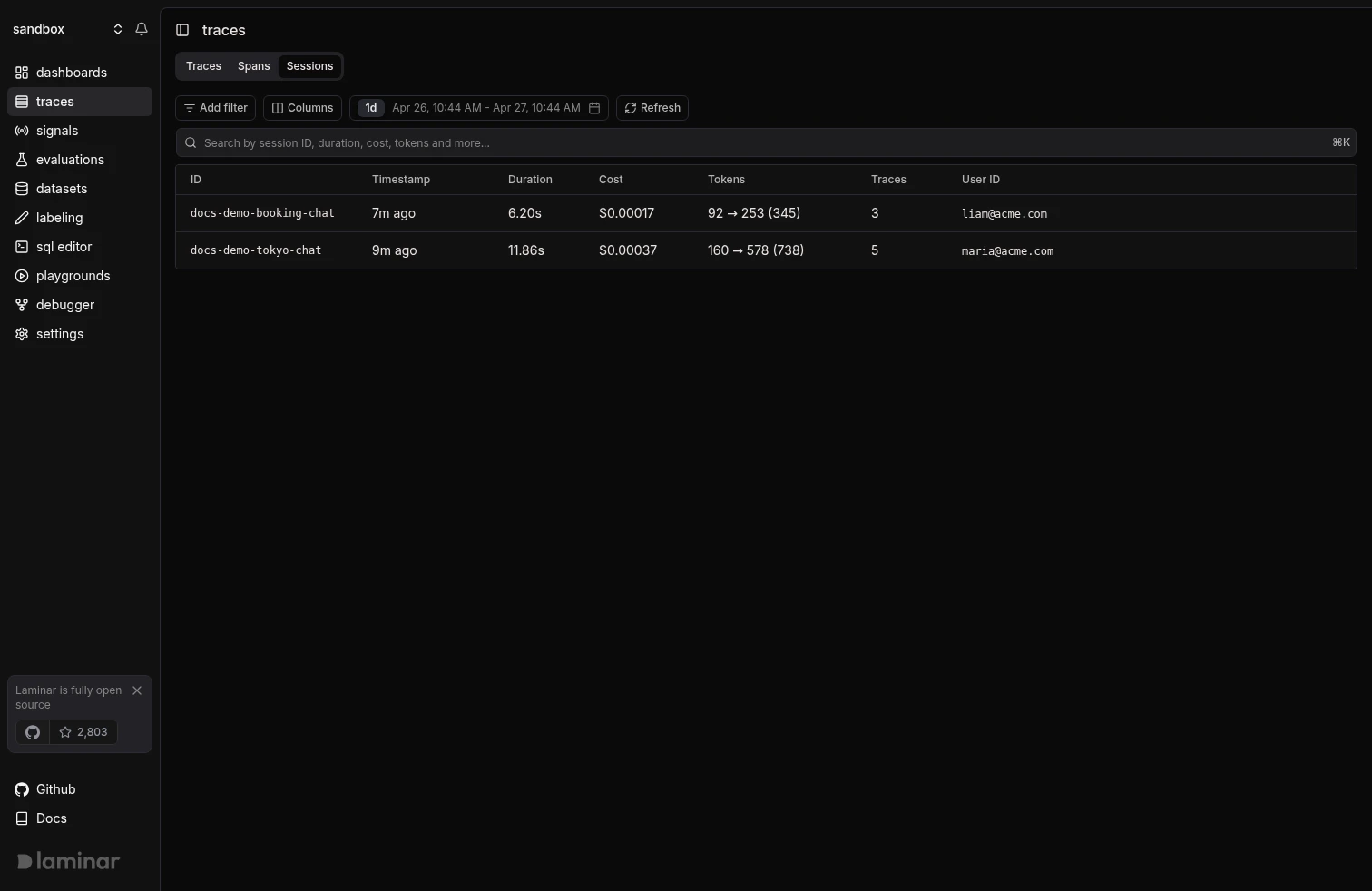
1. Navigate to the **Traces** page and select the **Sessions** tab. The table lists every session in the selected time range, with columns for duration, total cost, total tokens, trace count, and user ID.
 2. Click a row to open the full-page session view. The breadcrumb confirms which session you are looking at, and the header shows the session's duration, token count, and cost. Toggle **Timeline** to see when each trace ran, or use the search box to filter by text, span name, ID, or tags.
3. Each trace appears as a numbered card (`1/5`, `2/5`, ...) with an auto-extracted **Input** block and the final LLM output, so you can scan the conversation end to end without opening individual traces.
2. Click a row to open the full-page session view. The breadcrumb confirms which session you are looking at, and the header shows the session's duration, token count, and cost. Toggle **Timeline** to see when each trace ran, or use the search box to filter by text, span name, ID, or tags.
3. Each trace appears as a numbered card (`1/5`, `2/5`, ...) with an auto-extracted **Input** block and the final LLM output, so you can scan the conversation end to end without opening individual traces.
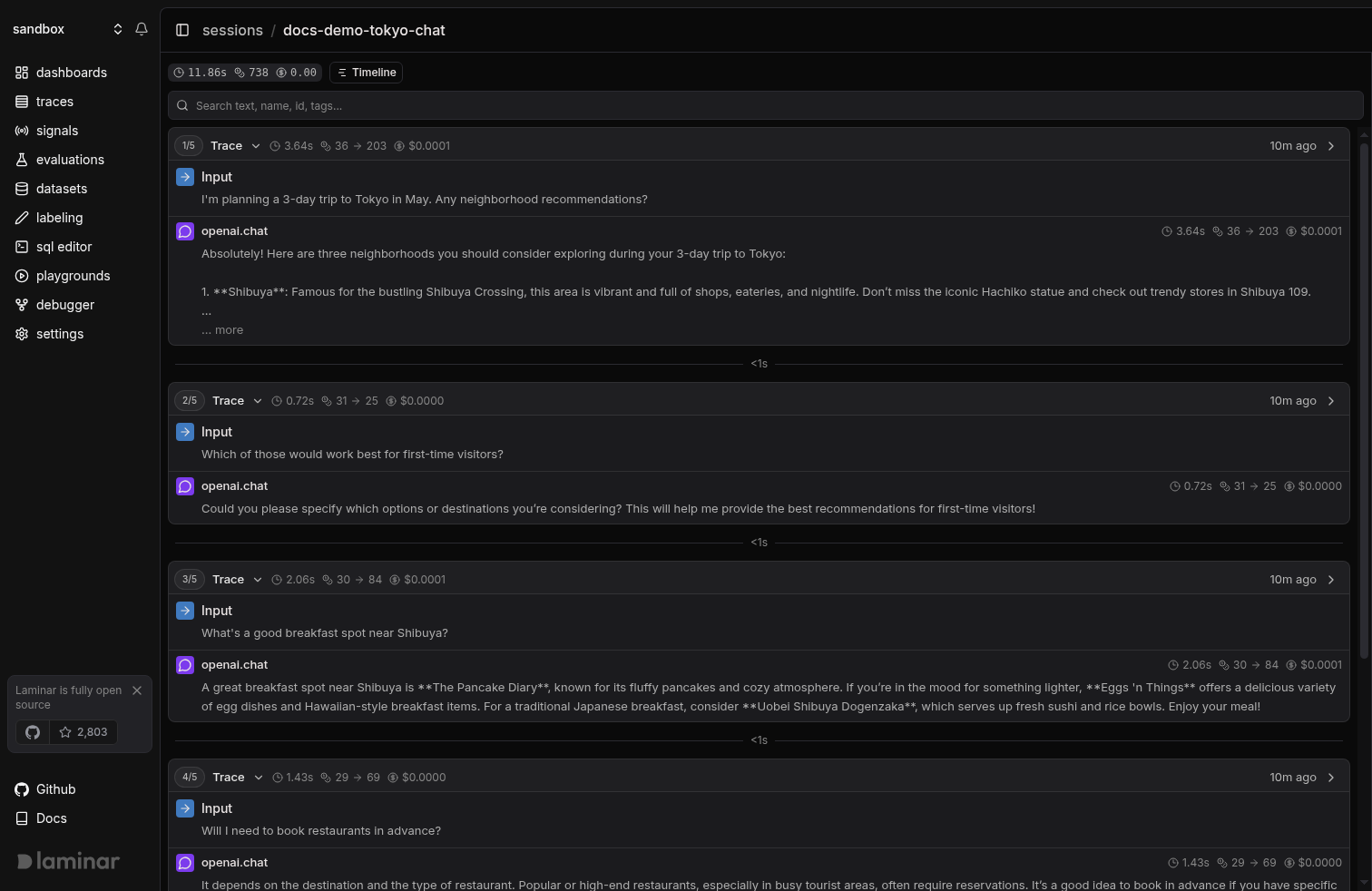 From any trace card, use the dropdown to copy the trace ID or jump into the standalone trace view for span-level debugging.
## Common Patterns
* **Chatbots:** session = `conversation_id`, trace = one user turn.
* **Workflows:** session = `checkout-{userId}`, trace = each step (`validateCart`, `processPayment`, `createOrder`).
From any trace card, use the dropdown to copy the trace ID or jump into the standalone trace view for span-level debugging.
## Common Patterns
* **Chatbots:** session = `conversation_id`, trace = one user turn.
* **Workflows:** session = `checkout-{userId}`, trace = each step (`validateCart`, `processPayment`, `createOrder`).