> ## Documentation Index
> Fetch the complete documentation index at: https://laminar.sh/docs/llms.txt
> Use this file to discover all available pages before exploring further.
# Span Types
A **span type** tells Laminar what kind of work a span represents. It controls how the span renders in the [transcript view](/docs/platform/viewing-traces#transcript-view), whether it counts toward token and cost aggregations, and how it behaves in evaluations. Most auto-instrumentation sets the right type for you. When you write manual spans, especially for tool calls inside an agent loop, setting the type yourself is what turns a flat list of `DEFAULT` spans into a readable transcript.
## Types you'll actually set
Three span types cover the manual-instrumentation cases:
| Type | When to use |
| --------- | ----------------------------------------------------------------------------------------------------------------------------------------- |
| `DEFAULT` | Any function on your code path that isn't a model call or a tool. This is the default. |
| `LLM` | A manual LLM call where you want Laminar to pick up token counts and cost. See [LLM Cost Tracking](/docs/tracing/structure/llm-cost-tracking). |
| `TOOL` | A function your agent invokes as a tool (`get_weather`, `search_flights`, `book_flight`, `run_sql`). |
The other types (`EXECUTOR`, `EVALUATOR`, `HUMAN_EVALUATOR`, `EVALUATION`, `CACHED`) exist for the evaluations framework and for internal auto-instrumentation. You won't set them by hand in day-to-day agent code.
## Why `TOOL` matters for agent traces
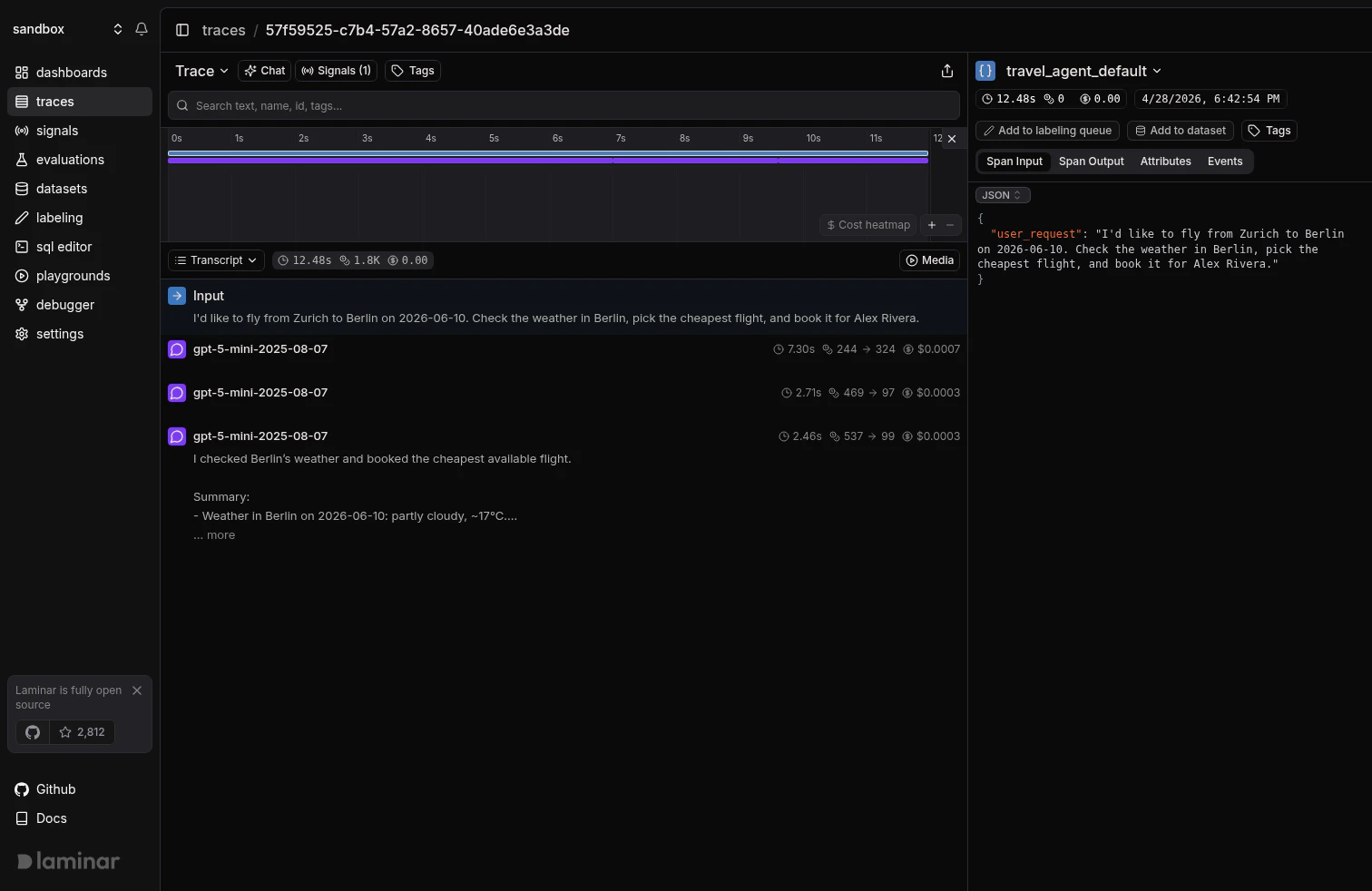
The transcript view only renders the rows that describe what the agent did: the user input, LLM turns, and **tool calls**. `DEFAULT` spans don't appear there (they live under Tree view). When you wrap tool functions with `@observe` but leave them as `DEFAULT` spans, the transcript shows only the LLM turns, as if the agent were thinking in a vacuum:
 Mark the same functions as `TOOL` and they interleave with the LLM turns, each with a bolt icon, the tool name, and an inline preview of the arguments:
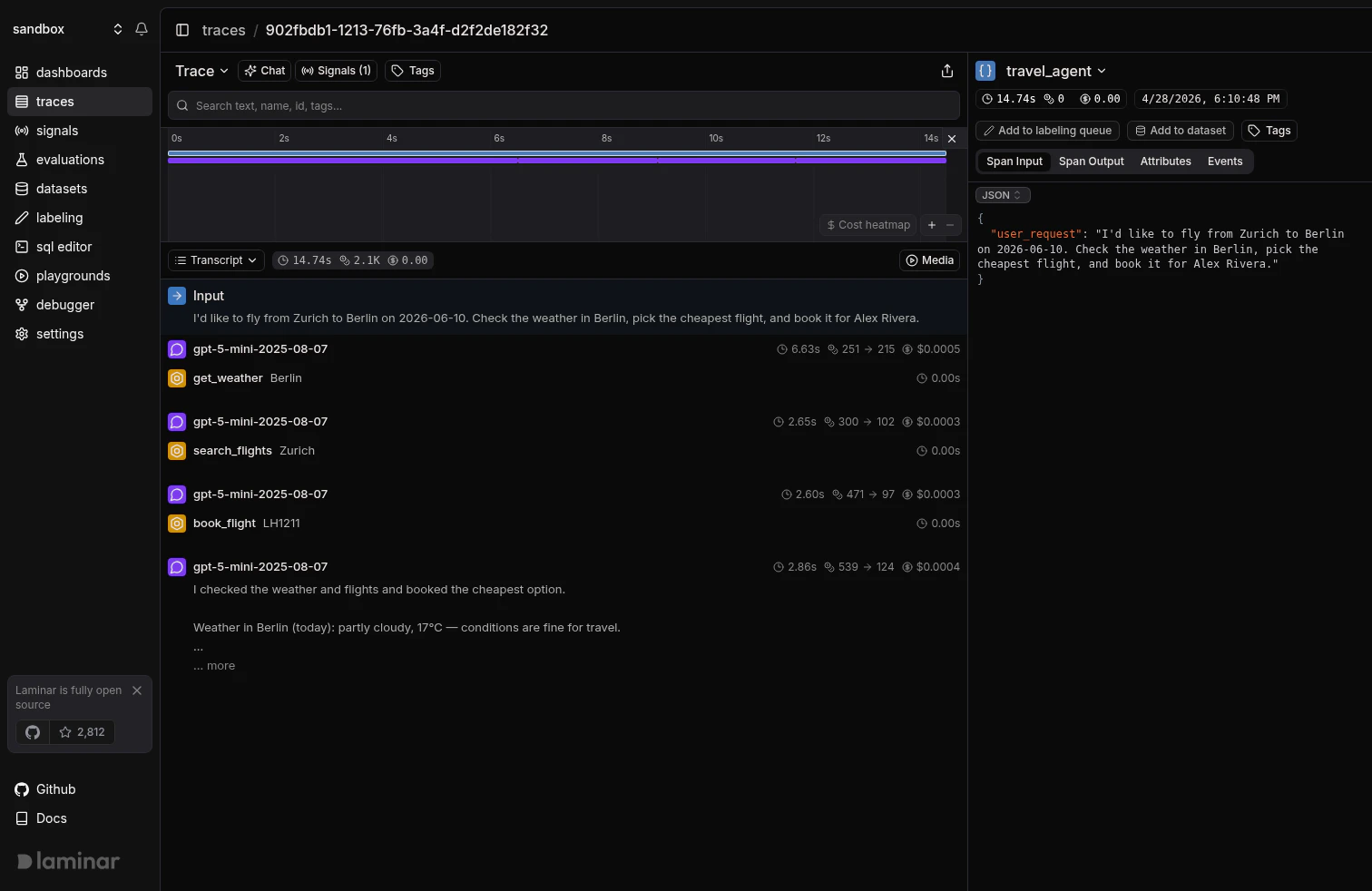 Same agent, same tool calls, same model: only the span type changed. Tool rows also feed [Signals](/docs/signals/introduction) and [SQL queries](/docs/platform/sql-editor) that filter on `span_type = 'TOOL'`, so typing them correctly makes cross-trace questions like *"how often did `book_flight` fail this week"* possible.
## Setting the type on `@observe`
Pass `spanType` / `span_type` when you wrap a tool function. The argument names and value types are the same as in the [`@observe` reference](/docs/sdk/observe).
```typescript theme={null}
import { observe } from '@lmnr-ai/lmnr';
const getWeather = async (city: string) =>
observe({ name: 'get_weather', spanType: 'TOOL' }, async () => {
const res = await fetch(`https://api.weather.example/${city}`);
return await res.json();
});
const searchFlights = async (origin: string, destination: string, date: string) =>
observe(
{ name: 'search_flights', spanType: 'TOOL' },
async () => {
// ... call your flight search API ...
}
);
```
```python theme={null}
from lmnr import observe
@observe(name="get_weather", span_type="TOOL")
def get_weather(city: str) -> dict:
# ... call your weather API ...
return {"city": city, "temperature_c": 17, "condition": "partly cloudy"}
@observe(name="search_flights", span_type="TOOL")
def search_flights(origin: str, destination: str, date: str) -> list[dict]:
# ... call your flight search API ...
...
```
The span name becomes the label on the tool-call row (use the same name the LLM sees in its tool schema), and the function's arguments and return value become the input and output shown when you expand the row.
## Setting the type on manual spans
For code that isn't a function (a block inside a larger handler, a dispatcher that chooses a tool by name, a loop over multiple tool invocations), use the manual-span APIs from [Trace Parts of Your Code](/docs/tracing/structure/manual-span-creation) and pass the type at span creation.
```typescript theme={null}
import { Laminar } from '@lmnr-ai/lmnr';
const callTool = async (name: string, args: Record) => {
const span = Laminar.startActiveSpan({ name, spanType: 'TOOL', input: args });
try {
const result = await TOOLS[name](args);
span.setAttribute('lmnr.span.output', JSON.stringify(result));
return result;
} catch (error) {
span.recordException(error as Error);
throw error;
} finally {
span.end();
}
};
```
```python theme={null}
from lmnr import Laminar
def call_tool(name: str, args: dict) -> dict:
with Laminar.start_as_current_span(
name=name,
span_type="TOOL",
input=args,
) as span:
result = TOOLS[name](args)
span.set_attribute("lmnr.span.output", json_dumps(result))
return result
```
This is the pattern most OpenAI-style agent loops want: a single dispatcher that looks up the tool by name and wraps every invocation in a `TOOL` span, so every tool call in the run shows up in the transcript with the right label and payload.
## Setting type without the SDK
If you ship OTLP directly (no `@lmnr-ai/lmnr` / `lmnr` import), set the type as a span attribute at creation time:
```text theme={null}
attributes: { "lmnr.span.type": "TOOL" }
```
See the [Span attribute reference](/docs/tracing/structure/span-attribute-reference) for the full set of Laminar-recognized attribute keys.
## When to leave a span as `DEFAULT`
`DEFAULT` is the right call for:
* **Business logic the model doesn't invoke directly**: request handlers, validators, post-processors, format converters. These belong in the trace for hierarchy and timing but shouldn't clutter the transcript.
* **Setup and teardown**: loading a config, building a prompt, parsing a response into a domain object. Readers of the transcript shouldn't have to scroll past these to find the model's decisions.
* **Internal helpers inside a tool**: the tool itself is the `TOOL` span; the HTTP helper it calls can stay `DEFAULT`.
If a function is conceptually part of the agent's reasoning loop and its output feeds back into the model, make it a `TOOL`. Otherwise leave it `DEFAULT`.
## What's next
How the transcript view, tree view, and timeline render the spans you've typed.
Full reference for `@observe` / `observe()` and every parameter it takes.
Start-as-current, start-active, and detached spans for code that isn't a function.
Set `spanType='LLM'` with the right attributes and Laminar will compute cost automatically.
Same agent, same tool calls, same model: only the span type changed. Tool rows also feed [Signals](/docs/signals/introduction) and [SQL queries](/docs/platform/sql-editor) that filter on `span_type = 'TOOL'`, so typing them correctly makes cross-trace questions like *"how often did `book_flight` fail this week"* possible.
## Setting the type on `@observe`
Pass `spanType` / `span_type` when you wrap a tool function. The argument names and value types are the same as in the [`@observe` reference](/docs/sdk/observe).
```typescript theme={null}
import { observe } from '@lmnr-ai/lmnr';
const getWeather = async (city: string) =>
observe({ name: 'get_weather', spanType: 'TOOL' }, async () => {
const res = await fetch(`https://api.weather.example/${city}`);
return await res.json();
});
const searchFlights = async (origin: string, destination: string, date: string) =>
observe(
{ name: 'search_flights', spanType: 'TOOL' },
async () => {
// ... call your flight search API ...
}
);
```
```python theme={null}
from lmnr import observe
@observe(name="get_weather", span_type="TOOL")
def get_weather(city: str) -> dict:
# ... call your weather API ...
return {"city": city, "temperature_c": 17, "condition": "partly cloudy"}
@observe(name="search_flights", span_type="TOOL")
def search_flights(origin: str, destination: str, date: str) -> list[dict]:
# ... call your flight search API ...
...
```
The span name becomes the label on the tool-call row (use the same name the LLM sees in its tool schema), and the function's arguments and return value become the input and output shown when you expand the row.
## Setting the type on manual spans
For code that isn't a function (a block inside a larger handler, a dispatcher that chooses a tool by name, a loop over multiple tool invocations), use the manual-span APIs from [Trace Parts of Your Code](/docs/tracing/structure/manual-span-creation) and pass the type at span creation.
```typescript theme={null}
import { Laminar } from '@lmnr-ai/lmnr';
const callTool = async (name: string, args: Record) => {
const span = Laminar.startActiveSpan({ name, spanType: 'TOOL', input: args });
try {
const result = await TOOLS[name](args);
span.setAttribute('lmnr.span.output', JSON.stringify(result));
return result;
} catch (error) {
span.recordException(error as Error);
throw error;
} finally {
span.end();
}
};
```
```python theme={null}
from lmnr import Laminar
def call_tool(name: str, args: dict) -> dict:
with Laminar.start_as_current_span(
name=name,
span_type="TOOL",
input=args,
) as span:
result = TOOLS[name](args)
span.set_attribute("lmnr.span.output", json_dumps(result))
return result
```
This is the pattern most OpenAI-style agent loops want: a single dispatcher that looks up the tool by name and wraps every invocation in a `TOOL` span, so every tool call in the run shows up in the transcript with the right label and payload.
## Setting type without the SDK
If you ship OTLP directly (no `@lmnr-ai/lmnr` / `lmnr` import), set the type as a span attribute at creation time:
```text theme={null}
attributes: { "lmnr.span.type": "TOOL" }
```
See the [Span attribute reference](/docs/tracing/structure/span-attribute-reference) for the full set of Laminar-recognized attribute keys.
## When to leave a span as `DEFAULT`
`DEFAULT` is the right call for:
* **Business logic the model doesn't invoke directly**: request handlers, validators, post-processors, format converters. These belong in the trace for hierarchy and timing but shouldn't clutter the transcript.
* **Setup and teardown**: loading a config, building a prompt, parsing a response into a domain object. Readers of the transcript shouldn't have to scroll past these to find the model's decisions.
* **Internal helpers inside a tool**: the tool itself is the `TOOL` span; the HTTP helper it calls can stay `DEFAULT`.
If a function is conceptually part of the agent's reasoning loop and its output feeds back into the model, make it a `TOOL`. Otherwise leave it `DEFAULT`.
## What's next
How the transcript view, tree view, and timeline render the spans you've typed.
Full reference for `@observe` / `observe()` and every parameter it takes.
Start-as-current, start-active, and detached spans for code that isn't a function.
Set `spanType='LLM'` with the right attributes and Laminar will compute cost automatically.