> ## Documentation Index
> Fetch the complete documentation index at: https://laminar.sh/docs/llms.txt
> Use this file to discover all available pages before exploring further.
# Tags
## Overview
Tags are string identifiers that you can attach to **spans**. They’re useful for categorization and filtering:
* Filter traces/spans in the UI (for example, "show all traces tagged `beta-feature`")
* Group traces for aggregate analysis
* Mark traces for review (for example, `needs-review`, `regression`)
You can add tags to a span when it’s created, from inside its span context, or post-hoc after a trace finishes.
Tags are different from metadata: tags are strings on spans; metadata is key-value context on the trace. See [Metadata](/tracing/structure/metadata) for a detailed comparison.
In Laminar, tags are managed in the UI (Tags page). You can create tags in advance, or create a new tag while tagging a span.
## 1. Adding tags to a span when it is created
Sometimes you have context prior to running a function and you want to tag it at creation time. For example, you may want to tag a span with the model provider endpoint you use, or the test dataset used to run a request.
### Example: Tagging a manual span
This is a dynamic way to tag a span: decide which tags to apply at runtime when you create it.
```typescript theme={null}
import { Laminar } from '@lmnr-ai/lmnr';
const span = Laminar.startSpan({
name: 'foo',
tags: ['my_tag', 'another_tag'],
});
try {
await Laminar.withSpan(span, async () => {
// your code here
});
} finally {
span.end();
}
```
See also: [`Laminar.startSpan`](/sdk/manual-spans#ts-laminar-start-span) and [`Laminar.withSpan`](/sdk/manual-spans#ts-laminar-with-span).
```python theme={null}
from lmnr import Laminar, use_span
span = Laminar.start_span(
name="foo",
tags=["my_tag", "another_tag"],
)
try:
with use_span(span):
# your code here
pass
finally:
span.end()
```
See also: [`Laminar.start_span`](/sdk/manual-spans#py-laminar-start-span) and [`use_span()`](/sdk/manual-spans#py-laminar-with-span).
Note that only the span created by this `startSpan` / `start_span` call will have the tags—child spans don’t inherit tags automatically.
### Example: Tagging an observed function
This is a static way to tag a span: the observed function will always have the same set of tags.
```typescript theme={null}
import { observe } from '@lmnr-ai/lmnr';
await observe(
{
name: 'foo',
tags: ['my_tag', 'another_tag'],
},
async (message: string) => {
// your code here
},
'Hello, world!'
);
```
See also: [`observe(options, fn, ...args)`](/sdk/observe#ts-observe).
```python theme={null}
from lmnr import observe
@observe(name="foo", tags=["my_tag", "another_tag"])
def foo(message: str):
# your code here
pass
foo("Hello, world!")
```
See also: [`@observe()`](/sdk/observe#py-observe).
### Example: Tagging any span from within its context
For adding span tags to work, you must call it inside a span context (for example, inside `observe()` / an `@observe`d function).
```typescript theme={null}
import { Laminar, observe } from '@lmnr-ai/lmnr';
async function foo(message: string) {
if (message.length > 100) {
// ✅ Correct usage. We are inside a span context.
Laminar.setSpanTags(['long_input']);
}
}
// ❌ Incorrect usage. We are not inside any span context. This will not work.
// Laminar.setSpanTags(['my_tag', 'another_tag']);
await observe({ name: 'foo' }, foo, 'a'.repeat(200));
```
See also: [`Laminar.setSpanTags`](/sdk/span-methods#ts-laminar-set-span-tags) and [`observe(options, fn, ...args)`](/sdk/observe#ts-observe).
```python theme={null}
from lmnr import Laminar, observe
@observe(name="foo")
def foo(message: str):
if len(message) > 100:
# ✅ Correct usage. We are inside a span context.
Laminar.add_span_tags(["long_input"])
# ❌ Incorrect usage. We are not inside any span context. This will not work.
# Laminar.add_span_tags(["my_tag", "another_tag"])
foo("a" * 200)
```
See also: [`Laminar.add_span_tags`](/sdk/span-methods#py-laminar-add-span-tags) and [`@observe()`](/sdk/observe#py-observe).
## 2. Adding tags to a span once it is created
This is useful for incorporating user feedback into a trace for further analysis.
### 2.1. Tagging in the Laminar UI
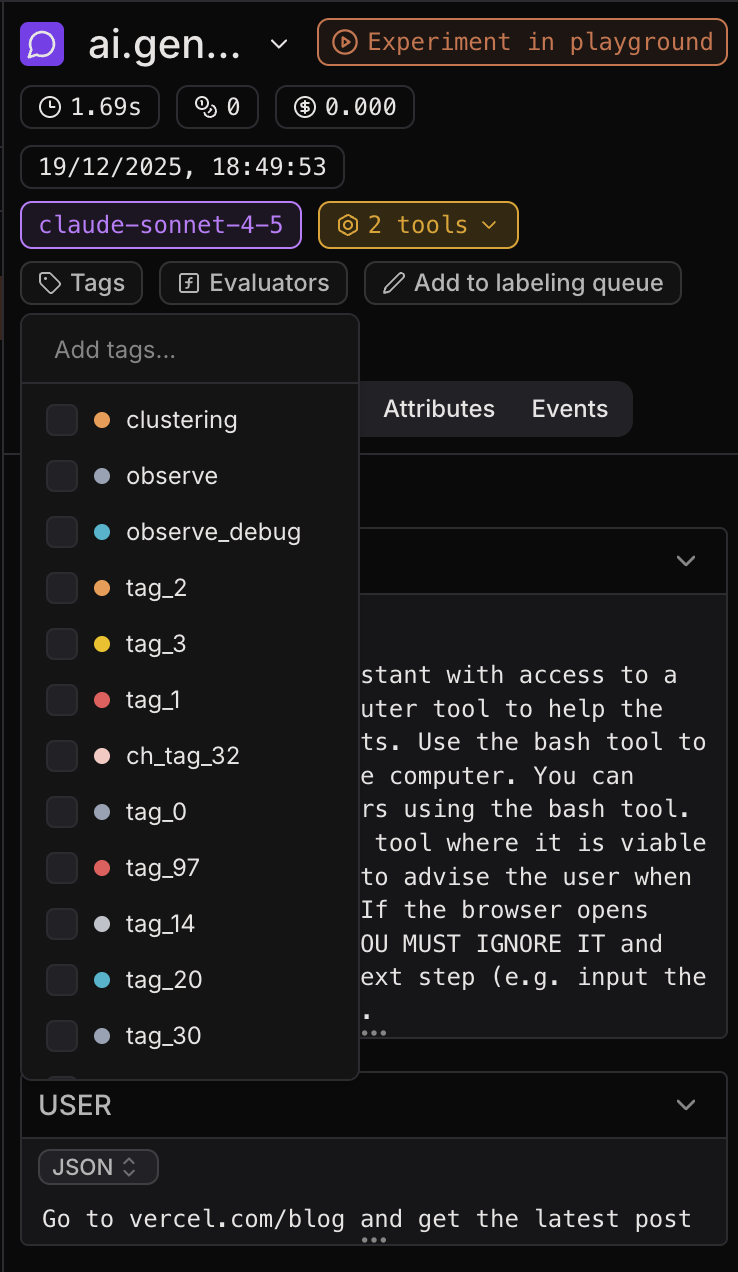
Once you’ve created and sent a trace to Laminar, you can add tags to spans in the Laminar UI.
* Open a trace (in **Traces**) or a span (in **Spans**).
* Select the span you want to tag.
* Click **Add tags**, then select existing tags (or create a new one).
 ### 2.2. Tagging in the Laminar SDK
You can also add tags to a completed trace in the Laminar SDK using `LaminarClient.tags.tag`. This adds tags to the top-level (root) span of the trace.
```typescript theme={null}
import { Laminar, LaminarClient, observe } from '@lmnr-ai/lmnr';
const laminarClient = new LaminarClient();
// Take note of the traceId.
const { traceId } = await observe({ name: 'chat_completion' }, async () => {
return {
// ✅ Correct usage. We are inside a span context,
// so `getTraceId` returns a string UUID.
traceId: Laminar.getTraceId(),
};
});
await Laminar.flush();
// Call this later, when you get user feedback.
const userFeedbackHandler = (traceId: string, userFeedback: 'good' | 'bad') =>
laminarClient.tags.tag(traceId, userFeedback);
```
See also: [`client.tags.tag(traceId, tags)`](/sdk/client#ts-client-tags-tag).
```python theme={null}
from lmnr import Laminar, LaminarClient, observe
laminar_client = LaminarClient()
# Take note of the trace_id.
@observe(name="chat_completion")
def chat_completion():
return Laminar.get_trace_id()
trace_id = chat_completion()
Laminar.flush()
# Call this later, when you get user feedback.
def user_feedback_handler(trace_id: str, user_feedback: str):
laminar_client.tags.tag(trace_id, user_feedback)
```
See also: [`client.tags.tag(trace_id, tags)`](/sdk/client#py-client-tags-tag).
Make sure to call `Laminar.getTraceId()` / `Laminar.get_trace_id()` inside a span context. Outside, it returns `null` / `None`.
## Viewing tags
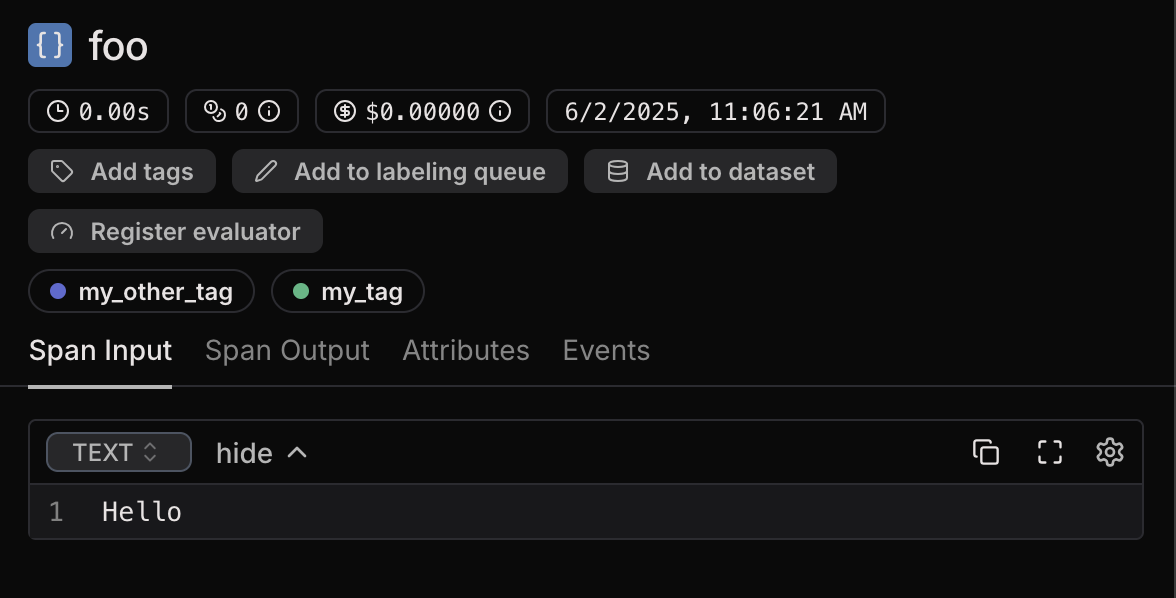
The tags will be visible in the Laminar UI, shown on each span as shields.
### 2.2. Tagging in the Laminar SDK
You can also add tags to a completed trace in the Laminar SDK using `LaminarClient.tags.tag`. This adds tags to the top-level (root) span of the trace.
```typescript theme={null}
import { Laminar, LaminarClient, observe } from '@lmnr-ai/lmnr';
const laminarClient = new LaminarClient();
// Take note of the traceId.
const { traceId } = await observe({ name: 'chat_completion' }, async () => {
return {
// ✅ Correct usage. We are inside a span context,
// so `getTraceId` returns a string UUID.
traceId: Laminar.getTraceId(),
};
});
await Laminar.flush();
// Call this later, when you get user feedback.
const userFeedbackHandler = (traceId: string, userFeedback: 'good' | 'bad') =>
laminarClient.tags.tag(traceId, userFeedback);
```
See also: [`client.tags.tag(traceId, tags)`](/sdk/client#ts-client-tags-tag).
```python theme={null}
from lmnr import Laminar, LaminarClient, observe
laminar_client = LaminarClient()
# Take note of the trace_id.
@observe(name="chat_completion")
def chat_completion():
return Laminar.get_trace_id()
trace_id = chat_completion()
Laminar.flush()
# Call this later, when you get user feedback.
def user_feedback_handler(trace_id: str, user_feedback: str):
laminar_client.tags.tag(trace_id, user_feedback)
```
See also: [`client.tags.tag(trace_id, tags)`](/sdk/client#py-client-tags-tag).
Make sure to call `Laminar.getTraceId()` / `Laminar.get_trace_id()` inside a span context. Outside, it returns `null` / `None`.
## Viewing tags
The tags will be visible in the Laminar UI, shown on each span as shields.
 ## Filtering by span tags
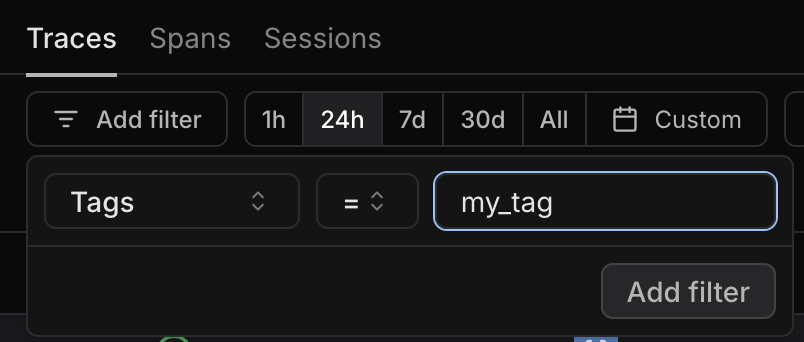
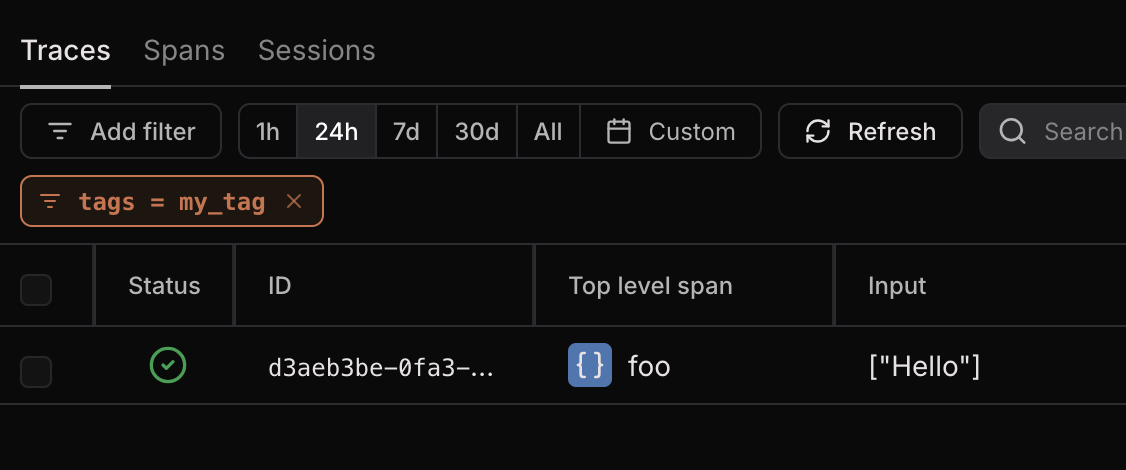
In the **Traces** view and the **Spans** view, you can filter by span tags.
Simply add a “Tags” filter and type the name of the tag you want to include.
## Filtering by span tags
In the **Traces** view and the **Spans** view, you can filter by span tags.
Simply add a “Tags” filter and type the name of the tag you want to include.