
TL;DR Building an agent with Claude Agent SDK? We've released instrumentation packages for the claude-agent-sdk in both Python and TypeScript. Both use a tiny, transparent Rust proxy (shipped inside the package, not a separate server) to capture every prompt, tool call, subagent trajectory, and latency metric from the Claude Code process. No extra dependencies or infrastructure. Get started now.
With Claude Agent SDK, you can build agents various agents including automated PR reviewers, self-healing CI/CD pipelines, research agents, web automations, or practically any task you can describe. Agents can spawn subagents, each with their own tools and context, creating deep execution trees.
However, the SDK has a serious observability challenge. Behind the scenes, it runs Claude Code as a subprocess, effectively a black box. Your agent spawns three subagents, one of them runs a bash command that makes an unwanted change in a file, and you have no idea which subagent did it or what prompt led there. You need to know:
- Did my agent fail because of my application logic or the LLM response?
- What exact prompt did the SDK send to the underlying Claude process?
- Which tools (file edits, bash commands) were actually executed?
- Which subagent went off the rails, and what was its trajectory?
Out of the box, answering any of these questions isn't possible.
At Laminar, we obsess over developer experience. We wanted to ensure that if you are building an agent on top of Claude, you can trace the entire execution flow — from your outer function through every subagent down to the actual LLM and tool calls — with zero friction. We aggressively engineered our solution to maintain a simple setup and minimal footprint while giving you insights at every level of depth.
The Challenge
The difficult part is that the SDK spins up a Node process with the actual Claude Code, which is effectively a separate environment. We needed a way to bridge the gap between your application code and that isolated process.
Our requirements were:
- Instrument Claude Agent SDK functions for the outside trace structure.
- Catch and instrument the LLM calls from the Claude Code Node process.
- Instrument tool calls and subagent trajectories.
- Most importantly: Make sure that data traced in step 1 and step 2 is under the same trace.
Attempt 1: External LLM gateway
The Claude Agent SDK allows changing ANTHROPIC_BASE_URL. Since Laminar instruments many gateways already, we thought we could point the SDK to a central proxy.
The architecture for multiple instances of claude-agent-sdk looked like this:
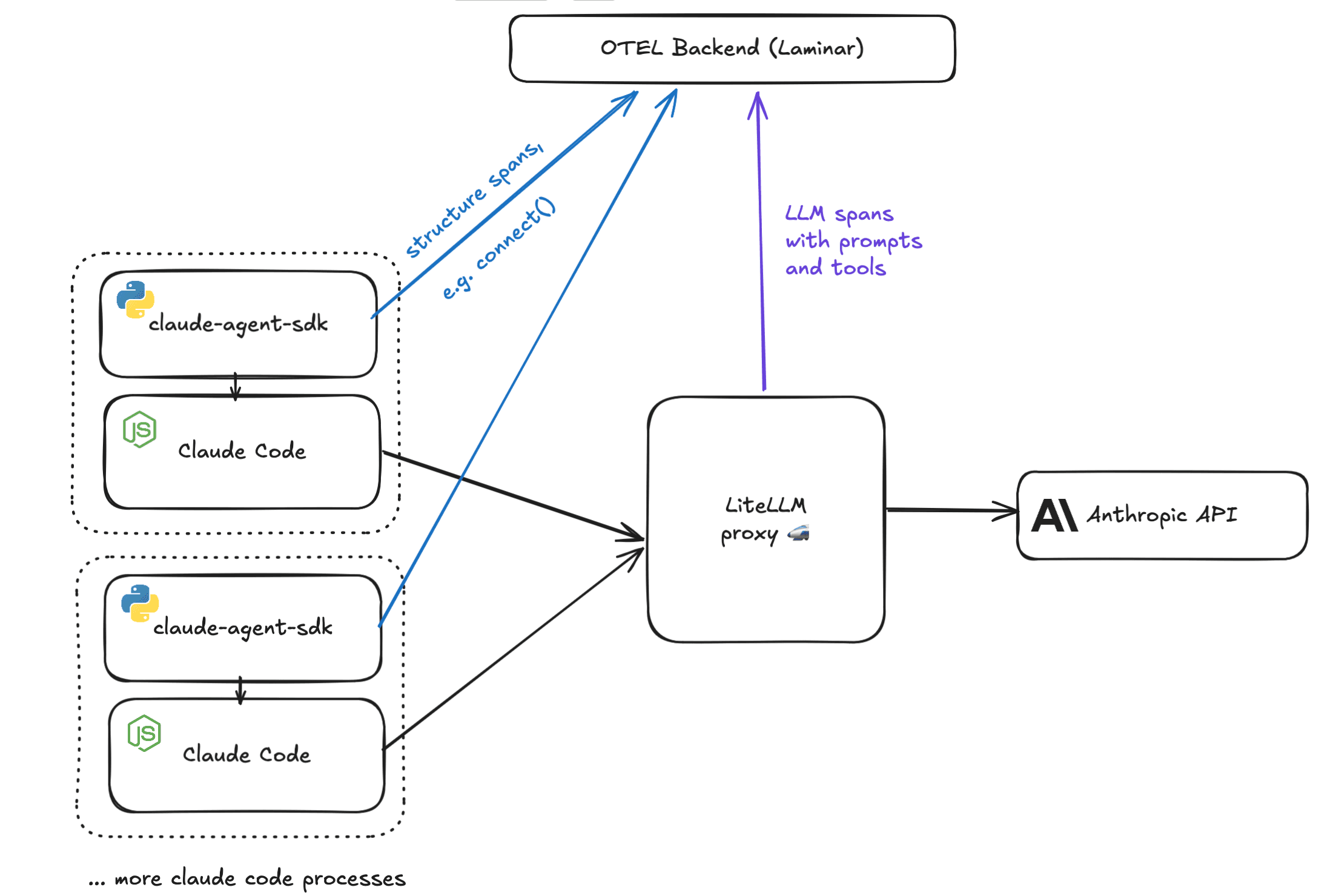
- The Setup: Multiple Claude Code processes; one central proxy (because running a full FastAPI/Flask server for every process is impractical).
- The Flow: Python or Node processes send structure spans (like connect()) to our backend. The gateway sends LLM data (prompts, tool results) to the same backend.
The Problem: Correlation
While the structure spans contain trace IDs, the LLM spans contain different trace IDs. How do we associate the two?
We considered spinning up a side endpoint on the proxy to make the association, but this created too much overhead:
- Users would have to change their own proxy code.
- We would need to pass metadata down to the actual LLM requests.
- Our backend would have to parse this extra metadata.
Attempt 2: Native Claude Code Logs
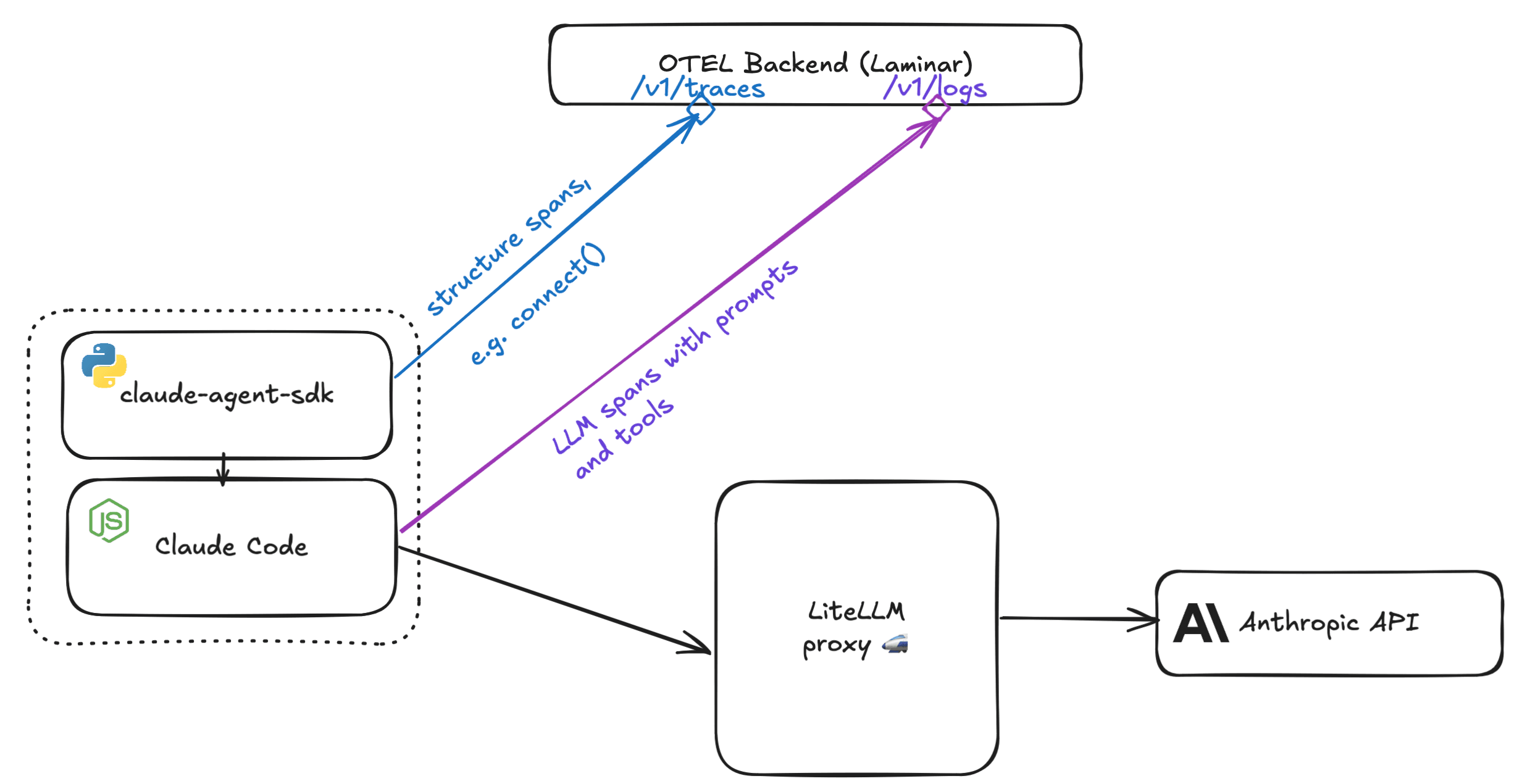
Claude Code already sends logs that are OTEL compatible!
We reasoned that if we set OTEL_EXPORTER_OTLP_LOGS_ENDPOINT and OTEL_EXPORTER_OTLP_HEADERS, we could relay metadata to our backend to associate logs with spans.
We spun up an endpoint to ingest these logs and convert them to our span format.
The Problem: Missing Data & Immutable Environment
But when we looked at the resulting logs, we saw these issues.
- Missing Data: Claude Code only sends metadata (duration, token counts, errors). No prompt data is logged (unless it's the user prompt, and even that is opt-in).
- Process Control: claude-agent-sdk reconnects to existing processes. If the Node process is already running, we cannot modify the environment variables (like trace headers) of that running process from the outside.
The Solution: A Lightweight Rust Proxy Living on Your Machine
We needed something controllable, non-intrusive, and invokable from Python & Node. Since Python and "lightweight" are rarely synonymous and Node is inherently single-threaded, we turned to Rust.
We designed a small Rust server invoked from Python & Node using PyO3 & NAPI-RS bindings.
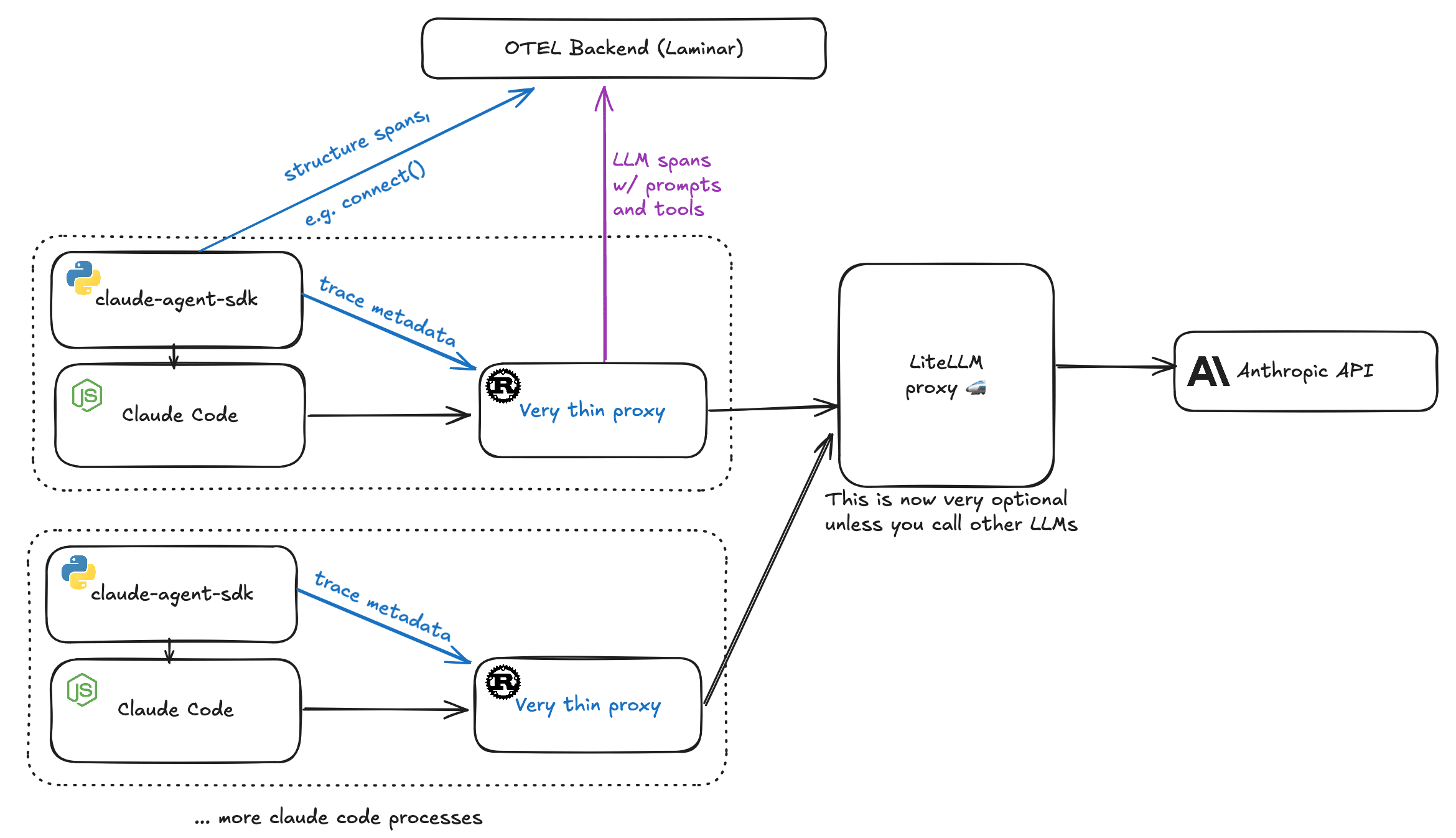
Despite the word "proxy," there is no separate server to deploy or maintain. The Rust binary ships inside the Python wheel or npm package and runs as a library alongside your process. It binds to a local port, intercepts Claude Code's API calls, and forwards them. It's a library, not infrastructure.
Why this works:
- Local & Fast: The proxy is lightweight and lives on the same machine as your application.
- Performance: It re-streams response tokens back immediately. It then processes observed data via tokio::spawn in background, making latency impact negligible.
- Portable: The binary is under 2MB and runs on almost any platform.
- Zero-Friction Setup: Works out of the box with just installation and initialization, no configuration of environment variables or base URLs required.
The Result
Other observability solutions for claude-agent-sdk can only see what happens at the client boundary — the call you made and the final response you got back. Some can also ingest Claude Code's native logs, but those only contain metadata like token counts and durations. Neither approach gives you the actual prompts, tool inputs/outputs, or subagent trajectories.
By solving the process-boundary problem with our Rust proxy, Laminar captures every LLM call, every tool execution, every subagent's trajectory — all nested under your application's trace.
By solving the process-boundary problem with our Rust proxy, Laminar now provides the only drop-in solution for tracing claude-agent-sdk. It doesn't require you to spin up any additional infrastructure and handles everything in place.
Traces collect all LLM prompts, tool call inputs, and tool outputs. When your agent spawns subagents, each subagent's full trajectory appears correctly nested under the parent. You can see exactly which subagent made which tool calls, what prompts it received, and where it diverged. Crucially, all of this is properly nested under your application's top-level query span.
Cloud backend providers including AWS Bedrock and Azure Foundry are also natively supported.
We went to great lengths to keep installation as simple as possible. The setup is just an install command and 1-2 lines of code. We want you analyzing your agents, not wrestling with your instrumentation.
You can view a sample trace here
Get started
Option A: Python
Installation
Install lmnr package.
pip install -U lmnr

uv add -U lmnr
Setup environment
export LMNR_PROJECT_API_KEY=YOUR_PROJECT_KEY
Usage
import asyncio

from claude_agent_sdk import ClaudeSDKClient
from lmnr import Laminar, observe

Laminar.initialize()

@observe()
async def main():
    async with ClaudeSDKClient() as client:
        await client.query(
            "Explain to me with examples, how memoization speeds up recursive "
            "function calls. Use the Fibonacci sequence as an example."
        )
        async for msg in client.receive_response():
            print(msg)

if __name__ == "__main__":
    asyncio.run(main())
Option B: TypeScript / JavaScript
Installation
Install @lmnr-ai/lmnr.
npm install @lmnr-ai/lmnr@latest

pnpm add @lmnr-ai/lmnr@latest
Setup environment
export LMNR_PROJECT_API_KEY=YOUR_PROJECT_KEY
Usage In the JS SDK, you simply wrap the query function.
import { query as origQuery } from "@anthropic-ai/claude-agent-sdk";
import { Laminar } from "@lmnr-ai/lmnr";
// 1. Initialize Laminar
Laminar.initialize({
  projectApiKey: process.env.LMNR_PROJECT_API_KEY,
});
// 2. Wrap the original query function
const query = Laminar.wrapClaudeAgentQuery(origQuery);
async function run() {
  // 3. Use the wrapped query function
  const result = await query({
    prompt: "Scan the current directory for TODOs and create a summary markdown file.",
  });

  console.log(result);
}
run();
For more details, check the Documentation.