When automating for the web, Stagehand gives developers access to both programmatic and abstracted automations in one framework. Use Playwright APIs when you need fine-tuned control over flows with AI-powered act() and extract() for flexible interactions, or autonomous Agents to delegate entire tasks.
The tradeoff with this agency has always been visibility. When your workflow fails on step 36, or your Agent starts hallucinating, you're left guessing what happened.
Now you can see everything. With Laminar, Stagehand, & Kernel, you have full observability for every agent decision and action, synced to a recording of what your agent actually saw and pondered.
What You Can Do
Understand why your Agent went off-script. You told it to find pricing information. It ended up on the blog page. Pull up the trace, step through the Agent's execution loop, see each action it considered and why it chose what it did. The session recording shows you exactly what it was looking at when it made each decision.
Debug when extract() returns malformed data. LLMs still struggle to reliably produce valid JSON matching your schema. When extract() fails, open the trace, find the LLM span, and open the trace in a Laminar Playground. Laminar loads the exact prompt, model config, and structured output schema. Tweak the prompt, adjust the schema definition, or try a different model. Iterate right there until it works, then update your code with confidence.
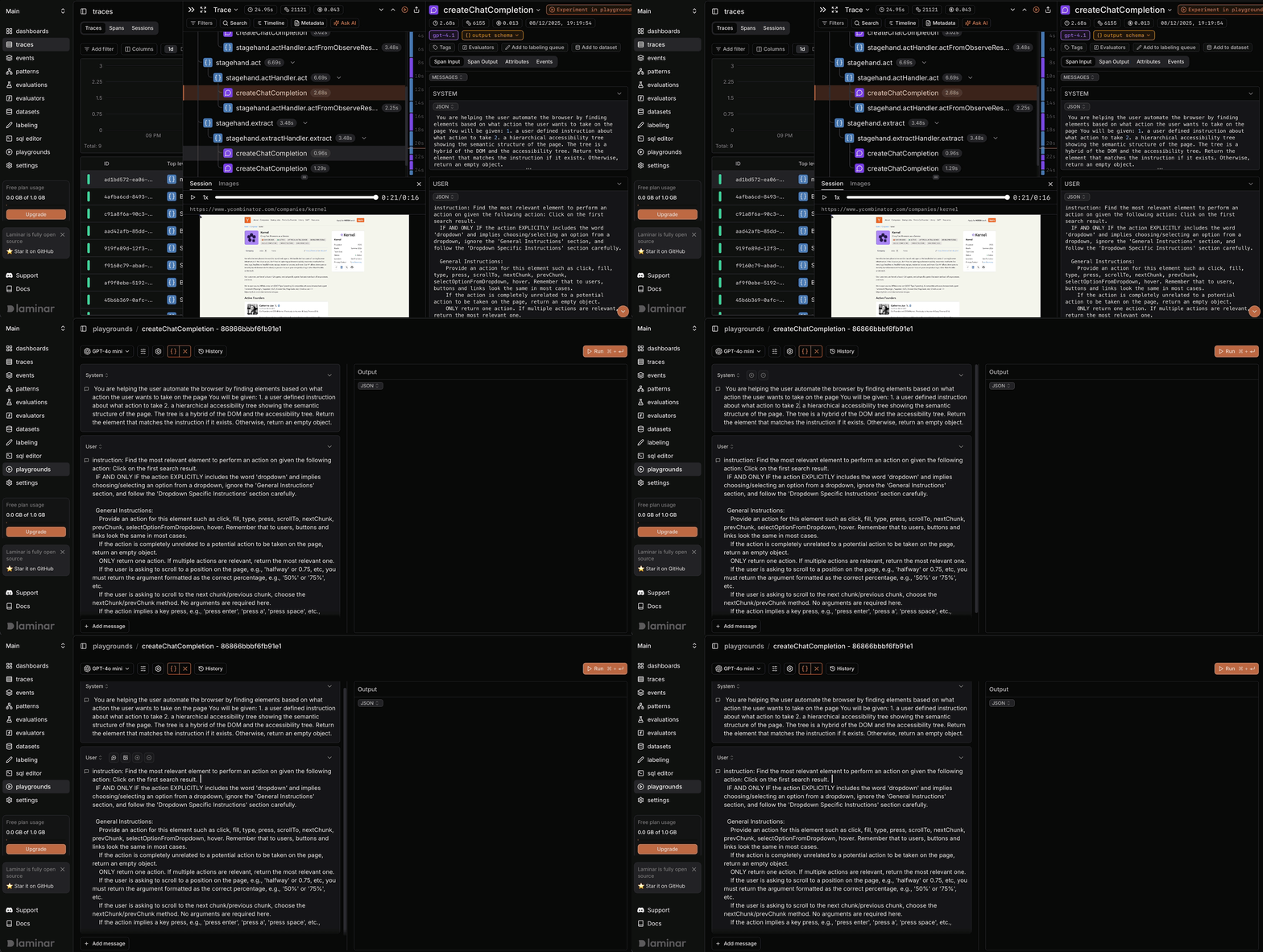
See why act() clicked the wrong element. Your act("Add to cart") hit the wrong button. The trace shows you the prompt Stagehand constructed, what the model returned, and the page state it was working with. The fix is often obvious when you can see exactly what the Agent saw.
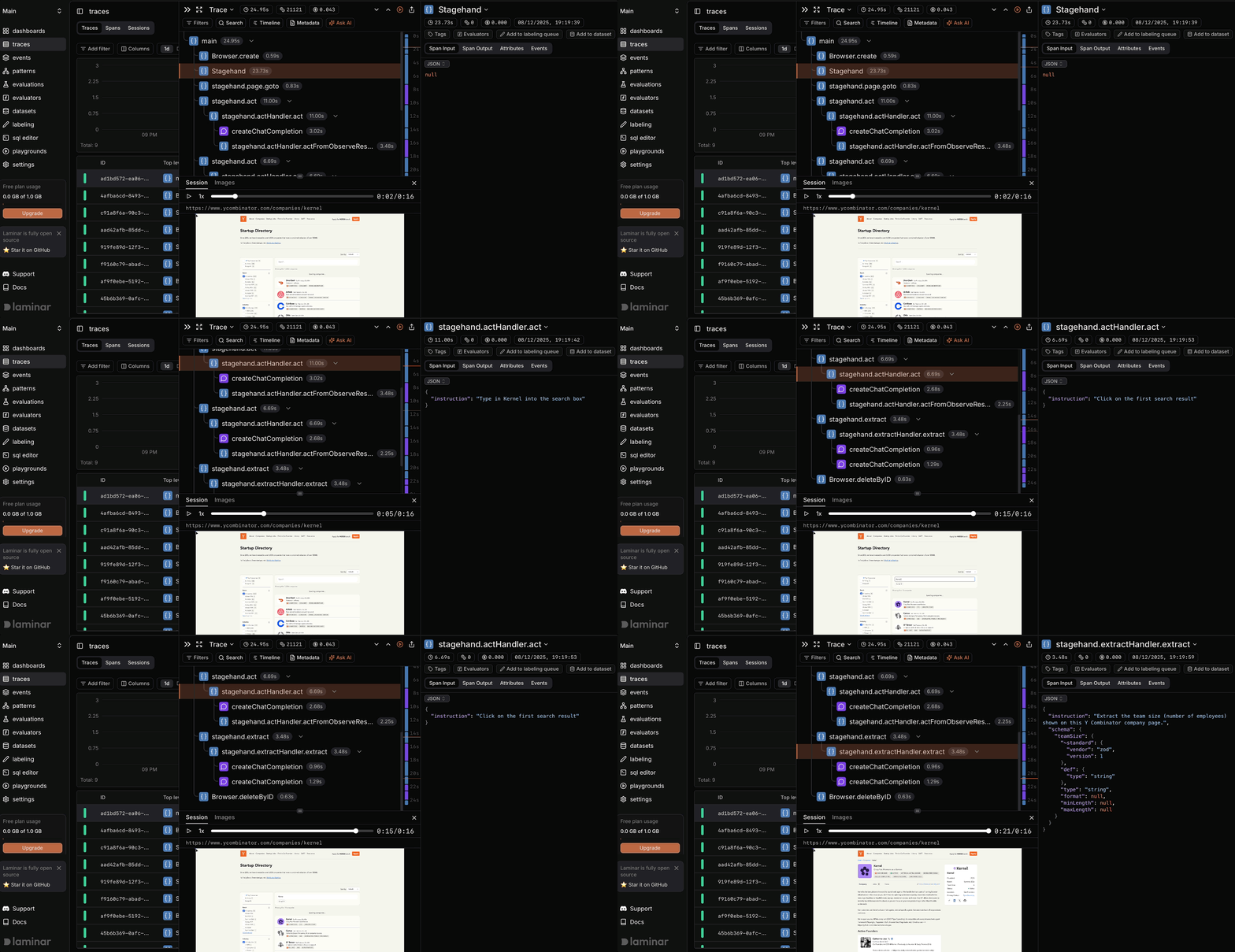
Step through complex workflows without re-running them. Your 70-step workflow failed somewhere in the middle. You don't want to re-run the whole thing with print statements. Open the trace, click through the span tree to find the failure, and watch the synchronized browser recording to see exactly what the page looked like at that moment. If you need to experiment with a failing LLM call, open it in Playground and iterate without touching your code.
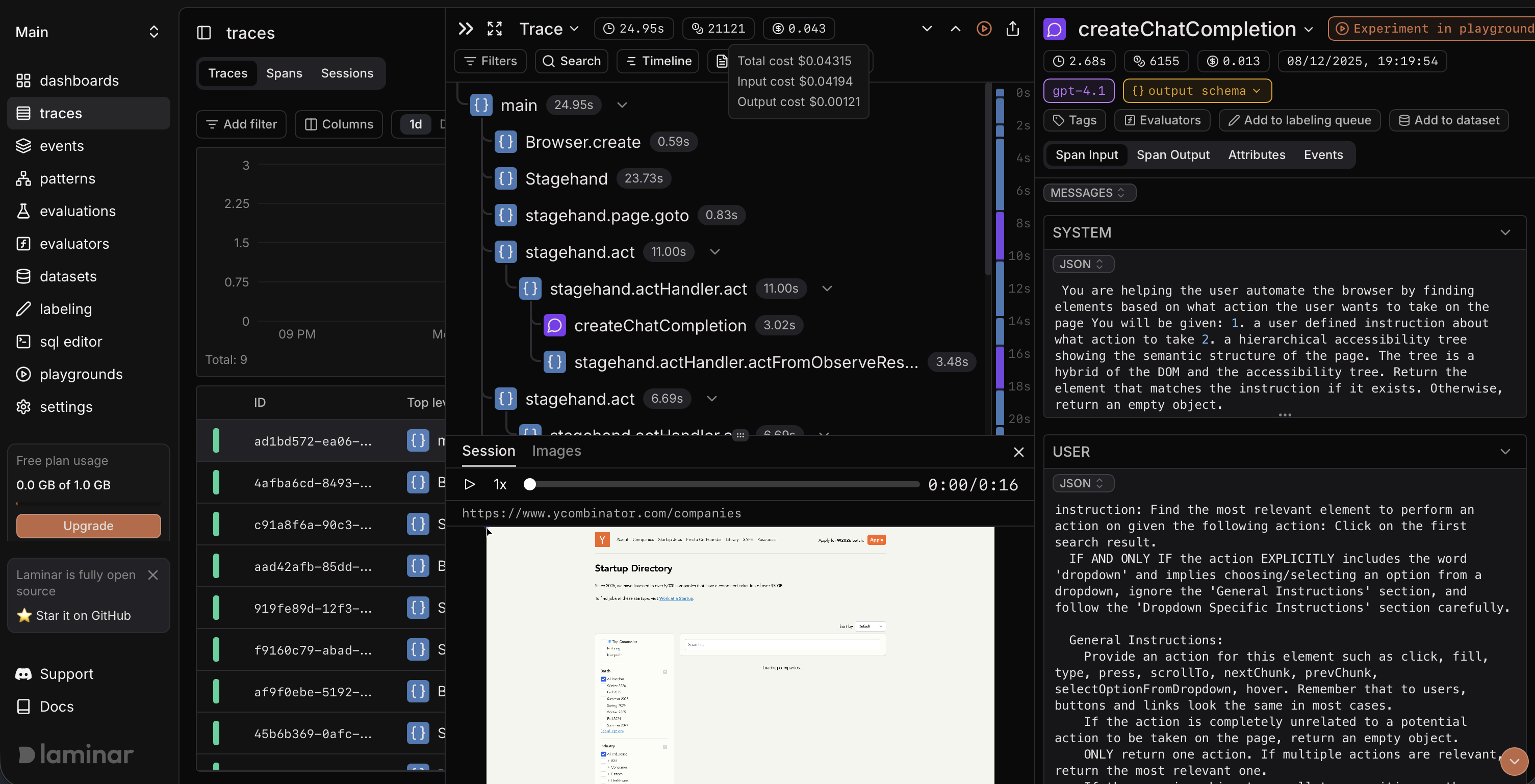
Track costs across workflows and Agents. Some workflows are cheap. Some Agent runs burn through tokens exploring too many paths. See exactly which act(), extract(), or Agent step costs what, and optimise accordingly.
Share debugging context with your team. Found a bizarre edge case at 1am? Share the trace link. Your teammate gets the full execution timeline, the browser recording, every LLM call. No more "can you try to reproduce this?"
How It Works
Install the SDKs:
npm install @lmnr-ai/lmnr @browserbasehq/stagehand
Initialize Laminar with Stagehand instrumentation:
import { Laminar } from "@lmnr-ai/lmnr";
import { Stagehand } from "@browserbasehq/stagehand";

Laminar.initialize({
  projectApiKey: process.env.LMNR_PROJECT_API_KEY,
  instrumentModules: {
    stagehand: Stagehand,
  },
});
Scripted Workflows with act/extract
Mix Playwright's precision with Stagehand's AI-powered actions:
const stagehand = new Stagehand({
  env: "LOCAL",
  model: "openai/gpt-4.1",
});

await stagehand.init();

const page = stagehand.context.pages()[0];

// Use Playwright APIs directly
await page.goto("https://github.com/lmnr-ai/lmnr");

// Use act() for AI-powered interactions
await stagehand.act("Click on the Issues tab");

// Use extract() for structured data
const issues = await stagehand.extract(
  "Extract the titles and numbers of the first 5 open issues",
  z.object({
    issues: z.array(
      z.object({
        title: z.string(),
        number: z.number(),
      })
    ),
  })
);

console.log(issues);

await stagehand.close();
await Laminar.flush();
Autonomous Agents
For multi-step tasks where you want to delegate entirely:
const stagehand = new Stagehand({
  env: "LOCAL",
  model: "openai/gpt-4.1",
});

await stagehand.init();

const page = stagehand.context.pages()[0];
await page.goto("https://news.ycombinator.com");

// Create an agent for multi-step autonomous tasks
const agent = stagehand.agent();

const result = await agent.execute("Find the top story about AI, click into it, and extract the title and top comment");

console.log(result);

await stagehand.close();
await Laminar.flush();
Both workflows and Agent runs produce full traces in your Laminar dashboard with synchronized browser recordings.
What You Get
- Session recordings synced to your traces — Watch exactly what your agent saw, rendered as video. Laminar captures the full browser session and synchronizes it with your execution timeline, so you can see the page state at every step. It's like a flight recorder for your browser automation.
- Full LLM visibility — Every prompt, response, and token count across workflows and Agent executions
- Execution timelines — Your entire run as a single navigable trace
- Playground debugging — Click any LLM span to open it with the exact config, prompt, and schema, ready to iterate
- Cost attribution — Know what you are paying for each step
Works with Stagehand v2 and v3 (v3 requires @lmnr-ai/lmnr@0.7.11 or later).
Ready to Productionize?
When you're ready to move beyond local development, our friends at Kernel provide cloud browser infrastructure purpose-built for automation at scale. No local browser management, stealth mode for avoiding detection, and live view URLs for debugging remote sessions. Laminar integrates with Kernel out of the box: same full observability, now with cloud browsers powering your production workloads.
Stagehand gives you flexibility. Playwright when you need control, AI when you need adaptability, Agents when you want to delegate. Now you can see exactly what's happening at every level.