
User feedback on an AI agent includes explicit ratings and comments, plus behavioral signals such as edits and regenerate clicks. To investigate an answer, you need to connect those signals to the run that produced it.
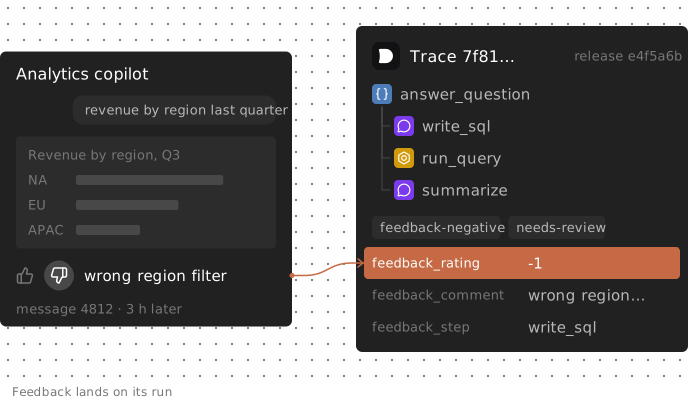
Consider an analytics copilot that turns "revenue by region last quarter" into SQL and summarizes the results. Three hours after a chart renders, the user clicks thumbs-down and writes "wrong region filter." The trace has ended; the feedback endpoint receives only a message ID.
If that message maps to a trace, you can inspect the generated SQL, check the data returned, and identify the release that produced the answer. This guide uses Laminar to capture that link and turn feedback into review work and release comparisons. Those comparisons help you choose what to investigate; they do not establish that a prompt change caused an improvement.
Store the trace ID with every agent message
Feedback often arrives in a separate request after the agent run has finished. Save the trace ID beside the message in your application database while the run is active.
In Laminar, Laminar.get_trace_id() returns the current trace ID inside a span context, such as an @observed function. The entry point below sets the session and user IDs, then returns the trace ID with the answer:
from lmnr import Laminar, observe

Laminar.initialize()


@observe(name="answer_question")
def answer_question(conversation_id: str, user_id: str, question: str) -> dict:
    Laminar.set_trace_session_id(conversation_id)
    Laminar.set_trace_user_id(user_id)
    sql = write_sql(question)
    rows = run_query(sql)
    answer = summarize(question, rows)
    return {"answer": answer, "sql": sql, "trace_id": str(Laminar.get_trace_id())}


def handle_question(conversation_id: str, user_id: str, question: str, plan: str) -> dict:
    result = answer_question(conversation_id, user_id, question)
    message_id = db.insert_message(
        conversation_id=conversation_id,
        trace_id=result["trace_id"],
        sql=result["sql"],
        answer=result["answer"],
        plan=plan,
    )
    return {"message_id": message_id, "answer": result["answer"], "sql": result["sql"]}
Here, write_sql, run_query and summarize are application functions, each decorated with @observe to appear as spans. db represents your database.
The browser receives a message_id, not the trace ID or a Laminar API key. Its feedback request posts that message ID to your backend, which looks up the trace. Call get_trace_id() before leaving the observed function: outside a span context, it returns None.
Keep context you will need for analysis, such as the plan or UI surface, in the message row too. Include any added fields in every metadata sync described below. The metadata docs describe this delayed-feedback pattern.
Choose the feedback unit: turn, conversation or step
Choose the unit before you build the button or calculate rates.
Turn: one trace. A vote on a message rates that turn. With one trace per user turn, the message's trace is the unit used by the handler and SQL below. A regenerate click belongs to the trace being replaced.
Conversation: one session. An end-of-chat rating concerns the whole conversation. Laminar groups traces into sessions by session_id. You can anchor session feedback to the last turn's trace, using separate conversation fields and feedback_scope: "conversation". Keep conversation ratings separate from feedback_rating so they do not overwrite a turn's vote. Roll up by session_id for conversation-level reporting.
Step: a span hint. Editing generated SQL points you toward write_sql, but does not prove that step failed. Post-run tags and metadata in this Laminar workflow attach to the trace. Record feedback_step: "write_sql" as a hint, and keep track of whether the app, user or reviewer supplied it. A reviewer must still inspect the span's input and output.
| Feedback | Unit | Where it goes |
|---|---|---|
| Thumbs up/down on a message | Turn | That message's trace |
| Comment on a message | Turn | That message's trace |
| End-of-conversation rating | Conversation | Last turn's trace, feedback_scope: "conversation" |
| User edits the generated SQL | Step hint | The message's trace, feedback_step: "write_sql" |
| Regenerate click | Turn | The trace being replaced |
Write user feedback to the finished trace in Laminar
Laminar has no dedicated feedback score object for production traces. Use tags such as feedback-negative and needs-review for routing. Use metadata for the rating, comment and step hint. Tags are queryable as trace_tags; metadata is JSON.
This backend handler records a vote, comment or SQL edit in your database before syncing it:
from lmnr import LaminarClient

client = LaminarClient()


def record_feedback(message_id: str, **changes) -> None:
    db.update_feedback(message_id, **changes)
    sync_feedback(message_id)


def sync_feedback(message_id: str) -> None:
    msg = db.get_message(message_id)
    if msg.rating == -1:
        client.tags.tag(msg.trace_id, ["feedback-negative", "needs-review"])
    client.traces.push_metadata(
        msg.trace_id,
        {
            "plan": msg.plan,
            "feedback_rating": msg.rating,
            "feedback_comment": msg.comment or "",
            "feedback_step": msg.step or "",
            "sql_edited_by_user": msg.sql_edited,
        },
    )
rating is 1, -1, or None for a message nobody rated. Called as record_feedback(message_id, rating=-1, comment="wrong region filter", step="write_sql"), the trace gets two tags and the full record. An edit alone, record_feedback(message_id, sql_edited=True, step="write_sql"), writes feedback_rating: null, which the queries below don't count as a rating.
In our tests against the current open-source Laminar server, push_metadata replaced the entire metadata object: a push containing only sql_edited_by_user erased an earlier rating, and a feedback push erased the plan key set during the run. The client reference describes a shallow merge. Sending the complete record works under either behavior, as long as it includes every key you want to keep.
Treat the database as authoritative and coordinate any other metadata writers. Extend both the database record and the sync snapshot when you add fields.
Re-reading the row avoids replaying an old payload, but overlapping syncs can still land out of order. Serialize writes per message where practical, and periodically re-sync changed messages so the trace can converge after updates settle.
Retry even without an exception. A metadata push before trace ingestion logs a warning and returns without raising. In our test, a click recorded before the trace was flushed was skipped, and a later sync wrote it. Retry from the database, not a saved payload.
Tags are additive. A user who flips from thumbs-down to thumbs-up still leaves feedback-negative and needs-review on the trace. Treat these as historical flags and read the current rating from metadata.
Langfuse provides named, typed scores with optional comments and a browser scoring client. Braintrust's logFeedback attaches scores, comments and metadata to a span; its feedback guide describes child spans per submission, with scores averaged on the parent. Those are more structured feedback models. In Laminar, you own the metadata schema.
Pair explicit feedback with behavioral signals
Explicit ratings tell you which vote a user chose, not why an answer failed. Langfuse's feedback guide describes explicit feedback as rare and skewed toward unhappy users. Unrated runs are not positive ratings.
Behavioral signals widen the pool of runs to examine, but need interpretation. A copy action could mean the answer was useful or that it is going into a bug report.
| Signal | Kind | How to capture | What it may mean |
|---|---|---|---|
| Thumbs down + comment | Explicit | Feedback endpoint | Answer wrong or unhelpful |
| SQL edited before running | Implicit | Query editor event | Look at write_sql first |
| Regenerate click | Implicit | Backend event | Answer rejected |
| Chart added to a dashboard | Implicit | Backend event | Answer used |
| Question rephrased next turn | Implicit | Trace analysis | Agent misunderstood |
| Conversation abandoned | Implicit | Session-level SQL | Solved, or gave up |
Capture backend events through the same application record, extending the sync snapshot to include their fields.
Textual signals need analysis of the run. In Laminar, a Signal combines an instruction and output schema that the Signals agent applies to finished traces matching its trigger and filters. It records a structured event when it finds a match.
The built-in Friction template looks for "confusion, repeated attempts, or poor user experience" and records a description and severity: low, medium or high. New projects can enable it during onboarding. It runs on traces over 1,000 tokens by default. The Signals quickstart explains setup.
A Signal reads one trace at a time. To detect a rephrased question, that trace must contain the earlier exchange. Most chat agents resend the conversation history on every model call, so it usually does. If your application truncates or summarizes conversation history, the Signal has less evidence.
Use these signals to select runs for review, not to assign a quality score.
When product analytics is enough
For satisfaction trends, keep thumbs events in your existing product analytics tool, such as PostHog or Amplitude. Your PM can work in the same event and cohort workflow.
A bare click event cannot explain why the answer disappointed someone. It needs run context to reveal the SQL, returned rows or prompt version. A trace gives an engineer that context.
You can use both: send the analytics event with the trace ID as a property, and write the feedback to the trace. Product analytics tracks behavior; the linked trace supports investigation.
Compare feedback by release and agent version
After a prompt or tool change, compare feedback on the traces produced by each release. Treat the result as descriptive: a shift tells you where to investigate, not that the change caused it.
Laminar records a release, usually a git commit SHA, when one is supplied or detected through configuration such as LMNR_RELEASE. It is a separate column, unaffected by metadata writes. Run this query in the SQL editor:
SELECT
    release,
    count() AS runs,
    countIf(JSONExtractInt(metadata, 'feedback_rating') IN (-1, 1)) AS rated,
    countIf(JSONExtractInt(metadata, 'feedback_rating') = -1) AS thumbs_down,
    countIf(JSONExtractBool(metadata, 'sql_edited_by_user')) AS edited,
    round(rated / runs, 3) AS feedback_rate,
    round(thumbs_down / greatest(rated, 1), 3) AS negative_share,
    round(edited / runs, 3) AS edit_rate
FROM traces
WHERE start_time > now() - INTERVAL 16 DAY
  AND start_time < now() - INTERVAL 2 DAY
  AND top_span_name = 'answer_question'
GROUP BY release
ORDER BY min(start_time)
The upper bound excludes the last two days to allow feedback to arrive. Choose that delay from your own feedback timing. On a test project with synthetic traffic (bound removed, since the runs were minutes old), it returned the results below. They demonstrate the query, not release quality:
| release | runs | rated | thumbs_down | edited | feedback_rate | negative_share | edit_rate |
|---|---|---|---|---|---|---|---|
| a1b2c3d | 20 | 7 | 4 | 2 | 0.35 | 0.571 | 0.1 |
| e4f5a6b | 21 | 11 | 3 | 2 | 0.524 | 0.273 | 0.095 |
Read coverage and negative share together. feedback_rate divides rated runs by all runs; negative_share divides negative ratings by rated runs. With no rated runs, the query returns zero for negative_share to avoid division by zero, not to report perfect satisfaction.
Compare releases with the same feedback UI and comparable traffic. A larger button can change who rates. These small synthetic samples cannot establish an improvement.
Laminar's agent versions feature is in beta. It groups LLM calls by the opening of their system prompt and records a new version when the prompt or tool definitions change. Keep the release alongside the version to identify its deployment. ARRAY JOIN associates feedback with versions present in a trace:
SELECT
    v.version_hash AS version,
    count() AS runs,
    countIf(JSONExtractInt(metadata, 'feedback_rating') IN (-1, 1)) AS rated,
    countIf(JSONExtractInt(metadata, 'feedback_rating') = -1) AS thumbs_down
FROM traces
ARRAY JOIN agent_versions AS v
WHERE start_time > now() - INTERVAL 16 DAY
  AND start_time < now() - INTERVAL 2 DAY
  AND top_span_name = 'answer_question'
GROUP BY version
ORDER BY runs DESC
A trace lists all agent versions that ran in it, so a multi-agent trace's rating contributes to each version. Filtering to the agent you changed narrows the cohort; it does not turn a whole-run vote into a step-level verdict.
Implicit signals can also be compared per run. This subquery counts traces with Friction events:
SELECT
    release,
    count() AS runs,
    countIf(JSONExtractInt(metadata, 'feedback_rating') = -1) AS thumbs_down,
    countIf(id IN (
        SELECT trace_id FROM signal_events
        WHERE signal_name = 'Friction' AND timestamp > now() - INTERVAL 16 DAY
    )) AS friction,
    round(thumbs_down / runs, 3) AS thumbs_down_rate,
    round(friction / runs, 3) AS friction_rate
FROM traces
WHERE start_time > now() - INTERVAL 16 DAY
  AND start_time < now() - INTERVAL 2 DAY
  AND top_span_name = 'answer_question'
GROUP BY release
Here, friction_rate means flagged runs divided by all selected runs. Friction evaluates only traces passing its triggers and filters, including the default token threshold. A release with shorter traces may have lower coverage. Compare eligibility and configuration before interpreting differences, then read representative traces. These counts do not measure Friction's detection accuracy.
Route negative runs into review and a regression dataset
Queue candidates, not presumed defects. This query selects negative ratings, SQL edits and Friction events:
SELECT
    id AS trace_id,
    session_id,
    release,
    JSONExtractInt(metadata, 'feedback_rating') AS rating,
    JSONExtractString(metadata, 'feedback_comment') AS comment,
    JSONExtractString(metadata, 'feedback_step') AS step,
    JSONExtractBool(metadata, 'sql_edited_by_user') AS edited,
    id IN (
        SELECT trace_id FROM signal_events
        WHERE signal_name = 'Friction' AND timestamp > now() - INTERVAL 7 DAY
    ) AS friction,
    agent_input,
    end_time
FROM traces
WHERE start_time > now() - INTERVAL 7 DAY
  AND top_span_name = 'answer_question'
  AND (rating = -1 OR edited OR friction)
ORDER BY end_time DESC
LIMIT 200
agent_input is the user's request as Laminar extracts it from the trace. For "wrong region filter," start with the write_sql hint. Compare the requested region with that span's input and generated filter, then inspect the rows returned by run_query. Decide whether the problem came from interpretation, data or a changed user requirement before proposing a fix.
From the SQL results, Export → Export to Labeling Queue sends rows to a labeling queue. A reviewer records what the agent should have done. For scheduled exports, use POST /v1/labeling_queues/{queue_id}/items with the trace ID as idempotencyKey; retries then return the same item instead of creating duplicates.
Approved cases can become regression tests. How to Turn Production Traces into an Eval Dataset covers that workflow.
Run the regression eval to check whether the known cases pass after the fix. Then compare production feedback on mature, comparable release cohorts. Passing known cases and seeing fewer complaints provide different evidence; neither proves the change helped every workload.
FAQ
Can the browser send feedback straight to Laminar?
Route it through your backend. Tag and metadata writes require a project API key, which must stay server-side. Authenticate the request, confirm the user can access the message, and validate allowed feedback fields before calling the handler. Do not pass arbitrary request fields into **changes.
How late can feedback arrive and still attach to the run?
For a finished trace still stored in the project, feedback can arrive seconds, minutes or days later if you retained its ID. A metadata push before ingestion is skipped, so delayed synchronization matters even for immediate clicks. The client reference documents the finished-trace calls.
Can I put a human reviewer's verdict on the same trace?
Yes. Use separate keys such as review_verdict and review_note, and include them in the authoritative full-record write. Keep the user's rating intact: "agent was right, data was stale" explains the complaint without erasing it. Ensure your sync worker includes reviewer fields rather than overwriting them.
Should I use thumbs-down to tune a Signal?
Use disagreements to select traces for review, not as labels. A thumbs-down run may be outside Friction's purpose or ineligible under its filters. A positive rating does not disprove friction. Check the trace against the instruction before discarding an event. Discarding deletes the event and adds your reason to the instruction on future runs. The Signals quickstart explains this behavior.