
Overview
Laminar is an open-source, OpenTelemetry-native observability platform for the Claude Agent SDK. Trace, debug, and monitor every agent turn, tool call, and subagent spawned byClaudeSDKClient.query and the module-level query function. Self-host via Helm or use managed cloud.
Claude Agent SDK (formerly Claude Code SDK) lets you call the same agent that powers Claude Code from your own code. It handles process management, tool execution, and model calls, and exposes a query function (TypeScript) and ClaudeSDKClient (Python) for driving a session.
Laminar captures the full structure of each run: the root call, every model turn, each tool call, and every subagent spawned via the Agent tool. Nested subagents show up as child spans under the invocation that spawned them, so you can read the whole agent tree in one trace.
What Laminar captures:
- The root call (
ClaudeSDKClient.query/ module-levelquery) with the prompt you sent. - Every model turn with prompts, responses, token counts, latency, and cost.
- Tool calls (
Read,Write,Edit,Bash,Glob,Grep,WebSearch, custom MCP tools) with arguments and results. - Subagents spawned via the
Agenttool as nested spans under the parent turn.
Getting started
- TypeScript
- Python
1
Install
Ensure you are using
@lmnr-ai/lmnr version 0.7.10 or higher.2
Set environment variables
3
Wrap the query function
query is an async generator. You must iterate it (or collect it) for the agent to run to completion. If you need the return value before initialization, the module-level instrumentClaudeAgentQuery(originalQuery) export is equivalent to Laminar.wrapClaudeAgentQuery.Running on Amazon Bedrock
The Claude Agent SDK supports Claude models hosted on Amazon Bedrock. Laminar traces work out of the box: follow Anthropic’s Amazon Bedrock guide to configure your AWS credentials and the SDK environment variables, and additionally setAWS_REGION to the region you’re targeting.
AWS_REGION is required for Laminar tracing to work correctly on Bedrock.See what happened in a trace
Open the trace in Laminar and you land on the transcript view: each turn reads as a conversation, with the prompt, the model’s response, tool calls inline with their inputs and outputs, and any subagents collapsed to their final output. A tree of span names tells you the shape of the run; the transcript tells you what actually happened.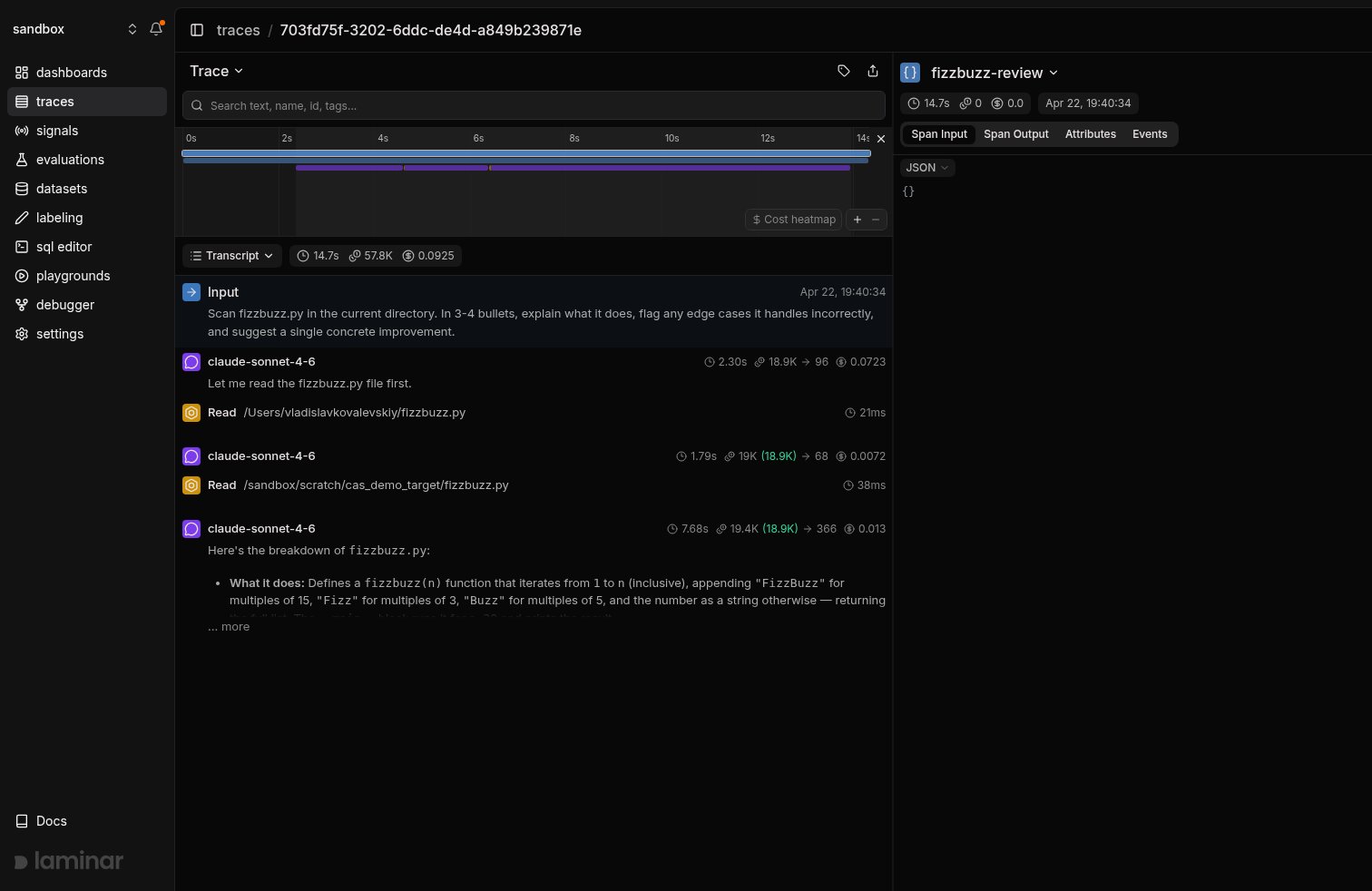
Transcript view: the user prompt, tool calls, and model responses read as a dialogue. Expand any span to see its full input and output.
Multi-agent runs
The Claude Agent SDK lets you define subagents programmatically with theagents option. Each subagent gets its own system prompt and tool allowlist, and the orchestrator invokes them via the Agent tool (formerly Task). In Laminar, every subagent invocation becomes a child span of the turn that spawned it, with its own LLM calls and tool calls nested underneath.
- TypeScript
- Python
Subagents are only invoked when
Agent is in allowedTools / allowed_tools. Without it, the orchestrator cannot delegate and you’ll see a single-threaded trace.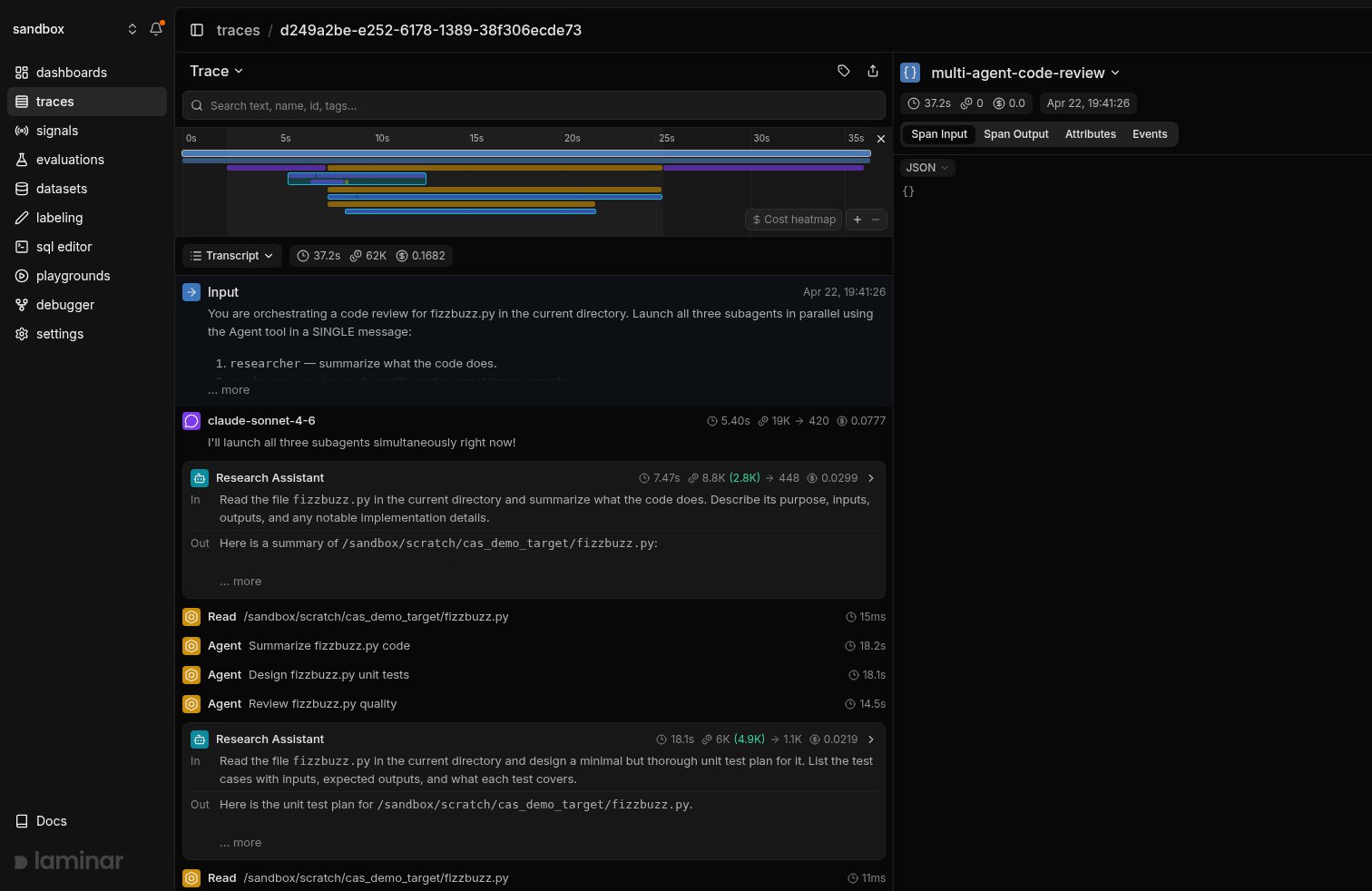
Tree view of a multi-agent run: the ClaudeSDKClient.query root contains the orchestrator turn and three Agent-tool subagents, each with its own LLM and tool calls nested underneath.
Track outcomes with Signals
Traces answer what happened on this run. Signals answer the cross-trace question: how often does the agent edit a file it wasn’t asked to, when does a subagent exceed five tool calls, which reviewers miss null-check bugs. A Signal pairs a plain-language prompt with a JSON output schema. Laminar runs it live on new traces (Triggers) or backfills it across history (Jobs) and records a structured event every time it matches. From there you query, cluster, and alert on events across every trace.Every new project ships with a Failure Detector Signal that categorizes issues on any trace over 1000 tokens. Open it from the Signals sidebar to see events as soon as your Claude Agent SDK traces arrive.
Query across traces
- SQL editor for ad-hoc queries across traces, spans, signals, and evals.
- SQL API for programmatic access from scripts and pipelines.
- CLI (
lmnr-cli sql query) for terminal-driven queries and piping JSON into shell tools or coding agents. - MCP server to query Laminar directly from Claude Code, Cursor, Codex, or any MCP-aware client.
Troubleshooting
I don't see any traces in Laminar
I don't see any traces in Laminar
- Confirm
LMNR_PROJECT_API_KEYis set in the same process that runs the Claude Agent SDK. - In TypeScript, make sure you’re iterating the async generator returned by
query. The agent only runs while you consume messages. - In Python,
claude-agent-sdkmust be importable whenLaminar.initialize()runs. Install it withpip install claude-agent-sdk.
Subagents aren't showing up as child spans
Subagents aren't showing up as child spans
- Add
AgenttoallowedTools/allowed_tools. Without it the orchestrator falls back to doing everything in-line. - Define subagents on the
agentsoption; otherwise theAgenttool has nothing to invoke. - The
Agenttool was calledTaskin earlier Claude Agent SDK versions (< 2.1.63). Upgrade to the latest SDK to match the examples above.
Self-hosting Laminar
Self-hosting Laminar
Set
LMNR_BASE_URL and the ports of your instance before initializing. For a local OSS deployment:What’s next
Viewing traces
Read the transcript view, filter, and search across traces.
Signals
Detect behaviors and failures across every run, then query, cluster, and alert on them.
SQL editor and MCP server
Query traces programmatically from the UI, API, or your IDE.
Tracing structure
Sessions, metadata, and tags for deeper control.
Related integrations
Claude Code
Trace Claude Code sessions with a one-command plugin.
OpenCode
Running the Claude Agent SDK alongside OpenCode? Trace both here.
Codex
Trace Codex CLI sessions with a one-command plugin.
Anthropic
Trace the Anthropic SDK directly in TypeScript and Python.
OpenHands SDK
Trace OpenHands software agents end to end.
All integrations
Browse every provider, framework, coding agent, and browser integration Laminar supports.