
Overview
Laminar is an open-source, OpenTelemetry-native observability platform for AI agents. Trace, debug, and monitor every run of an eve durable agent by adding Laminar as an OpenTelemetry destination. eve emits spans for agent turns, model calls, and tool calls; Laminar captures the full run without per-call wiring. Self-host via Helm or use managed cloud. What Laminar can capture from an eve agent, depending on eve’s content settings:- User messages and system instructions sent to the model.
- Model output and reasoning for each turn.
- Tool calls, their arguments, and tool results.
- Token counts, latency, and cost per call.
- The model name and provider behind each call.
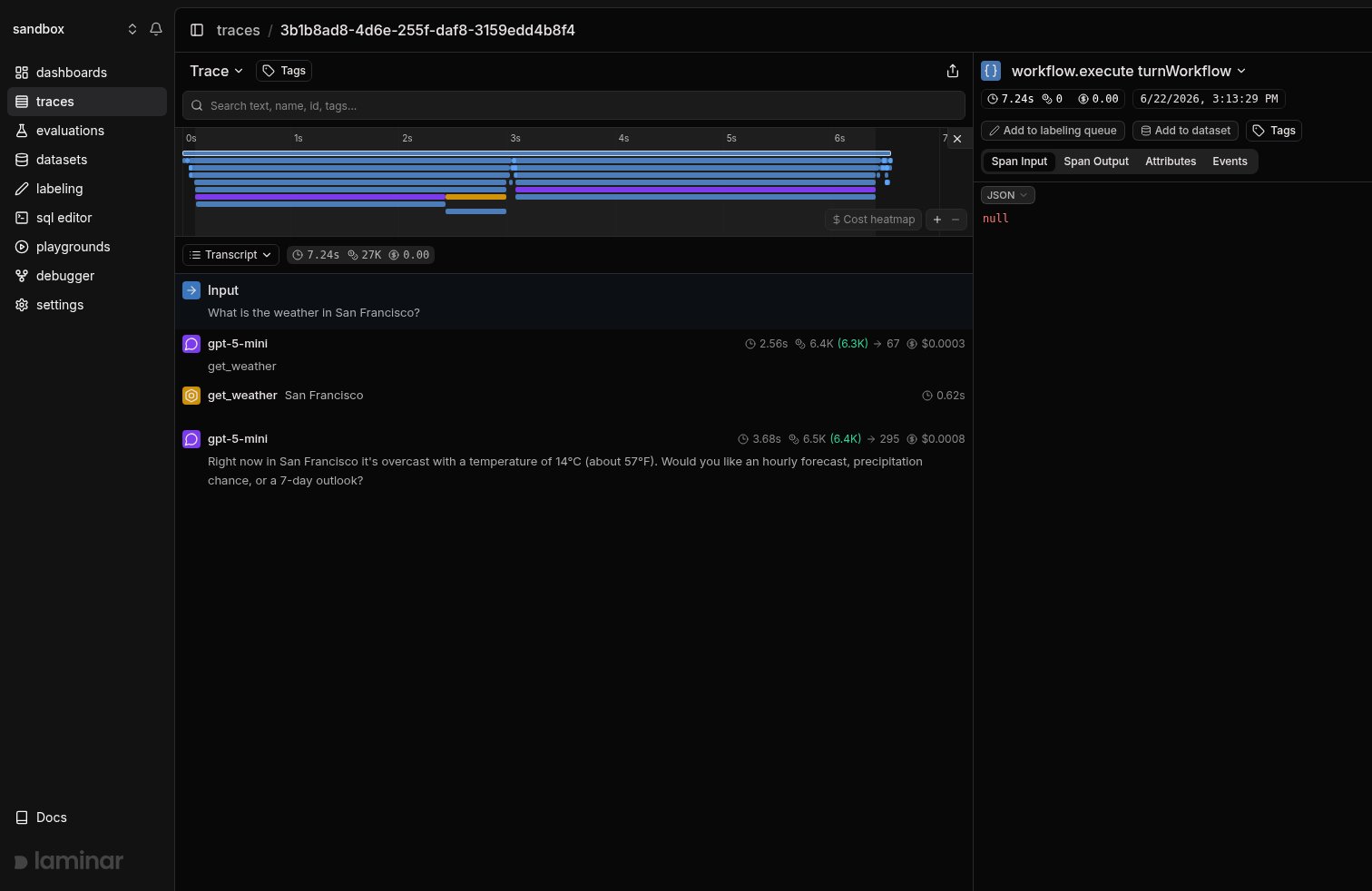
An eve agent turn in Laminar: the user question, model turns, a tool call, and the final answer rendered as a transcript, with the span timeline on the right.
Getting Started
eve discovers files underagent/instrumentation/ automatically. Add a Laminar destination using eve’s otelIntegration(); eve owns the tracer provider and the agent’s trace context. This setup requires @lmnr-ai/lmnr 0.8.51 or newer and eve 0.76.3 or newer (Node.js 24).
1
Install
2
Set environment variables
Laminar initialization. If not specified,
Laminar will look for the key in the LMNR_PROJECT_API_KEY environment variable.3
Add Laminar as an OpenTelemetry destination
Create Do not call
agent/instrumentation/laminar.ts. eve discovers the file and attaches Laminar’s span processor to its OpenTelemetry pipeline. The processor reads LMNR_PROJECT_API_KEY from the agent’s environment.agent/instrumentation/laminar.ts
Laminar.initialize() in the agent: eve owns the tracer provider.Set
LMNR_PROJECT_API_KEY in the agent server’s environment, not just the eval runner’s. The agent exports its own spans; the reporter exports the eval grades separately.4
Run your agent
Build and start the agent as usual. Every turn is traced.Send the agent a message and the trace appears in Laminar.
Run evals
eve ships its own eval runner (eve eval). Add Laminar as a reporter to see each run as an evaluation, with one datapoint per eval. You can compare runs and chart scores across a group.
Use eve 0.76.3 or newer with @lmnr-ai/lmnr 0.8.51 or newer.
1
Register the Laminar reporter
Add
LaminarReporter to the reporters array in your eval config. The reporter reads LMNR_PROJECT_API_KEY from the environment.evals/evals.config.ts
groupName is what makes runs comparable: every run under the same group appears on one progression chart. On run start the reporter prints the URL of the evaluation to stdout.2
Run the evals
Trace the judge model calls
t.judge(...) assertions run in the runner process, not in the agent, so the agent’s instrumentation never sees them. To capture the judge’s model call, register Laminar’s AI SDK telemetry in the eval config. eve calls the AI SDK’s experimental_decide from inside its own bundle, and AI SDK v7 reads registered telemetry from a global registry, so this one registration reaches it.
evals/evals.config.ts
process.exit() that ends eve eval.
Each judge call lands as its own span under the eval trace. Without this step the scores are still recorded; only the judge’s model call is missing.
What lands on each datapoint
Every eval produces one datapoint with three scores:
The scores stay the same across every eval file on purpose. eve eval files assert different things, and per-assertion score columns would leave most rows empty.
Per-assertion detail goes to the datapoint metadata under
assertions, with a shorter failedAssertions list when something fails. The metadata also carries the eve verdict, the session status, the eve session id, the model id, and the tools the agent called. On the trace itself, each assertion becomes an EVALUATOR span, so you read the grade and the run that earned it in one place.
Reporter options
Track outcomes with Signals
Traces answer what happened on this run. Signals answer the cross-trace question: how often does the agent call a tool that returns an empty result, when does a turn run more steps than expected, how often does the agent answer without calling the tool it should have. A Signal pairs a plain-language instruction with a JSON output schema. Laminar runs it live on new traces (Triggers) or backfills it across history (Jobs) and records a structured event every time it matches. From there you query, cluster, and alert on events across every run.Every new project ships with a Failure Detector Signal that categorizes issues on any trace over 1000 tokens. Open it from the Signals sidebar to see events as soon as your eve traces arrive.
Query across traces
- SQL editor for ad-hoc queries across traces, spans, signals, and evals.
- SQL API for programmatic access from scripts and pipelines.
- CLI (
lmnr-cli sql query) for terminal-driven queries and piping JSON into shell tools or coding agents. - MCP server to query Laminar from Claude Code, Cursor, or Codex.
Troubleshooting
I don't see any traces in Laminar
I don't see any traces in Laminar
- Confirm
LMNR_PROJECT_API_KEYis set in the agent server’s environment, not just the eval runner’s. - Confirm
agent/instrumentation/laminar.tsdefault-exportsotelIntegration({ spanProcessors: [new LaminarSpanProcessor()] })and that you restarted or rebuilt the agent after editing it. - Check that the agent and reporter use the same project key. On an existing Vercel deployment, check its tracing sampling settings too: an unsampled agent trace cannot be exported.
I see the model and tool calls but no message content
I see the model and tool calls but no message content
eve controls whether prompts and responses are included in its spans. Laminar cannot display content eve did not record. Check your agent’s content settings in eve’s OpenTelemetry guide.
I see the eval scores but no judge model call
I see the eval scores but no judge model call
Add
registerTelemetry(new LaminarAiSdkTelemetry()) to evals/evals.config.ts. Judge assertions run in the eval runner, which the agent’s instrumentation never sees.A running eval row stays pending in the UI
A running eval row stays pending in the UI
Reload the evaluation page. Rows written by the eve reporter do not stream their result into an open page yet. The stored data is complete, so a reload shows every score.
I see two tracer providers or duplicated spans
I see two tracer providers or duplicated spans
Remove
Laminar.initialize() or other extra tracer-provider setup from the agent. eve owns its tracer provider and attaches agent/instrumentation/laminar.ts to it; adding another provider can duplicate or detach spans.This does not apply to evals/evals.config.ts. That file runs in the eval runner, where the reporter and the AI SDK telemetry integration share one provider.What’s next
Viewing traces
Read the transcript view, filter, and search across traces.
Signals
Detect behaviors and failures across every run, then query, cluster, and alert on them.
SQL editor and MCP server
Query traces programmatically from the UI, API, or your IDE.
Evaluations
Score agent behavior on a dataset and track it as the agent changes.
Comparing runs
Read score deltas between two runs of the same eval group.
Tracing structure
Sessions, metadata, and tags for deeper control.
Related integrations
Vercel AI SDK
eve is built on the AI SDK. Trace
generateText and streamText directly here.Mastra
Trace Mastra agents, workflows, and tools in TypeScript.
Temporal
Trace agents that run as Temporal workflows.
OpenAI
Trace the OpenAI SDK directly in TypeScript and Python.
OpenAI Agents SDK
Trace agent runs, handoffs, and tool calls.
All integrations
Browse every provider, framework, coding agent, and browser integration Laminar supports.