
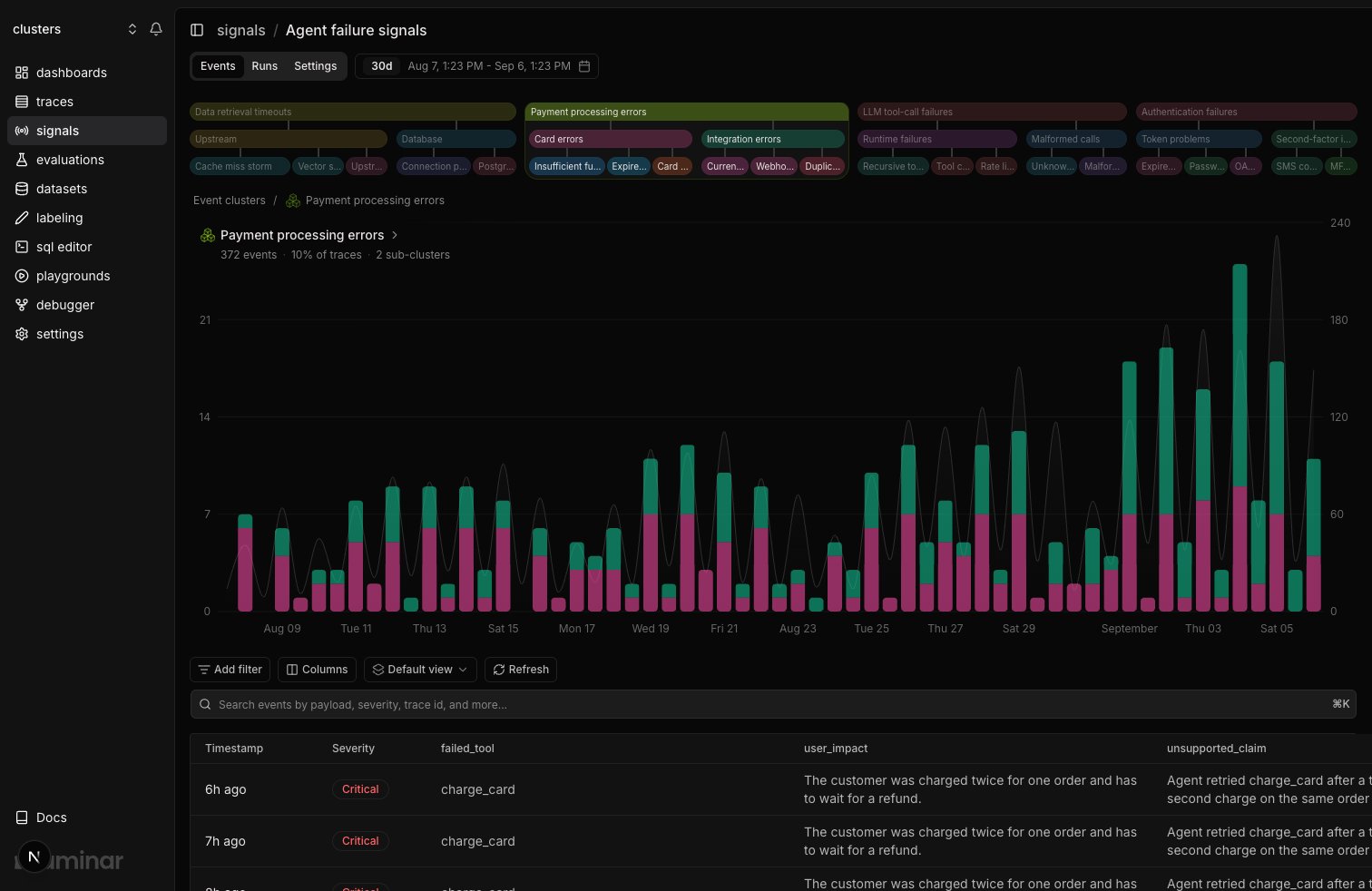
The clusters view above the events table: the icicle strip, with the focused cluster's readout over the frequency chart
What a cluster is
A cluster is a group of signal events whose summaries are semantically similar. Laminar groups events by meaning rather than exact wording, so “timeout calling the payments API” and “payments request exceeded deadline” land in the same cluster. Clustering is scoped to a single Signal: events from different Signals never share a cluster. Read top-down when you want the shape of the problem (“most failures are tool loops”). Read bottom-up when you want the specific example (“this one loop is the config-validation tool calling itself twelve times”).Clustering is fully automatic. You will start to see clusters as more traces are processed.
Where to find them
On any Signal detail page, open the Events tab. The clusters view sits above the events table:- The icicle strip. One row per level of the hierarchy, broadest at the top and most specific at the bottom, with each band’s width proportional to its event count. A band sitting under another is one of its sub-clusters, so the whole tree reads at a glance without expanding anything. When a row runs out of width, the smallest bands fold into a +N counter you can open.
- The frequency chart. Each cluster is a stacked series over time, with a Signal runs overlay so you can read cluster volume against how often the Signal ran.
- The readout, pinned over the top-left of the chart. It names whatever cluster is in focus and gives its event count, its share of traces, and its sub-cluster count. With nothing in focus it shows the total cluster count for the range.
How the hierarchy works
Clusters form a tree, up to three levels deep:- Leaf clusters are the most specific named groups: events that describe near-identical behavior, like “config-validation tool retries in a loop”.
- Parent clusters group similar leaf clusters into broader patterns, like “tool call loops”. A parent’s events are the union of its children’s events, so counts add up as you move up the tree.
- The top level is a handful of broad categories that cover most of the Signal’s events. This is the view to start from during triage.
When events get clustered
Clustering runs asynchronously, after events are created:- Every new signal event is queued for clustering together with its summary.
- Queued events for the same Signal are processed in batches. A batch runs once enough events accumulate, or shortly after the first event arrives, typically within a minute.
- Each event in the batch either joins the closest existing group or starts a new one. As related events accumulate, named clusters appear in the UI; events that have not joined a named cluster sit in the Unclustered bucket.
- If the batch created new clusters or meaningfully changed existing ones, names are generated or refreshed.
When clusters earn their keep
Clusters pay off when you have hundreds or thousands of events and an open-ended question:- Triage: “Of the 4,000 traces flagged by
agent_failurethis week, which handful of failure modes account for most of them?” - Regression detection: a cluster that was empty yesterday and full today is a new failure mode.
- Prompt tuning: if a cluster contains events you don’t consider matches, your prompt is too broad. If expected events split across unrelated clusters, your payload schema isn’t capturing the discriminating fields.
Querying clusters with SQL
Clusters are queryable in the SQL Editor from three directions:- From traces.
traces.clusterscarries the clusters a trace’s signal events landed in, names and counts already resolved. The shortest path to which runs are in this cluster, and the only one that puts cluster names next to trace cost, duration, and metadata. - From events.
signal_eventshasclusters(every cluster an event belongs to, from its most specific one up through its parents),leaf_clusters(only the most specific ones), andcluster_details(the same clusters with their names and levels resolved). - From the clusters themselves. The
clusterstable has one row per named cluster, includingname,level,parent_id, andnum_signal_events, so you can reconstruct the hierarchy or trend cluster sizes over time.
Next steps
Alerts
Fire Slack or email notifications on new signal events or clusters.
SQL Editor
Query clusters off
traces, or the clusters and signal_events tables directly.