
Nowadays, agents build agents.
We ran a simple experiment: point a coding agent (Claude Code) at another coding agent (Pi) and say "Use Laminar to make this thing score better on Terminal Bench 2.1".
It moved the score from 68.5% to 75.3% on the held-out test set.
How did it do it? All the data is captured by Laminar so let's see.
The setup
The optimizer agent: Claude Code (Opus 4.8, Fable 5)
The target agent: Pi agent (Sonnet 5)
The datasets: the optimizer was only allowed to see Terminal Bench Pro while the final agent was tested on Terminal Bench 2.1
Using Laminar
The optimizer agent sees "You scored 0.54 on the benchmark". How does it know how to improve?
The real gradient signal lies in the traces of the target agent and that's readily available on Laminar. The optimizer agent has full SQL access to every trace from the target agent run.
"What are the main categories of failures I should focus my fixes on?"
"Did the system prompt change actually solve the issue?"
"What was the agent thinking when it ran that bash tool?"
Here are the Laminar features that made this possible:
Laminar Debugger - every trace, eval, CLI command, and agent annotation is captured in a Debugger session
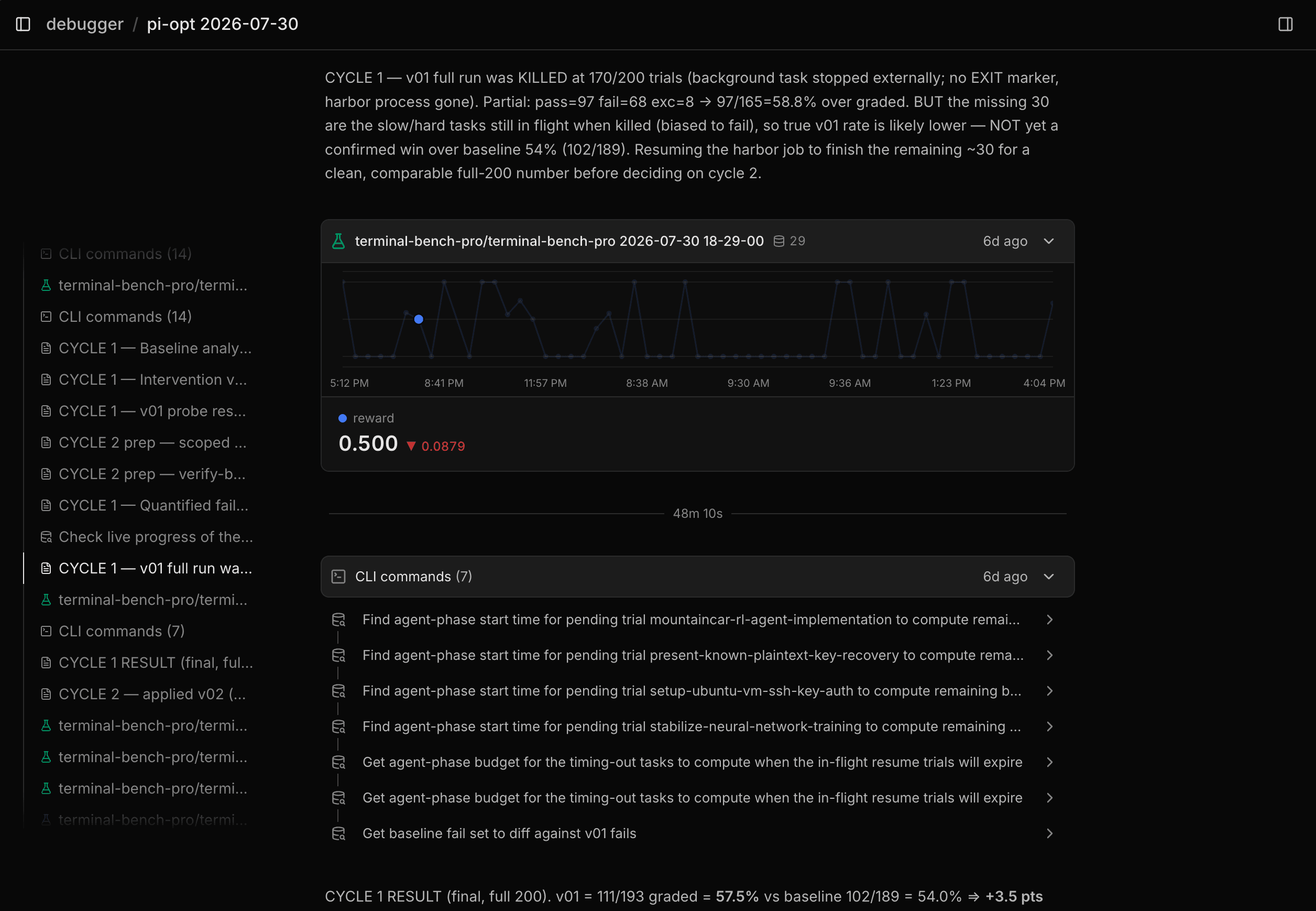
Laminar Evals - every benchmark run was traced and scored within Laminar Evals
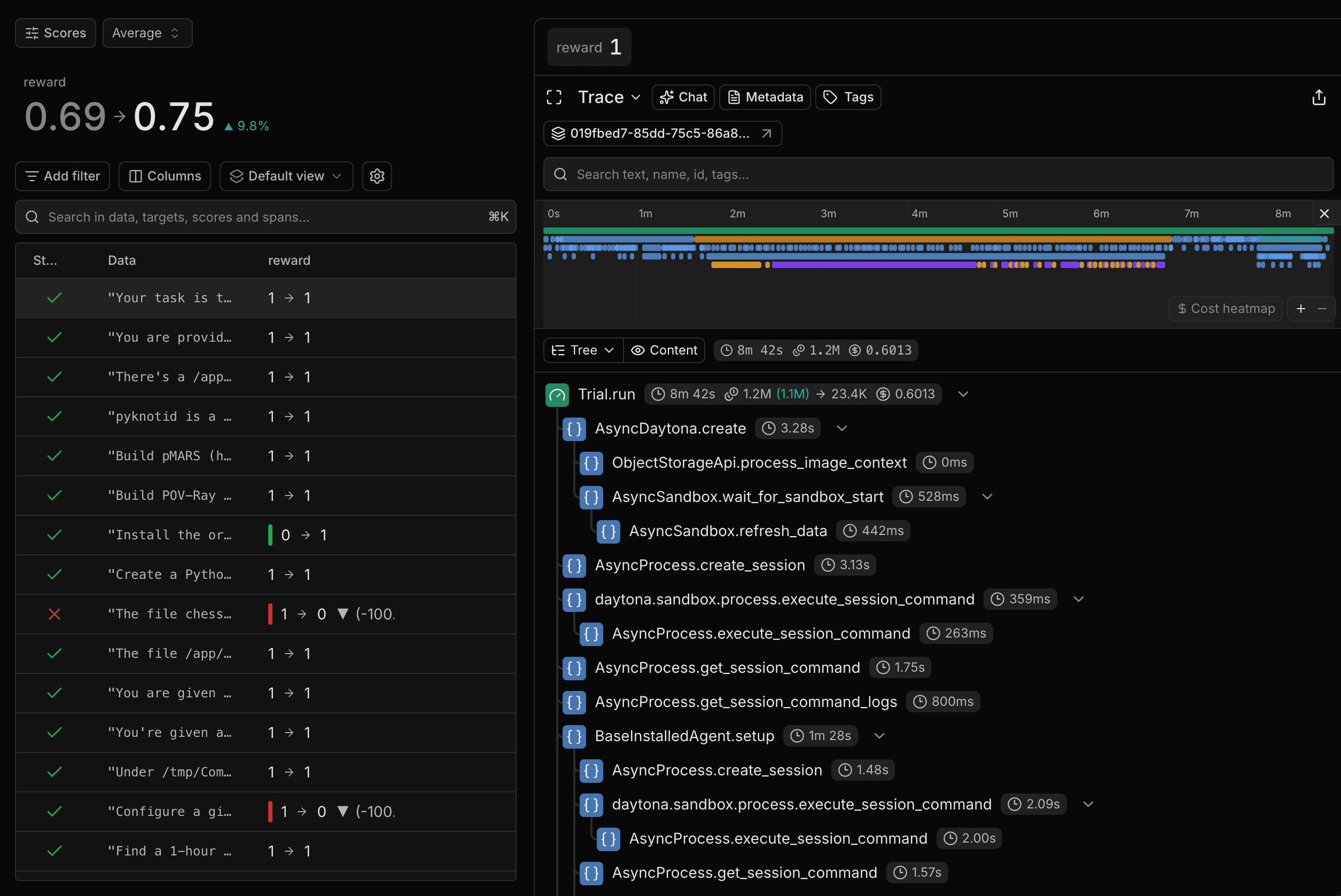
Laminar CLI - gives full SQL access to all Laminar data
Claude Code plugin - traced the Optimizer Agent's every move
[Pi Agent Extension](TODO: we haven't released it yet) - traced every run of the target agent
What the agent did
The agent was allowed to change three things about the Pi Agent:
- AGENTS.md system prompt
- Custom Pi agent extensions
- Custom skills
Here are some of the changes it made.
System-prompt rule: "Understand the exact contract before acting"
Digging through failed runs, the optimizer agent kept finding runs where the main reasoning was right but the actions taken deviated from the task contract slightly. These benchmarks are all or nothing, so a near miss is still scores a zero. For example on Terminal Bench Pro's implement-tensor-parallel-matmul, the agent wrote the matrix-multiply, declared "Implemented and verified /app/tensor_parallel.py" and stopped. It only failed 1 out of the 20 grader tests. It's column splitting logic was off by one and it's own checks failed to capture this.
It decided to introduce a system prompt rule to handle this.
The system-prompt rule
1. Understand the exact contract before acting
- Read the task twice. Extract every explicit requirement into a mental checklist:
  the precise **output location** (which file/path), **format** (JSON shape, exact
  keys, stdout text, trailing newline), **naming** (function/class/CLI names), **exit
  codes**, and any stated **edge cases**. Graders check these literally, and an answer in
  the wrong file or with an extra key scores zero even when the logic is right.
- Inspect the environment before coding: `ls -la`, read the referenced files, look for
  an existing test/benchmark/harness, sample input files, and any `README`/spec.
- If input or reference data exists, look at real samples ‚ and do not assume its shape.
- When the real input is only provided at grading time (nothing to test against now),
  derive the output contract *literally* from the task wording ‚ and exact output path,
  filename, stdout vs file, and format, and and honor it precisely; a plausible-but-wrong
  guess (e.g. writing `output.txt` when stdout was asked for) fails silently.
Here's where it made a difference.
Terminal Bench 2.1's sanitize-git-repo task asks the agent to redact every API key in a repo without modifying any file that isn't contaminated.
The unoptimized agent redacted the secrets correctly and then rewrote all 100 existing commits with git fliter-repo mutating the entire repo and failing the test_no_files_changed check.
The optimized agent redacted the same secrets but then explicitly declined to touch history.
Final verification pass across whole repo including git history isn't needed (only working tree per task scope)
It then closed with git diff --stat showing that exactly 3 file changed.
System-prompt rule: "Verify empirically, never by argument"
The optimizer agent saw that the target agent would often make false assumptions or reason its way to untrue conclusions. These false assumptions could often be avoided with a quick command.
For example, in this run on Terminal Bench Pro's optimize-optimize-product-search-query, the agent was handed a runnable benchmark and asked which index speeds up a slow query. Instead of running it, the agent picked an option only by reading the SQL.
D - Add on index products(created_at). Reasoning: The query has ORDER BY p.created_at DESC LIMIT 100...
It submitted that guess without ever creating the indexes or measuring.
To combat this type of failure, the optimizer added a rule to the system prompt.
The system-prompt rule
2. Verify empirically, never by argument
- When the environment lets you *measure*, measure. If a task hands you a benchmark,
  a dataset, a runnable harness, or asks "which option is best", **run it and compare
  real numbers** — do not pick an answer from plausible reasoning. Reasoned guesses on
  measurable questions are the single most common way these tasks are failed.
- For "choose the best of N options" tasks, **test every candidate and compare** — don't
  stop after one option looks good; the best requires seeing all of them measured. Undo
  experimental changes afterward if they aren't the requested deliverable.
- Access may be restricted at first (a limited DB user, missing permissions); if the
  obvious path is blocked, find a legitimate way in (a superuser, `sudo -u`, another
  credential in the environment) before falling back to reasoning.
- After every change, run the relevant check. Read the actual error output before
  retrying; never re-issue a failed command unchanged.
Here's how it made a difference.
Terminal Bench 2.1's winning-avg-corewars task asks the agent to write a Core War warrior that beats the five supplied opponents.
The unoptimized agent hand-built a scanner-bomber and spent most of its time tuning constants with brute-force search scripts that never actually succeeded despite taking the whole 60 minutes allotted for the task.
The optimized agent instead ran the opponents against each other first, following the system prompt rule's directive. By doing this, it discovered that a G2-style clear already beat the bar. From there, it rebuilt the design, swept one parameter, and completed the task. It was done in 2 minutes vs the unoptimized agent's 60.
Time discipline extension
Each Terminal Bench task has a fixed time limit. This time limit is not shown to the agent and immediately shuts the agent down when it expires.
The target agent frequently ran out of time on tasks making it one of the biggest failure categories.
Purpose: convert timeout-deaths and thrash-spirals into passes. The real per-task budget is NOT visible in the sandbox (typical budgets: 15-60 min wall clock).
The optimizer agent built an extension that injects reminders at 10/20/30/45 minutes telling the agent to write its best-effort deliverable as soon as possible and then refine.
This makes sense because raw Pi agent has no sense of urgency on a task, and cannot make proper time-vs-quality tradeoffs.
While the motivation for this extension was sound, the results were mixed.
In the optimizer's own local smoke tests the reminders fired. And its mini Terminal Bench Pro run with just two tasks passed cleanly as well causing the agent to keep the extension.
In the final Terminal Bench 2.1 run, the extension fired on 14 tasks. However, the pass rate among those 14 tasks did not improve relative to the baseline (9/14 -> 8/14).
There is some evidence that this extension had an effect.
For example, on the path-tracing task, the unoptimized run and the optimizer run both hit the same timeout failure, but the unoptimized agent spent its entire time budget on a Python parameter-fitting rabbit hole and never wrote the required image.c it would be judged one. The optimized agent caught itself after the extension's 10 min reminder, wrote the deliverable to disk, evaluated it's progress so far, and continued improving.
Other optimization attempts
The optimizer agent tried many many ideas and most of them failed. Looking at the traces we can see exactly what it tried. Here are some of the most interesting ones:
Game-AI skill
The optimizer wrote a skill telling the agent to use minimax/alpha-beta for game tasks. While useful in theory, the skill backfired. On tasks that required the code to follow a very specific structure (e.g. Terminal Bench Pro's
Fresh reviewer extension
This extension spawned an independent reviewer agent to re-check completed work. The optimizer found in its own tests that this extension fixed 2 real bugs, but also caused 2 failures by "fixing" already correct implementation. It concluded "net-zero reward effect from fresh-reviewer" and dropped the extension.
Model thinking mode
The optimizer tried raising thinking level from "low" to "high" in an attempt to perform better on more difficult tasks. The probes it ran on specific tasks (compute-symbolic-eigenpairs-3x3-matrix, go-board-move-recommendation, mcts-tictactoe-ai-implementation, minesweeper-safe-move-selector ) showed no benefit, so it reverted stating "thinking=high (no benefit)".
Want to try it yourself?
The agent improved by 7 points on Terminal Bench 2.1, but that's not the interesting part.
This entire process was traced end-to-end. The optimizer agent and the target agent were both traced by Laminar. The Terminal Bench runs were collected as Laminar Evals. The entire optimization process was captured as a Debugger Session.
Laminar doesn't just capture data, it also provides signal to improve and evaluate your agents.
Want to optimize your agent with the same loop? Get started today.
- Tracing: Claude Code Plugin, Pi Agent Extension, and many more
- CLI
- Evals
- Debugger