
Overview
We’ll explore a simple emotional support chat application built with Next.js that:- Provides a chat interface for users seeking emotional support
- Uses OpenAI’s
gpt-5.6-lunato generate empathetic responses - Traces the entire process with Laminar
- Uses Vercel’s AI SDK for AI interactions
Setup
You can use the example app from our GitHub repo. Alternatively, for a clean install, follow these steps:1
Initialize a Next.js app
2
Install Dependencies
Let’s now install the required packages:
3
Environment Setup
.env.local file:.env.local
Laminar initialization. If not specified,
Laminar will look for the key in the LMNR_PROJECT_API_KEY environment variable.Get your OpenAI API key from the OpenAI dashboard.4
Update next.config.ts
Add the following to your This is because Laminar depends on OpenTelemetry, which uses some Node.js-specific functionality, and we need to inform Next.js about it. Learn more in the Next.js docs.
next.config.ts file:next.config.ts
5
Project Structure
The project has the following structure:
Implementation
Let’s look at the key components of our Next.js application with Laminar tracing:1. instrumentation.ts
This file is crucial as it registers Laminar with the AI SDK. Next.js automatically loads this file during initialization.instrumentation.ts
LaminarAiSdkTelemetry is the recommended way to trace the AI SDK on v7 and later. You register it once, and every generateText, streamText, generateObject, streamObject, and embed call in your app is traced: model turns, tool calls, token usage, and cost. There is no per-call configuration to add or forget.
The constructor calls Laminar.initialize() for you when Laminar isn’t already initialized, so you don’t need a separate init call. laminarOptions takes everything Laminar.initialize() accepts. Omit it entirely and Laminar reads LMNR_PROJECT_API_KEY from the environment.
Laminar only works in the ‘nodejs’ runtime of Next.js.
Learn more about the instrumentation.ts file in the Next.js docs.
Laminar must be registered at the entry point of the application, before the first AI SDK call.
For Next.js, the
instrumentation.ts file is ideal for this purpose as it’s loaded early in the application lifecycle.If you already register a tracer provider with registerOTel from @vercel/otel, don’t let Laminar register a second one: see Coexisting with @vercel/otel.2. app/page.tsx
This file contains the main page layout for our chat application:app/page.tsx
3. app/api/chat/route.ts
This file contains the API route handler that processes chat messages and communicates with the OpenAI API. There is no Laminar-specific code here. BecauseLaminarAiSdkTelemetry is registered in instrumentation.ts, the generateText call below is traced as-is.
app/api/chat/route.ts
AI SDK v7 rejects
system role entries inside messages with AI_InvalidPromptError. Pass the system prompt as the instructions option instead, as above. Laminar still records it on the span input, so the transcript view shows the full conversation.telemetry block on that call:
4. components/chat-ui.tsx
This component handles the chat interface and manages the chat state. Feel free to modify the UI as you see fit, this is just an example.components/chat-ui.tsx
Running the Application
Start the Next.js development server:Testing the Application
- Navigate to
http://localhost:3000in your browser - Interact with the chat interface by typing messages
Viewing Traces
After interacting with the chat, you can view the traces in your Laminar dashboard at https://laminar.sh. The trace will show:- An
ai.generateTextspan for the AI SDK operation - A nested
ai.llmspan for the model call, with the prompt, the response, and the model id - Token usage, latency, and cost
Key Features Demonstrated
- Next.js Instrumentation: Using Next.js’s instrumentation API to register Laminar
- AI SDK Integration: One registration traces every AI SDK call, with no per-call config
- OpenAI Tracing: Automatic tracing of OpenAI API calls
- Token Usage: Automatic calculation of tokens used for each OpenAI call
- Cost Estimation: Automatic estimation of the cost of each OpenAI call
Example Traces
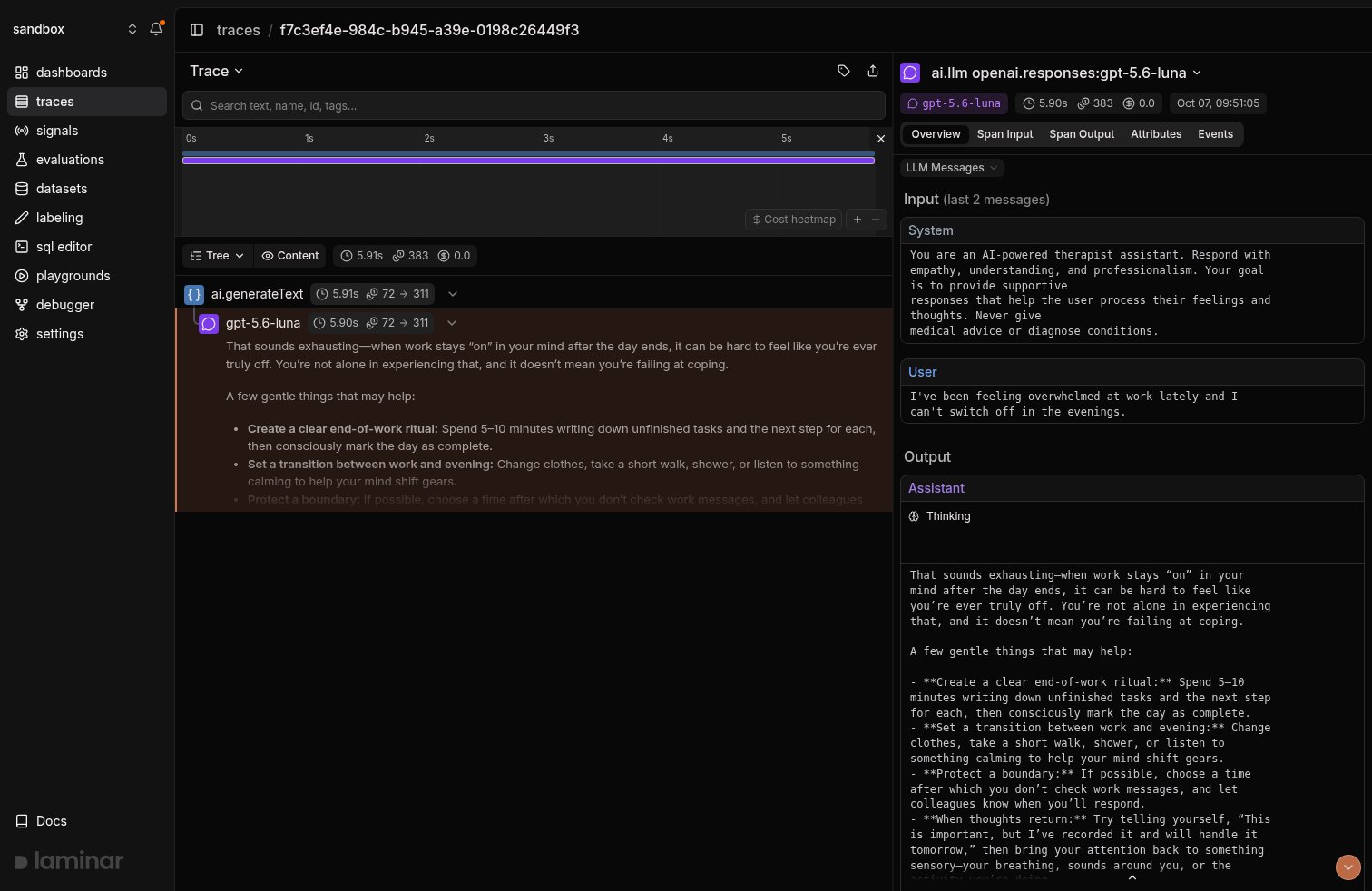
A screenshot of a trace from the example app.
Troubleshooting
If you encounter issues:- Check that your API keys are correctly set in the
.env.localfile - Verify that
registerTelemetry(new LaminarAiSdkTelemetry())runs in theinstrumentation.tsfile, guarded by theNEXT_RUNTIME === 'nodejs'check - Verify that the
next.config.tsfile is correctly configured - Confirm you are on
aiv7 or later (npm ls ai). On v5 and v6,registerTelemetrydoes not exist and you need theexperimental_telemetrysetup instead - Ensure all dependencies are installed
- Review the Next.js logs for any application errors