
An AI agent audit trail is a record of who asked an agent to act, which version acted, what it read and changed, and who approved the action. An IT access agent adds an employee to netsuite-ap-clerks after a Slack request. Three weeks later, internal audit asks who authorized it. The trace contains add_user_to_group and its arguments, but the manager's approval is a thumbs-up in another thread.
Traces can supply the execution record if you instrument the actions and record identity and approvals. They do not, by themselves, guarantee delivery or preserve evidence against deletion. This guide builds a Laminar workflow for capture, approval checks and read auditing, then shows where an application audit log and immutable archive fit. The figure illustrates a combined record, not a product screenshot.
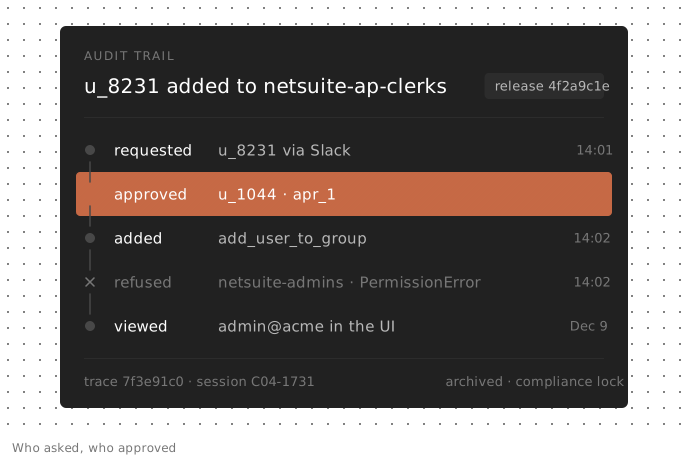
The fields an AI agent audit trail should record
An audit trail answers six questions about each run. Instrumentation captures some answers; your application must supply the rest.
| Question | Fields | Why it matters |
|---|---|---|
| Who asked? | Authenticated requester ID, tenant, channel, request ID | Ties the action to a person and their permissions |
| Which agent acted? | Release, prompt and tool-definition version, model | Identifies the code and definitions used |
| What did it read? | Read-tool calls with arguments and results | Records the data available to the agent |
| What did it do? | Write-tool calls: arguments, result, status, timestamps | Records attempted actions and reported results |
| Who approved it? | Approval ID, authenticated decider, scope, decision, time | Identifies who authorized which action |
| What was the outcome? | Final status, reply, changed resource IDs | Connects the request to its reported effect |
Two requirements sit outside the run: recording who later accessed the evidence and preserving it for the required period. Within the run:
- Take identity from authentication. Record the user your application authenticated, not a name the model extracted. Include the service identity when the agent acts on someone's behalf. Prefer internal IDs to emails.
- Version more than code. Keep the release, prompt and tool-definition versions, and requested and reported models.
- Record refusals. A rejected attempt to grant netsuite-admins access belongs in the record too.
- Give approvals a scope. An approval must identify the authenticated decider and the user, group or amount authorized. A Boolean cannot establish that connection.
Can LLM traces be used as an audit log?
Traces can supply much of the record. A trace groups the OpenTelemetry spans for instrumented LLM and tool calls, preserving their inputs, outputs, status and timing. That gives you execution context around an action, subject to your capture and redaction settings.
The Laminar setup in this guide has four limits:
- Delivery is best effort. The SDK batches spans for background export. In a test with Python SDK lmnr 0.9.1 and an unreachable backend, it logged retries while the function returned normally. A process that exits without flushing can lose its last spans.
- Traces can be deleted. Laminar's audit log, available on Cloud Pro and Enterprise and on self-hosted deployments, records trace deletion. It does not preserve the deleted trace.
- Queryable retention depends on deployment. Cloud data-access windows are 7 days on Free, 30 days on Starter, 6 months on Pro and custom on Enterprise. Self-hosted Laminar keeps traces until deletion and has no built-in retention setting.
- Identity and approvals need application instrumentation. Auto-instrumentation does not establish who authenticated to your app or approved an action elsewhere.
Long retention also increases privacy exposure. Configure PII redaction and decide which evidence you need before archiving messages. Copying traces into immutable storage preserves what arrived; it cannot recover unrecorded actions.
What regulations ask for in agent logs
The EU AI Act is one reason a legal team may request agent logs. This is an engineering summary, not legal advice.
Article 12 requires high-risk AI systems to “technically allow for the automatic recording of events (logs) over the lifetime of the system” to support risk identification and monitoring. Its explicit minimum fields concern remote biometric identification, not every agent. Articles 19 and 26(6) require providers and deployers to retain logs under their control for at least six months, unless other applicable law says otherwise. Article 14 requires effective human oversight; approval records can help document that oversight.
Applicability depends on the system's use and classification, including relevant Annex III uses and regulated-product categories. Do not infer it from the label “agent.” Ask your legal team to determine the obligations and retention period.
The Digital Omnibus on AI, Regulation (EU) 2026/1744, moved the relevant high-risk application dates to 2 December 2027 for Annex III systems and 2 August 2028 for Annex I systems. It left these logging and oversight articles unchanged.
Build an agent audit trail from traces with Laminar
The access-agent example uses the Laminar Python SDK. Your application supplies the authenticated request, approval service and identity-provider client. TypeScript's observe supports userId, sessionId, metadata and spanType options for the corresponding instrumentation.
Stamp the requester on the trace
Set the user ID at the entry point, using the authenticated session. The user and session IDs become filterable trace columns:
from lmnr import Laminar, observe

Laminar.initialize()

@observe(name="access_request")
def handle_access_request(req: AccessRequest) -> str:
    Laminar.set_trace_user_id(req.requester_id)
    Laminar.set_trace_session_id(req.slack_thread_id)
    Laminar.set_trace_metadata({
        "tenant_id": req.tenant_id,
        "channel": "slack",
        "request_id": req.id,
    })
    return run_agent(req.text)
Set each metadata key once at the root. If several spans set the same key, the last span processed wins. Metadata is not an append-only history of decisions.
Record tool calls, including approvals
Mark each tool function with the TOOL span type. The decorator records arguments as input and the return value as output. An exception marks the span as an error:
@observe(name="request_approval", span_type="TOOL")
def request_approval(user_id: str, group: str, reason: str) -> dict:
    decision = approvals.request_and_wait(user_id=user_id, group=group, reason=reason)
    return {
        "approval_id": decision.id,
        "decision": decision.status,
        "decided_by": decision.decided_by,
        "user_id": decision.user_id,
        "group": decision.group,
        "decided_at": decision.decided_at,
    }

@observe(name="add_user_to_group", span_type="TOOL")
def add_user_to_group(user_id: str, group: str, approval_id: str) -> dict:
    approvals.assert_covers(approval_id, user_id=user_id, group=group)
    return idp.add_member(group, user_id)
The approval service must authenticate the decider and supply the output fields. The model requests access; it does not supply the authoritative approval. The write tool checks scope against the service before changing membership.
In SDK tests with a stub approval service, the approved netsuite-ap-clerks write succeeded. Reusing that approval for netsuite-admins, or citing a denied approval, raised PermissionError. Both refusals produced error tool spans with their inputs recorded. The service check is the control; the trace is evidence of its execution.
For sensitive tool arguments, use ignore_inputs=["token"] or ignore_input=True on @observe rather than storing secrets.
Identify the version that acted
The SDK stamps a release on spans from the release option, LMNR_RELEASE, or deployment variables such as GITHUB_SHA. For a container without .git, pass the commit at build time:
ARG GIT_SHA
ENV LMNR_RELEASE=$GIT_SHA
Agent versions, currently beta, groups traces by the system prompt and tool definitions used. SQL exposes release and agent_versions on traces; LLM spans contain requested and reported models. Self-hosted deployments require AGENT_VERSIONING_ENABLED=true.
Find writes without a matching recorded approval
This query checks successful add_user_to_group tool spans from the last day against approved outputs from the past eight days. It matches approval ID, user and group, including approvals recorded in another trace:
SELECT trace_id, span_id, start_time, input
FROM spans
WHERE span_type = 'TOOL'
  AND name = 'add_user_to_group'
  AND status = 'success'
  AND start_time > now() - INTERVAL 1 DAY
  AND (
    JSONExtractString(input, 'approval_id'),
    JSONExtractString(input, 'user_id'),
    JSONExtractString(input, 'group')
  ) NOT IN (
    SELECT
      JSONExtractString(output, 'approval_id'),
      JSONExtractString(output, 'user_id'),
      JSONExtractString(output, 'group')
    FROM spans
    WHERE span_type = 'TOOL'
      AND name = 'request_approval'
      AND JSONExtractString(output, 'decision') = 'approved'
      AND start_time > now() - INTERVAL 8 DAY
  )
Seven seeded ClickHouse 24.8 cases tested the matching logic. It flagged missing approval, wrong group, denied approval and a second write reusing approval for another user. It did not flag a matching write, a refused write or a write approved three days earlier in another trace. The same query also runs on Laminar Cloud's SQL API.
An empty result means no tuple mismatches among the named, traced calls within the searchable window. Older or unavailable approvals appear missing. This query does not establish approval-before-write timing, expiry or revocation; enforce those requirements in the approval service.
Run it in the SQL editor, or schedule SQL API calls and route returned rows for investigation.
For checks that require interpretation, Signals use model judgments to flag potential violations in finished traces matching their filter. They require Laminar Cloud or an enterprise license for self-hosting. An instruction for this agent could be:
Did the agent request or grant access the requester didn't ask for, or tell the user it granted something different from what add_user_to_group did? Record the request, the action taken and what the agent told the user.
Use a schema containing requested, action, told_user and mismatch_type. Configure an alert to send new events to your security channel.
New Signals default to traces over 1,000 tokens, which can exclude short access requests. Change the filter to cover this agent and test known violations before relying on alerts. Keep deterministic checks for exact rules; automatic failure detection is a review aid, not proof that every violation was found.
Record who accessed the evidence
Laminar's audit log records trace-data reads, including opening traces, loading the traces table, exports and SQL queries from supported interfaces. Query events include the query text. Events identify the user or API key, role, source and outcome; changes such as deletion and sharing are recorded too.
Owners and admins open Settings > Audit log and can export filtered CSV files of up to 100,000 rows. Cloud availability is Pro and Enterprise; self-hosted workspaces include it. The audit log does not record span ingestion or sign-ins.
Export snapshots to immutable storage
For longer retention, snapshot selected evidence into storage with enforced retention. The SQL API accepts read-only SELECT queries authenticated with a project API key. This example exports hourly trace records, root and tool spans, and model-call metadata to an S3 bucket configured with Object Lock and default compliance-mode retention:
import datetime as dt
import json

import boto3
from lmnr import LaminarClient

client = LaminarClient()
s3 = boto3.client("s3")
BUCKET = "agent-audit-archive"

QUERIES = {
    "traces": """
        SELECT id, start_time, end_time, status, user_id, session_id,
               metadata, release, agent_versions
        FROM traces
        WHERE start_time >= {start:DateTime64} AND start_time < {end:DateTime64}
    """,
    "spans": """
        SELECT trace_id, span_id, parent_span_id, name, span_type,
               start_time, end_time, status, input, output
        FROM spans
        WHERE (span_type = 'TOOL'
               OR parent_span_id = '00000000-0000-0000-0000-000000000000')
          AND start_time >= {start:DateTime64} AND start_time < {end:DateTime64}
    """,
    "llm_calls": """
        SELECT trace_id, span_id, start_time, request_model, response_model
        FROM spans
        WHERE span_type = 'LLM'
          AND start_time >= {start:DateTime64} AND start_time < {end:DateTime64}
    """,
}

def snapshot_hour(start: dt.datetime) -> None:
    end = start + dt.timedelta(hours=1)
    taken = dt.datetime.now(dt.timezone.utc)
    params = {"start": f"{start:%Y-%m-%d %H:%M:%S}", "end": f"{end:%Y-%m-%d %H:%M:%S}"}
    for name, sql in QUERIES.items():
        rows = client.sql.query(sql, params)
        s3.put_object(
            Bucket=BUCKET,
            Key=f"{name}/{start:%Y/%m/%d/%H}/{taken:%Y%m%dT%H%M%SZ}.jsonl",
            Body="\n".join(json.dumps(row) for row in rows).encode(),
            ChecksumAlgorithm="SHA256",
        )
In this example, the root span contains the request and reply. A test against live Laminar data with S3 mocked by moto wrote two timestamped object sets under compliance retention; deleting a version was denied. It did not test late-finishing traces or enforcement on AWS S3.
Operational limits matter:
- Repeat each window. A proposed schedule is hour H at H+2, then two days later. Each query filters its own rows' start times, so one run can occupy several hourly files. Repeated snapshots can capture updates available by then, not arbitrarily late data. Track successful windows and rerun failures.
- Keep windows small. SQL enforces execution-time, memory and result-size limits. In testing, a day of tool and LLM spans with full inputs and outputs exceeded the result-size limit; an hour exported successfully. Split oversized windows and back off on HTTP 429.
- Archive definitions separately. agent_versions contains hashes, not prompt text, and this job omits LLM messages. A release SHA identifies definitions only if they live in that release's code. Otherwise archive them separately. Retain rendered prompts too if your audit requires them.
- Understand Object Lock's scope. It requires versioning. Compliance mode prevents anyone, including root, from deleting or overwriting a locked version or shortening retention. New versions and delete markers remain possible. Locking cannot restore spans that never reached Laminar.
- Preserve access records. The audit log is not a SQL table. Export its CSV from Settings into the archive separately, and enable S3 server access logging or CloudTrail data events to record archive reads.
Traces vs an application audit log or SIEM
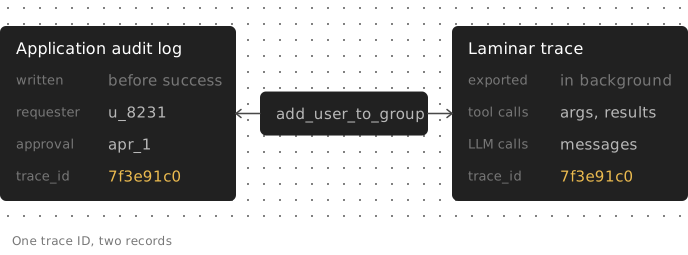
The complementary system of record is an application audit log configured for the job. Your code emits events for approvals and write actions, waits for acknowledgment before reporting success, and stores them under enforced retention. An append-only application table or SIEM can fill that role if its configuration meets your requirements.
| Application audit log | Laminar traces | |
|---|---|---|
| Write path | Blocking if you make it so | Batched background export in this setup |
| Contents | Fields your application emits | Instrumented calls, subject to capture settings |
| Approvals and identity | Explicit application fields | Explicit application fields added to traces |
| Immutability | Controls the store enforces | Deletable; deletion audited where available |
| Retention | Configured store policy | Cloud plan window; until deletion on self-host |
| Execution context | Whatever context your application emits | Captured model calls and tool results |
For actions requiring an acknowledged record, use both. Emit a compact audit event with requester, action, approval ID, resource IDs and trace ID. Keep execution context in the trace under that ID.
Acknowledgment does not make the audit event and target-system change atomic. A timeout can leave the outcome uncertain. Reconcile events against the target system rather than treating a successful tool span as conclusive evidence of the external effect. The diagram shows this combined design; the instrumentation snippets above do not implement its application audit log.
FAQ
Will the exported audit trail contain personal data?
With PII redaction on, detected PII is replaced before storage. In Dual mode, owners and admins can see originals in the UI, but project API keys receive placeholders, so the SQL API export is redacted. User IDs, metadata and attributes outside input and output are not redacted. Keep emails and secrets out of those fields; review the PII redaction coverage before choosing archive contents.
How do I record an approval made in a ticketing system?
Store the trace ID on the ticket. When the decision arrives, use client.traces.push_metadata(trace_id, {...}) to attach its approval ID, authenticated decider, scope, decision and timestamp. This merges metadata into a finished trace; keep the ticket as the primary approval record.
The SQL check above reads approval tool outputs, not metadata. It will not match this record automatically. Check these approvals against the ticketing system's authoritative record instead.
Is Laminar's audit log the agent's own audit trail?
No. The requester on an agent trace and the actor in Laminar's audit log describe different activities. One initiated the agent run; the other accessed or changed evidence in Laminar. A SQL API export is attributed to its API key, not automatically to the requester whose traces it exports.
Self-hosted workspaces include the audit log, but other features have licensing requirements. Check the self-hosting feature matrix before selecting a deployment.