
DEFAULT spans into a readable transcript.
Types you’ll actually set
Three span types cover the manual-instrumentation cases:
The other types (
EXECUTOR, EVALUATOR, HUMAN_EVALUATOR, EVALUATION, CACHED) exist for the evaluations framework and for internal auto-instrumentation. You won’t set them by hand in day-to-day agent code.
Why TOOL matters for agent traces
The transcript view only renders the rows that describe what the agent did: the user input, LLM turns, and tool calls. DEFAULT spans don’t appear there (they live under Tree view). When you wrap tool functions with @observe but leave them as DEFAULT spans, the transcript shows only the LLM turns, as if the agent were thinking in a vacuum:
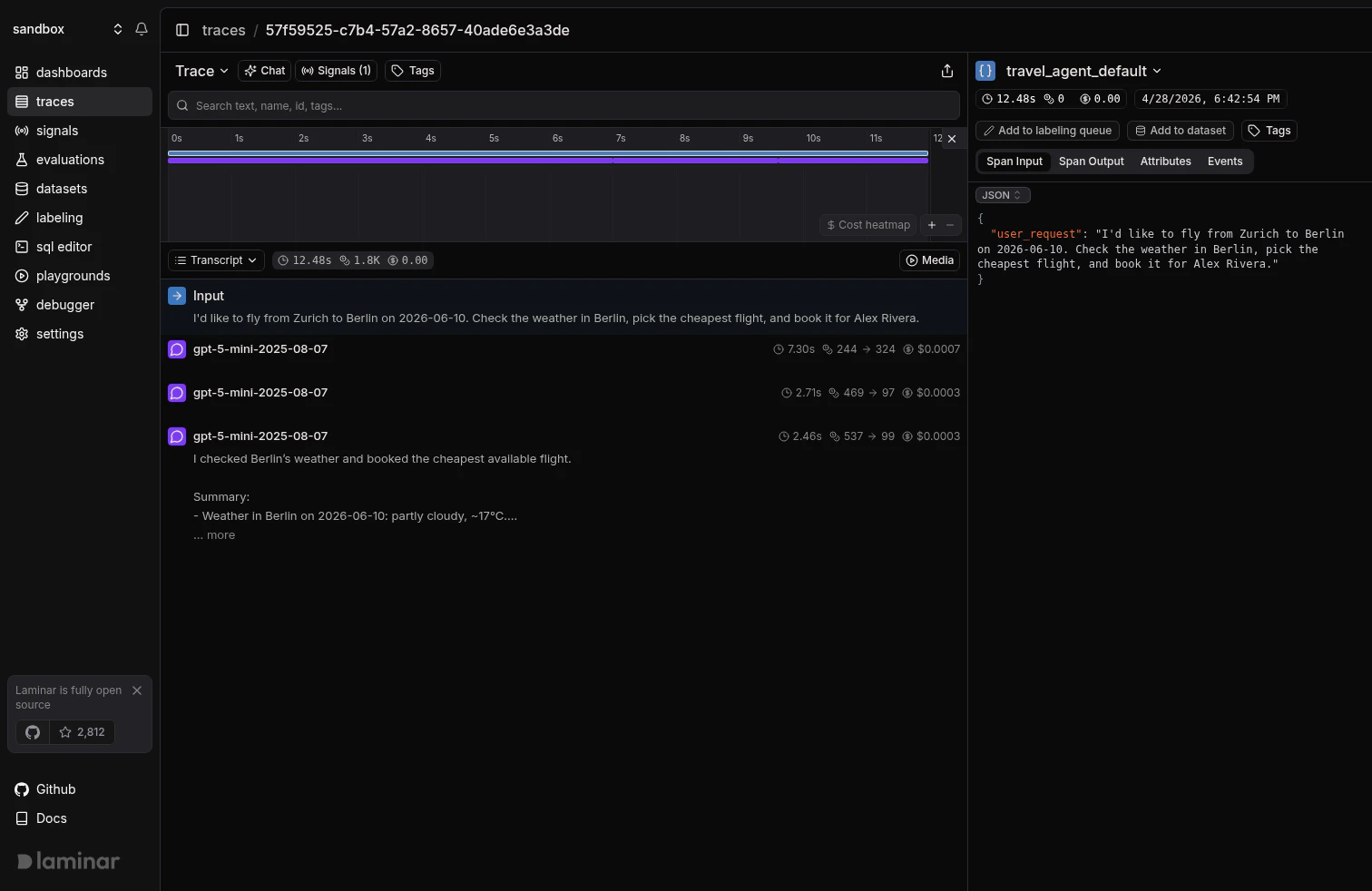
Tool functions left as DEFAULT spans: the transcript shows the three LLM turns but nothing about the weather lookup, flight search, or booking the model called between them.
TOOL and they interleave with the LLM turns, each with a bolt icon, the tool name, and an inline preview of the arguments:
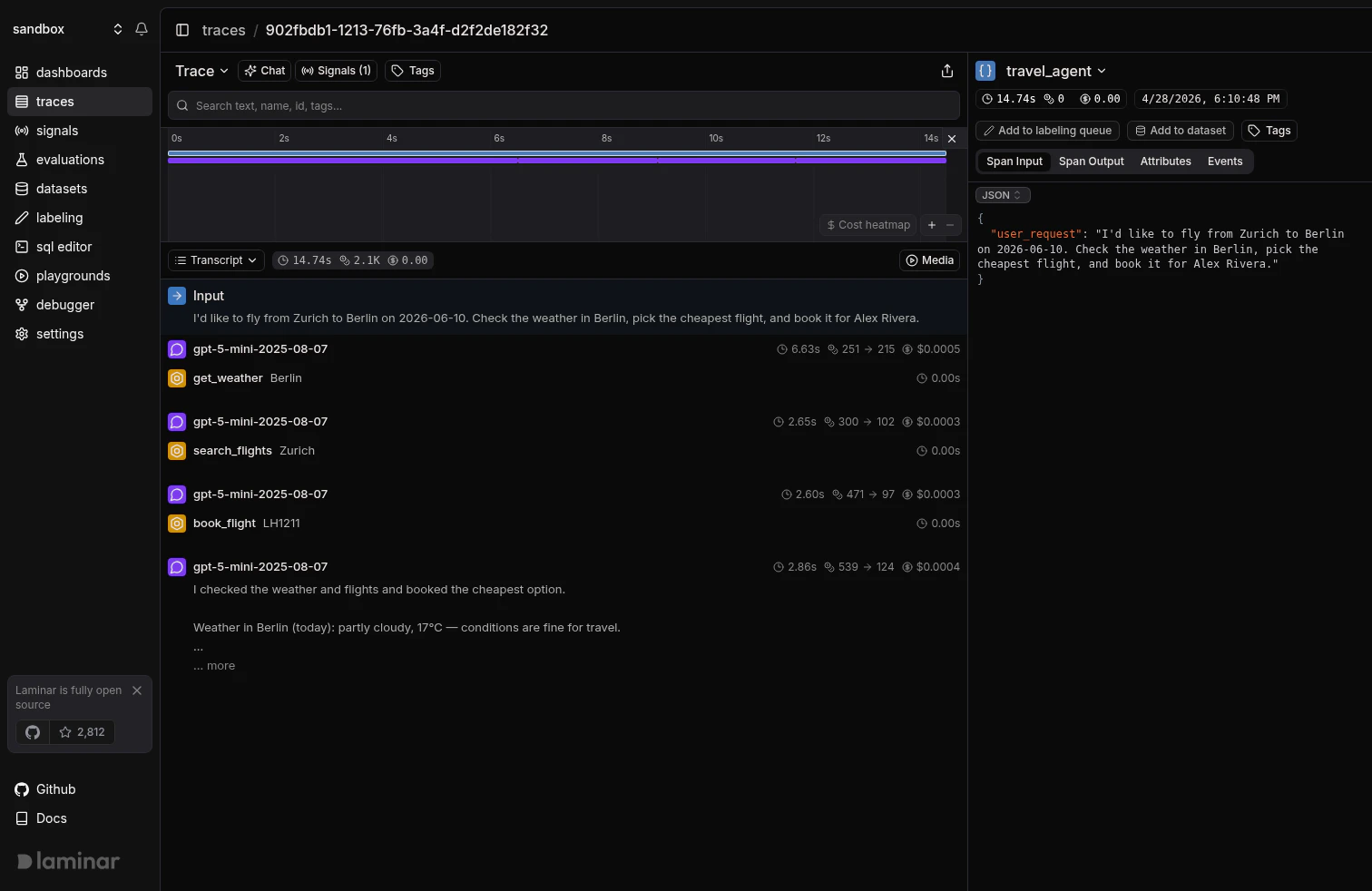
Same agent with span_type='TOOL': each tool call renders inline between the LLM turns, with an argument preview so you can read the run top-to-bottom.
span_type = 'TOOL', so typing them correctly makes cross-trace questions like “how often did book_flight fail this week” possible.
Setting the type on @observe
Pass spanType / span_type when you wrap a tool function. The argument names and value types are the same as in the @observe reference.
- TypeScript
- Python
Setting the type on manual spans
For code that isn’t a function (a block inside a larger handler, a dispatcher that chooses a tool by name, a loop over multiple tool invocations), use the manual-span APIs from Trace Parts of Your Code and pass the type at span creation.- TypeScript
- Python
TOOL span, so every tool call in the run shows up in the transcript with the right label and payload.
Setting type without the SDK
If you ship OTLP directly (no@lmnr-ai/lmnr / lmnr import), set the type as a span attribute at creation time:
When to leave a span as DEFAULT
DEFAULT is the right call for:
- Business logic the model doesn’t invoke directly: request handlers, validators, post-processors, format converters. These belong in the trace for hierarchy and timing but shouldn’t clutter the transcript.
- Setup and teardown: loading a config, building a prompt, parsing a response into a domain object. Readers of the transcript shouldn’t have to scroll past these to find the model’s decisions.
- Internal helpers inside a tool: the tool itself is the
TOOLspan; the HTTP helper it calls can stayDEFAULT.
TOOL. Otherwise leave it DEFAULT.
What’s next
Viewing traces
How the transcript view, tree view, and timeline render the spans you’ve typed.
Observe decorator
Full reference for
@observe / observe() and every parameter it takes.Manual span creation
Start-as-current, start-active, and detached spans for code that isn’t a function.
LLM cost tracking
Set
spanType='LLM' with the right attributes and Laminar will compute cost automatically.