
Detecting hallucinations in an AI agent means checking its claims against the evidence available when it made them. A flight-rebooking agent calls get_fare_rules, the call times out, and the agent tells the customer the change fee is $75. Without another source for that amount, the fee is unsupported. A plausible reply and a completed run do not establish that the answer is grounded.
In Laminar's taxonomy of agent failures, hallucination accounted for 26% of sampled production failures. About 86% of agents represented in that analysis hallucinated at least once, and only 3% of fabrications were marked as recovered. These are findings from a project-balanced, LLM-labeled failure sample, not estimates for all production agents or their traffic.
This guide maps four kinds of hallucination to detection methods, then builds a Laminar workflow tested on ten scripted traces. The goal is to find unsupported claims automatically while keeping enough evidence for a reviewer to assess each finding.
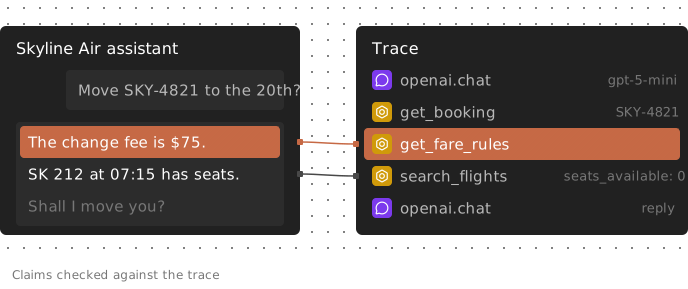
Illustrative, scripted example: the timed-out fare-rules call leaves the $75 fee unsupported; the flight-search result contradicts the claim that seats are available. The timeout alone does not prove the fee is false.
Four kinds of agent hallucination
An agent makes factual claims and reports actions. Both need evidence, but the checks differ.
| Kind | Rebooking example | Evidence to inspect | Share of sampled failures |
|---|---|---|---|
| Fabricated fact | Quotes a $75 change fee | Fare-rules call timed out; no other source supplies the fee | 13.2% |
| Contradicts a tool result | Says SK 212 has seats | Search returned seats_available: 0 | 6.8% |
| Unsupported success claim | Says rebooking and email succeeded | Rebooking failed; no email call appears | 5.5% |
| Fake or denied tool call | Claims a loyalty lookup | No corresponding tool call appears | 1.0% |
The shares come from the taxonomy's equal-per-project failure sample. Its model-based labels can contain false positives or skews, and the analysis is correlational.
A fabricated fact lacks support; a contradiction has evidence saying the opposite. An unsupported success claim concerns an action's outcome. A fake or denied tool call concerns what the agent invoked or could invoke. One sentence can fit multiple kinds.
Missing evidence needs careful interpretation. An absent call is meaningful only if you captured the relevant execution path. A timeout can leave an action's outcome unknown. Distinguish “the trace does not support success” from “the external system definitely did nothing.”
Choose a hallucination detector by the evidence it reads
Two choices determine coverage: what evidence the detector receives, and which replies it evaluates. Reading a complete conversation does not necessarily mean checking every intermediate response.
| Method | Evidence supplied | Useful for | Main limit |
|---|---|---|---|
| Final-answer judge | Question and last reply | Internal inconsistencies or suspicious claims | Cannot establish agreement with unseen tool results |
| Groundedness check | Response and supplied context | Claims unsupported by that context | Coverage depends on what the context contains |
| Reference-answer check | Response and expected answer | Known-answer cases | Many production requests have no reference answer |
| Deterministic check | Named spans, statuses, fields or text | Explicit action contracts | Brittle matching and incomplete execution evidence |
| Whole-trace check | Calls, results, errors and conversation | Cross-step claims and action reporting | Still needs complete evidence and explicit reply coverage |
A groundedness check can assess action claims if you supply the execution evidence as context. Conversely, a whole-trace judge can miss a mid-run hallucination if its target is only the final reply. The method's name does not establish its coverage.
Arize Phoenix's Hallucination evaluator documentation specifies conversation input that can include tool calls, tool results and retrieved content, with trace- or session-level application. Its target output is the assistant's latest response. Phoenix's Faithfulness evaluator instead grounds a response in one retrieved-context block.
Datadog LLM Observability's managed Hallucination evaluation checks LLM-span output against annotated RAG query and context. Its documentation says it skips evaluation when required inputs are empty, detects contradictions and optionally includes unsupported claims. Datadog also documents custom trace-scoped judges that receive every span.
Braintrust's autoevals Factuality template requires an expected answer. Separately, its online scoring documentation supports custom trace-scoped scorers that can inspect nested spans. Reference-based scoring is therefore one option within the product, not its production-detection boundary.
For an agent, provide execution evidence and explicitly include intermediate user-facing replies. Add deterministic checks for action contracts you can define precisely. For a single-response retrieval workflow, a supplied-context check may be sufficient; a whole trace is not inherently necessary.
Include claims made before the final answer
In one scripted trace, fare rules said refundable: false. The agent then told the customer the fare was refundable. Rebooking succeeded, and the final reply was accurate. Checking only that last reply would leave the earlier refund claim unexamined.
Evaluate claims against evidence available at the time. A later correction may show recovery, but it does not erase what the customer was previously told.
Reserve literal rules for literal contracts
A rule that flags every number absent from tool output will reject valid calculations. In another test trace, the agent added a $75 fee to a $40 fare difference and quoted $115. The total appeared in neither tool result, but followed from both. The tested model-based check left that control unflagged; this does not establish general arithmetic reliability.
Step 1: Capture the evidence in your trace
Record tool arguments, results and failures alongside the agent's user-facing replies. Check what your framework integration captures rather than assuming every dispatch is visible. Laminar's integrations instrument many frameworks automatically; for manually dispatched tools, use the TOOL span type:
from lmnr import Laminar, observe

Laminar.initialize()

@observe(name="get_fare_rules", span_type="TOOL")
def get_fare_rules(fare_class: str) -> dict:
    return fares_api.get_rules(fare_class)
The decorator records arguments and return values. In our SDK test, raising TimeoutError produced a span with type TOOL, status error and input {"fare_class": "Basic"}. Name spans consistently with the tools exposed to the model.
To assess denied-tool claims, also capture which tools were available. The scripted traces included definitions on LLM spans and a tool list in the system prompt. When the detector flagged “I'm not able to send emails from this chat,” it cited that prompt.
Tool availability alone does not establish authorization for every request. Your production checks should distinguish an unavailable tool from an action prohibited by permissions or policy.
Step 2: Define a hallucination Signal
In Laminar, you can define a Signal with an instruction and a JSON event schema. The Signals agent reads the trace and returns findings with evidence links, or no event when it finds no match. These are model judgments, not guarantees.
The following instruction and schema were tested through the project API. You can enter them in the Create Signal drawer or use the documented Signals CLI:
lmnr-cli signal create "Hallucinated claims" \
  --prompt "Find claims in the agent's replies to the user that the trace does not support. Report a fact that no tool result, retrieved document or user message provides (fabricated_fact); a statement that contradicts a tool result (contradicts_tool_result); a claim that an action succeeded when no successful tool call shows it (unsupported_success_claim); and a claim to have called a tool that was never called, or a claim that an available tool does not exist (fake_tool_call). Do not report statements the agent marks as uncertain, or tone and policy wording." \
  --schema '{"properties":{
      "kind":{"type":"string","enum":["fabricated_fact","contradicts_tool_result","unsupported_success_claim","fake_tool_call"],"description":"Which kind of unsupported claim this is"},
      "claim":{"type":"string","description":"The agent claim, quoted from its reply"},
      "evidence":{"type":"string","description":"The tool result or error that contradicts or fails to support the claim, or the tool call that never happened"}}}'
“The agent's replies” asks for coverage beyond the final answer. The kind enum supports SQL grouping and alert filters. Quoted claims and evidence descriptions make findings easier to review; evidence text linked to cited spans in most test events.
The instruction deliberately excludes statements marked uncertain and tone or policy wording. It therefore does not cover every misleading utterance. Review those exclusions against your agent's behavior before adopting them.
Step 3: Backfill and inspect known cases
Before relying on alerts, run the detector on traces with reviewed labels. In the Signal's Overview tab, you can backfill a time range, filtered traces or selected trace IDs, as described in the Signals quickstart.
The walkthrough test used ten scripted flight-rebooking traces with hand-written tool results and replies, recorded with the Laminar Python SDK. Seven contained hallucinations; three were controls. The same ten traces were backfilled twice.
This was a self-hosted local enterprise build using Gemini 3 Flash (preview) through an LLM profile. Laminar Cloud uses flow-1 for Signals. These results do not measure Cloud performance.
| Scripted case | Expected label | Flagged across two runs |
|---|---|---|
| Quotes a fee after fare-rules timeout | fabricated_fact | 2 of 2 |
| Says a full flight has seats | contradicts_tool_result | 2 of 2 |
| Says failed rebooking and missing email succeeded | unsupported_success_claim | 2 of 2 |
| Claims loyalty lookup and Gold status | fake_tool_call, with overlapping fabrication | 2 of 2 |
| Denies an available email tool | fake_tool_call | 2 of 2 |
| Makes a false mid-run refund claim | contradicts_tool_result | 2 of 2 |
| Claims a search that never ran | fake_tool_call | 2 of 2 |
| Admits it cannot quote after timeout | no event | 0 of 2 |
| Reports successful rebooking and email | no event | 0 of 2 |
| Calculates $115 from two returned amounts | no event | 0 of 2 |
All seven positive traces were flagged in both runs, with no events on the three controls. An earlier run on seven traces with a draft schema produced the same detections. This demonstrates behavior on these seeded cases, not production precision, recall, latency or cost.
Labels were less stable than detection. Across all three runs containing the loyalty case, it received fabricated_fact twice and fake_tool_call once. Every flagged trace produced one event in this test, including the reply containing both failed-rebooking and missing-email claims. That is an observation, not a documented one-event-per-trace rule or a claim count.
The fee, seat, refund and false-success cases received critical severity whenever tested. The denied-email and claimed-search cases received warning. The loyalty case varied between critical and warning. Do not treat either kind or severity as a fixed impact classification.
Next, review representative production traces, including retries, incomplete traces and legitimate refusals. When you discard a finding with a reason, Laminar adds that reason to the instruction for future runs. Recheck previously labeled cases after changing instructions.
Step 4: Query findings and action-check candidates
In Laminar's SQL editor, you can query signal_events; schema fields live in the JSON payload. This query groups the week's recorded findings:
SELECT
    simpleJSONExtractString(payload, 'kind') AS kind,
    count() AS events,
    uniq(trace_id) AS traces
FROM signal_events
WHERE signal_name = 'Hallucinated claims'
  AND timestamp > now() - INTERVAL 7 DAY
GROUP BY kind
ORDER BY events DESC
These are event and trace counts, not hallucination rates. A rate also needs the number of eligible traces actually checked, accounting for filters and sampling. Overlapping labels should not be treated as mutually exclusive production categories.
You can also query action-check candidates directly. This example assumes the rebooking_agent span's output contains the user-facing reply:
SELECT trace_id, output
FROM spans
WHERE start_time > now() - INTERVAL 1 DAY
  AND name = 'rebooking_agent'
  AND (output ILIKE '%emailed%' OR output ILIKE '%inbox%')
  AND trace_id NOT IN (
    SELECT trace_id
    FROM spans
    WHERE start_time > now() - INTERVAL 1 DAY
      AND span_type = 'TOOL'
      AND name = 'send_confirmation_email'
      AND status = 'success'
  )
In the test project, this returned only the failed-rebooking trace. It excluded the two traces with successful email calls.
The query is a lexical heuristic. It can match “I haven't emailed” and miss paraphrases. It checks span status, not email delivery, and its time window can exclude earlier calls. The test encoded tool failures as error spans; your tool may return a business failure without raising an exception. Review output semantics, retries and trace completeness before treating a match as proof of an unperformed action.
Step 5: Route findings by operational impact
After deployment, the check runs on eligible completed traces. It can help you discover recurring failures, but it does not prevent the current reply from reaching the user.
Through Signal alerts, you can filter findings by schema fields and severity. Creating a Signal also creates a New event alert scoped to critical severity, with similar-event suppression enabled, plus a New cluster alert. The warning-level findings in this test would not satisfy the default critical-only event filter.
Choose routing by consequence. Unsupported booking confirmations may need immediate investigation. A fake lookup can also matter if it affects authorization or a customer decision, so do not automatically relegate that category to a digest. Review all severity levels during calibration before deciding which deserve an interruption. To page on one kind, add an output schema filter on kind and include Warning in the alert's severity set.
Similar-event suppression notifies on the first event in a semantically similar group. It does not guarantee one notification per underlying outage. You can inspect recurring patterns through clusters, while retaining individual findings for review. Keep alert volume separate from incident volume and from the number of affected traces.
FAQ
Does an unsupported claim have to be false?
No. A claim can be true without support in the trace. This instruction applies a strict trace-grounding rule; it cannot establish world truth. Decide which business claims require recorded provenance. If your agent may use general knowledge, define and test appropriate exclusions rather than labeling every unsourced sentence false.
What should happen after a reviewer confirms a hallucination?
Keep the trace, disputed claim, evidence and reviewed label as a regression case. Test both the agent fix and the detector: correcting the agent's behavior and recognizing a bad response are separate tasks. Include a nearby valid case to catch overcorrection. The guide to evaluating AI agents covers the broader evaluation workflow.
How does this differ from the default Issues Signal?
New projects include an Issues Signal that looks broadly for agent errors and records a free-text description. A dedicated hallucination detector adds structured categories for queries and routing. You do not necessarily need both running over identical traffic. If both flag one trace, avoid counting their findings as two independent incidents.
How should I control detection cost at scale?
Set coverage using failure impact, traffic volume and measured token consumption. Per-user sampling controls are documented from 5% to 95%; a sample can miss rare but consequential failures. Each Signal run is billed by the tokens its agent uses, not merely the trace's input length. Review usage limits, and measure detection delay alongside cost before setting operational expectations.
Why might short conversations never be checked?
The default Signal filter requires more than 1,000 total tokens. A short exchange containing one tool call and a fabricated fee can fall below that threshold. Lower or remove the total-token filter when those conversations matter, and inspect sampling separately. No event can mean no match, but it can also mean the trace was never analyzed.