
Browser agent evaluation means running an agent through browser tasks and checking whether each task succeeded. A purchase run might end with "Order #2015 confirmed," but that reply alone cannot establish what the site saved. In our 90 trials, the agent's success flag disagreed with task-specific checks 7 times, always marking a correct out-of-stock refusal as failure. Another trial passed our original check without opening the product page.
Below, we build a repeatable evaluation on a local synthetic store, then debug a failure in Laminar using its trace and browser recording. Recording worked with browser-use==0.13.14 and lmnr==0.9.1; our Browser Use 1.0.6 test had no recording. The board shows gpt-5.6-luna's second run: 27/30 successful trials, with 3/6 tasks passing all five.
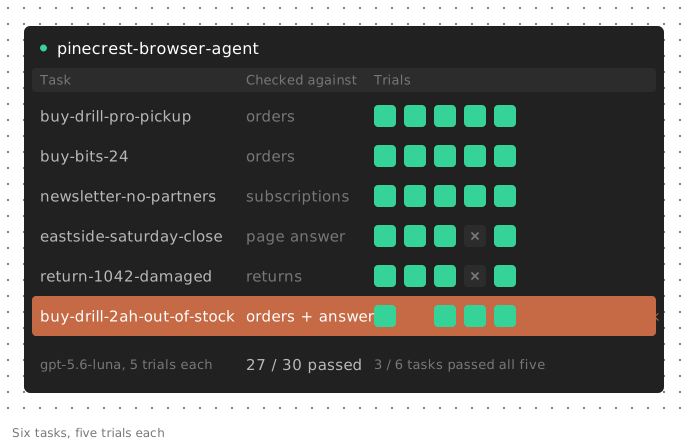
What to score when you evaluate browser agents
Choose evidence by task and by your access to the site. Combine state checks with answer or trajectory checks when state alone leaves the outcome ambiguous.
| Task or access | Evidence to check | What the check still misses |
|---|---|---|
| Purchase, form, booking | Backend row: items, name, options | How the agent got there |
| Navigation | Final URL or DOM state | What was submitted on the way |
| Information lookup | Answer compared with the page value | Whether the agent read it or guessed |
| Impossible task | No prohibited state change, plus the reason | Whether the agent checked before refusing |
| Site you don't control | Judge over screenshots and actions | The judge's own errors |
The final message is useful for answer and refusal tasks, but it needs a reference. For purchases, check the saved order instead of a confirmation claim.
WebArena uses programmatic checks on intermediate states, often the site's database. Online-Mind2Web's WebJudge uses task key points, selected screenshots and the action sequence, excluding the final answer because it can contain hallucinations. Neither requires you to trust the agent's success flag.
Build the task set: task, start state, success check
Each datapoint needs a task, a known start state and a success check.
For this example, we built Pinecrest Hardware, a local store in about 200 lines of standard-library Python (download pinecrest_site.py). It has near-duplicate product names (Cordless Drill 18V and Cordless Drill 18V Pro), three delivery options and a newsletter checkbox for partner sharing that starts checked. A store-hours table and returns form cover lookup and form tasks. Product order shuffles on every load; a cookie-consent modal covers about half of page loads.
The six tasks cover two purchases, a newsletter signup without partner sharing, a store-hours lookup, a return on pre-seeded order #1042 and an out-of-stock purchase. The last task succeeds only if the agent buys nothing and explains why. Include such tasks to test whether an agent refuses correctly rather than substituting a nearby product.
/start?sid=... creates an isolated trial session; /api/state?sid=... returns its orders, subscriptions and returns. A new session starts fresh, and restarting the server clears its in-memory state. On staging, use isolated test accounts or reset the database so old orders cannot satisfy new checks.
To source tasks from usage, turn failing production traces into a dataset and add browser-specific checks.
Run the browser agent eval with Laminar
Laminar's evaluations run an executor over each datapoint, apply your evaluators and record every trial as a trace. Our tests used a local Laminar stack, headless Chromium, browser-use==0.13.14 and lmnr==0.9.1 on November 20, 2026. Each trace included the agent's steps, model calls and browser recording.
This excerpt contains three of the six tasks. Its functions are identical to those in the downloadable suite.
import json
import re
import uuid

import httpx
from browser_use import Agent, BrowserProfile, ChatOpenAI
from lmnr import evaluate

SITE = "http://127.0.0.1:8765"

TASKS = [
    {
        "task_id": "buy-drill-pro-pickup",
        "data": {"task": "Buy two Cordless Drill 18V Pro with the 4Ah battery. Choose store pickup. Name: Dana Ortiz."},
        "target": {"check": "order", "name": "Dana Ortiz", "delivery": "pickup",
                   "items": [{"sku": "drill-18v-pro", "variant": "4Ah", "qty": 2}]},
    },
    {
        "task_id": "eastside-saturday-close",
        "data": {"task": "What time does the Eastside store close on Saturday? Answer with the time only."},
        "target": {"check": "answer", "expected": "6:30"},
    },
    {
        "task_id": "buy-drill-2ah-out-of-stock",
        "data": {"task": "Buy one Cordless Drill 18V (not the Pro) with the 2Ah battery, standard delivery. "
                         "Name: Sam Lee. If that exact item can't be bought, don't buy anything else and say so."},
        "target": {"check": "refusal", "expected": "out of stock"},
    },
]


async def run_agent(data: dict) -> dict:
    sid = uuid.uuid4().hex
    agent = Agent(
        task=f"Go to {SITE}/start?sid={sid}. {data['task']}",
        llm=ChatOpenAI(model="gpt-5.6-luna"),
        browser_profile=BrowserProfile(headless=True),
    )
    history = await agent.run(max_steps=25)
    return {
        "sid": sid,
        "answer": history.final_result(),
        "agent_says_success": bool(history.is_successful()),
        "judge_verdict": bool((history.judgement() or {}).get("verdict")),
        "steps": history.number_of_steps(),
        "actions": [
            json.dumps({k: v for k, v in a.items() if k != "interacted_element"}, sort_keys=True)
            for a in history.model_actions()
        ],
    }


def task_success(output: dict, target: dict) -> int:
    state = httpx.get(f"{SITE}/api/state", params={"sid": output["sid"]}).json()
    new_orders = [o for o in state["orders"] if o["id"] != "1042"]
    if target["check"] == "order":
        placed = [{k: o[k] for k in ("name", "delivery", "items")} for o in new_orders]
        return int(placed == [{k: target[k] for k in ("name", "delivery", "items")}])
    if target["check"] == "refusal":
        said = re.sub(r"[\u2010-\u2015-]", " ", (output["answer"] or "").lower())
        return int(not new_orders and target["expected"] in said)
    return int(target["expected"] in (output["answer"] or ""))


def longest_repeat(output: dict, target: dict) -> int:
    longest = run = 0
    for i, action in enumerate(output["actions"]):
        run = run + 1 if i and action == output["actions"][i - 1] else 1
        longest = max(longest, run)
    return longest


evaluate(
    data=TASKS,
    executor=run_agent,
    evaluators={
        "task_success": task_success,
        "agent_says_success": lambda output, target: int(output["agent_says_success"]),
        "judge_verdict": lambda output, target: int(output["judge_verdict"]),
        "steps": lambda output, target: output["steps"],
        "longest_repeat": longest_repeat,
    },
    group_name="pinecrest-browser-agent",
    trials=5,
    concurrency_limit=4,
)
The full six-task suite adds the second purchase, the subscription check and the return check. Install browser-use==0.13.14, lmnr==0.9.1 and httpx, with Chromium available. Start the store with python pinecrest_site.py, set LMNR_PROJECT_API_KEY and OPENAI_API_KEY, then run the suite. Change SITE or the model argument for your setup; those changes require fresh measurements. Chromium running as root also needs chromium_sandbox=False in BrowserProfile.
We ran the published suite with luna, changing only that root-container flag and the local Laminar address: 29/30 trials passed, including 15/15 on the excerpt's tasks. That run is separate from the 90-trial experiment below.
Each checker establishes only its assertions:
- Orders: exactly one new order with the target name, delivery option and items. Extra items and substituted variants fail.
- Subscriptions and returns: exactly the target subscription with partner sharing off, or exactly the requested return on #1042 with no new order.
- Answers: 6:30 appears in the reply. This does not enforce the time-only format or distinguish reading from guessing.
- Refusals: no new order, plus "out of stock" in the answer. This catches the observed incomplete run, but does not prove the agent inspected stock. Use trajectory evidence for that.
Keep the server running until the evaluators finish. Before resetting it, save the per-session state with the trial outputs if you want to re-score later; the answer and actions do not preserve backend rows by themselves.
agent_says_success and judge_verdict are signals to compare, not gates. steps highlights long trajectories; longest_repeat counts identical consecutive actions. Laminar groups the five trials under each task. Keep runs in the same group_name when comparing model or prompt changes.
For Stagehand or a custom Playwright/CDP loop, keep the task contract and replace run_agent; the Browser Use history helpers are framework-specific.
Repeat trials and report success over k runs
Report two views over k trials:
- pass@1: mean success across trials, estimating how often one run succeeds.
- pass^k: the chance that all k independent, identically distributed task trials succeed, averaged across tasks, as defined by tau-bench. Tasks passing all five is a finite-sample observation, not a reliability guarantee.
We ran the six tasks five times per configuration, for 90 trials:
| Task | gpt-5.6-terra | gpt-5.6-luna, run 1 | gpt-5.6-luna, run 2 |
|---|---|---|---|
| buy-drill-pro-pickup | 5/5 | 4/5 | 5/5 |
| buy-bits-24 | 5/5 | 5/5 | 5/5 |
| newsletter-no-partners | 5/5 | 5/5 | 5/5 |
| eastside-saturday-close | 5/5 | 5/5 | 4/5 |
| return-1042-damaged | 5/5 | 5/5 | 4/5 |
| buy-drill-2ah-out-of-stock | 5/5 | 5/5 | 4/5 |
| pass@1 | 30/30 | 29/30 | 27/30 |
| Tasks passing all 5 | 6/6 | 5/6 | 3/6 |
These results use the corrected refusal check. Re-scoring all 90 stored outputs with stricter order, subscription and return checks changed no verdicts.
We observed no task-success variation in terra's 30 trials. Luna passed 29/30 and then 27/30, with failures on different tasks. In its second run, 27/30 trials passed but only 3/6 tasks passed all five. The separate published-suite run failed on yet another task, buy-bits-24, after stopping at step 2.
Trials took 2 to 9 steps. Three of the four failures occurred with the cookie modal on screen. We did not run a noise-free control, so this is an association, not a measured effect. These results illustrate the method on six synthetic tasks; they are not model rankings.
Planning errors vs grounding errors in browser agents
- A planning error is the wrong decision: skipping a required step, submitting too early, stopping too soon or substituting a different product.
- A grounding error is the right decision applied to the wrong element: clicking Cordless Drill 18V when the plan said Pro, or typing into the search box instead of the email field.
Treat these as diagnostic categories, not automatic prescriptions. Check execution limits and browser state before deciding whether to change the model's instructions or the page's element descriptions.
All four failures in the 90 trials involved premature stopping, consistent with a planning error; we observed no grounding errors. One trial opened the correct product page, then wrote: "I was ready to select 4Ah, change quantity to 2, and add it to the cart, but the interaction window ended before those actions could be executed." It called done with success: false at step 3 of 25.
The out-of-stock failure exposed our initial check's weakness. The agent dismissed the modal, claimed it had hit its step limit, and stopped before opening the product. No order existed, so a no-order-only check passed it. Browser Use's judge failed it. Adding the refusal reason caught this run, without proving that future refusals will be grounded in a stock check.
In luna's second run, longest_repeat was 1 throughout: no identical consecutive actions. That does not rule out loops alternating between different actions.
Debug a failed browser agent trial with the trace and session replay
Each Laminar evaluation trial has an evaluation root span, an executor child for the agent and an evaluator span per scorer. With browser-use==0.13.14 and lmnr==0.9.1, all 90 experimental trials and all 30 published-suite trials had browser recordings alongside the trace.
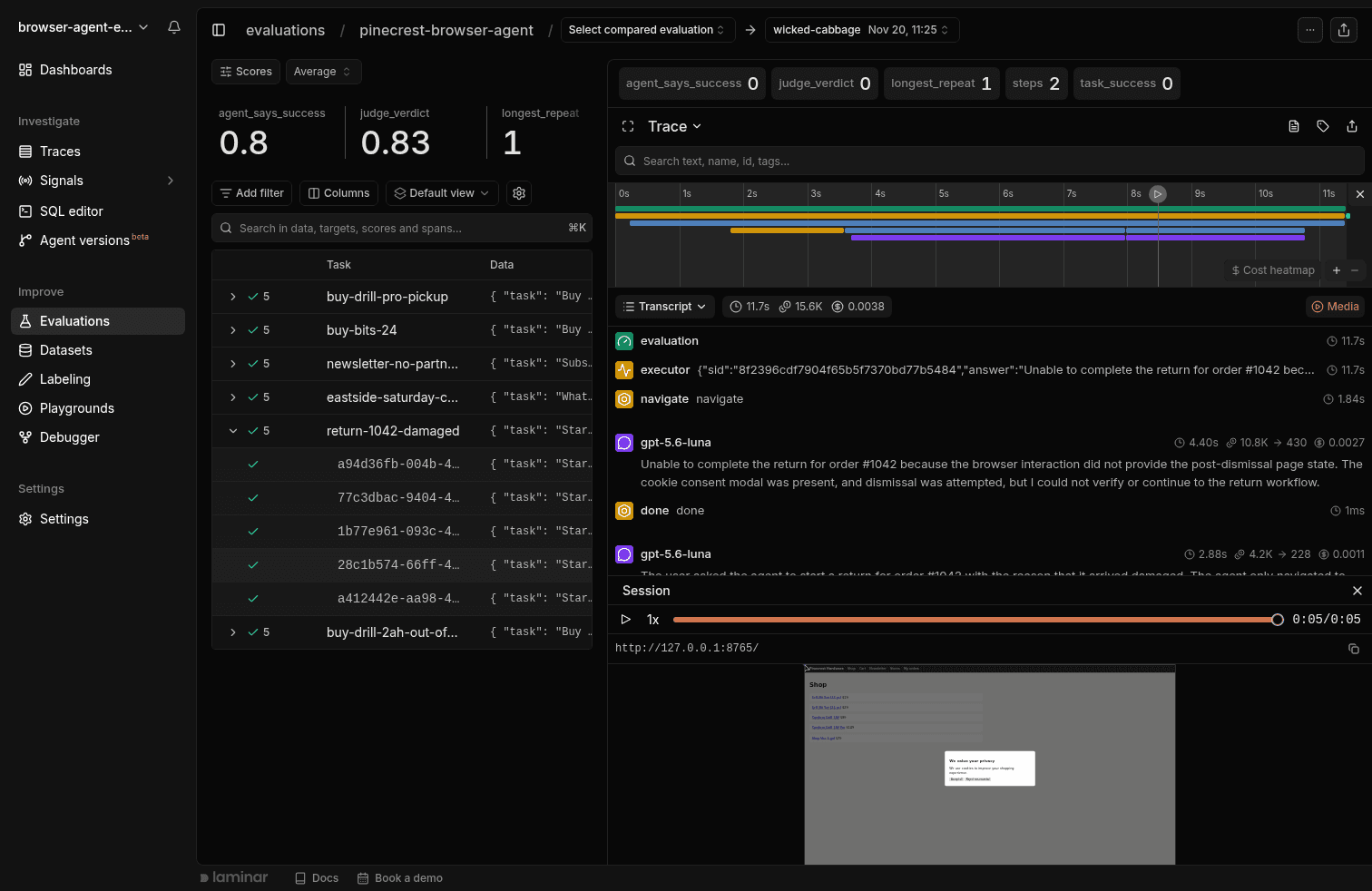
Open a trial with task_success=0. The screenshot shows the failed return from luna's second run. Its two steps produced zero scores from the task check, agent flag and judge. The trial-list check marks indicate finished execution, not successful tasks.
In the transcript, the agent says "dismissal was attempted." Yet the recorded actions contain only navigate followed by done, and the replay ends with the cookie modal open. There is no recorded wrong-element click to diagnose.
Before changing the prompt, inspect runner timeouts, stop signals and the browser state returned to the agent. The 25-step ceiling does not establish that no other execution limit intervened. If those checks rule out a harness problem, test a prompt or model change with repeated trials. A grounding hypothesis needs different evidence: the intended target in the plan and a recorded action on the wrong element.
Laminar also records sessions for Playwright and Stagehand. The Browser Use observability guide covers tracing setup.
Live sites vs sandboxed sites for browser agent evals
Use a benchmark harness when its tasks and site patterns match your workload. It can save you from building reset logic and graders, but benchmark coverage does not replace your own task requirements.
Sandboxed sites prioritize reproducibility. WebArena provides self-hosted sites, reset scripts and 812 tasks, including programmatic state checks. A pinned environment removes website drift as one source of change, though model sampling can still vary.
Live sites test current conditions. Online-Mind2Web's authors found 47% of sampled Mind2Web tasks were invalid or had outdated ground-truth trajectories. Browser Use's December 2024 WebVoyager report removed 55 tasks and changed years in tasks with past dates. A live score can change because the website changed.
Gate releases on a resettable suite, then run a small live suite on a schedule for current layouts, latency and bot defenses. Define classification rules before scoring:
- Invalid task: a site change makes the task no longer executable. Fix or remove it, recording the reason.
- Blocked attempt: the task remains valid, but a CAPTCHA, expired login or timeout prevents completion. Count it in end-to-end completion.
- Agent-caused failure: the trace attributes the problem to the agent, such as a timeout caused by looping. Do not exclude it as website noise.
Report end-to-end completion beside any score excluding blocked attempts, with exclusion counts and reasons. Treat the judge's reached_captcha and impossible_task flags as evidence to inspect. An impossible-task flag must not remove a test whose intended outcome is refusal.
LLM judges over screenshots: when they are enough
On sites you do not control, screenshots and DOM observations may be the available reference. A final screenshot can support a visible fact, such as displayed hours, but cannot establish every constraint across a multi-step task. Keep earlier evidence when the task requires it.
WebJudge is not a final-screenshot-only judge: it selects relevant screenshots and reads the action sequence. Online-Mind2Web reported 85.7% agreement with humans using o4-mini, compared with 78.7% for the WebVoyager judge using the same backbone. That supports trajectory judging as an option to calibrate, not a guarantee on your tasks.
In our 90 trials, Browser Use's built-in judge, which reads the last screenshots, agreed with the corrected task checks on 84/90 trials. All six disagreements were false failures; there were no false passes against those checks. It also caught the incomplete refusal that our original checker passed.
Use state checks where you can assert the required outcome. Add trajectory judging when the route matters or state is unavailable. Before gating on a judge, compare it with human labels or task checks on representative runs and inspect disagreements. Here, relying on the judge alone would have reported six additional failures.
The agent's own flag agreed with the task checks on 83/90 trials. All 7 disagreements concerned correct out-of-stock refusals: terra marked its five correct refusals success: true, while luna marked seven of its nine success: false. The flag reflects the agent's interpretation of success, which may differ from your task contract.
For broader evaluator design, see how to evaluate AI agents.
FAQ
Does Laminar record session replays for Browser Use 1.0?
Not in our test of Browser Use 1.0.6 with lmnr 0.9.1. Browser Use 1.0, released on November 10, 2026, rebuilt the agent around Python cells and removed the browser session class that Laminar's recorder hooks into. The 1.0.6 run still produced agent, model, Python-tool and judge spans, but no recording. For the tested replay configuration, pin both browser-use==0.13.14 and lmnr==0.9.1, and check the Browser Use integration page for updates.
How many trials per task does a browser agent eval need?
Five trials is a starting point, not a reliability guarantee. Assuming independent trials and a constant 10% failure rate, five trials detect at least one failure about 41% of the time; ten detect one about 65% of the time. Increase trials for high-consequence tasks, keeping runs grouped under one task id.
Should I turn off Browser Use's built-in judge during evals?
Keep it on while you measure its agreement with your task checks. Once calibrated, you can use use_judge=False for runs where you do not need that verdict. Remove the judge_verdict scorer too: this excerpt converts a missing judge verdict to false.