
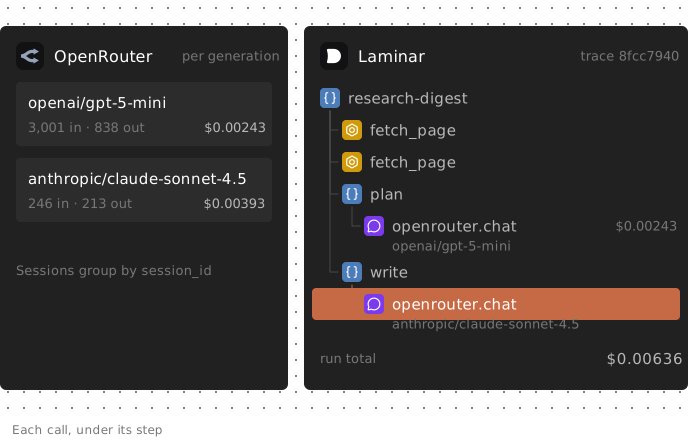
OpenRouter observability means tracking which model handled an agent request, its token usage and cost, and the step that made it. OpenRouter already reports model, tokens and cost. Send a session_id, and its Sessions tab groups the run's generations and totals their cost.
Suppose a research-digest agent fetches two pages, plans with one model and writes with another. OpenRouter can group both generations and accept request-level trace labels, but it cannot independently observe the fetches or calls that bypass its gateway. In-process tracing adds that application context. This guide shows what OpenRouter answers natively, how to trace the same workflow with Laminar, and how to attribute cost to steps even when they share a model.
What OpenRouter usage tracking covers natively
Start with OpenRouter's native features. You may already have enough information to answer your usage question without adding another system.
| Feature | What it answers | Where to look |
|---|---|---|
| Response usage | Tokens and cost per request | Response or generation API |
| Activity | Spend and usage by model, provider or key | Dashboard and exports |
| Logs | Serving provider, status and attempts | Generation details |
| Sessions | Models, requests and cost per session | Sessions tab |
| Broadcast | Request traces in another destination | Configured destination |
| Key limits | Spend enforcement per API key | Key settings |
Several details matter for agent workloads:
- Usage accompanies responses. OpenRouter's usage accounting docs define cost as the amount charged to your account for that request. Token details include cached and reasoning tokens. You can also retrieve generation information by ID through /api/v1/generation.
- Activity supports account-level analysis. It breaks down spend, requests and tokens by model, provider, API key, app or user, with CSV/PDF exports and Activity and Analytics APIs, which require a management API key rather than an inference key.
- Logs show routing. Generation details include the final provider, fallback information and a provider-attempt waterfall. Use this view to investigate which upstream provider served a request or whether routing attempts contributed to latency.
- Prompt and completion logging is configurable. Input & Output Logging is off by default. Enable it under Settings > Observability to record content for subsequent requests; it does not backfill earlier requests.
- Sessions group labeled requests. Send session_id or the x-session-id header to group generations with their models, request count and total cost. The same ID also acts as a sticky-routing key for prompt caching, so it can influence which provider serves a request.
- Broadcast exports request traces. Destinations include an OpenTelemetry Collector, webhooks, S3 and named vendors. The request's trace field supports trace and span labels, generation names and a parent span ID.
If you need the cost of one labeled run through OpenRouter, Sessions directly answers that question.
What an in-process agent trace adds
OpenRouter sees requests that pass through its gateway. An agent trace can also capture the surrounding execution:
- Tools and retrieval. A fetch may return an error page that the writer then summarizes. Recording the fetch beside the model call lets you inspect the input that caused the bad digest.
- Direct provider calls. A run may use a provider-specific feature or call a model without going through OpenRouter. Those calls need instrumentation outside the gateway.
- Named application steps. OpenRouter accepts session and trace labels, but your application must supply that context. Named parent spans provide another way to distinguish plan from write, including when both use the same model.
The useful addition is the relationship between operations. A model call becomes a child of the function that made it, next to the run's tool calls. The agent observability guide covers this trace structure in more detail.
Set up OpenRouter observability in Python
Laminar's OpenRouter integration instruments the official OpenRouter SDK:
pip install -U lmnr openrouter python-dotenv
Set LMNR_PROJECT_API_KEY from your Laminar project and OPENROUTER_API_KEY in your environment or .env. Laminar.initialize() detects the OpenRouter SDK and instruments chat.send, responses.send and embeddings.generate.
The following example fetches pages, extracts relevant facts with openai/gpt-5-mini, then writes a digest with anthropic/claude-sonnet-4.5. Our Python test used lmnr 0.8.0 and openrouter 1.3.71 on October 21, 2026; the install command above selects current releases rather than pinning those versions.
import os
import urllib.request

from dotenv import load_dotenv
from lmnr import Laminar, observe
from openrouter import OpenRouter

load_dotenv()
Laminar.initialize()

client = OpenRouter(api_key=os.environ["OPENROUTER_API_KEY"])
PLANNER = "openai/gpt-5-mini"
WRITER = "anthropic/claude-sonnet-4.5"
SESSION_ID = "digest-2026-10-21"


@observe(span_type="TOOL")
def fetch_page(url: str) -> str:
    with urllib.request.urlopen(url, timeout=20) as resp:
        return resp.read().decode("utf-8", errors="ignore")[:6000]


def ask(model: str, prompt: str) -> str:
    result = client.chat.send(
        model=model,
        messages=[{"role": "user", "content": prompt}],
        session_id=SESSION_ID,
    )
    return result.choices[0].message.content


@observe(name="plan")
def plan(topic: str, pages: list[str]) -> str:
    return ask(
        PLANNER,
        f"List the 5 facts most relevant to '{topic}' from these pages, one line each.\n\n"
        + "\n\n---\n\n".join(pages),
    )


@observe(name="write")
def write(topic: str, notes: str) -> str:
    return ask(WRITER, f"Write a 120-word digest on '{topic}' from these notes:\n{notes}")


@observe(name="research-digest")
def research_digest(topic: str, urls: list[str]) -> str:
    Laminar.set_trace_session_id(SESSION_ID)
    Laminar.set_trace_metadata({"topic": topic})
    pages = [fetch_page(url) for url in urls]
    return write(topic, plan(topic, pages))


if __name__ == "__main__":
    print(research_digest("tracing LLM calls in agents", [
        "https://raw.githubusercontent.com/lmnr-ai/lmnr/main/README.md",
        "https://raw.githubusercontent.com/lmnr-ai/lmnr-python/main/README.md",
    ]))
    Laminar.flush()
@observe(name="research-digest") creates the root span. The plan and write spans name the steps, so each OpenRouter call nests under the step that made it. The fetch decorator marks each fetch as a tool call. Laminar.flush() lets a short script send its spans before exiting.
Laminar.set_trace_session_id and set_trace_metadata affect Laminar only. They do not populate OpenRouter's session_id; the example passes that separately on every request. The fixed session ID is for the demo. Use a distinct ID per execution if you want separate OpenRouter Sessions totals for repeated runs.
Set up OpenRouter tracing in TypeScript
In Node, pass the OpenRouter SDK to instrumentModules so Laminar can patch it. Set the same two API-key environment variables used by the Python example.
npm install @lmnr-ai/lmnr@latest @openrouter/sdk
import { Laminar, observe } from '@lmnr-ai/lmnr';
import { OpenRouter } from '@openrouter/sdk';

Laminar.initialize({ instrumentModules: { openrouter: OpenRouter } });

const client = new OpenRouter({ apiKey: process.env.OPENROUTER_API_KEY });

async function ask(model: string, prompt: string): Promise<string> {
  const result = await client.chat.send({
    chatRequest: { model, messages: [{ role: 'user', content: prompt }] },
  });
  if (!('choices' in result)) throw new Error('expected a non-streaming response');
  return String(result.choices[0].message.content ?? '');
}

const fetchPage = (url: string) =>
  observe({ name: 'fetch_page', spanType: 'TOOL', input: { url } }, async () => {
    const response = await fetch(url);
    if (!response.ok) throw new Error(`Fetch failed: HTTP ${response.status} for ${url}`);
    return (await response.text()).slice(0, 6000);
  });

await observe({ name: 'research-digest' }, async () => {
  const page = await fetchPage('https://raw.githubusercontent.com/lmnr-ai/lmnr/main/README.md');
  const notes = await ask('openai/gpt-5-mini', `List 3 facts from this page, one line each.\n\n${page}`);
  return ask('anthropic/claude-sonnet-4.5', `Write a 60-word digest from these notes:\n${notes}`);
});

await Laminar.flush();
The TypeScript test environment used Node 24, @lmnr-ai/lmnr 0.8.51 and @openrouter/sdk 1.4.25. The 'choices' in result check narrows the return type, which can also be a stream.
This shorter example records the fetch and both model calls under the root. It does not create named plan and write spans or send an OpenRouter session ID. The per-step results below come from the Python example, where those step spans exist.
If you already use the OpenAI SDK against OpenRouter's API base URL, you can keep that client; the OpenAI integration covers its options. Instrument OpenAI instead, using instrumentModules: { OpenAI } in TypeScript; Python requires no additional initialization for that SDK. Calls appear as openai.chat spans with provider openrouter.
See which model OpenRouter used for each step
Open the Python run's trace in Laminar. The transcript view is the default trace view; tree and timeline views are also available. Inspect the fetch outputs, then follow the plan and write spans to their model calls.
These measurements came from trace 8fcc7940, read back through Laminar's SQL API:
| Step | LLM span | Model | Input / output tokens | Cost |
|---|---|---|---|---|
| plan | openrouter.chat | openai/gpt-5-mini | 3,001 / 838 | $0.00243 |
| write | openrouter.chat | anthropic/claude-sonnet-4.5 | 246 / 213 | $0.00393 |
The trace also contained two fetch_page tool spans. The planner's 838 output tokens included 640 reasoning tokens.
The exact model-call costs were $0.00242625 and $0.003933, totaling $0.00635925. Each span cost equaled the corresponding OpenRouter usage.cost value. These are measurements from one execution, not expected prices for every run of the script.
Laminar's cost tracking uses a non-zero cost reported on the span first, then custom model prices, then its built-in price table. The OpenRouter instrumentation copies usage.cost onto the span, preserving OpenRouter's reported charge. The OpenAI SDK integration does not forward that value, so Laminar calculates the cost from token usage. Our OpenAI SDK test produced a matching cost, but that does not show it will always equal what OpenRouter charges.
Requested model and responding model
Each LLM span stores both the requested and responding model. In the routing test, a request for openrouter/auto returned deepseek/deepseek-v4.1-flash-1017, and Laminar recorded both values. The model column prefers the response model when present. OpenRouter's fallback documentation identifies the response model as the model used and billed.
The span's provider value is openrouter, not the upstream serving provider. Laminar's OpenRouter instrumentation does not record that upstream provider or the preceding fallback attempts. Use OpenRouter Logs for those details. The span carries the generation ID in gen_ai.response.id, giving you an identifier to look up in OpenRouter.
Cost per agent run, step and model
Laminar's SQL editor queries span and trace data. The same queries can run through /v1/sql/query with a project API key.
To total OpenRouter usage by model over the last day:
SELECT
    model,
    count() AS calls,
    sum(input_tokens) AS input_tokens,
    sum(output_tokens) AS output_tokens,
    round(sum(total_cost), 6) AS cost
FROM spans
WHERE span_type = 'LLM'
  AND provider = 'openrouter'
  AND start_time > now() - INTERVAL 1 DAY
GROUP BY model
ORDER BY cost DESC
This produces a breakdown similar to OpenRouter's Activity by model, limited to the OpenRouter calls traced in this Laminar project. For step attribution, group by path, which includes the named parent spans:
SELECT
    trace_id,
    path,
    model,
    count() AS calls,
    round(sum(total_cost), 6) AS cost
FROM spans
WHERE span_type = 'LLM'
  AND path LIKE 'research-digest.%'
  AND start_time > now() - INTERVAL 7 DAY
GROUP BY trace_id, path, model
ORDER BY trace_id, cost DESC
Unlike the first query, this query has no provider filter. The results discussed here come from the OpenRouter-only Python runs.
For trace 8fcc7940, the paths were research-digest.plan.openrouter.chat and research-digest.write.openrouter.chat. The writer cost $0.00393 and the planner $0.00243, despite the planner reading about twelve times as many input tokens.
A second execution used gpt-5-mini for both steps. Model-only grouping merged their cost into $0.00540. Path grouping kept them separate: write cost $0.00379 and plan cost $0.00161. The writer generated 1,869 output tokens, including 1,664 reasoning tokens; OpenRouter reported 2,944 of the planner's 3,001 input tokens as cached.
These measurements demonstrate attribution when models overlap. They do not establish a general cost ranking between models: caching and generated output differed between executions.
Without named step spans, both calls have the path research-digest.openrouter.chat. Grouping by that path cannot distinguish planning from writing; it only separates models when their names differ.
The traces table also carries the session ID, metadata and total cost. Use that context to organize runs by topic or another field your application attaches. For a standing view, custom dashboards include cost and token presets, grouping by model or provider, and an Expensive traces preset. For more on reading token and cost data, see the guides to AI token cost and AI agent cost tracking tools.
Unified tracing across OpenRouter and direct provider calls
A gateway can unify access to models while some calls still bypass it. Those direct calls need their own SDK instrumentation to appear in the agent trace.
In our mixed-provider test, one observed Python function called gpt-5-mini through OpenRouter, then Claude Haiku 4.5 directly through the Anthropic SDK. Both calls appeared under the same parent trace. This demonstrated shared execution context, but it also exposed an accounting problem.
With anthropic 1.17.0 and lmnr 0.8.0, the direct Anthropic call produced two sibling LLM spans: anthropic.chat, with provider anthropic, and anthropic.messages.create, with an empty provider. Each recorded 12 input tokens, five output tokens and $0.000037. The trace counted that call twice, producing a total of $0.00023475. The OpenRouter call appeared once at $0.00016075.
Do not treat that mixed-provider total as reconciled spend. Before aggregating across SDKs, check that each request produces one billable LLM span. The OpenRouter-only measurements above are separate from this result.
Keep model and provider together when analyzing mixed traffic, because gateway model IDs and direct-provider IDs can differ. Use OpenRouter's usage records and Activity to reconcile OpenRouter charges; use trace context to explain where those calls occurred in the run.
Limits to plan for
Raw HTTP calls need explicit instrumentation. Calls made with fetch, requests or httpx are not automatically instrumented by the OpenRouter SDK integration. Wrapping them in observe() records inputs, outputs and duration, but Laminar does not extract LLM-specific tokens or cost from raw HTTP responses. Use the OpenRouter or OpenAI SDK for the demonstrated automatic accounting workflow.
Laminar cannot cap spend. Set a credit limit on the OpenRouter API key to enforce a spending boundary. Once exhausted, OpenRouter rejects requests with HTTP 402 and limit_source: openrouter_key_limit in the error metadata until the limit resets or you raise it. Resets are optional; a non-resetting limit does not replenish automatically. A GET to /api/v1/key exposes limit_remaining for headroom checks. A key per agent or environment gives each its own cap and Activity breakdown.
An invalid model ID does not test fallback behavior. Our test submitted a models list beginning with a nonexistent model. OpenRouter returned HTTP 400, and Laminar recorded an error span. No real fallback was forced. OpenRouter documents fallbacks for serving failures such as downtime and rate limits; these measurements do not demonstrate how an actual fallback sequence appears.
Which tool answers which question
| Question | Where to start |
|---|---|
| Monthly spend by model or key? | OpenRouter Activity |
| Serving provider and routing attempts? | OpenRouter Logs |
| Cost of one labeled OpenRouter run? | OpenRouter Sessions |
| Enforced spending limit? | OpenRouter key limits |
| Tool output before a model call? | Instrumented agent trace |
| Cost of named application steps? | Step spans and path-grouped SQL |
| Direct calls within the same run? | Instrumentation for each SDK |
FAQ
Can I send OpenRouter Broadcast data to Laminar instead of using the SDK?
A direct Broadcast-to-Laminar integration was not tested, although Broadcast's OpenTelemetry Collector destination sends OTLP/HTTP JSON and Laminar accepts that encoding. Protocol compatibility alone does not establish how exported spans map to Laminar's model, token and cost fields. Tool calls and direct-provider calls still require separate instrumentation; see Laminar's OpenTelemetry documentation for supported endpoints and encodings.
When is usage available for a streaming call?
OpenRouter reports streamed usage in the final SSE chunk. Consume the stream through its final usage chunk before checking the recorded cost against OpenRouter's charge. A stream stopped early may leave usage missing or incomplete on the span.
Why does my span show openrouter/auto as the request model?
That field preserves the automatic-routing model you requested. To analyze only automatically routed traffic, filter on request_model = 'openrouter/auto', then group by model to see which responding models handled those requests.
Will prompt and completion text be recorded in the trace?
Yes. Trace content is enabled by default, and the OpenRouter instrumentation then records input and output messages and tool definitions on each LLM span. This is independent of OpenRouter's Input & Output Logging setting. With Laminar's PII redaction set to On, detected names, emails and secrets in new span inputs and outputs are replaced with placeholders before storage. Dual mode keeps the original and redacts it for readers other than workspace owners and admins. Neither mode rewrites existing traces or covers metadata such as user IDs, and on Laminar Cloud the setting requires a Pro or Enterprise plan. Review what your application sends before enabling production tracing.
Can I alert on an agent outcome rather than a cost threshold?
Laminar's Signals support natural-language conditions over traces, with alerts for matching events. For a digest agent, a condition could describe an output citing a page the agent never fetched. Choose conditions based on the failures you need to investigate; the guide to AI agent failure detection discusses additional patterns.