
See your agent runs in browser
Watch your agent work from the Laminar UI while it drives the loop from the terminal. Open Debugger in your project and select the session, or click thedebugger_url the SDK prints (it opens automatically when a debug run starts).
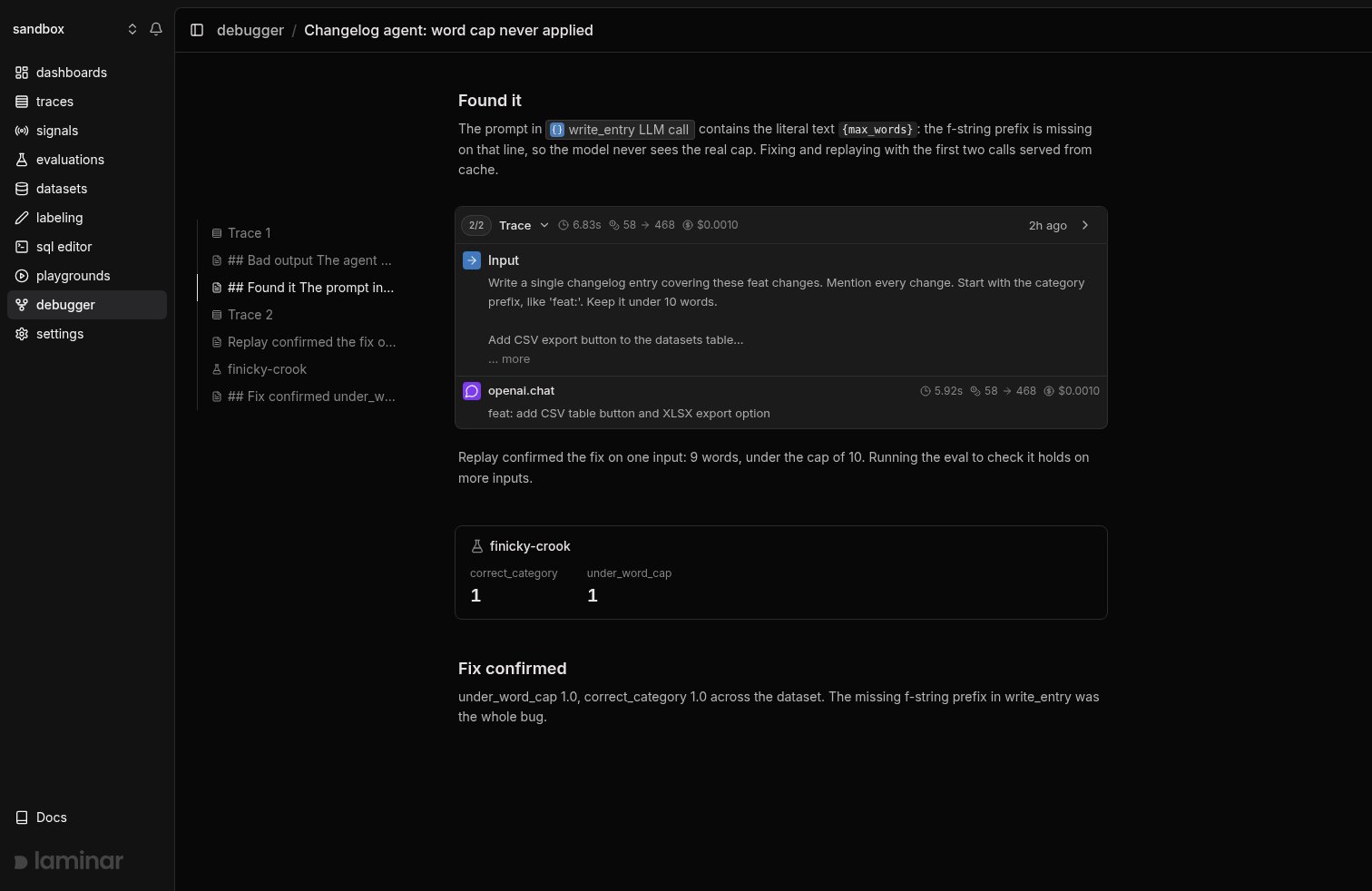
A session is a timeline of blocks: runs (traces), evaluations, notes, and CLI commands the agent ran, interleaved by time. The view streams every block live as your coding agent works. Each run renders Laminar’s auto-extracted user inputs, LLM turns, tool calls, and collapsed sub-agent cards. Evals render as cards with per-score averages, notes render as markdown between them, and tracked commands render as terminal-style rows, so you can follow the agent’s reasoning in real time.
1. Record a run
AddLMNR_DEBUG=true to your agent’s run command:
debugger_url, opens it in your browser, and writes .lmnr/debug-session.json in the working directory. When the run finishes, the SDK prints a LMNR_DEBUG_RUN line with the run’s ids. Always pipe stdout/stderr and grep for it explicitly, since other output will drown it.
The JSON on that line looks like:
.lmnr/debug-session.json, and every later LMNR_DEBUG=true run in this directory (or any subdirectory) reads that file and rejoins the same session automatically (no browser reopens). Your traces stay grouped without passing a session id around.
Continuation is not replay. Rejoining the session records another fresh run; it does not replay the previous trace. Replay is armed explicitly in step 4. To start a clean session instead of continuing, run
npx lmnr-cli debug session new, which mints a new session and resets the file.2. Name the session and write notes
Name the investigation so it’s easy to find later. Click the session title in the session-view header and type a name inline, or set it from the CLI. The CLI commands below target the session in.lmnr/debug-session.json by default, so you don’t pass a session id:
add-note call adds a standalone note to the session, slotted into the timeline at the moment it was written, between the runs and evals it comments on. The human watching the session view sees your notes appear live, in order, without opening a terminal.
In notes, reference a specific span with an XML tag. The UI renders it as a clickable chip that opens that span:
3. Inspect with SQL
Query the session’s traces from the CLI:span_type is LLM, TOOL, DEFAULT, or CACHED (a replayed call in a replay run). Find the LLM call before the buggy one; its span_id is the replay boundary you’ll pass as LMNR_DEBUG_CACHE_UNTIL.
Every sql query (and ask) run in a directory with an active debug session is recorded into that session as a command block, so a reviewer sees what the agent investigated. Use --reasoning "<why you're running this>" to attach a short explanation of the command’s intent; it renders in the UI on the command block (and in the session summary), so a human watching the session can follow the agent’s reasoning without reading the raw query. Keep it to a short phrase (about 15 words). Pass --no-track (or set LMNR_NO_COMMAND_TRACKING=1) to skip recording a command.
Run npx lmnr-cli sql schema to see all available tables.
4. Replay to iterate fast
After editing the agent, re-run with replay:LMNR_DEBUG_REPLAY_TRACE_ID is the trace_id from the run you want to replay. LMNR_DEBUG_CACHE_UNTIL is the span id of the last LLM call to replay: the debugger serves cached responses through that call (inclusive) and runs live past it. Pass the id of the call before the buggy one, and the debugger runs your fix live while caching everything before it. See how caching works for the lookup mechanism.
Each replay produces a new trace in the same session, so attempts appear sequentially in the UI.
A replay run persists
replay_trace_id and cache_until into .lmnr/debug-session.json, so subsequent LMNR_DEBUG=true runs in the same directory replay against the same trace without re-passing the env vars. Env vars always override the file per field. npx lmnr-cli debug session new clears the replay state along with minting a fresh session.5. Prove the fix with an eval
A replay shows the fix works on one input. To show it holds in general, run your evaluation under the same debug session:LMNR_DEBUG=true resolves the session from .lmnr/debug-session.json the same way agent runs do, and links itself to it. The eval appears in the session timeline as a card showing its name and per-score averages. When the session contains more than one eval, each score also shows its change against the previous eval, green for up, red for down, so did the fix move the numbers is answered at a glance. Click the card to open the full evaluation with its datapoints and traces.
A typical closing sequence: note what you’re about to verify, run the eval, note the outcome.
6. Re-orient with a session summary
After a context reset or to catch up on an ongoing session, dump the session’s full timeline:--session-id <session-id> for another. Output is one entry per block, oldest first: traces and evals print as self-closing tags you can feed into SQL queries, commands print as <command> tags carrying their exit code and any --reasoning, and notes print as their raw markdown.
What’s next
Viewing traces
Read the full transcript view: inputs, LLM turns, tool calls, and sub-agent cards.
Evaluations
Write the evals the debugger runs: datapoints, executors, and evaluators.
SQL editor
Query spans, traces, and signal events with ClickHouse SQL directly in the browser.
CLI reference
Full reference for
lmnr-cli sql, dataset, and debug session commands.