
Overview
OpenCode is an open-source AI coding agent. You can use it as a CLI or run it as a server and drive sessions from your own code to build products on top of the agent. Laminar makes those runs observable with the@lmnr-ai/opencode-plugin plugin, which works with OpenCode V2 and with OpenCode V1 (1.4 and newer).
What Laminar captures:
- Every conversation turn, one trace per turn.
- LLM prompts, responses, token counts, latency, and cost.
- Tool calls (
bash,read,write,edit, custom tools) with arguments and results. - Subagents, nested under the tool call that started them.
- When you send a prompt from inside
observe, the server-side turn nests under your caller span, so the entire call stack lands in a single trace.
Calling OpenCode from TypeScript
Laminar ships two pieces that cooperate:@lmnr-ai/opencode-pluginruns inside the OpenCode server and emits the turn, LLM, and tool-call spans.@lmnr-ai/lmnrruns in your code. Your prompt carries the current span context to the server, and the plugin parents the turn under it. On V2 you pass the context in the prompt’smetadata; on V1,@lmnr-ai/lmnrpatches@opencode-ai/sdkand injects it for you.
observe block into the server’s opencode turn span and all the way down to each LLM call.
Add the Laminar plugin to your OpenCode config
- OpenCode V2
- OpenCode V1
plugins and V1 reads plugin. Using the other version’s key means the plugin never loads.Set LMNR_PROJECT_API_KEY
LMNR_PROJECT_API_KEY from the environment of the process that runs the OpenCode server, so export it in the shell where you start the server. On V1, opencode.createOpencode() starts the server from your TypeScript process, so that is the same shell. The plugin also reads .env files in the project directory.Laminar initialization. If not specified,
Laminar will look for the key in the LMNR_PROJECT_API_KEY environment variable.Send prompts from inside observe
- OpenCode V2
- OpenCode V1
opencode serve:lmnrSpanContext in the prompt’s metadata:Trace structure
Because your prompt hands the span context to the server-side plugin, the trace comes back as a single tree: yourobserve span is the root, the server’s turn span is its child, and every model call and tool call hangs off the turn. There is no separate trace for the server: everything the OpenCode process does on this turn shows up nested under the TypeScript code that kicked it off.
On V2 the turn span is opencode turn and each model call is an ai.llm <provider>:<model> span. The screenshots below come from a V1 run, where the turn wraps session.llm spans instead.
The tree view makes that nesting obvious:
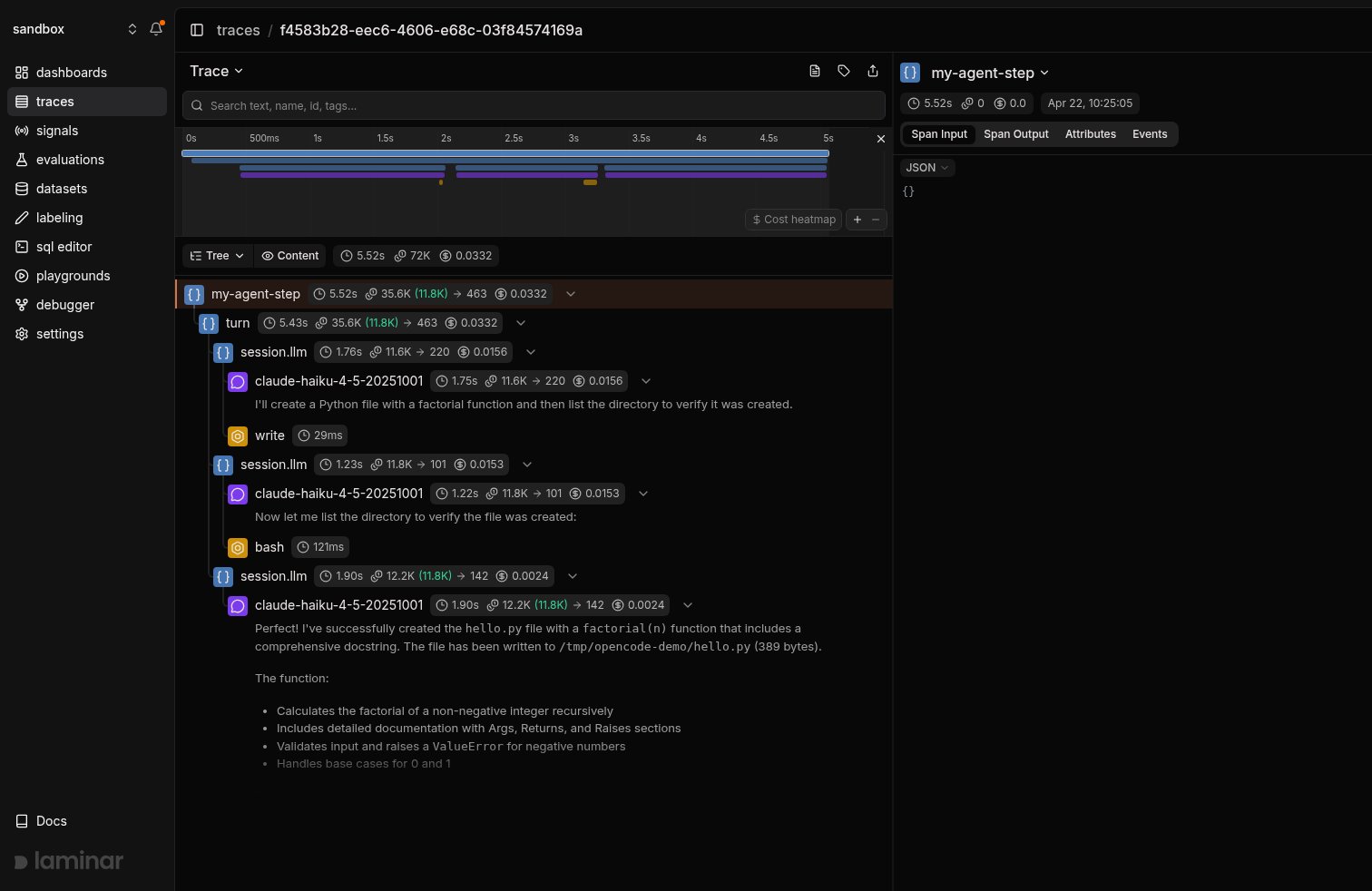
Tree view: the outer my-agent-step span from the TypeScript caller is the parent of the server's turn, which wraps every session.llm, model call, and tool call (write, bash) the agent made on this turn.
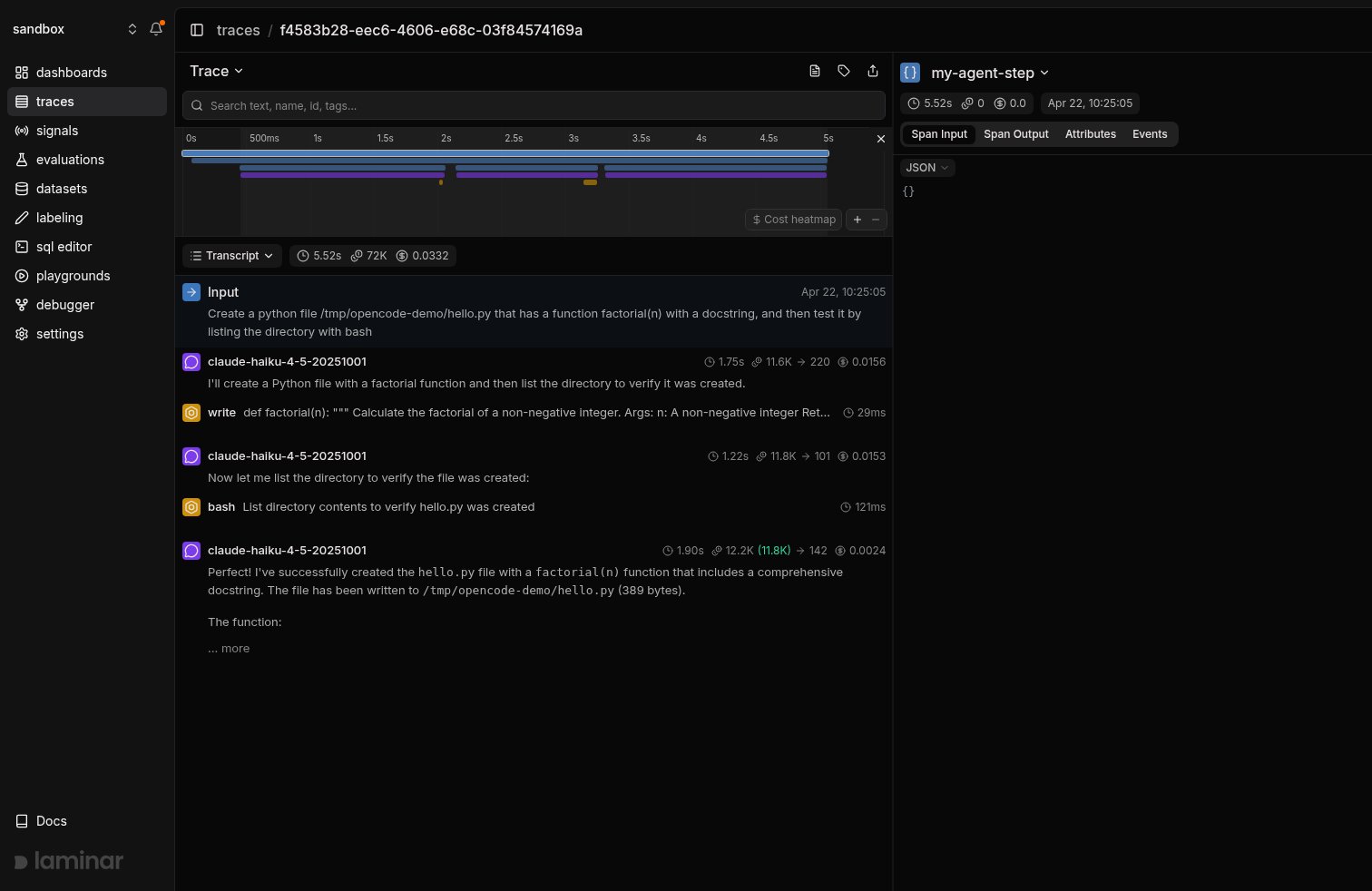
Same trace in transcript view: the turn reads as a dialogue with the model responses and tool invocations inline.
Using the OpenCode CLI
The plugin works the same way on a standaloneopencode CLI run: add it to your OpenCode config, export LMNR_PROJECT_API_KEY, and every conversation turn gets traced. There’s no TypeScript caller to be the parent span, so each turn becomes its own top-level trace.
Install the OpenCode CLI
Configure the plugin and key
plugins on V2, plugin on V1), and export LMNR_PROJECT_API_KEY in the shell you launch opencode from. You can also put the key in a .env file in the project directory; the plugin loads it automatically.Run opencode
[laminar] tracing initialized → https://api.lmnr.ai on V2, or Laminar tracing initialized → https://api.lmnr.ai on V1. On V1 the plugin also turns on OpenCode’s experimental OpenTelemetry flag for you, so you don’t need to touch the OTel config. V2 doesn’t have that flag, and the plugin builds its spans from OpenCode’s event stream instead.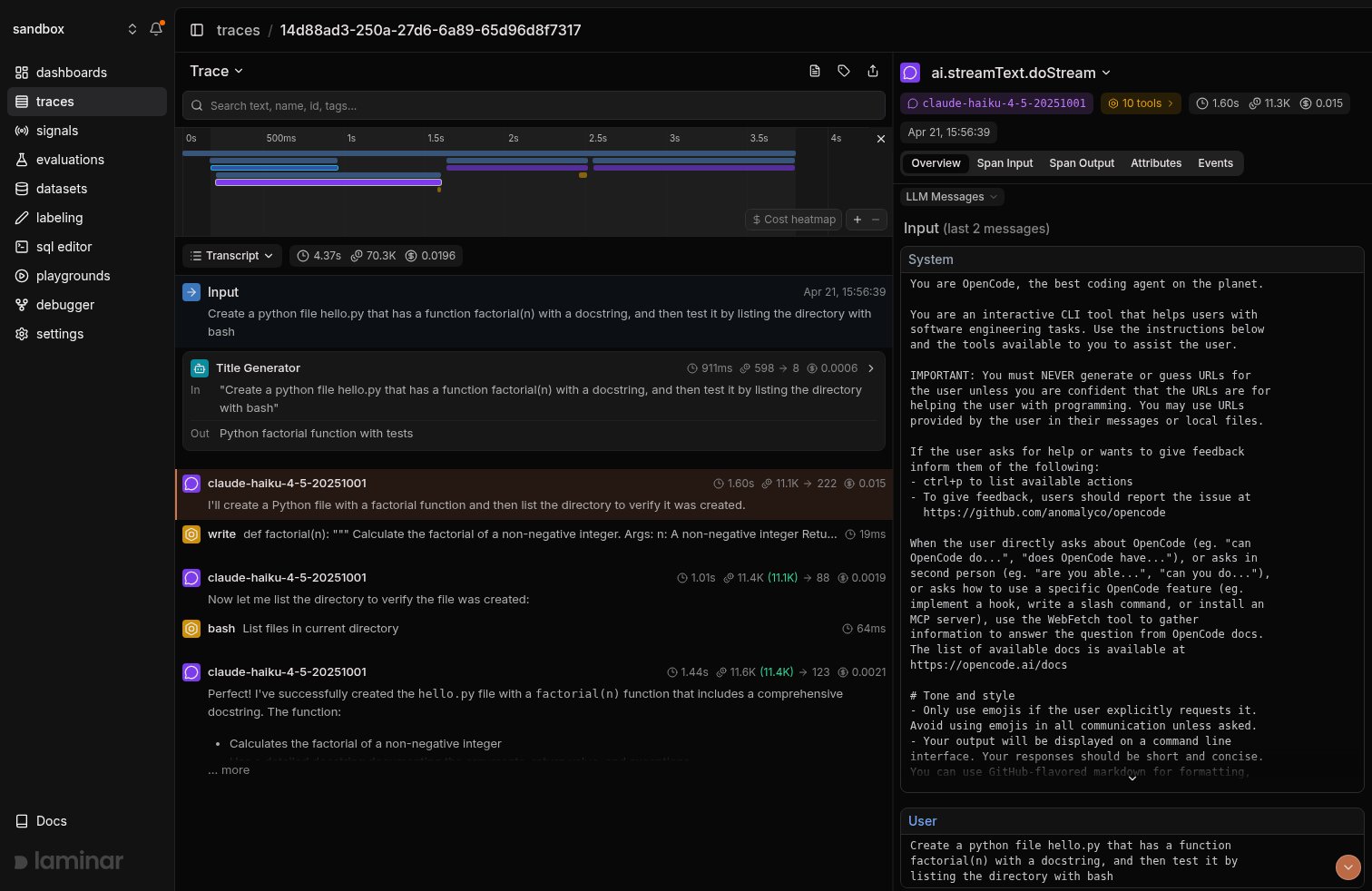
CLI run traced on its own: the turn span is the root, wrapping the model response, the write tool call, and the bash tool call for a Python factorial task.
Track outcomes with Signals
Traces answer what happened on this turn. Signals answer the cross-trace question: how often does the agent edit a file it wasn’t asked to, when does the bash tool run a destructive command, which turns burn tokens without touching a file. A Signal pairs a plain-language prompt with a JSON output schema. Laminar runs it live on new traces (Triggers) or backfills it across history (Jobs) and records a structured event every time it matches. From there you query, cluster, and alert on events across every trace.Query across traces
- SQL editor for ad-hoc queries across traces, spans, signals, and evals.
- SQL API for programmatic access from scripts and pipelines.
- CLI (
lmnr-cli sql query) for terminal-driven queries and piping JSON into shell tools or coding agents. - MCP server to query Laminar directly from OpenCode, Claude Code, Cursor, or Codex.
Troubleshooting
I don't see any traces in Laminar
I don't see any traces in Laminar
LMNR_PROJECT_API_KEYmust be set in the environment of the process that launches the OpenCode server, not just in the process that creates the OpenCode client. The plugin runs on the server side and reads the key there.- Check the OpenCode log for
tracing initialized → .... If you seeLMNR_PROJECT_API_KEY not setinstead, the plugin loaded but had no key. - Check the config key for your OpenCode version: V2 reads
"plugins", V1 reads"plugin". The other version’s key silently does nothing.
Traces from my TypeScript caller aren't linked to the server turn
Traces from my TypeScript caller aren't linked to the server turn
- Make sure both sides are on a current
@lmnr-ai/lmnr(install with@latest). The caller-side instrumentation and the plugin’s context extraction need to match up. - The server process also needs the plugin in its OpenCode config. Without it, only your caller-side span reaches Laminar.
- Send the prompt from inside
observe(or another active span). There is no context to pass otherwise. - On V2, pass
metadata: { lmnrSpanContext: Laminar.serializeLaminarSpanContext() }with the prompt. Only V1’s@opencode-ai/sdkgets the context injected automatically.
Self-hosting Laminar
Self-hosting Laminar
LMNR_BASE_URL and LMNR_GRPC_PORT in the same environment as LMNR_PROJECT_API_KEY. For a local OSS instance, that’s LMNR_BASE_URL=http://localhost and LMNR_GRPC_PORT=8001. The plugin passes these through when it initializes Laminar.