
agent_input in SQL, so you can search, group, and filter agent runs by the task they were given.
It needs no configuration. You do not have to pass the task to the root span, name a span in a special way, or set an attribute. If your agent makes LLM calls that Laminar traces, it gets a task.
Where the task shows up
Traces table
Every trace has an Input column next to the root span name. Instead of reading a list of identicalagent.run rows, you read the requests your users sent. Drag the column edge to widen it, sort by it, or filter on it like any other column.
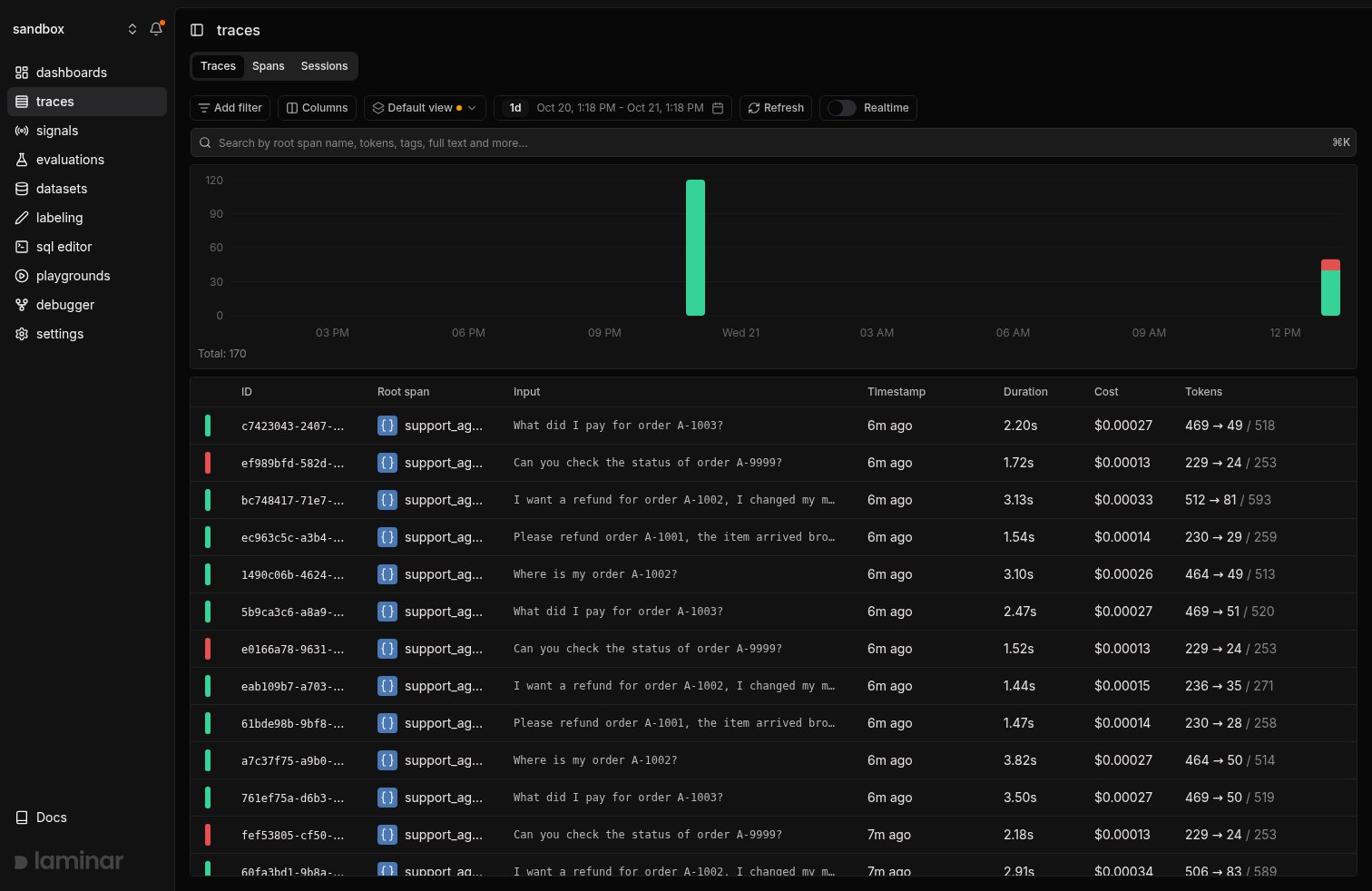
The Input column in the traces table shows the task from each run of a support agent. Red bars mark runs that failed, and every one of them is a request about order A-9999.
Transcript view
Open a trace and the task is the first block in the transcript view, labelled Input. Each subagent card shows its own input the same way, so in a multi-agent run you can see what the orchestrator asked every subagent to do without expanding anything.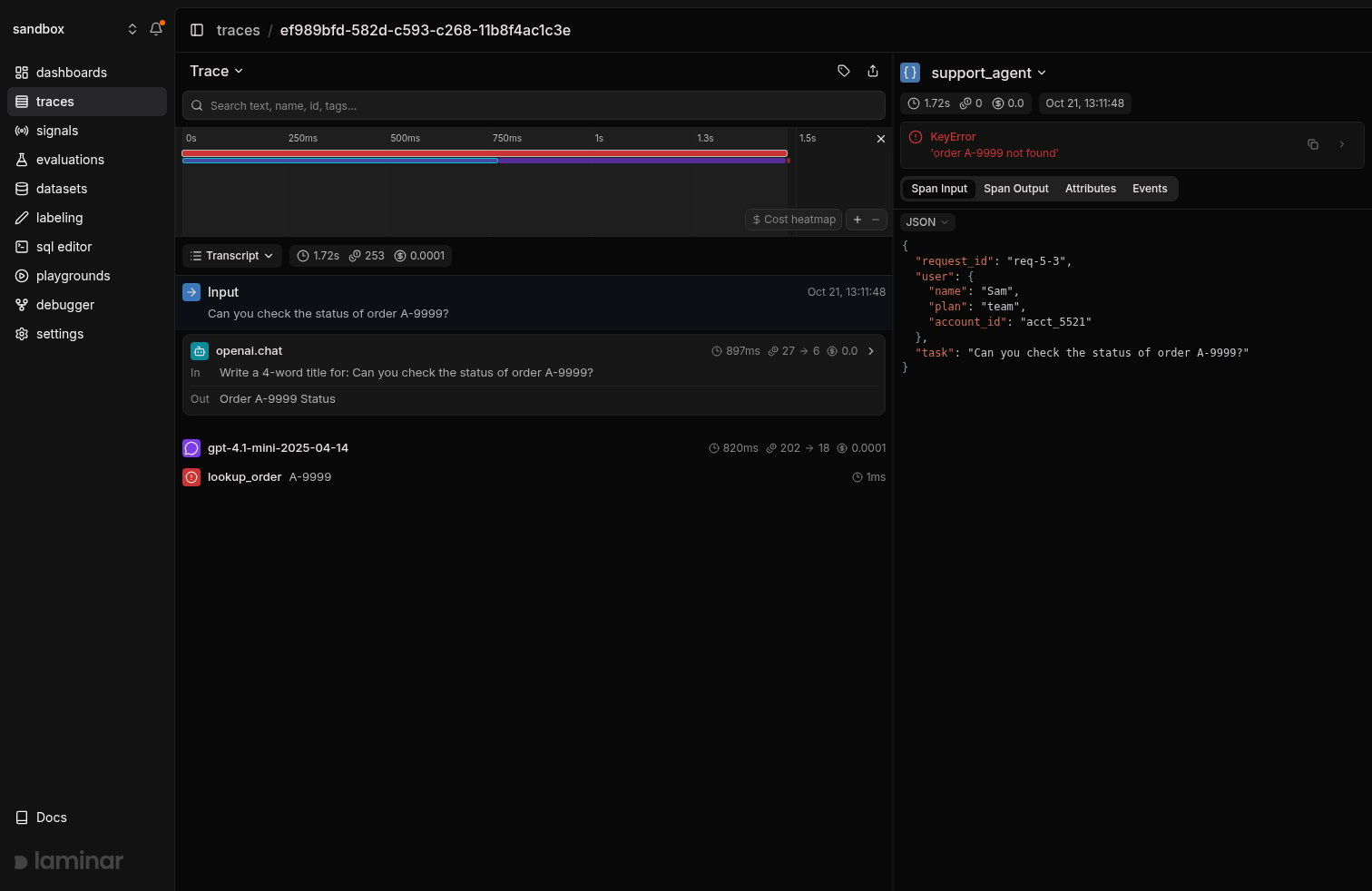
The transcript view of a failed run opens with the extracted task. The small title-generation call below it uses the same request inside a different prompt, and Laminar does not mistake it for the task.
How Laminar finds the task
Real agents rarely send the user’s request as a clean string. It sits in the last user message, wrapped in system reminders, environment details, user profiles, retrieved context, and earlier turns of the conversation. The root span often carries something else entirely: a request ID, a config object, or nothing at all. Laminar looks for the task where the model actually received it:- Any span, any depth. There is no requirement to put the task on the root span or anywhere else. Laminar reads the LLM calls inside the trace, wherever your framework or your own code created them.
- The main agent’s call, not a helper’s. Agents make small side calls: generating a title, classifying intent, summarizing a tool result. Laminar takes the request from the call that drives the agent and ignores the rest.
- Only the request, not the scaffolding. From the last user turn, Laminar keeps the part a person wrote and drops the template around it, such as
<system_reminder>blocks, environment details, and user info. - Subagents get their own input. Each subagent’s input is extracted separately, so the trace-level task stays the user’s original request while subagent cards show the instructions the orchestrator passed down.
On a self-hosted deployment, task extraction uses the server’s AI provider configuration, the same
LLM_PROVIDER and LLM_API_KEY that power chat with trace and SQL with AI. If they are not set, tasks can come back empty. See Self-hosting configuration.Query tasks with SQL
The task is stored in theagent_input column of the traces table, as plain text. You can query it from:
- SQL editor in the Laminar UI.
- SQL API:
POST /v1/sql/querywith your project API key, for notebooks, scheduled jobs, and your own dashboards. - Laminar CLI:
lmnr-cli sql query "...", from a terminal or a coding agent.
trace_outputs table:
agent_input in substring(agent_input, 1, 2000) when you select many rows.
What you can do with it
Error rate per task
A project-wide error rate tells you the agent is failing. Grouping by task tells you on what:multiIf(agent_input ILIKE '%refund%', 'refund', agent_input ILIKE '%status%', 'order status', 'other'), or use Signals to label each run with a category and group by that.
The same pattern works for cost and latency: swap the error columns for avg(total_cost) or quantile(0.95)(duration) to find the tasks that are expensive or slow.
Understand what users ask your agent
Read the Input column, or query it, to see the real distribution of requests. It is the fastest way to learn which tasks matter, which ones your prompt never anticipated, and which ones users keep retrying.Build datasets and evals from real tasks
Filter the traces table on the Input column, or queryagent_input, to find runs worth keeping, then export their spans to a dataset. Real tasks from production make better evaluation inputs than examples you write by hand.
What’s next
Viewing traces
Read a run as a transcript, starting from its task.
SQL editor
The full
traces and trace_outputs schema, with more example queries.Signals
Describe an outcome in plain language and track it across every run.
Datasets
Turn real tasks from production into evaluation data.