
Agent versioning is in beta.
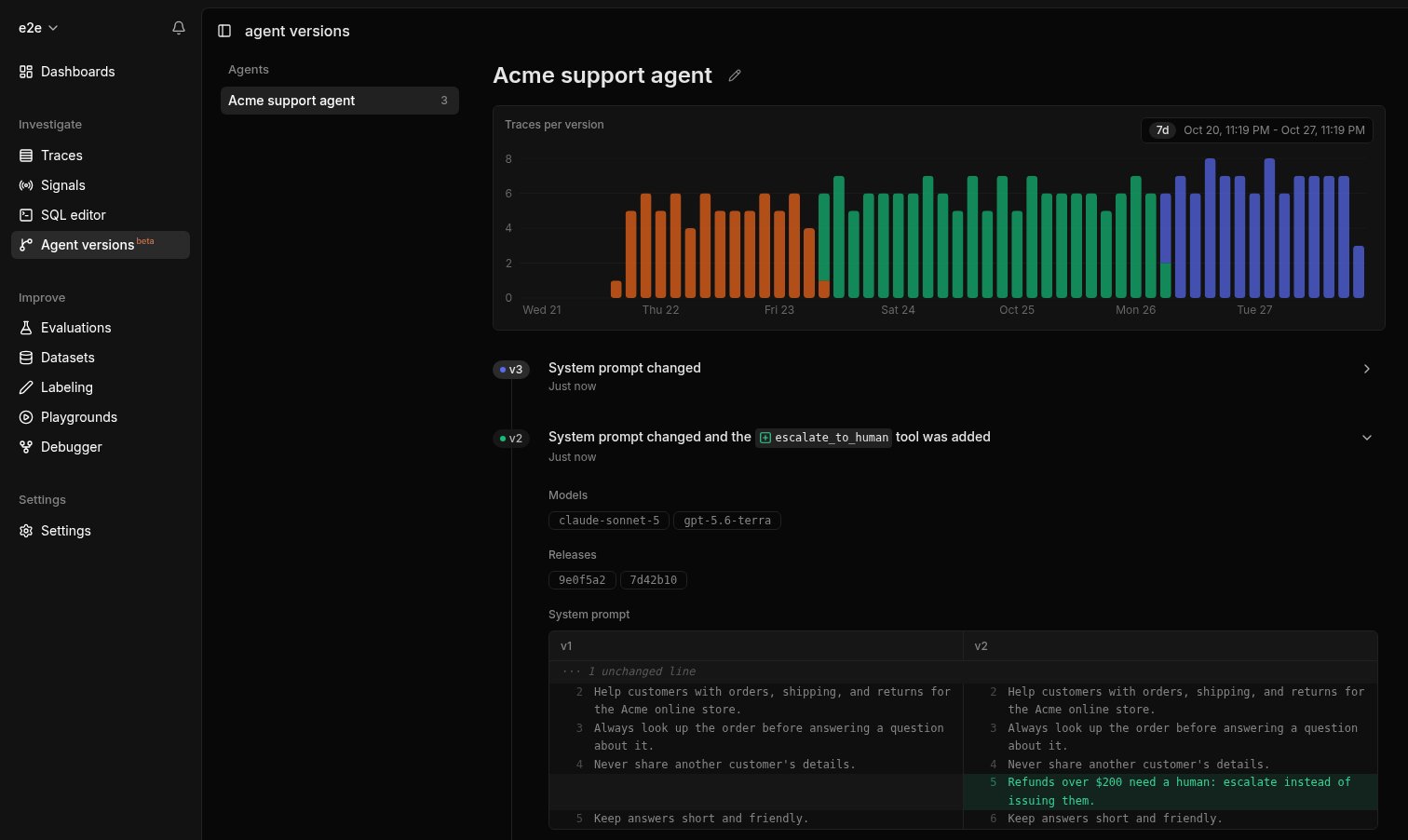
Version 2 of this support agent shipped in two releases and ran on two models. Its system prompt is diffed against version 1, and the chart shows how many traces each version served.
Agents and versions
An agent is the set of LLM calls that share the opening of a system prompt. Laminar names each agent from its prompt; click the pencil icon next to the name to rename it. LLM calls without a system prompt don’t belong to an agent, and traces from evaluations and the playground are not versioned. A version is the part of the system prompt and tool definitions that is the same in every run of the agent. Text that changes from request to request, such as the user’s name, retrieved documents, or the current date, is not part of the version, so it doesn’t create new ones. Change the prompt or a tool definition and the agent gets a new version; go back to an earlier prompt and the agent returns to the version it had before. For each version, the page shows:- Models: every model the version ran on.
- Releases: the releases that shipped this version, when your traces carry them.
- System prompt and Tools: the version’s text, diffed against the previous version.
- Traces per version: a chart of how many traces each version served over time.
How Laminar assigns versions
Laminar versions an agent in one of two ways, depending on whether its traces carry a release.Automatic, from traces
Without a release, Laminar infers versions from the traces themselves: it compares the system prompts and tools of consecutive runs and starts a new version once a change sticks. This needs no setup, but it is an inference. A new version appears only after enough traces confirm the change, so a low-traffic agent can wait a while for its versions. When two prompts run side by side for a long time, such as a canary or several environments sending to one project, some traces can be attributed to the wrong version. And versions are not linked to the code you deployed.Exact, from releases (recommended)
When your spans carry a release, Laminar versions the agent by release instead:- Every trace gets the version of the release that produced it, no matter when it ran or what else was running alongside it. Canaries, staged rollouts, rollbacks, and several environments in one project are all attributed correctly.
- New versions appear faster, from the first few traces of a release.
- Each version lists the releases it shipped in, so you can go from a regression to the commit that introduced it.
Attach a release
A release identifies the code that produced a trace. The Laminar SDKs stamp it on every span, and most deploy platforms need no code change: the SDK reads the commit SHA from the environment.Automatic detection
Laminar.initialize() uses the first release it finds, in this order:
-
The
releaseoption passed toLaminar.initialize(). -
The
LMNR_RELEASEenvironment variable. -
A deploy platform or CI variable:
-
The commit checked out in the working directory or one of its parents, read from
.git.
lmnr 0.8.3 (Python) and @lmnr-ai/lmnr 0.8.53 (TypeScript).
Set the release explicitly
Container images usually ship without the.git directory and outside a platform that sets one of the variables above. Pass the commit SHA at build time and expose it as LMNR_RELEASE:
Dockerfile
Laminar.initialize() instead:
- TypeScript
- Python
production puts every deploy under one release.
Without the Laminar SDK
If you send traces with your own OpenTelemetry exporter, set thelmnr.span.release attribute on your spans. Laminar reads the release from each LLM span, so set it on every span rather than only the root. See the span attribute reference.
Query agent versions with SQL
Every trace carries the agent versions that ran in it in theagent_versions column of the traces table, one element per agent, version, and model. ARRAY JOIN it to break traces down by version or model:
On a self-hosted deployment, agent versioning is off by default. Set
AGENT_VERSIONING_ENABLED=true in the environment of the app-server and the app-server consumer to turn it on. Agent names are generated with the server’s LLM_PROVIDER and LLM_API_KEY; without them, agents show as Unnamed agent until you rename them.What’s next
Viewing traces
Read a version’s runs as a transcript.
Signals
Track outcomes and failures across your traces.
Task extraction
See what each run was asked to do.
SQL editor
Query traces, versions, and signal events.