
lmnr-cli eval run, locally on Docker or in Laminar’s cloud sandboxes, and every trial lands in Laminar as an evaluation datapoint with the agent’s full trace next to its score.
The case format is Harbor’s, so an evals folder is plain Harbor tasks with a small amount of Laminar configuration on top. This page covers why you’d use hosted evals, the concepts, a quickstart, and how to build a harness that measures what your agent does in production.
Hosted evals are in beta. The
lmnr-cli eval run command, its flags, and the folder layout may still change.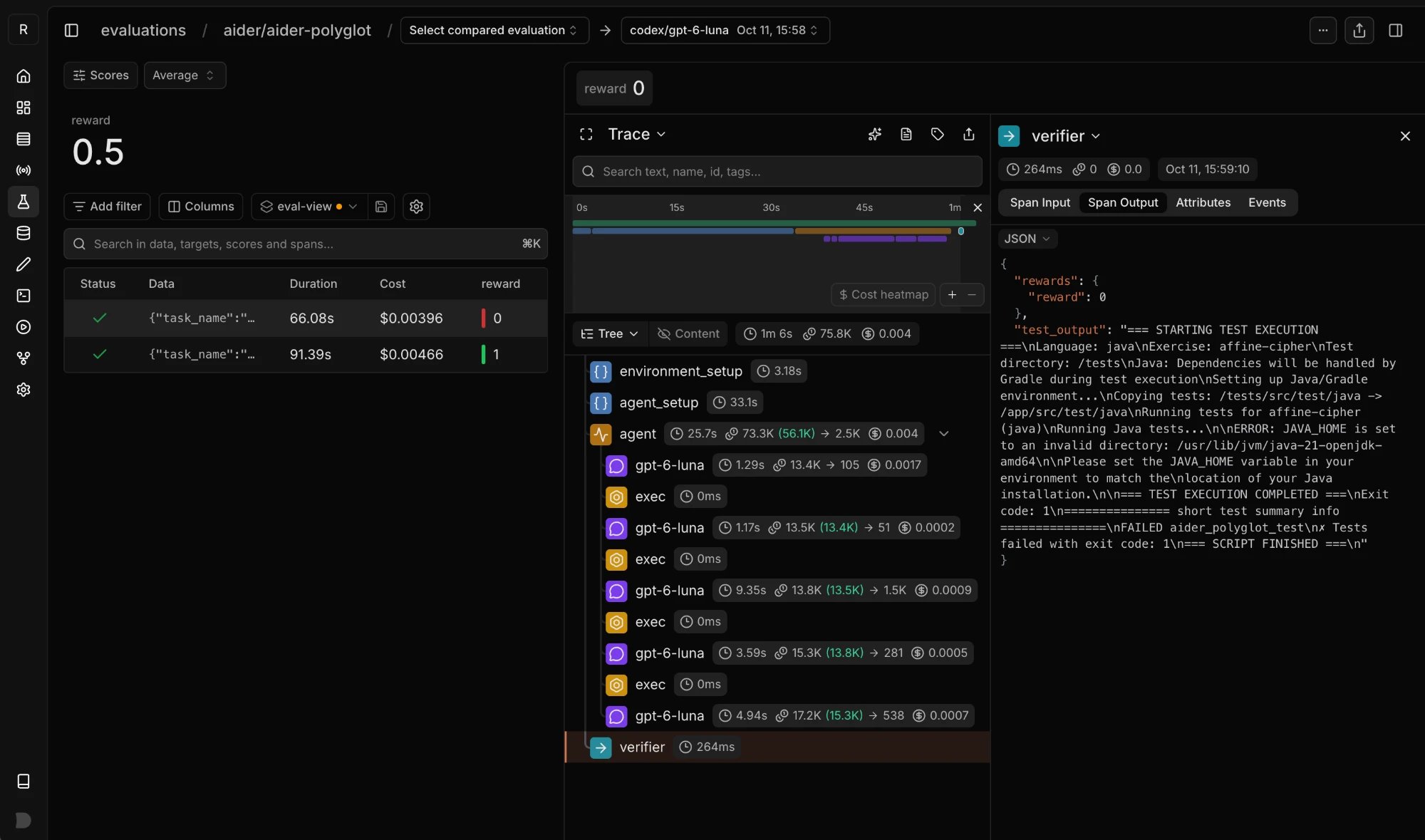
A Harbor trial in Laminar: the score, the agent's model calls and commands, and the verifier output explaining the failure.
Why hosted evals
SDK evaluations call a function in your process: datapoint in, output out, evaluators score the output. That works well for a prompt, a classifier, or a single LLM call. It gets hard once the thing you’re testing is an agent that acts on the world:- The outcome is state, not a return value. A support agent issues a refund, a coding agent edits files, a pipeline writes rows. Scoring the final message misses whether the right thing actually happened.
- The bugs are in the integration. The query that returns the wrong rows, the tool that times out, the retry loop, the config that’s only set in production. Mocks and fixtures in a unit-style eval hide exactly these.
- Production failures need their exact context. Reproducing a failure means the same conversation, the same records, the same account state. Each case needs its own data, and cases can’t share a database without interfering with each other.
- Production fidelity. The real code and the real services run in the container, started the way production starts them. You seed them; you don’t mock them.
- Isolation. Each case boots its own stack with its own data, so cases run in parallel with no shared state and no ordering.
- No production changes. The driver calls an entry point the app already has (an HTTP route, a CLI command, a queue message, an exported function), so you test the code path users hit.
- Local and cloud from one folder.
lmnr-cli eval runruns trials on your Docker. Add--remoteand the same folder runs in Laminar sandboxes, one per trial. - No lock-in. Tasks, image, agent, and verifier are plain Harbor. Laminar adds the trajectories, run history, comparisons, SQL access, and managed execution.
The two coexist. Keep SDK evaluations for fast checks on a prompt or a function, and use hosted evals when the answer depends on the whole system.
Core concepts
Harbor’s vocabulary maps onto evals of your own product like this:- Task (case): one scenario. A directory with a
task.toml(which image, resources, timeouts), aninstruction.md, the case’s data inenvironment/, and a verifier intests/. In production evals, tasks are variations of the same scenario: same code and services, different data. - Environment: the container a trial runs in. Here it’s one prebuilt image holding your app, its services, and shared scripts. Each task’s
environment/files (for examplecase.json) are copied into it when the trial starts. - Agent: the code that drives the trial. In Harbor’s original use this is a general-purpose agent like Claude Code. In hosted evals of your product, it’s a thin class that starts your stack, seeds the case, and calls your app’s entry point. Your AI agent is the app under test, not the Harbor agent.
- Verifier:
tests/test.sh, run after the agent finishes. Any language, any grading method (exact match, a rubric, an LLM judge). It writes a reward, such as1or0, to/logs/verifier/reward.txt. - Trial: one attempt at one task: start the environment, run the agent, run the verifier. Run a task several times with
--n-attemptsto measure variance. - Suite: a directory in
evals/with aharbor.yaml(a Harbor job config) and its tasks. Most projects have one suite. - Trajectory: what the app did during the trial: its LLM calls and tool calls. Laminar shows it under the trial’s trace.
The trace shape and how retries, crashes, and cancellations are counted are the same as for the Harbor integration.
Quickstart
This quickstart evaluates a small support-ticket triage function: it sends a ticket to Claude and returns a category. You’ll package it into an image, add two cases, and run them. The same layout scales to an app with a database and several services; Build a harness that matches production covers that. The app is one module, instrumented with Laminar:app/triage.py
anthropic and lmnr in requirements.txt.
1
Install the prerequisites and link the project
You need Docker, uv, and Node.js for
lmnr-cli. lmnr-cli eval run runs a pinned Harbor version with the Laminar plugin through uvx, so you don’t install Harbor yourself.From the repo root, link the directory to a Laminar project:setup signs you in, writes LMNR_PROJECT_API_KEY to .env, and installs the Laminar agent skill. See Laminar CLI for details.2
Lay out the evals folder
Create this structure next to your code:
3
Describe the image
lmnr.yaml names the image and how to build it. Paths are relative to evals/, and context: .. makes the repo root the build context, so the image is built from your live source:evals/lmnr.yaml
evals/image/Dockerfile
/logs/agent/result.json:evals/image/shared/run_case.py
4
Write the suite config and the agent
harbor.yaml is a Harbor job config. Secrets are ${VAR} placeholders, never literal values:evals/support/harbor.yaml
install() does nothing. It passes self.model_name on so --model can override the model for a run:evals/support/agent/agent.py
5
Add a case
The task points at the image by name and says where its The reference answer and the verifier live in Make the verifier executable with
environment/ files go:evals/support/tasks/refund-double-charge/task.toml
evals/support/tasks/refund-double-charge/instruction.md
evals/support/tasks/refund-double-charge/environment/case.json
tests/, which Harbor uploads only when the verifier runs, so the app never sees them:evals/support/tasks/refund-double-charge/tests/expected.json
evals/support/tasks/refund-double-charge/tests/test.sh
chmod +x. A second case is a copy of this directory with a different case.json and expected.json.6
Add secrets
Put
ANTHROPIC_API_KEY in .env at the repo root, next to the LMNR_PROJECT_API_KEY that setup wrote. lmnr-cli fills every ${VAR} from your shell, then .env.local / .env, and stops before anything starts if one is missing.Keep secrets and Harbor’s job output out of git:.gitignore
7
Run the evals
From the repo root:
lmnr-cli builds triage-evals with your Docker, runs every task in every suite, and prints a link to the results. The support suite becomes an evaluation group in your project, and this run is a new evaluation in it.8
Read the results
Open the evaluation. Each trial is a datapoint with its reward as the score. Because the app calls
Laminar.initialize(), the trial’s trace shows the Claude call under the agent span as a transcript, so a 0 takes one click to explain.Locally, Harbor’s raw output is in evals/support/jobs/<timestamp>/: each trial has agent/ (your result.json and logs) and verifier/ (reward.txt, test-stdout.txt).Run evals with lmnr-cli
lmnr-cli eval run has two modes. Run it from the repo root: .env and .env.local are read from the current directory, and every mode needs Docker on the machine that runs lmnr-cli, because it builds the images there.
- Local is the iteration loop. Run it after every change.
--remotescales out.lmnr-clibuilds or pulls every image the selected suites use forlinux/amd64, uploads only the layers Laminar doesn’t have yet, starts the run, and returns. Results appear in the project’s evaluations as trials finish. Harbor’s job output stays in the sandbox, so debug a failure that only happens remotely from the trial’s trace in Laminar.
In CI
Use--json and the exit code. A local run prints {mode, suites, failed, url}; a --remote run prints {mode: "remote", uploadId, sandboxId, suites, url} once the run has started. Set LMNR_PROJECT_API_KEY and the secrets your harbor.yaml references as CI secrets.
Remote limits and image requirements
- One container per trial. docker-compose tasks don’t run remotely.
cpusandmemory_mbabove the sandbox limit are clamped, and a run that exceeds the time limit is stopped. - The folder upload is capped at 1 GiB. Symlinks,
.git,node_modules, virtualenvs, caches, andjobs/directories are skipped, and.env*files are never uploaded. Keep large fixtures out ofevals/. - Images need
tar,gzip, andbash, plussuif a task runs as a non-root user. They’re built forlinux/amd64(emulated, slowly, on Apple silicon), so architecture-specific downloads should useARG TARGETARCH. - Concurrency is capped per project (50 sandboxes by default). A higher
--n-concurrentqueues rather than running more at once. - Large images may need a higher
build_timeout_secunder[environment]intask.toml(default 600 seconds), which bounds image preparation plus sandbox start. - Self-hosted Laminar: set
LMNR_GRPC_PORTin your shell or.envfor--remoteruns, or the trial traces don’t arrive.
The evals folder
lmnr-cli eval run treats every directory directly inside evals/ that has a harbor.yaml as a suite. A fuller layout, for an app with services and a database:
lmnr.yaml and the image
lmnr.yaml lists the images tasks can use. dockerfile and context are relative to evals/; context defaults to the Dockerfile’s directory. lmnr-cli rebuilds these images on every run (a cached build when nothing changed), so there are no tags to bump and no registry to push to.
When you write the Dockerfile:
- Order layers from rarely to often changing: system packages, then dependencies, then shared scripts, then app code. An app change then rebuilds, and for
--remoteuploads, one small layer. COPYspecific paths, neverCOPY . .from the repo root. Docker only sends whatCOPYreferences, so a large repo costs nothing, whileCOPY . .would bake in everything, including every suite’stests/and their reference answers. Fromevals/, copyimage/shared/only.- Build from the live source, not a vendored copy, so the app and its migrations always come from the same revision as the evals.
.dockerignore applies, and builds that lmnr-cli runs never receive .git or .env* files.
harbor.yaml
A suite’sharbor.yaml is a plain Harbor job config: agents, datasets, n_concurrent_trials, and so on. Relative paths resolve from the suite directory, and the suite directory is on PYTHONPATH, so import_path: agent.agent:ClassName points at <suite>/agent/agent.py.
task.toml
Setdocker_image to an image name from lmnr.yaml and leave the Dockerfile out of environment/. Every trial then starts from the same built image, and Harbor uploads the contents of environment/ into workdir after the container starts. That is how case.json reaches a shared image.
task.toml
cpus and memory_mb. Locally all trials share your machine, so keep n_concurrent_trials to what it can run; remotely each trial gets its own sandbox, so raise concurrency for that run with --n-concurrent.
An image name that isn’t in lmnr.yaml is pulled from its registry, so public images work as-is.
A per-task Dockerfile in environment/ is the exception, for a case that genuinely needs a different system setup. Remove docker_image from that task: while it’s set, Harbor uses the image and ignores the Dockerfile. With a Dockerfile, environment/ is the build context and nothing is uploaded at start, so the Dockerfile has to COPY the case data itself. It also can’t FROM an image that only exists in lmnr.yaml; start from a public base.
Secrets and env vars
Declare every secret and setting as a${VAR} placeholder:
agents[].envinharbor.yaml, for the agent and the app it starts.[verifier.env]intask.toml, for example the key an LLM-graded verifier needs.[environment.env]intask.toml, for the container.
${VAR:-default} makes one optional. Values come from your shell first, then .env.local / .env in the current directory. For --remote they travel with the run as env vars; files containing secrets are never uploaded. Commit a .env.example listing the names so teammates know what to fill in.
Build a harness that matches production
The quickstart’s app is a single function. Real products have a database, a queue, background workers, and an LLM configured somewhere. These practices keep a hosted eval measuring what your agent does in production rather than what the harness does.Principles
- Production fidelity over convenience. Run the real code and the real services for as much of the stack as you can. Seed them; don’t mock them. Mock only what you can’t run (a third-party SaaS, a private internal service), at the network edge through the app’s existing base-URL config, never by editing the code path. Every mock is a gap in what the eval measures, so write each one down.
- Zero production changes. Drive an entry point the app already exposes. A harness-only code path tests the harness. If nothing existing reaches the behavior you want to test, treat adding an entry point as a deliberate decision (for example an internal endpoint disabled unless a config flag is set), not something to slip in.
- One case, one environment. Every container boots its own stack with its own data. Never share a database between cases.
- Evals live next to the code, built from the same source tree and revision.
- Turn the run into artifacts, then verify the artifacts. The driver leaves its observable result in files (a
result.json, an exported row, a transcript), and the verifier grades those.
Find the entry point and the outcome
Before writing any harness code, read the production path under test and write down:- the entry point you can call without modification (a route, a CLI command, a queue consumer, a function);
- the inputs it reads (rows, files, messages) and where they live;
- the terminal state it produces (a response body, a status row, an emitted record) and how to read it;
- the external calls it makes (LLM, HTTP) and how they’re configured.
Boot the services in the container
Everything the entry point touches runs inside the one container, with no docker-in-docker:- Databases start as background processes with the engine’s own bootstrap (
initdb,redis-server,clickhouse server). Install the version production runs, from the distro, the vendor’s apt repo, or a multi-stageCOPY --from=<official image>:<version>. - Schemas are created the way the app’s own startup creates them: roles, databases, migrations in order, then anything created after migrations in code (views, grants, seed rows). If the app has no migrations, create only the tables the path under test needs, and note that the schema was inferred.
- Queues, caches, and object stores with an in-memory or local-disk fallback can use it. That’s production-supported code, not a mock.
- The app runs as its production artifact: the real package, or a compiled binary built in a builder stage of the same Dockerfile (a binary built on a macOS host is the wrong format).
- Readiness: poll the health endpoint with a timeout, and on failure print the app log to stderr so it shows up in the job output.
CMD and base-image entrypoints don’t run. A start script in image/shared/ launches each service in the background (nohup ... &) with its output redirected to /logs/agent/*.log (an unredirected background process can keep the exec call from returning), then waits for readiness. No ports are published to the host: every call to the app comes from inside the container, which is why the agent runs there.
Start the app with env -i and an explicit minimal env so nothing from the host leaks in, and forward the names it needs: API keys and LMNR_TRAJECTORY_PATH.
Seed the data
Decide for each dataset which kind it is:- Shared baseline data is the same for every case: reference tables, a default org and user, config rows, an LLM profile. Seed it in the image build or in a shared script that runs at startup. Each container still gets its own copy.
- Per-case data is what reproduces one scenario: the conversation, the records, the account state. It lives in the task’s
environment/and is loaded by the same shared seed script for every case.
case.json, a SQL file, a directory of fixtures), so adding a case is a directory copy plus data and never a harness change.
Seed through the app’s own API when it involves encryption, validation, or derived fields (creating a record with secrets, for example: let the server encrypt them). Insert directly into the database for bulk fixtures and for things the API gates behind auth or plan limits. Mirror the columns the app reads, and hash credentials exactly the way the app does.
Make seed data look real
Capable models notice when they’re being tested, and an agent that suspects a test can behave differently from how it behaves in production. Fixtures are where this leaks most:- Timestamps. Data exported weeks ago reads as stale when replayed today. Default to relative timestamps (shift on load so the latest event is near now, keeping the intervals). Keep absolute dates only when the case depends on one, such as an end-of-month or DST boundary. Check dates outside timestamp columns too: free text, filenames, and time-ordered ids (UUIDv7, ULID).
- Ids. Patterned ids like
user_1or12000000-0000-4000-8000-0123456789abgive the game away. Generate them the way the app does and keep references consistent. - Names and content. No
John Doe,[email protected],Acme, or lorem ipsum. Replace scrubbed PII with plausible values, not placeholders. - The harness itself. If the agent can see the filesystem, process list, or environment, keep harness files out of sight or neutrally named: no
/eval,EVAL_MODE=1, ortest_casein anything it can read.
Write the agent
Subclass Harbor’sBaseInstalledAgent, so the agent’s commands run inside the container next to your app. (BaseAgent, which runs on the host and reaches the container through environment.exec, is only for a product that can’t run in the container.) lmnr-cli pins Harbor 0.25.0; see Harbor’s custom agents guide for the full interface.
install()stays empty with a prebuilt image. It runs in every trial, and anything it would install belongs in the image. Per-trial setup goes at the start ofrun().run()stays thin: start the stack, seed baseline and case data, run the driver.- Run commands with
exec_as_agent, orexec_as_rootwhen they need root. Theagents[].envvalues fromharbor.yamlreach every command the agent runs, so useenv=only for per-command extras. - Read the model from
self.model_name, so--modelworks. - Import only
harbor, the standard library, and modules in the suite directory. The class runs in the Harbor process (your machine or Laminar’s orchestrator), not in the container; everything else belongs in the image. - Optionally override
populate_context_post_run(context), which runs after the trial’s logs are copied to the host, to parseresult.jsoninto the agent context.
- For a synchronous entry point (an HTTP call or a function that returns the result), call it with a timeout and record the response.
- For an asynchronous one (enqueue a job, the app writes a status later), poll the status the app writes until it’s terminal, with a hard timeout. Don’t sleep for a fixed time.
- Map the result to an outcome the verifier can grade, with
failedandtimeoutas distinct outcomes so they’re never mistaken for a model verdict. Write the full detail (status, error, ids, duration) to/logs/agent/result.json. - Exit
0whenever you produced an outcome, includingfailedandtimeout. A non-zero exit makes the trial an error, which should mean the harness broke.
timeout_sec, and both below the task’s [agent] timeout_sec.
Use the real model
Never substitute a fake or recorded model for the one under test: a canned response only tests the harness. Route the app’s model calls through its normal configuration (a profile row, a base-URL env var), using the key from the agent env. A failing LLM endpoint often makes an app retry rather than fail, so your timeout is what ends the run; report it astimeout, not failed.
Write the verifier
tests/test.sh is the entry point. It can call anything: a Python script comparing against expected.json, a rubric, an LLM judge with its key in [verifier.env]. It writes the reward to /logs/verifier/reward.txt. A discrete outcome (pass or fail, event or no event) is the easiest place to start.
Where it runs is set by environment_mode under [verifier] in task.toml:
"shared"(the default) runs in the agent’s container after the agent finishes and can read anything the run left behind, such as/logs/agent/result.json."separate"runs in a fresh container that sees only what the task declares: files listed in the top-levelartifacts = [...], plus snapshots of runtime state taken by[[verifier.collect]]commands before the environment is torn down. Use it when the verifier needs its own dependencies or must not see the app’s internals.
tests/, never in environment/.
Capture the trajectory
The trial’s trace is only as rich as what the app reports. Without a trajectory you see the reward but not the LLM calls and tool calls behind it. If the app is instrumented with Laminar (it callsLaminar.initialize()), there’s nothing to convert. During a run, the plugin sets LMNR_TRAJECTORY_PATH=/logs/agent/trajectory.json in the agent env. With it set, the SDK writes the app’s spans to that file instead of sending them to Laminar, and the plugin attaches them to the trial’s trace: every LLM call with tokens and cost, and tool calls as TOOL spans. The app needs no Laminar API key and no network access to Laminar. This works with the Python SDK (lmnr 0.8.4 and later); TypeScript SDK support is in progress. Make sure the app process actually receives LMNR_TRAJECTORY_PATH, especially if the start script uses env -i.
If the app isn’t instrumented yet, adding Laminar is a small production change that also gives you production traces. See Tracing.
If it isn’t instrumented, reconstruct the trajectory from the app’s own history. Most products already store the conversation for their UI, for audit, or as agent memory: message tables, run and step tables, LangGraph checkpointers, JSONL transcripts. After the driver finishes, including on failed and timeout since partial trajectories are the most useful, run an exporter that reads this case’s history and writes /logs/agent/trajectory.json in Harbor’s ATIF format:
- Each message is a step with a sequential
step_id(1, 2, 3…), asource(system,user, oragent), amessage, and an ISO 8601timestamp. model_name,tool_calls, andmetricsare only allowed onagentsteps. Tool results go in that step’sobservation.results, paired bysource_call_id.- History seeded from
case.jsongetsis_copied_context: true, so it’s shown but not mistaken for the agent’s work. - Leave
metricsunset rather than estimating: stored history usually lacks token counts, costs, and the exact prompt of each call. Say where the trajectory came from innotes.
Check that the harness can fail
Run the suite locally until it passes, then test the harness itself:- Run a positive and a negative case that share the same prompt and config and differ only in input.
- Flip a reference answer once and confirm the reward drops to
0. A harness that can’t fail is broken. - Open a trial’s trace and confirm the LLM and tool calls are there.
- Run
--remoteonce to confirm the folder works in Laminar sandboxes.
Turn production failures into cases
Hosted evals exist to close the loop between what breaks in production and what you test before shipping:- Find the traces. Pick production traces with the failure you care about, plus a few that were correctly not flagged. If you track the failure with a Signal, query its events with
lmnr-cli signal listandlmnr-cli sql query, or the SQL editor. - Export the minimal input for each into a
case.json: the messages, tool calls, and records the app needs. Replace PII and secrets with plausible values, keep structure and ordering, and rebase timestamps. - Set the reference answer from the production outcome after a human check. Keep positive and negative cases paired against the same prompt and config.
- Copy a task directory, drop in the new data and reference answer, and run
lmnr-cli eval run --task <new-case>, then the whole suite. Commit it.
Troubleshooting
A change to the app or the image doesn't show up
A change to the app or the image doesn't show up
lmnr-cli rebuilds the lmnr.yaml images on every run, but Docker’s layer cache can still hide a change, for example a RUN step that downloads “latest”. Check the file inside a running container, then clear the cache with docker builder prune or bump a cache-busting ARG placed before the stale step.A service won't start as root
A service won't start as root
Some services, such as Postgres, refuse to run as root. Start them as a service user with
gosu or su, and make sure that user can write the log directory (chmod 777 /logs/agent).The app can't see an env var from harbor.yaml
The app can't see an env var from harbor.yaml
agents[].env reaches every command the agent runs. If the start script launches the app with env -i, it must forward each name explicitly.The trial trace has no LLM or tool calls
The trial trace has no LLM or tool calls
Either the app isn’t instrumented with Laminar, or it didn’t receive
LMNR_TRAJECTORY_PATH. See Capture the trajectory.Job output shows [REDACTED] in odd places
Job output shows [REDACTED] in odd places
A secret’s value is very short, so every occurrence of it in the output is redacted. Use long, distinctive placeholder values.
Where are the logs for a failed trial?
Where are the logs for a failed trial?
For local runs, in
evals/<suite>/jobs/<timestamp>/. For --remote runs, Harbor’s job output stays in the sandbox: open the trial’s trace in Laminar instead.Each local trial has agent/ (your logs and result.json), verifier/ (reward.txt, test-stdout.txt), and exception.txt with the agent’s traceback if it raised.Next steps
Compare runs
Every run of a suite is charted in its group. Diff two runs side by side to see which cases regressed.
Read a failing trial
Open a low-scoring datapoint and read the app’s run as a transcript.
Track failures with Signals
Detect a failure in production traces, then turn the flagged traces into cases.
Harbor integration
Already running
harbor run on a benchmark? Add the Laminar plugin directly.