
Overview
Laminar is an open-source, OpenTelemetry-native observability platform for Temporal workflows. Trace, debug, and monitor a workflow run as a single trace, even though its client, workflow, and activities run in separate processes. Self-host via Helm or use managed cloud. Temporal splits an application across processes: a client starts workflows, a worker runs the workflow functions and their activities, and workflows can fan out to activities, child workflows, signals, and updates. Laminar propagates trace context through Temporal headers, so the client-side workflow call, the worker-side workflow, and every activity it schedules land under one trace instead of scattering into disconnected spans. In Python this is fully automatic; in TypeScript you register a set of interceptors. What Laminar captures:- A client-side span for each workflow’s lifecycle (start to result, cancel, or terminate).
- A span per activity execution on the worker, named after the activity type, with arguments and return value.
- Any LLM calls, tool calls, or manual spans inside an activity, nested under that activity.
- Trace context forwarded to activities, child workflows, and
continueAsNewscheduled from inside a workflow.
How the wiring fits together
Temporal runs the client and worker as separate entry points. How much you wire up depends on the language.- TypeScript
- Python
- Client process: initialize Laminar with the
@temporalio/clientmodule so workflow runs are wrapped in a span, then register the workflow, activity, and schedule client interceptors. These inject the active trace context into Temporal headers. - Worker process: initialize Laminar with
disableBatch: true, register the activity interceptor (reads the headers and wraps each activity in a span), and register the workflow interceptor module (forwards the trace context from a running workflow to anything it schedules).
Getting started
- TypeScript
- Python
Install
@lmnr-ai/lmnr version 0.8.28 or higher:ai and @ai-sdk/openai packages are only for the example activity below; swap them for whatever your activities actually call.Set environment variables
Define the workflow interceptor module
require.resolve so Temporal can bundle it into the workflow sandbox:Set up the worker
disableBatch: true, register the activity interceptor factory, and register the workflow interceptor module by path:Set up the client
@temporalio/client module as a namespace and pass it to Laminar.initialize so each workflow run is wrapped in a span. Then register the workflow, activity, and schedule client interceptors:execute call in observe() is optional but recommended: it creates a root span so the whole run is easy to find in the UI. Without it, the workflow lifecycle span becomes the root.@temporalio/client module via instrumentModules: { temporal: { client } }. This is what lets Laminar wrap each workflow run (start to result) in a span, which is the parent that the worker-side workflow and activities nest under. The three client interceptors then inject that span’s context into Temporal headers.Write workflows and activities as usual
observe() span inside them is captured and nested under the activity span:See what happened in a trace
Open the trace in Laminar and you land on the transcript view: the workflow’s LLM call reads as a conversation, with the prompt, the model’s response, and thecount_words tool call inline. A span tree tells you the shape of the run; the transcript tells you what actually happened.
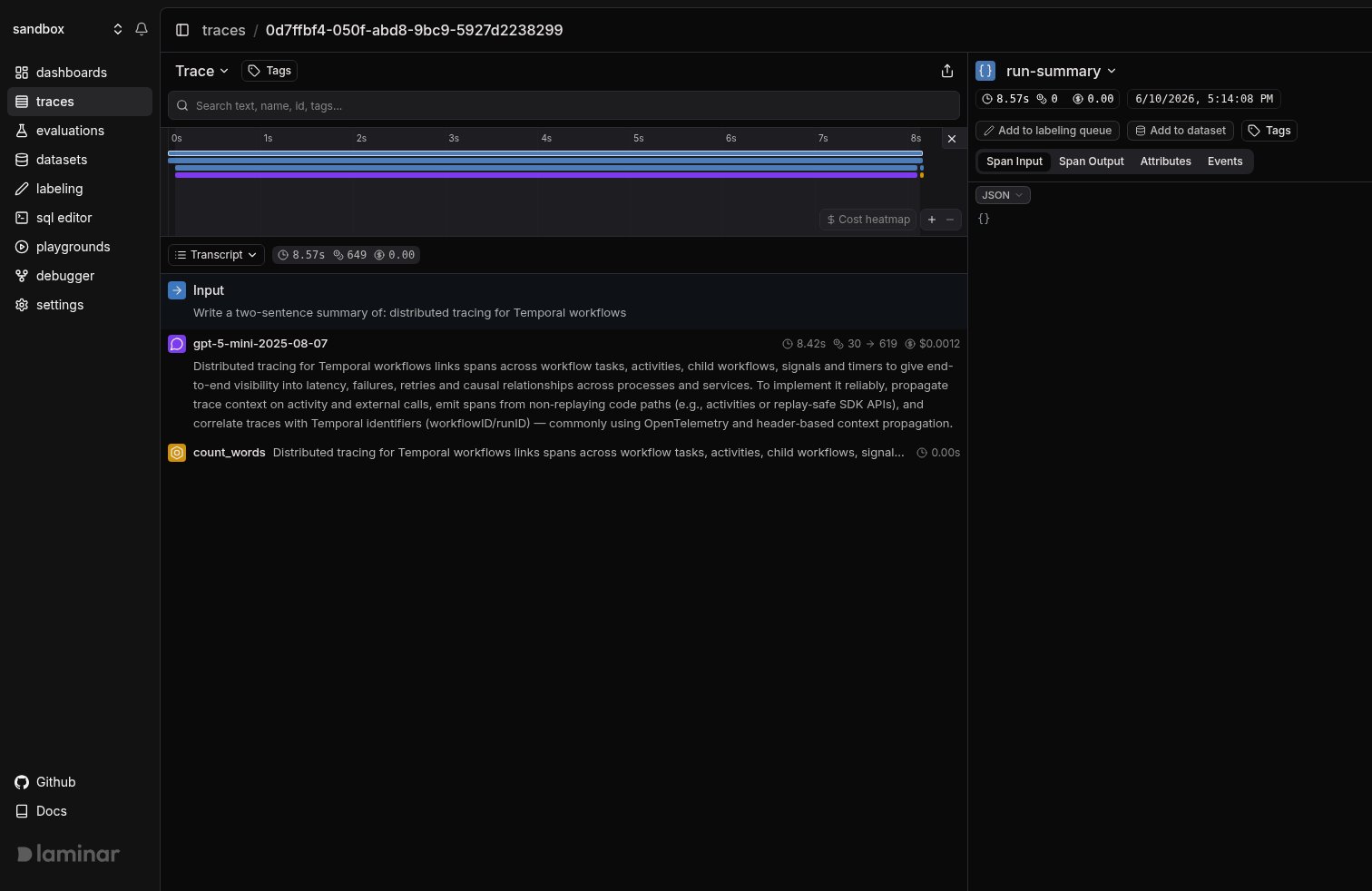
Transcript view of a Temporal workflow run. The summarizeTopic activity's LLM call and the count_words tool call are surfaced inline, with token counts and cost on the LLM span.
run-summary root, the workflow lifecycle span, every activity, and the LLM and tool spans inside them all land in one trace, out of the box, no matter how disjoint the activities are. The tree view below just makes that single stitched-together hierarchy easy to read.
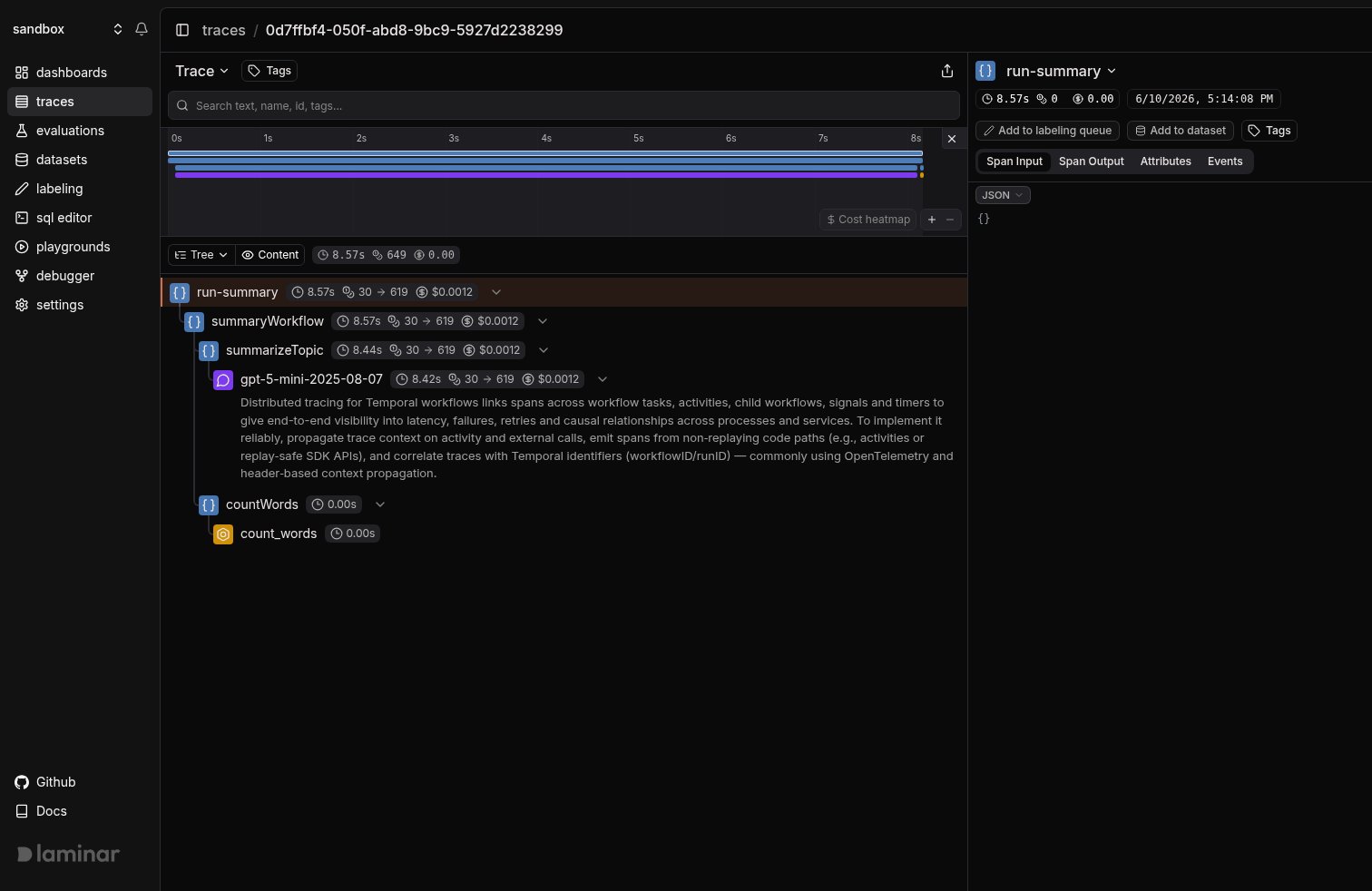
Tree view of the same run: run-summary wraps the summaryWorkflow lifecycle span, summarizeTopic nests the gpt-5-mini LLM span, and countWords nests the count_words tool span, all stitched across processes via Temporal headers.
Control what activity spans record (TypeScript)
In TypeScript,ActivityInterceptorFactory accepts three options, all defaulting to true:
createActivitySpan: wrap each activity execution in a span named after the activity type. Set tofalseto only restore the trace context (so your ownobserve()calls inside the activity act as roots) without an extra wrapper span.recordActivityArgs: record the activity’s arguments as the span input. Set tofalseto omit large or sensitive arguments.recordActivityOutput: record the activity’s return value as the span output. Set tofalseto omit large or sensitive results.
recordActivityArgs and recordActivityOutput are ignored when createActivitySpan is false.
The three client interceptors map to Temporal’s three client surfaces:
WorkflowClientInterceptor: injects trace context on workflow start, signal, query, update, terminate, and describe calls.ActivityClientInterceptor: injects trace context on standalone activity client calls. Standalone activities are experimental in Temporal, so this interceptor is best-effort.ScheduleClientInterceptor: registered but a deliberate no-op. A Schedule is a long-lived server-side object whose stored workflow-start action replays on every triggered run, so injecting the active span at creation time would pin every future run to one long-dead trace. Each triggered run starts its own root trace instead.
Keep the workflow interceptor in your own file (TypeScript)
Therequire.resolve('@lmnr-ai/lmnr/temporal-workflow-interceptors') path works for most setups. Two cases call for vendoring the interceptor in your own repository and passing a relative path:
- Your bundler or monorepo layout cannot resolve the package entry point inside the workflow bundle.
- You build workflows with a pre-built bundle via
bundleWorkflowCode(see the note below).
src/laminar-workflow-interceptors.ts) and reference it the same way: require.resolve('./laminar-workflow-interceptors').
laminar-workflow-interceptors.ts
laminar-workflow-interceptors.ts
workflowBundle, Temporal ignores interceptors.workflowModules, because the bundle is already compiled. Register the interceptor at bundle time instead:Track outcomes with Signals
Traces answer what happened on this run. Signals answer the cross-trace question: how often does an activity retry before succeeding, which workflows exceed their timeout, when does the model return an empty summary. A Signal pairs a plain-language prompt with a JSON output schema. Laminar runs it live on new traces (Triggers) or backfills it across history (Jobs) and records a structured event every time it matches. From there you query, cluster, and alert on events across every trace.Query across traces
- SQL editor for ad-hoc queries across traces, spans, signals, and evals.
- SQL API for programmatic access from scripts and pipelines.
- CLI (
lmnr-cli sql query) for terminal-driven queries and piping JSON into shell tools or coding agents. - MCP server to query Laminar directly from Claude Code, Cursor, Codex, or any MCP-aware client.
Troubleshooting
I don't see any traces in Laminar
I don't see any traces in Laminar
- Confirm
LMNR_PROJECT_API_KEYis set in both the client and the worker process. - Python: both processes must call
Laminar.initialize()before theClientconnects, andtemporaliomust be importable at that point so the auto-instrumentation engages. - TypeScript: both processes must call
Laminar.initialize(). The client needsinstrumentModules: { temporal: { client } }; the worker needsdisableBatch: true.
The workflow and activities are separate traces, not one
The workflow and activities are separate traces, not one
- Python: make sure
Laminar.initialize()runs beforeClient.connect()in both processes. The interceptor that propagates context is injected atClientconstruction, so initializing afterward misses it. - TypeScript: the client must register
WorkflowClientInterceptorand pass the@temporalio/clientmodule viainstrumentModules: { temporal: { client } }. The module is what wraps the run in the parent span; the interceptor injects that span into headers. The worker must register the workflow interceptor module viainterceptors.workflowModules. If it is missing, the workflow starts but never forwards its context to the activities it schedules.
Activity spans are missing or empty
Activity spans are missing or empty
- Python: confirm
Laminar.initialize(disable_batch=True)runs in the worker process before the worker connects. Withoutdisable_batch=True, short-lived activity executions can exit before the batching span processor flushes their spans. - TypeScript: register
ActivityInterceptorFactory()underinterceptors.activityinWorker.create, and setdisableBatch: truein the worker. Short-lived activity executions can exit before a batched span processor flushes their spans. If you setcreateActivitySpan: false, activities only restore context and rely on your ownobserve()spans to appear.
Workflow start throws on uuid or timestamps
Workflow start throws on uuid or timestamps
Laminar.start_as_current_span() / Laminar.start_span() in Python, observe() / Laminar.startSpan() in TypeScript). Workflow code runs in Temporal’s deterministic sandbox and cannot create spans. Move instrumentation into activities (normal functions) or onto the client.Self-hosting Laminar
Self-hosting Laminar
What’s next
Viewing traces
Signals
SQL editor and MCP server
Span types
Related integrations
eve
Vercel AI SDK
generateText and streamText in Next.js and Node.js.